




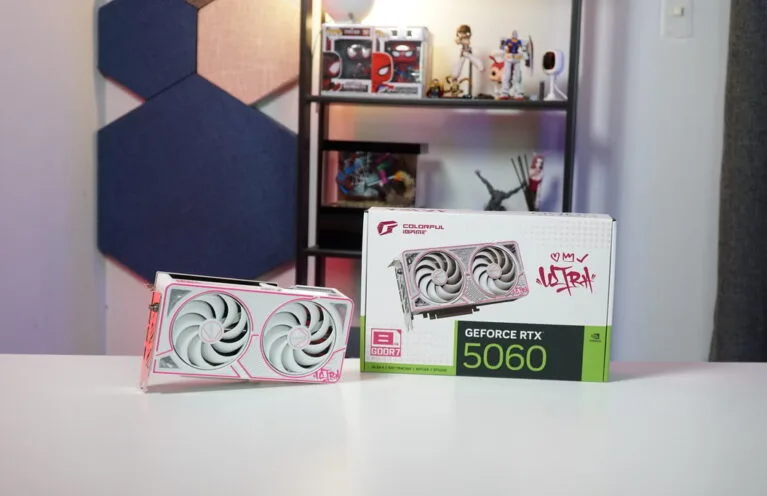
The Nvidia GeForce RTX 5060 was released last Computex 2025 with little to no reviews available on launch day due to the timing of the launch. The RTX 5060 is set to replace 60-class GPUs that are more than one-generation old. It’s currently the cheapest GPU to offer Nvidia Blackwell exclusive features, specifically DLSS 4 Multi Frame Generation which boasts frame rates up to four times – an ideal upsell for budget, 1080p gamers. Like the RTX 5060 Ti, the RTX 5060 doesn’t have a reference, founders edition model so we have the COLORFUL iGame RTX 5060 Ultra W DUO OC GPU as our reference RTX 5060 card in this review.
Nvidia Blackwell Architecture

The Blackwell Architecture is probably one of the most hyped graphics architectures from NVIDIA since the announcement of the NVIDIA GH200 Grace Hopper Superchip for data centers, especially for AI. Its performance advancement in the server and AI fields led enthusiasts to believe in a similar uplift on the consumer side. NVIDIA highlights Neural Rendering as the next era of computer graphics, and that is what Blackwell is built upon. Blackwell Architecture uses the latest NVIDIA DLSS 4 with Multi Frame Generation, NVIDIA Reflex 2 features with NVIDIA RTX Neural Shaders, alongside other advancements such as the use of GDDR7 memory.
DLSS 4 Multi Frame Generation

One of the key highlights of the Nvidia GeForce RTX 50 series is DLSS 4, which takes advantage of the RTX Neural Shaders. In a nutshell, DLSS 4 is a steroid version of DLSS 3.5, where it’s able to generate up to three frames based on one rendered frame. Unlike DLSS 3.5, which generates one frame per rendered frame.
To put it into perspective, in a DLSS Frame Generation 4X setup at 120 FPS, only 30 frames are rasterized, aka “traditionally rendered,” while the 90 frames are AI-generated, with 15 out of 16 pixels generated by AI. There are three frames inserted between the traditional rendered frames.
Neural Shaders, Shader Execution Reordering & Flip Metering
Is DLSS 4 available on previous RTX GPUs? Yes and No

While DLSS 4 features an upgrade in every aspect of its feature set, the main DLSS Multi Frame Generation feature is exclusive to the RTX 50 series GPUs. DLSS 3 Frame Generation’s AI model relied on game data and the RTX 40 series’ optical flow accelerator based on motion vectors and depth to generate one frame. DLSS 4 Multi-FrameGen takes advantage of the RTX 50 series’ Neural Shaders, more efficient SER, and AI management processor to render additional frames.
Multiframe generation is taxing on older RTX GPUs due to the hardware or architectural limitations, making them a “decelerator” as these renders happen within a few milliseconds. Nvidia 5th Gen Tensor Cores addresses this by having up to 2.5x more AI processing performance compared to the last gen. That said, there are complexities in generating three frames in between traditional ones. For this reason, Blackwell uses hardware Flip Metering, which transfers the frame pacing logic to the GPU instead of the CPU for better display timings.
These combinations of hardware and software implementations improve, or at the very least, minimize the negative impact on image quality, smoothness, and latency, especially when compared to the previous DLSS technology.
DLSS Transformer Model
The previous DLSS technologies used Convolutional Neural Networks(CNNs) to generate new pixels by analyzing localized context and tracking changes in those areas over successive frames. Nvidia claimed to have peaked in maximizing DLSS CNN architecture six years after the introduction of DLSS on the RTX 20 series. This prompted them to move to the new Transformer Model for Image Quality improvements.
The new DLSS Transformer Model uses a vision transformer, enabling self-attention operations to evaluate the importance of each pixel in a frame and the next frame/s. This new model doubles the parameters of the CNN model, allowing it to generate pixels with better stability, reduced ghosting, higher details, and smoother edges depending on the scene.
Nvidia Reflex 2

Nvidia implements Frame Warp, a technology commonly used in VR games. Based on the latest mouse or controller input, the CPU calculates the camera position of the next frame as the frame is being rendered by the GPU. Frame warp uses the new camera position and “warps” the frame just rendered by the GPU to the extrapolated frame. The warping is done at the last possible moment, before the rendered frame is sent to the display, ensuring the latest input is reflected on the display.
The “warped frame” has small holes or blank pixels as the supposed pixels are moved to reflect the recent movement. Nvidia’s predictive rendering algorithm uses camera, color, and depth data from prior frames to in-paint these holes. This results in users seeing the rendered frame with an updated camera perspective, without the holes. This effectively reduces the latency for any camera-moving actions in the game for better aiming or tracking.
There are currently no games that support Reflex 2 at launch, but Nvidia confirmed that Reflex 2 will be coming to Valorant and The Finals.
NVIDIA GeForce RTX 5060 Specifications
| RTX 50 SERIES SPECS | RTX 5090 | RTX 5080 | RTX 5070 Ti | RTX 4090 | RTX 4080 SUPER | RTX 4080 | RTX 4070 Ti SUPER | RTX 4070 Ti | RTX 4070 SUPER |
| Cores | 21760 | 10752 | 8960 | 16384 | 10240 | 9728 | 8448 | 7680 | 7168 |
| Tensor Cores | 680 | 336 | 280 | 512 | 320 | 304 | 264 | 240 | 224 |
| RT Cores | 170 | 84 | 70 | 128 | 80 | 76 | 66 | 60 | 56 |
| Boost Clock (GHz) | 2.41 | 2.62 | 2,45 | 2.52 | 2.55 | 2.51 | 2.61 | 2.61 | 2.48 |
| Base Clock (GHz) | 2.01 | 2.3 | 2.3 | 2.21 | 2.21 | 2.21 | 2.34 | 2.31 | 1.92 |
| Memory Config | 32GB GDDR7 | 16GB GDDR7 | 16GB GDDR7 | 24GB GDDR6X | 16GB GDDR6X | 16GB GDDR6X | 16GB GDDR6X | 12GB GDDR6X | 12GB GDDR6X |
| Memory Interface | 512-bit | 256-bit | 256-bit | 384-bit | 256-bit | 256-bit | 256-bit | 192-bit | 192-bit |
| Total Graphics Power | 575W | 360W | 300W | 450W | 320W | 320W | 285W | 285W | 220W |
| Min Required PSU | 1000W | 850W | 750W | 850W | 750W | 750W | 700W | 700W | 650W |
| Price | Php 145,800 | Php 72,860 | Php 54,630 | Php 112,300 | Php 69,300 | Php 84,200 | Php 55,420 | Php 63,200 | Php 41,550 |
COLORFUL iGame RTX 5060 Ultra W DUO OC – A Closer Look
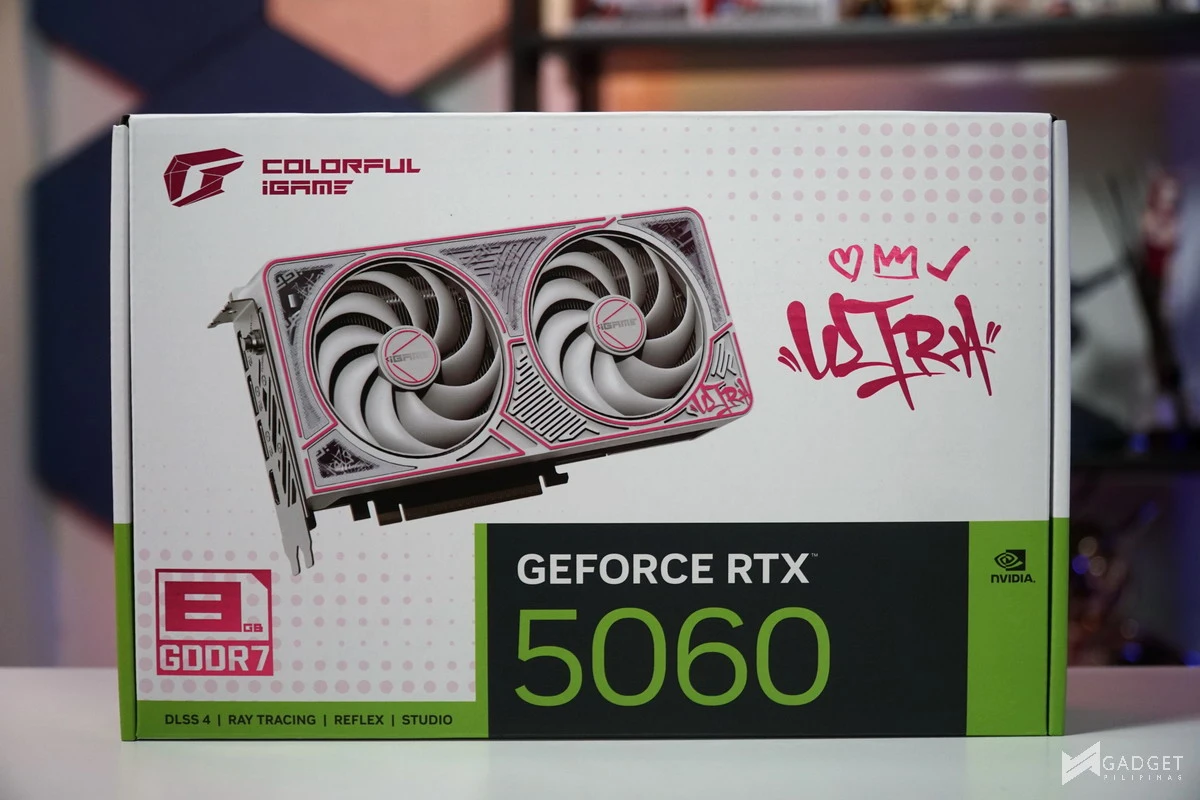
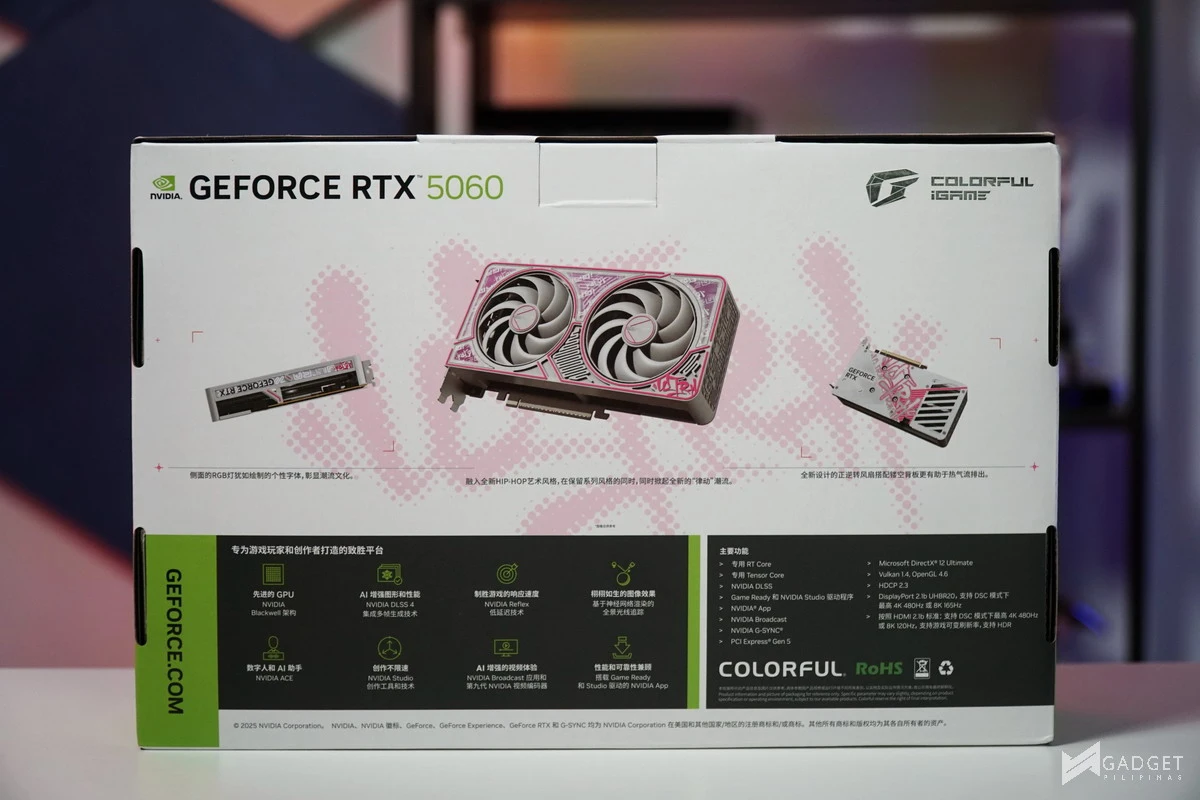
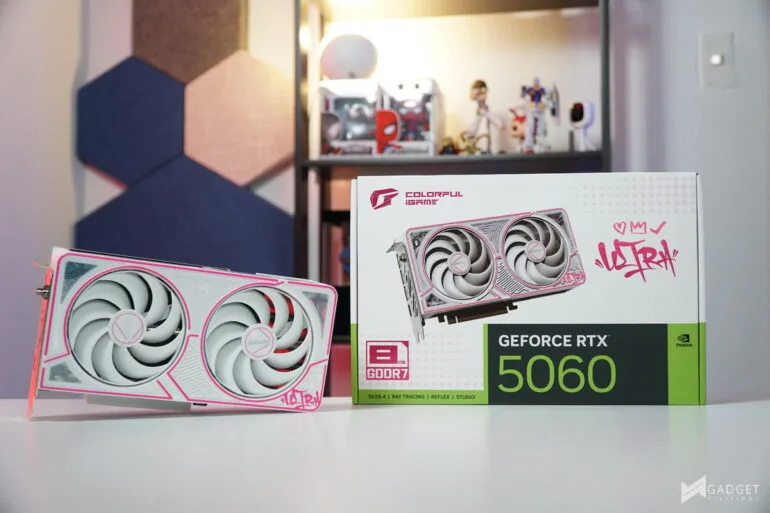
The COLORFUL iGame RTX 5060 Ultra W DUO OC comes in a stylish packaging with white and pink design coupled with your typical black and green NVIDIA color accents. Instead of the usual feature highlights or cooler design breakdown on the back, you have several renders of the iGame RTX 5060 Ultra W DUO OC showcasing the design.
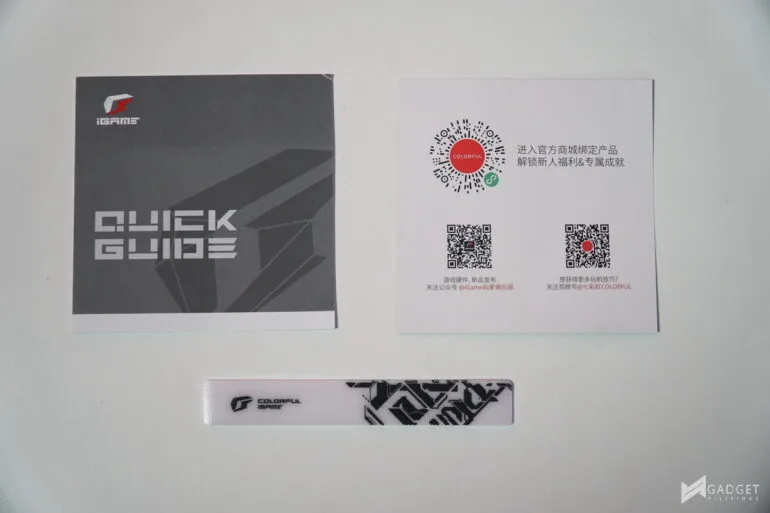
Apart from the usual quick start guide and warranty manual, COLORFUL includes an iGame velcro strap.
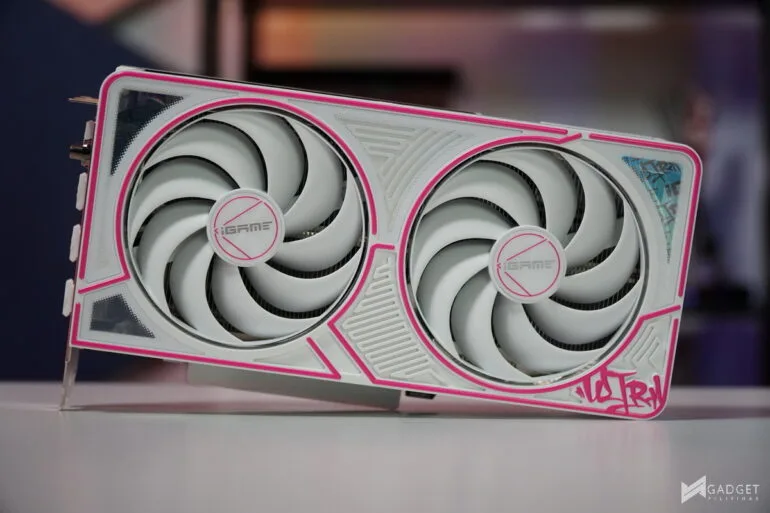
The white shroud paired with the loud pink accent makes the iGame RTX 5060 Ultra W DUO OC pop. You have maze-like markings across the shroud.
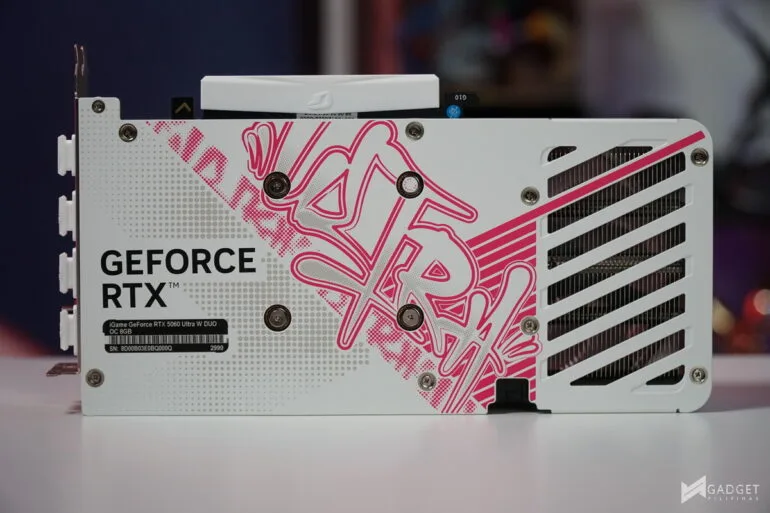
COLORFUL includes a full metal backplate on its RTX 5060 card despite being a budget GPU variant. That said, it’s one of the most stylish looking backplates with a pink graffiti-like Ultra marking on the center of the GPU.
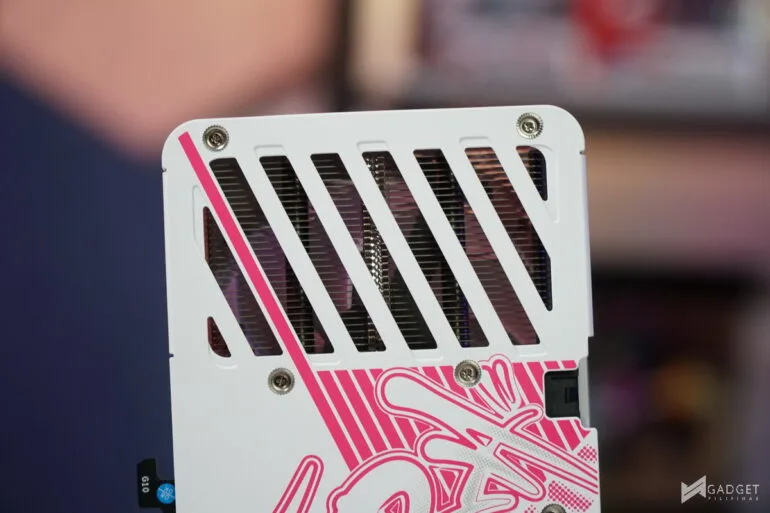
There’s a small cutout right after the PCB ends which exposes the heatsink for airflow to pass through. The cutout is one of the smallest I’ve seen for an RTX 50 series class card but it’s still something as it helps in better airflow thus resulting in better cooling.
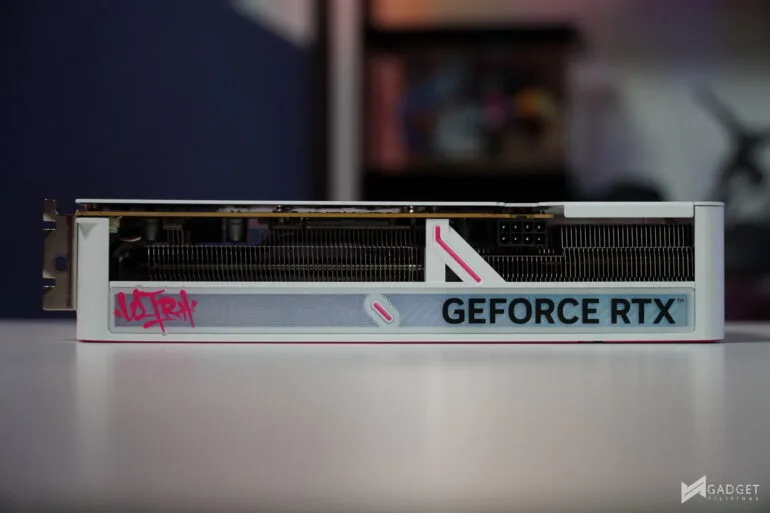
The COLORFUL iGame RTX 5060 Ultra W DUO OC is a compact, 2-slot card measuring only 231 x 120 x 49mm making it an easy fit in most, if not all, PC cases, even SFF/ITX cases. The Ultra and GEFORCE RTX strip has RGB lighting and can be controlled via the iGame Center software.
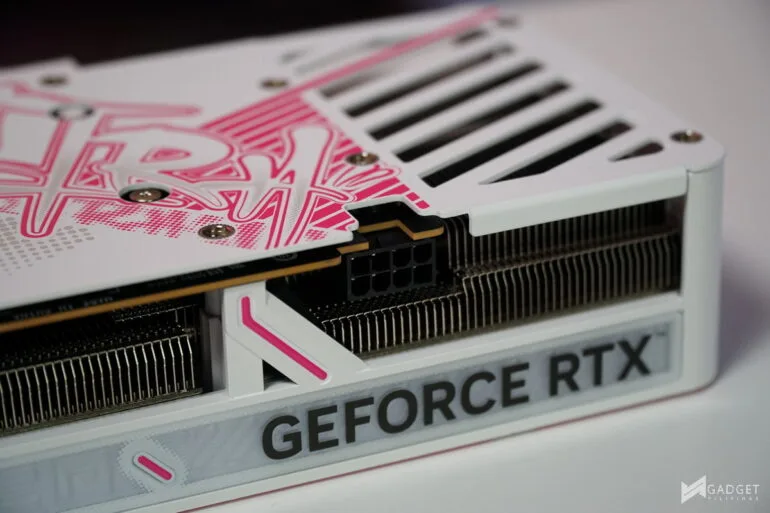
The NVIDIA GeForce RTX 5060 is rated at 145W TGP with a recommended PSU of atleast 550W. COLORFUl used the classic 8-pin PCIe cable for its RTX 5060 for better compatibility especially for those looking to upgrade.
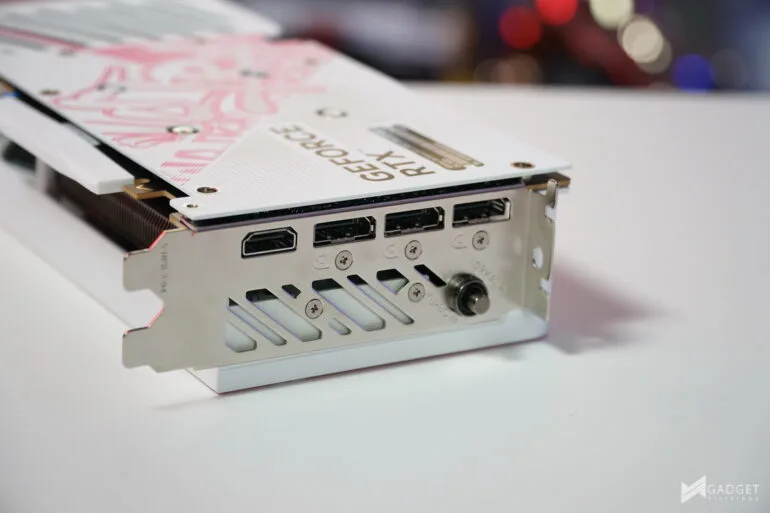
The COLORFUL RTX 5060 Ultra W DUO OC has a standard port configuraiton: three DisplayPort 2.1b ports and one HDMI 2.1b port. Unlike most GPUS that have a dual-BIOS or OC Switch, the switch on the RTX 5060 Ultra W DUO OC is located on the IO bracket making it easily accessible.
The COLORFUL RTX 5060 ULTRA W DUO OC runs at a base speed of 2280MHz – 2497MHz while the OC speeds run at 2280 – 2580MHz. OC is enabled by default and it will the profile used throughout our benchmarks for this review.
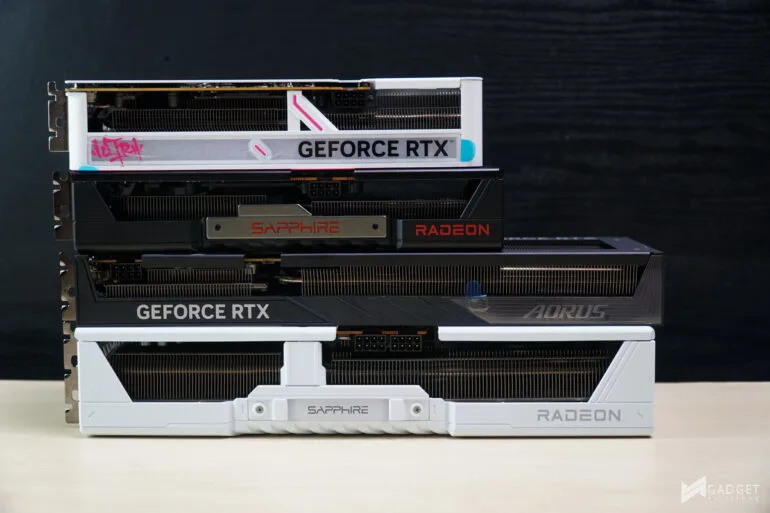
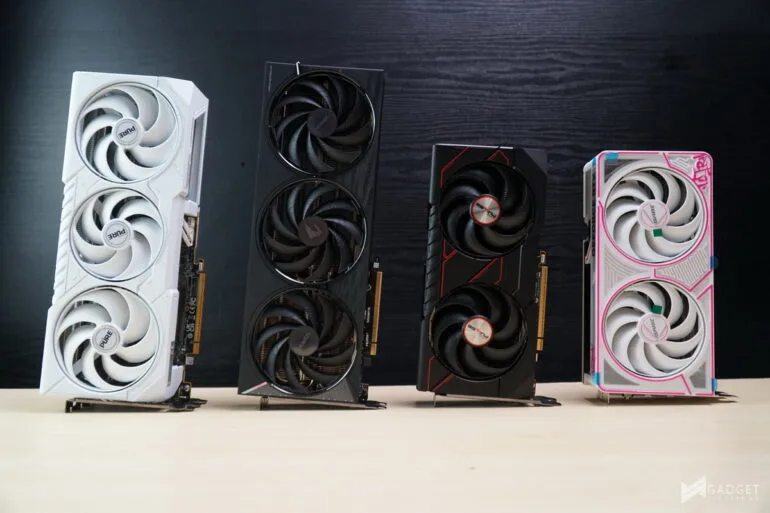
Benchmark Setup and Test Methodology
Gadget Pilipinas’ testing philosophy is to provide detail-oriented results as accurately as possible so that our readers can replicate our tests, given that these conditions are met. Different benchmarking apps and sequences are used depending on the tested component or device.
| CPU | AMD Ryzen 7 9800X3D |
| COOLER | ASUS ROG RYUJIN II 360mm V2 – Noctua NT-H2 Thermal Paste |
| MOTHERBOARD | Gigabyte X870E Aorus Master | BIOS F4i |
| MEMORY | GSkill Trident Z Neo 32GB(2x16GB) DDR5-6000 CL28 |
| GPUs | Nvidia RTX 5090 Founders Edition | Nvidia RTX 5080 Founders Edition | Inno3D RTX 5080 X3 | Nvidia RTX 4090 Founders Edition |
| STORAGE | Kingston Renegade 2TB NVME SSD |
| POWER SUPPLY | FSP VITA GM1000W Gold ATX 3.1 |
| OPERATING SYSTEM | Windows 11 Pro Build 24H2, VBS off |
| CASE | Open Benchtable V2 |
We use CapFrameX 1.7.5 BETA as our primary FPS capture and analysis tool for all our gaming benchmarks. The latest build version of Windows 11 Pro and WHQL-certified drivers are used for our benchmarks. Readings such as temperatures and power draws are recorded using HWINFO64, and other relevant software for cross-checking.
For more info, read our Review and Benchmark methodology article.
COLORFUL iGame RTX 5060 Ultra W DUO OC – Synthetic and Productivity Benchmarks
ADOBE PREMIERE PRO VIDEO EDITING BENCHMARK
Procyon benchmark suite is developed by UL, the same team behind 3DMark and PCMark benchmarks. The UL Procycon video editing benchmark uses Adobe Premiere in a typical video editing workflow. The benchmark starts by importing two video project files with various edits, adjustments, and effects – the second project uses several GPU-accelerated effects. Each project is exported in 1080p with H.264 encoding and again in 4K with HEVC H.265. The reported score is based on the time taken to export all four videos. GPU acceleration is turned on for GPU benchmarks.
PCMark10
From the same developers of the popular game benchmarking tool 3DMark, PCMark 10 is a benchmarking app for measuring a whole PC’s performance. It covers a wide variety of tests to reflect common tasks performed in a modern workplace. We selected PCMark 10’s extended benchmark and reported both the overall score and the Digital Content Creation Score.
V-RAY 6
V-Ray Benchmark is a stand-alone version of V-Ray developed by Chaos Group. It is designed to test the CPU and GPU by rendering sample scenes at a fixed amount of time. V-Ray is a plug-in mostly utilized by 3D computer graphics software applications mainly for industrial design, product design, architecture, film, and video game production. V-Ray is not limited to 64-threads as it supports multi and mega-threading.
GeekBench 6.3
Geekbench is a multi-platform benchmark used to gauge CPU performance and compare them across Windows, Mac, and Mobile. Geekbench 6 is the latest version and doesn’t rely on memory more than the previous Geekbench 4, making it a great tool to measure both single-core and multi-core CPU performance. Geekbench also sa GPU benchmarks using the OpenCL and Vulkan API.
BLENDER 4.3.0
Blender is a widely used, free, open-source 3D creation suite. It supports the whole 3D pipeline process from modeling, rigging, animation, simulation, rendering, and even motion tracking. Blender has become a standard for CPU benchmarks with the BMW27 and Classroom Scene most used. This prompted the company to release Blender Open Data Benchmark in 2018, a benchmark-specific version allowing users to run a preset benchmark and share the results online like 3DMark.
HANDBRAKE 1.8.2
Handbrake is a top-rated open-source video conversion software that is used by professionals, enthusiasts, and even reviewers as a reference point, mainly because of its wide variety of media codecs. The rise of streaming and blogging makes video content, both encoding and transcoding, important for these people, regardless of whether they’re seasoned professionals or just starting out. Handbrake also takes advantage of AVX-512 and OpenCL to accelerate certain types of media codecs. Our Handbrake benchmark converts a 3:16 4K60 clip shot from an S24 Ultra to 1080p60 H264 mp4 for CPU or 1080p NVENC H265 for GPU.
3DMark Benchmark Suite
3DMark is the go-to benchmark for gamers because of the ability to share and compare results online. We test GPUs both in DX11 Firestike and DX12 Timespy for the “classic” benchmarks. We also used 3DMark’s latest Steel Nomad and SpeedWay benchmarks as we slowly shift to these “more accurate” synthetic game benchmarks.
COLORFUL iGame RTX 5060 Ultra W DUO OC – AI Benchmarks
Geekbench AI
Computer Vision – Procyon
Image Generation – Procyon
Text Generation – Procyon
COLORFUL iGame RTX 5060 Ultra W DUO OC – Gaming Benchmarks
RETURNAL
Returnal is one of the most technologically advanced games since the launch of Cyberpunk 2077. Released last April 2021 on PS5 and February 2023 on PC, it uses Unreal Engine 4 and supports multiple technologies such as Ray Tracing, DLSS, VSR, and FSR.
COUNTERSTRIKE 2
CounterStrike 2 or CS2 is the successor to the now-retired CSGO and now uses the Source 2 Engine – the same engine used on DOTA 2. CS2 is a great FPS game to test out CPU performance. Our benchmark process uses the replay function of the game.
DOTA 2
Dota 2 is a good reputation among F2P titles, especially MOBAs and RTS as it lands on the demanding side of the spectrum. Its gameplay and quality of life updates are far more frequent than most F2P titles, thanks to its vast popularity. Our benchmark sequence is based on a replay of Liquid vs. Gaimin Gladiators in the The International Grand Finals Game 3 from the team fight that happened from 16:24 to 17:24.
SPIDER-MAN: MILES MORALES
Marvel’s Spider-Man: Miles Morales is developed by Insomniac Games and published by Sony, is one of the most popular PC port titles last 2022. It’s one of the few modern game titles that support upscaling technologies FSR, DLSS, and XeSS, making it a great title to use for benchmarks.
F1 23
F1 23 is the official video game of the 2023 Formula One and Formula 2 championships, developed by Codemasters. F1 2023 is the sixteenth installment in the franchise and uses the Ego Engine 4.0. F1 233 is a good representation of racing games thanks to its realistic graphics and fairly demanding spec requirements as well as support for Ray Tracing and the latest upscaling technologies such as DLSS, XeSS, and FSR.
ASSASSIN’S CREED: MIRAGE
Assassin’s Creed Mirage is the latest Assassin’s Creed game from Ubisoft making it the thirteenth major installment in the franchise. It uses the AnvilNext 2.0 game engine and is the very first AC game to support the latest upscaling technology such as XeSS, FSR, and DLSS.
Cyberpunk 2077
Cyberpunk 2077 is arguably the most hyped game of 2020. Developed by CD Projekt Red, the dystopian open-world, action-adventure RPG sports is one of the most demanding titles to date. Cyberpunk 2077 also supports three Ray Tracing settings as well as DLSS, which makes the game a great tool to measure Ray Tracing performance for both AMD and Nvidia graphics cards.
HORIZON FORBIDDEN WEST
Horizon Forbidden West is a 2022 action role-playing game developed by Guerrilla Games and published by Sony Interactive Entertainment. The Horizon Zero Dawn game sequel launched on PC last March 2024 built on the Decima Game Engine, the same one used on Death Stranding. Horizon Forbidden West features Ray Tracing and Upscaling technologies not present in the prequel game.
BLACK MYTH WUKONG
Black Myth: Wukong is one of the most popular game titles launched in 2024, with its stunning graphics thanks to the Unreal Engine 5. Developed by Game Science, Black Myth: Wukong is one of the most demanding titles recently released titles with complete Ray Tracing and Upscaling technology features, making it a great benchmark for new hardware.
GHOST OF TSUSHIMA
Ghost of Tsushima is an action-adventure game developed by Sucker Punch Productions and published by Sony Interactive Entertainment. It was initially released for the PlayStation 4 in July 2020 and later for PlayStation 5 and Windows. Ghost of Tsushima runs on a modified and optimized version of Sucker Punch’s in-house engine, originally built for the PlayStation platforms.
HOGWARTS LEGACY
Hogwarts Legacy is a popular game catering to the hearts of Harry Potter fans and gamers with its rich world and engaging gameplay. Developed by Avalanche Software and built on the Unreal Engine 4, Hogwarts Legacy delivers detailed environments and character models with support for the latest rendering and upscaling technologies.
FAR CRY 6
FarCry 6 is an FPS game published by Ubisoft that uses the Dunia engine. It heavily relies on and takes advantage of DirectX 12 to render a realistic environment that is taxing to both the CPU and GPU. It’s also the first game in the franchise to support Ray Tracing.
COLORFUL iGame RTX 5060 Ultra W DUO OC – Temps and Power Draw
The COLORFUL iGame RTX 5060 Ultra W DUO OC manages to reach a peak temp of 70.1°C. It’s the only RTX 5060 GPU to reach over 70°C albeit it’s also the only RTX 5060 GPU with a 2-slot, dual-fan design. The 70.1°C temp is a nothing to worry about especially considering its form factor and it’s an OC model GPU.
Conclusion
COLORFUL has slowly made its way into being recognized in the global market, coming from its #1 market dominance in China. The brand’s wide range of GPU tiers allows them to compete at every price point from the flagship ROG Astral, Aorus Master GPUs with its Vulcan cards, all the way to the mainstream tier with its Advanced and Ultra line up.
Unlike most brands cutting costs on its GPU series just because of the lower tier GPU price segment, COLORFUL spared nothing on the iGame RTX 5060 Ultra W DUO OC. It still sports all of the features that its bigger Ultra cards in the RTX 50 series lineup despite being only a budget RTX 5060 GPU. It’s performance can keep up with the larger triple fan card models plus it offers a unique aesthetic that’s become a signature for COLORFUL graphics cards.
That said, the COLORFUL iGame RTX 5060 ULTRA W DUO OC commands an arguably steep price of Php 25,000, a Php 5,000 premium over the RTX 5060 SRP. For that price, you’re definitely paying for both the White colorway premium and OC model premium of the GPU. It’s definitely a tough sell especially for PC builders as the Php 5,000 premium over an MSRP GPU could be allocated to other components that would give out more frames. But, if you’re after a premium-looking White GPU that doesn’t compromise on performance, then the COLORFUL iGame RTX 5060 ULTRA W DUO OC is your best option under the Php 25,000 mark for an RTX 5060. If you find the dual-fan cooler somewhat lacking in terms of aesthetics and cooling, then there’s a triple fan variant of the Ultra W OC for only Php 900 more.

Grant Soriano
Grant is a Financial Management graduate from UST. His passion for gadgets and tech crossed him over in the industry where he could apply his knowledge as an enthusiast and in-depth analytic skills as a Finance Major. His passion allows him to earn at the same time help Gadget Pilipinas' readers in making smart, value-based decisions and purchases with his reviews and guides.
View all articles →Related Reviews
 MacBook Neo Long-Term Review: My Bedside Mac
 Sony 1000X The Collexion Review: Three Months Later
 ASUS ProArt P16 (H7607BA) Review: the RTX Spark platform, tested in the work creators actually do
 HONOR 600S Review: Bits of What’s Loved on the HONOR 600 Series in a More Accessible Package
 Keychron C75 HE 8K TMR Keyboard Review
 Samsung Galaxy S26 FE: Great Functional Elegance