

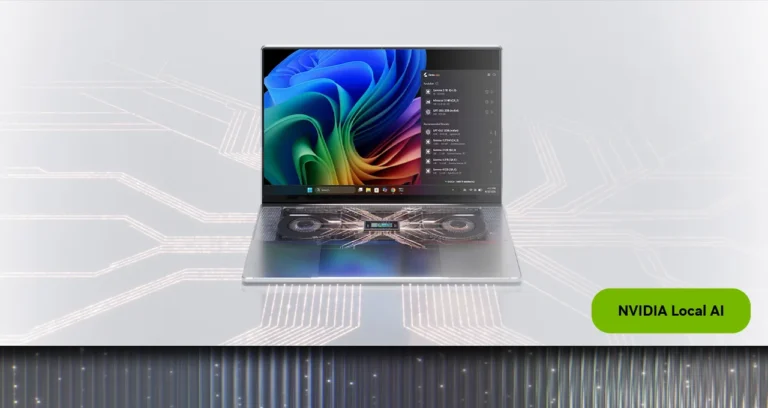

NVIDIA RTX Spark
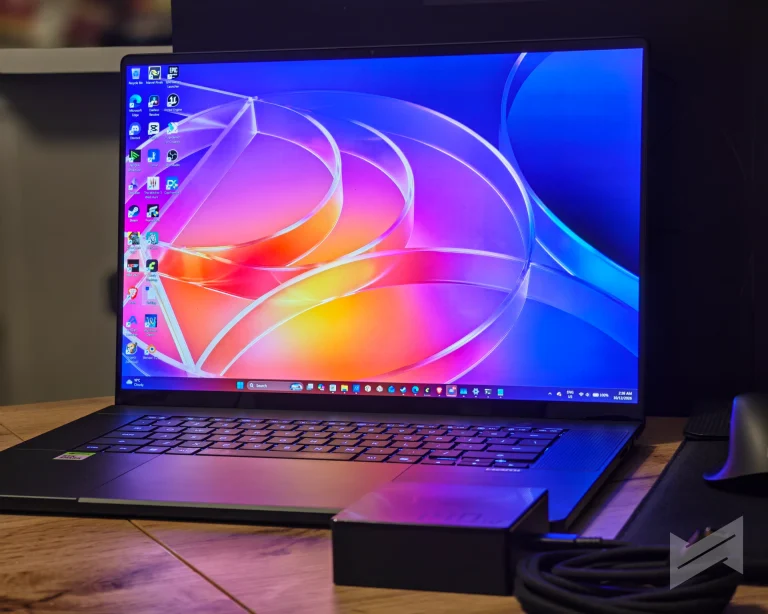
NVIDIA has spent the last two years talking about what happens when a GPU stops being a card and becomes half of a superchip. The ASUS ProArt P16 (H7607BA) is one of the first laptops where that talk can be measured. Inside is the RTX Spark N1X, an NVIDIA superchip that pairs a 20-core ARM CPU with a 6,144-core Blackwell RTX GPU and gives both of them access to the same pool of LPDDR5X memory. Our review unit carries 64 GB of it, a 16-inch 3K OLED panel, and a chassis that weighs 1.77 kg.
The interesting question is not whether this laptop is fast. The interesting question is whether local AI and creative work stop being benchmark exercises and become things you would actually do. For a week we ran language models locally, fine-tuned one on the laptop itself, rendered in Blender and V-Ray, edited in DaVinci Resolve, and played three games across three fan profiles. We also compared our numbers against the reference figures NVIDIA measured on the same configuration.
Two housekeeping notes before the results. We deliberately skipped most of the usual synthetic suite, because several of those tests either do not run on this platform or no longer tell you anything useful, and we explain why in the methodology. And everything below is our own hardware: the ASUS ProArt P16 with 64 GB, not the 128 GB variant NVIDIA used for some of its creator figures.
About the RTX Spark platform and the N1X
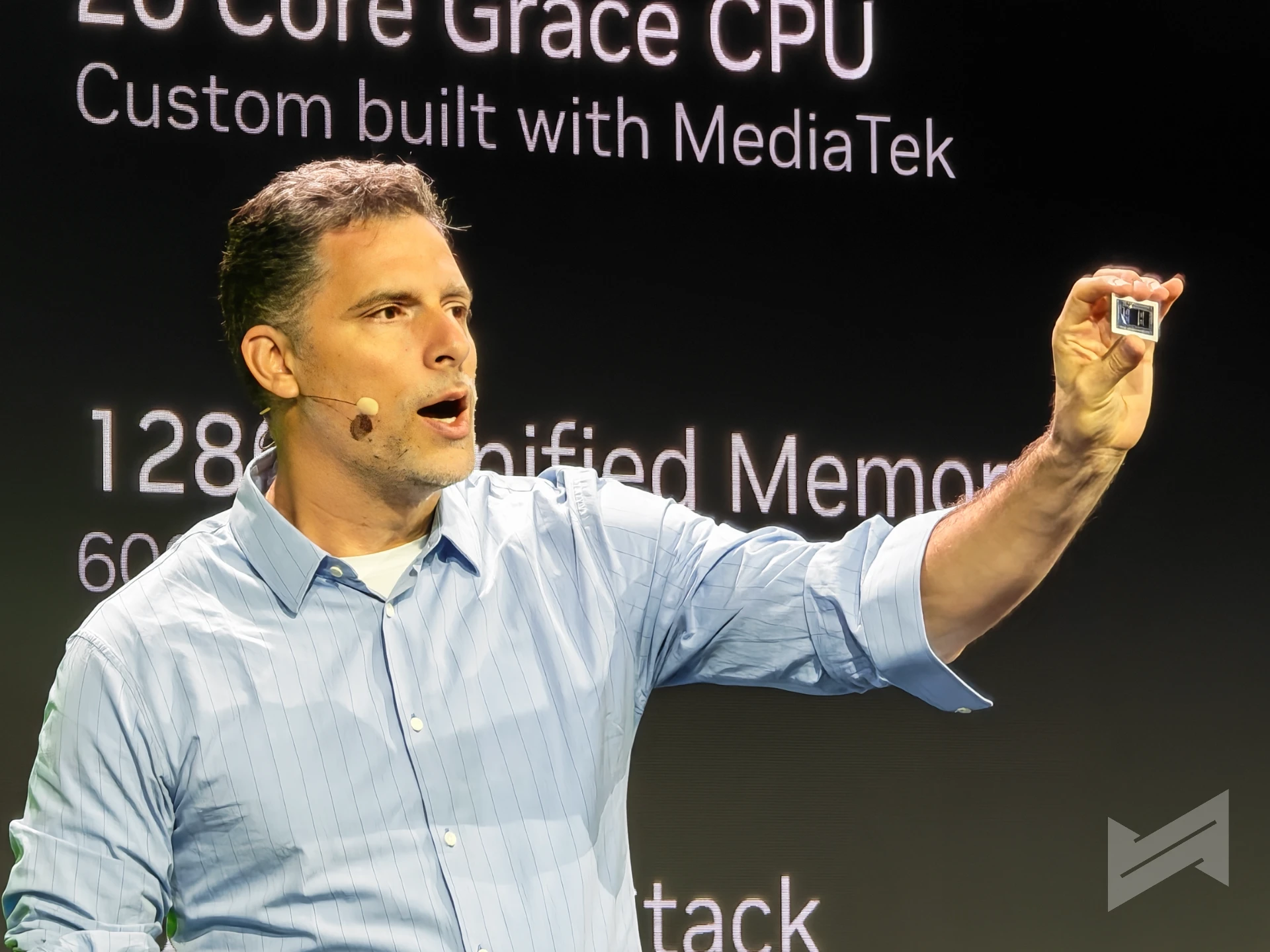
RTX Spark is NVIDIA’s name for a family of superchips built on TSMC’s 3 nm process, where a Grace-class Arm CPU and a Blackwell RTX GPU sit on one package and talk to each other over NVLink-C2C at 600 GB/s bidirectional. The point of that arrangement is memory. Instead of a fixed pool of VRAM with a PCIe bus in front of it, the CPU and the GPU share a single 256-bit, 16-channel LPDDR5X pool that runs at up to 300 GB/s. A model that measures 20 GB does not have to fit inside a graphics card. It has to fit inside the machine.
NVIDIA lists the N1X in two configurations, and the distinction matters when you read any review of an RTX Spark laptop. The first pairs an 18-core CPU with a 5,120-core GPU across 40 streaming multiprocessors. The second pairs a 20-core CPU, split into 10 performance and 10 efficiency cores, with a 6,144-core GPU across 48 SM. Our review unit is the second one. Both SKUs share the same 4th-generation RT cores, 5th-generation Tensor cores, 24 MB of L2 cache, and 4:2:2 encode and decode support, and both can be configured from 45 W to 80 W of SoC power.
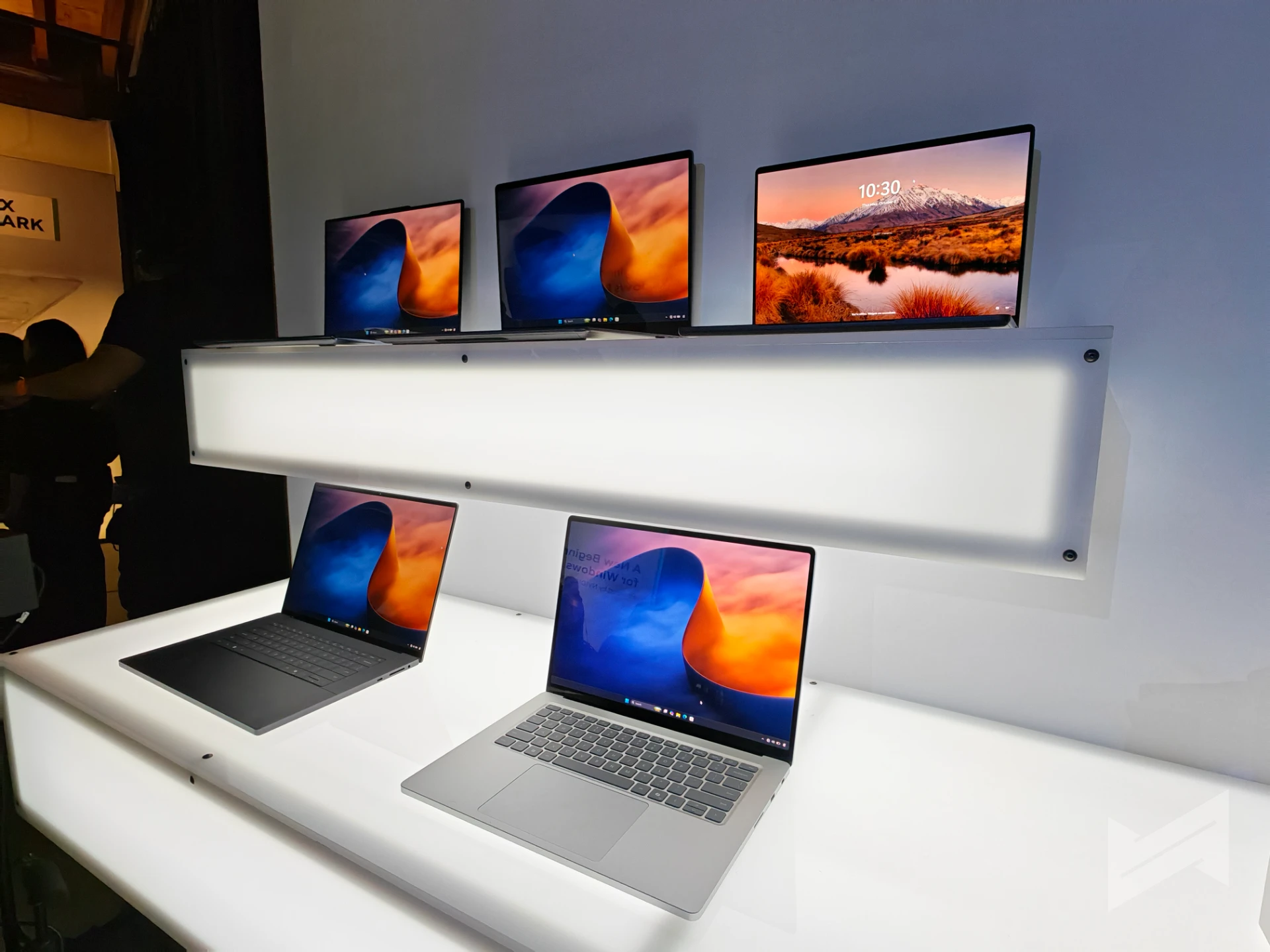
NVIDIA also gives the platform its own graphics feature set, and DLSS 5 is the part gamers will care about. It combines super resolution with multi-frame generation, so the GPU renders a fraction of the frames you see. On a laptop with this much GPU and this much shared memory, that is the difference between a playable result and a pretty screenshot.
ASUS ProArt P16 H7607BA 64 GB Specs
| Item | Specification |
|---|---|
| Model | ASUS ProArt P16, H7607BA |
| Platform | NVIDIA RTX Spark N1X, 20-core CPU with 6,144-core Blackwell RTX GPU |
| Memory | 64 GB LPDDR5X on board, up to 300 GB/s (24 / 32 / 48 / 64 / 128 GB options) |
| Storage | M.2 NVMe PCIe 4.0 SSD, with two M.2 2280 PCIe 5.0 x4 slots |
| Display | 16.0-inch 3K OLED, 2880 x 1800, 16:10, 120 Hz, 0.2 ms, touch with stylus support |
| Brightness | 500 nits typical, 1,100 nits HDR peak |
| Color | 100% DCI-P3, 1,000,000:1 contrast, PANTONE Validated |
| HDR | VESA Certified DisplayHDR True Black 1000 |
| Ports | 3x USB 4.0 Gen 3 Type-C 40 Gbps, 1x USB 3.2 Gen 2 Type-A, HDMI 2.1 FRL, SD Express 7.0 reader, 3.5 mm combo |
| Wireless | Wi-Fi 7 tri-band 2×2, Bluetooth 5.4 |
| Keyboard | Backlit chiclet, 1.7 mm travel, haptic touchpad |
| Battery | 99.9 Wh, 4-cell, with a 140 W Type-C adapter |
| Dimensions | 35.41 x 24.30 x 1.29 to 1.59 cm, 1.77 kg |
| Software | ProArt Creator Hub, MuseTree, StoryCube, GlideX, ScreenXpert, MyASUS |
A closer look
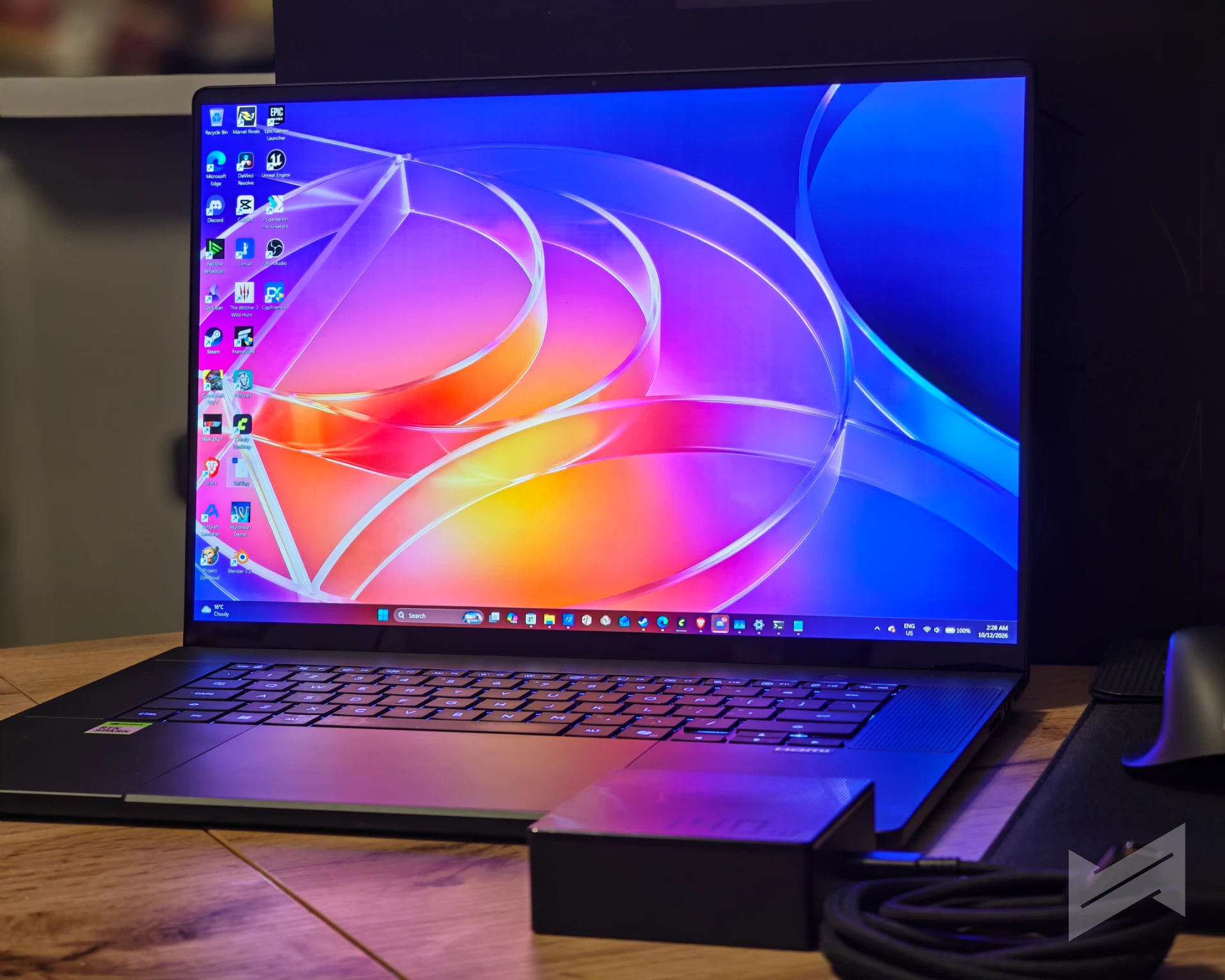
The ASUS ProArt P16 is a laptop that feels more expensive than its specification sheet suggests. The chassis is rigid in the hand and it stayed that way through almost a week of daily handling. We found no significant flex anywhere on the body, not at the lid, not above the keyboard, not even at the palm rest. The finish picks up fingerprints, and the keyboard deck is a genuine smudge magnet, so expect to keep a cloth nearby. That is the price of the soft-touch surface.There is one significant thing about its build that I wish to mention, and that is size. If I had to choose between a 16-inch or a 14-inch, I would have chosen the former. It’s the size that actually rivals my MacBook Pro 14, which I intend to replace with the ASUS ProArt P14. While I appreciate ASUS for still making this a lighter 16-inch laptop, this is where “smaller is better” matter more.
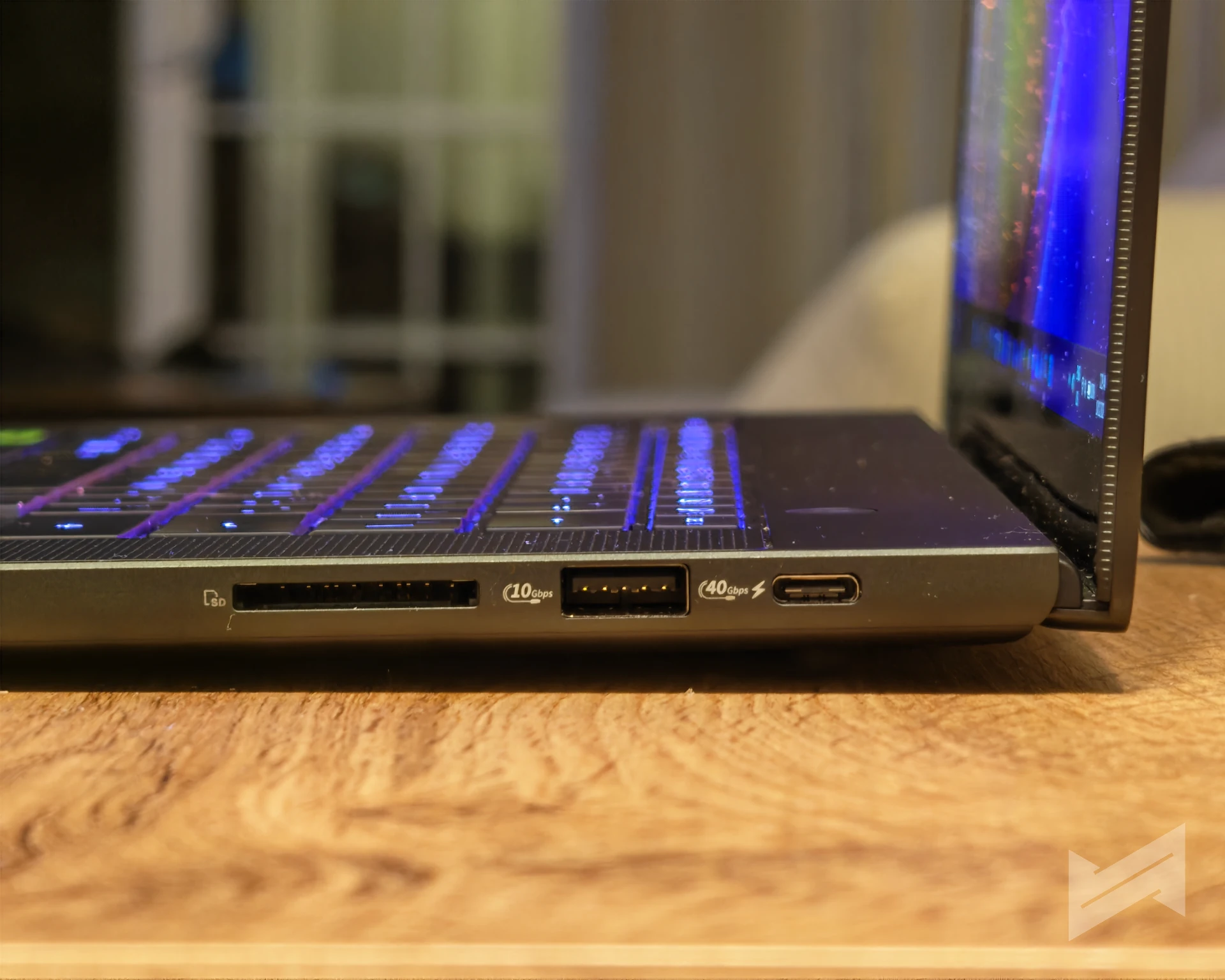
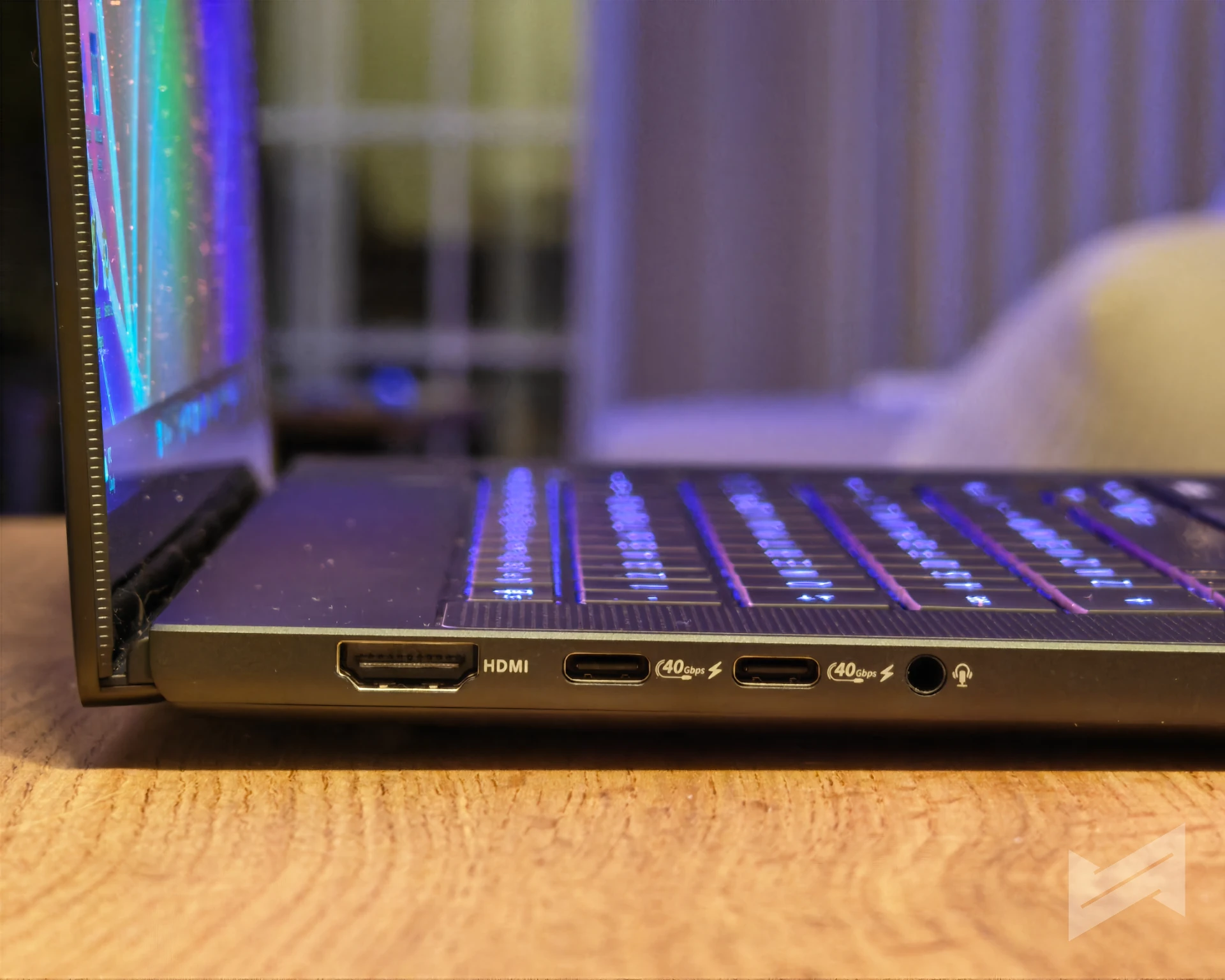
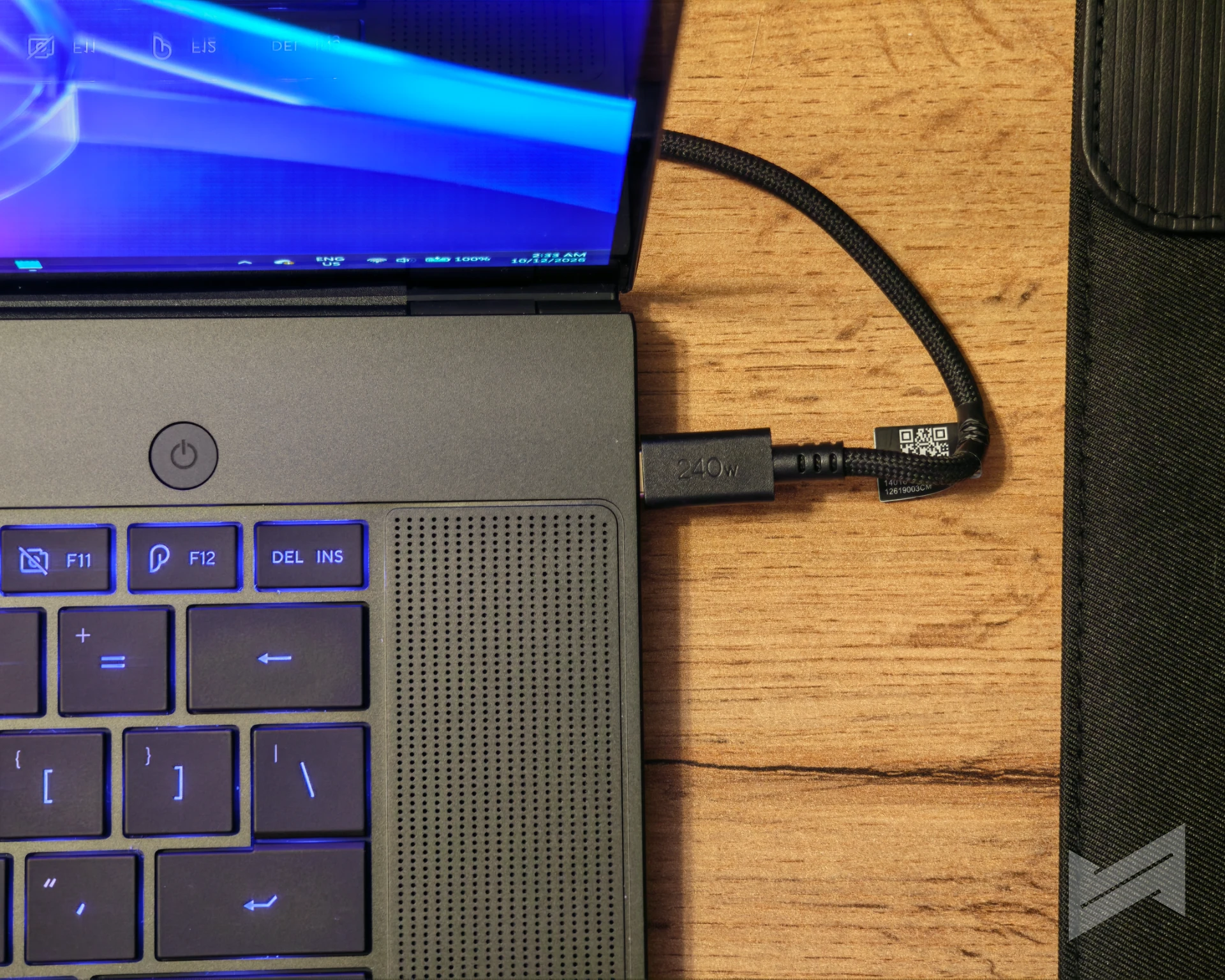
The port selection is the most pleasant surprise on a chassis this thin. Three USB 4.0 Type-C ports handle display output and power delivery at up to 40 Gbps, there is a full-size USB-A port for the dongles nobody wants to carry, HDMI 2.1 for an external monitor, and an SD Express 7.0 card reader. For anyone who shoots on a camera and edits on the same machine (like myself), that card slot is not a bonus. It is the feature that decides whether you need a bag of adapters. Even the bundled power cable is braided, which is a small thing that says something about how long ASUS expects this machine to be used.
A week of local AI work changed how this laptop feels to use. Fine-tuning a model on a laptop used to be a demonstration. Here it is a task you can start and walk away from, and the fine-tuned model gave shorter, more accurate answers than the base model without losing speed. What surprised us most is how little the machine changes when you unplug it. The ProArt P16 held its performance whether it was on battery or on the adapter, which is not something we can say for most performance laptops that shut their power limits off the moment the barrel connector comes out.
Included in the package: the ASUS ProArt MD301
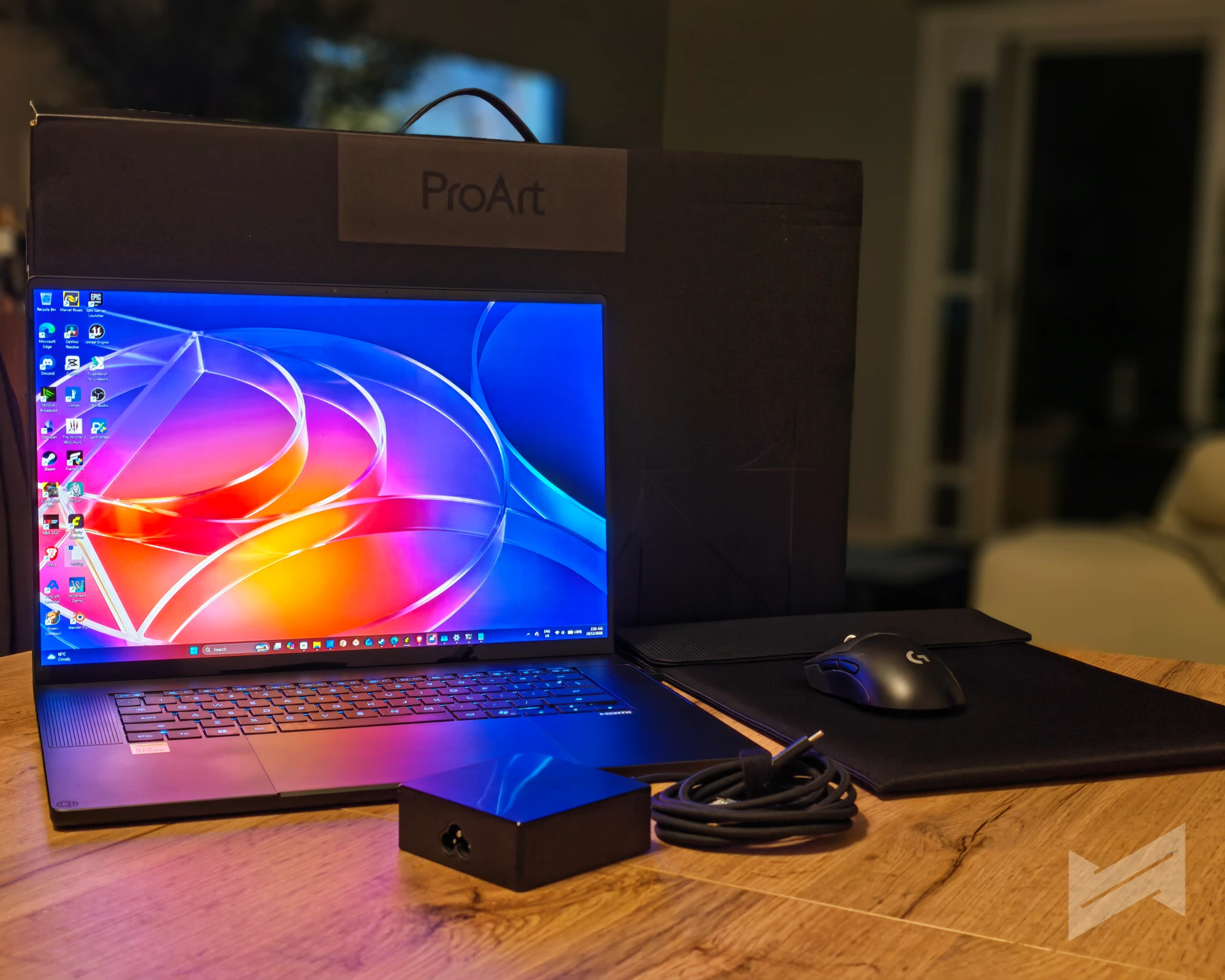
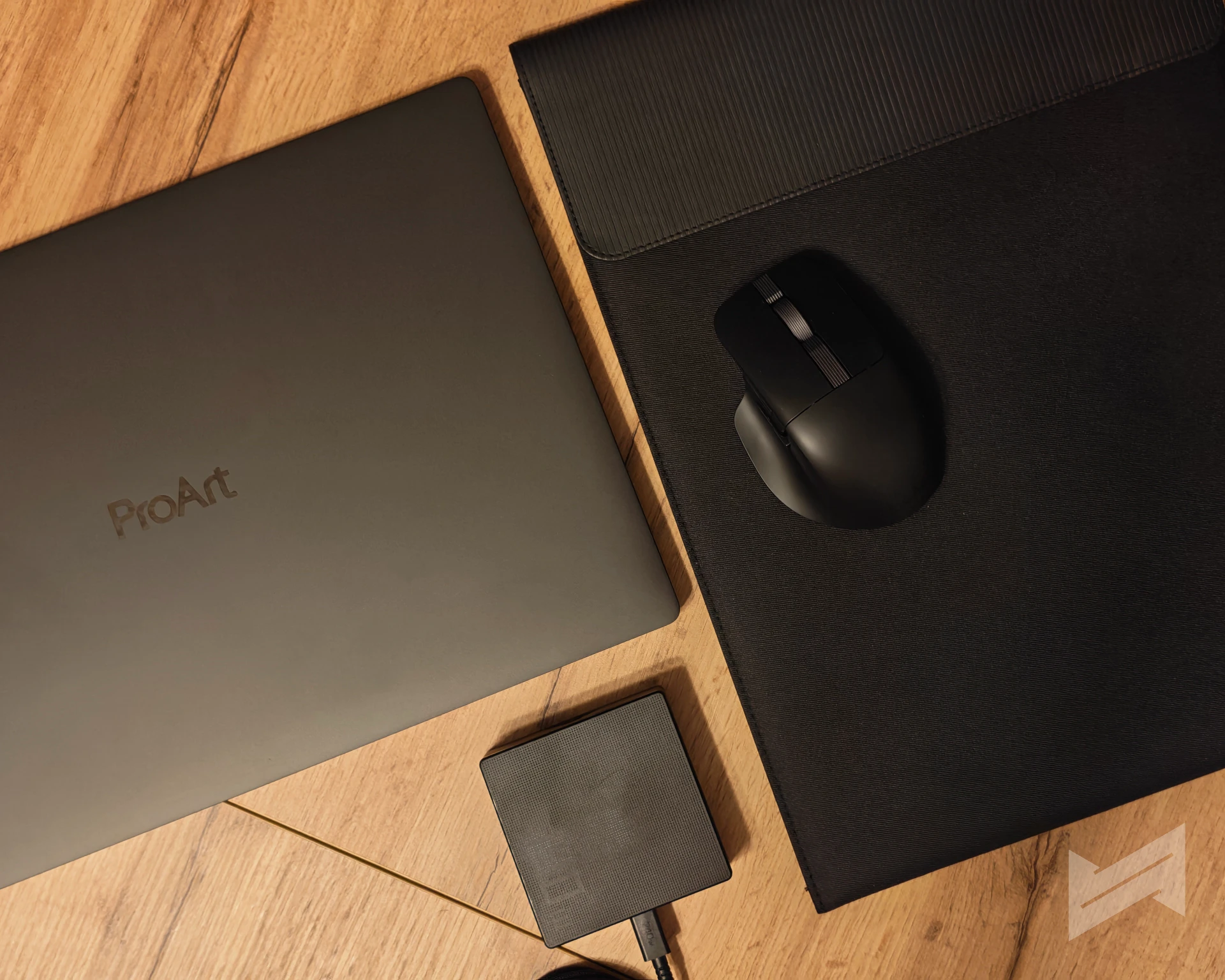
The box contains the laptop, a protective sleeve, the 140 W Type-C adapter, and the ASUS ProArt MD301 mouse. We have seen this mouse before. It is the same bundled pointer that shipped with the ASUS ProArt PX13 we reviewed in June, and it remains a comfortable, quiet wireless mouse that matches the laptop rather than feeling like an afterthought. Note the adapter rating: 140 W, not 100 W. The USB-C ports will accept up to 100 W of power delivery from a third-party charger, but the bundled brick is the 140 W unit, and that is the one you want for heavy loads. ASUS also notes that included accessories vary by country and territory, so the bundle you buy locally may differ.
ASUS ProArt P16 Display
The panel is a 16-inch 3K OLED at 2880 x 1800 in a 16:10 aspect ratio, running at 120 Hz with a 0.2 ms response time, and it supports touch input with a stylus. It covers 100% of DCI-P3 with a 1,000,000:1 contrast ratio, it carries PANTONE validation, and it is certified to VESA’s DisplayHDR True Black 1000 standard. ASUS rates it at 500 nits typical and 1,100 nits peak in HDR, and it advertises 70% less harmful blue light and a 90% screen-to-body ratio.
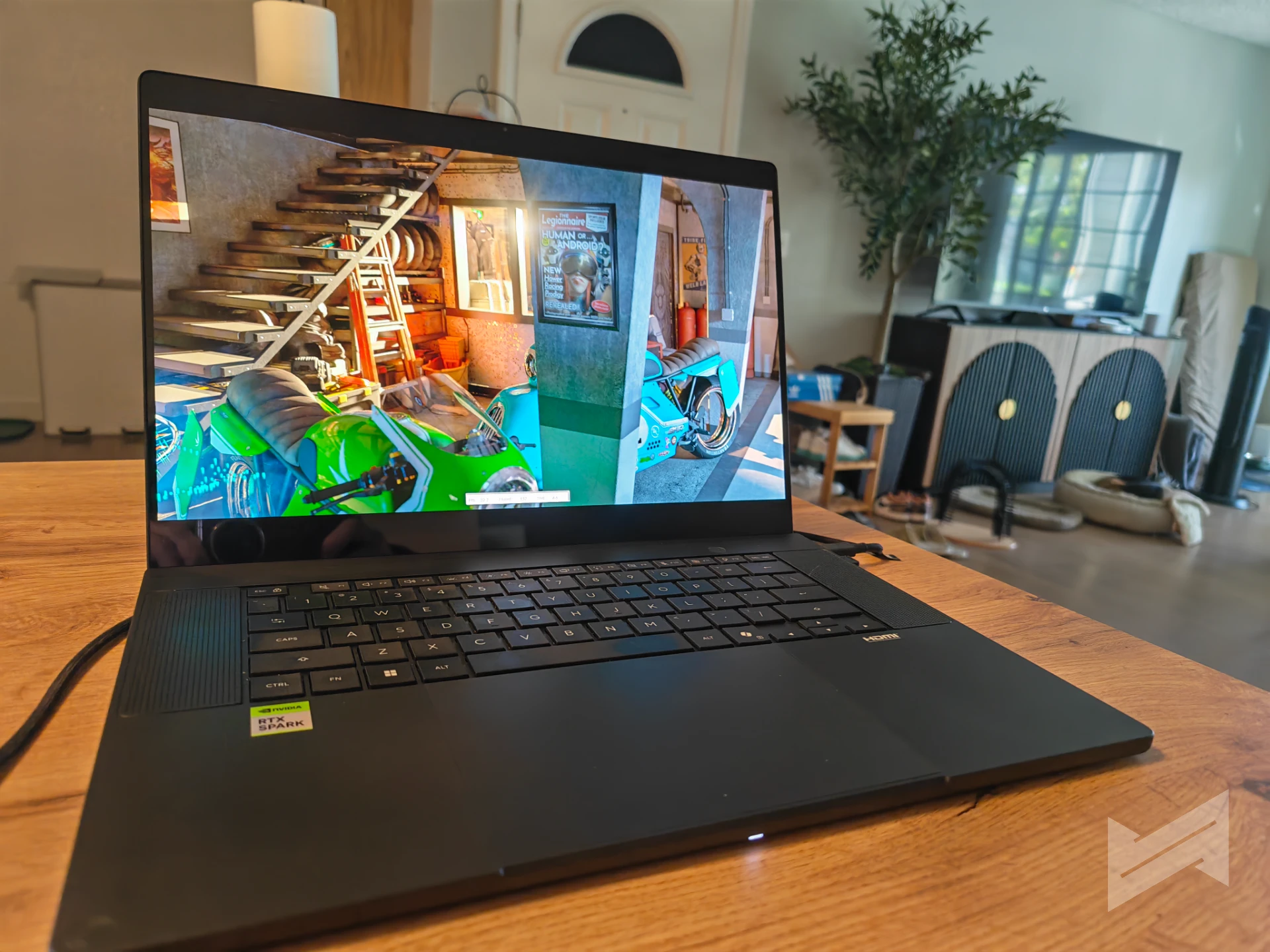
One clarification, because it has caused confusion in early coverage of this machine. The figure “1000” in DisplayHDR True Black 1000 is the name of the certification, not a brightness rating. The panel does 500 nits in normal use and up to 1,100 nits in HDR. It is also worth being precise about resolution. ASUS sells the H7607 line with either a 3K panel or a UHD+ 3840 x 2400 panel, and the two are different configurations of the same model number, not a contradiction. Our unit is the 3K, and the extra headroom of the OLED matters more here than a finer pixel pitch would, because the platform can push high frame rates in games and you want a panel that can show them.
Keyboard
The keyboard is a chiclet design with 1.7 mm of travel and three levels of backlighting, sitting above a haptic touchpad. Typing on it felt immediately familiar. The keys have a short but real resistance rather than the hollow, bottomless feel of a very thin membrane deck, and the travel is enough that your fingers find the actuation point without slamming. Long writing sessions on it were comfortable, which is the only test that matters for a machine aimed at creators.
The criticism is cosmetic but persistent. The deck shows oil and dust quickly and it is not easy to keep clean during a working day. The touchpad is responsive and the haptic feedback is convincing, and we had no trouble with palm rejection while typing.
Benchmark setup and test methodology
Every reference figure in this review comes from NVIDIA’s RTX Spark reference, and the device labels in that guide matter. Our 64 GB ProArt P16 is the reference machine for the gaming, 3DMark and AI + Agents tables. The creator table is different: the Comfy Desktop figures come from NVIDIA’s 128 GB ProArt configuration, and the V-Ray and PugetBench figures come from a Microsoft Surface Ultra. We say so at every table, and we never mix a reference figure from one machine with a result of ours from another.
Our own numbers follow a house method. Every benchmark ran on the ProArt P16 with the internet disconnected, because most of these tools upload their scores automatically and a background upload will contaminate a run. Results that support repeats follow a two-run rule, and the second run is the one we record. Games were captured with CapFrameX 1.8.5, temperatures and power draws with HWiNFO64 and OCCT Enterprise, and each game was run three times per fan profile, with the aggregate of those three runs used as the score. Where a figure is a single capture, we say so.
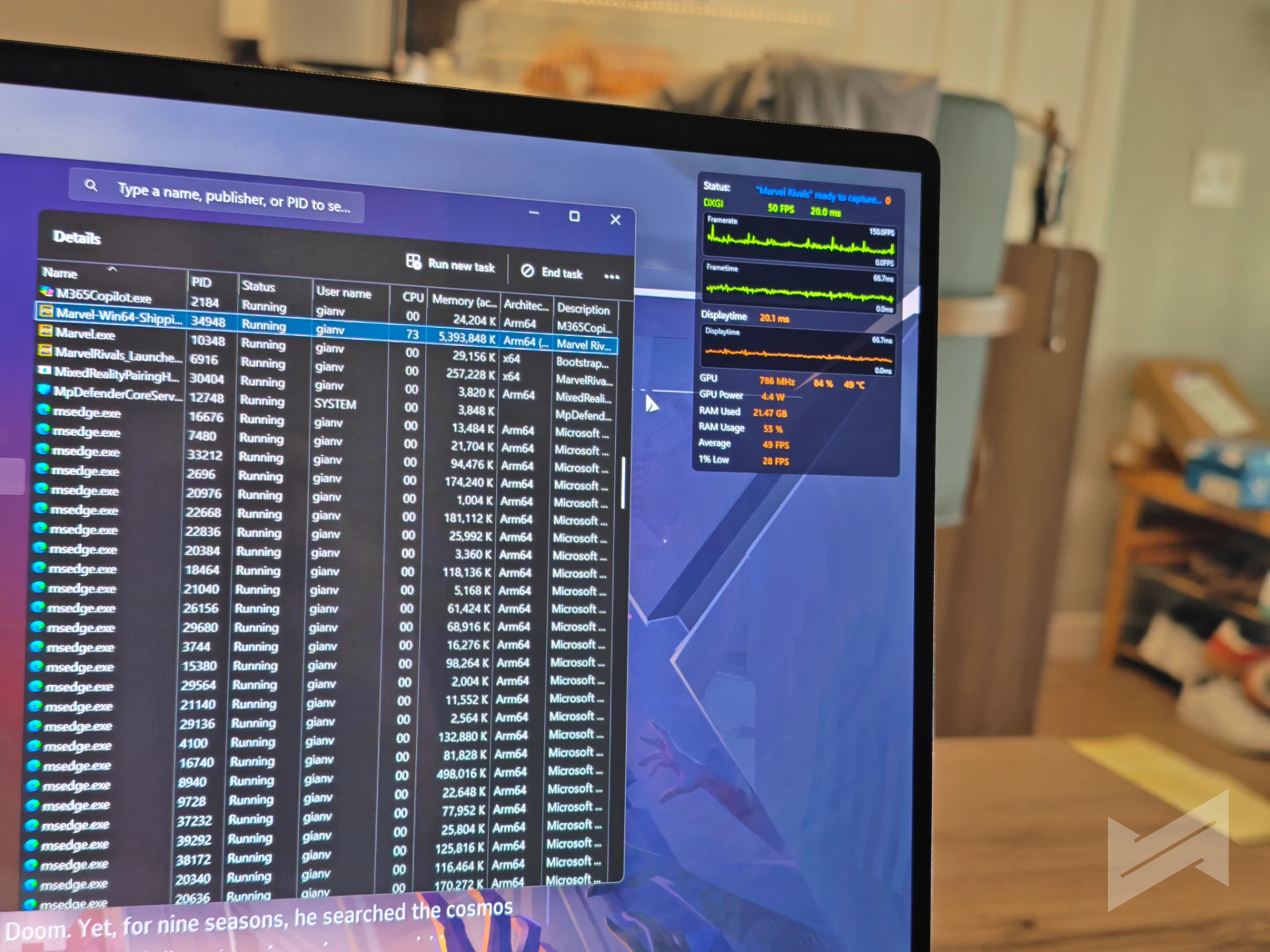
We test the fan profiles the way ASUS exposes them: Silent for the quiet profile, Standard for everyday use, and Performance for maximum sustained throughput. These profiles are effectively power limits, so they are a genuine variable in every result, not a cosmetic setting. For benchmark runs we pinned Performance mode and disabled power mode synchronization, so that unplugging the laptop could not quietly drop it into a lower power state.
What we deliberately skipped, and why
We left the usual synthetic suite out of this review on purpose, and the reasons are worth stating because the omissions are as informative as the results. Geekbench 6 did not produce usable numbers on our unit, and SuperPI 32M runs through Prism emulation on this platform, because there is no ARM64 build of it, which turns a CPU test into a test of the translation layer. Benchmarks that measure an emulator tell you nothing about the silicon. We intend to run Geekbench 7 later, and we will update this review once we review more RTX Spark laptops in the future.
On the graphics side, 3DMark Fire Strike and Time Spy are simply too old to act as proxies for modern titles. NVIDIA’s own guidance is to use Speed Way and Steel Nomad, which are the two tests we kept, alongside Port Royal and Solar Bay for ray tracing. The full list of what we did run, and what is still outstanding, lives in our working checklist.
ASUS ProArt P16 64GB RTX SPark Benchmarks
AI and agents
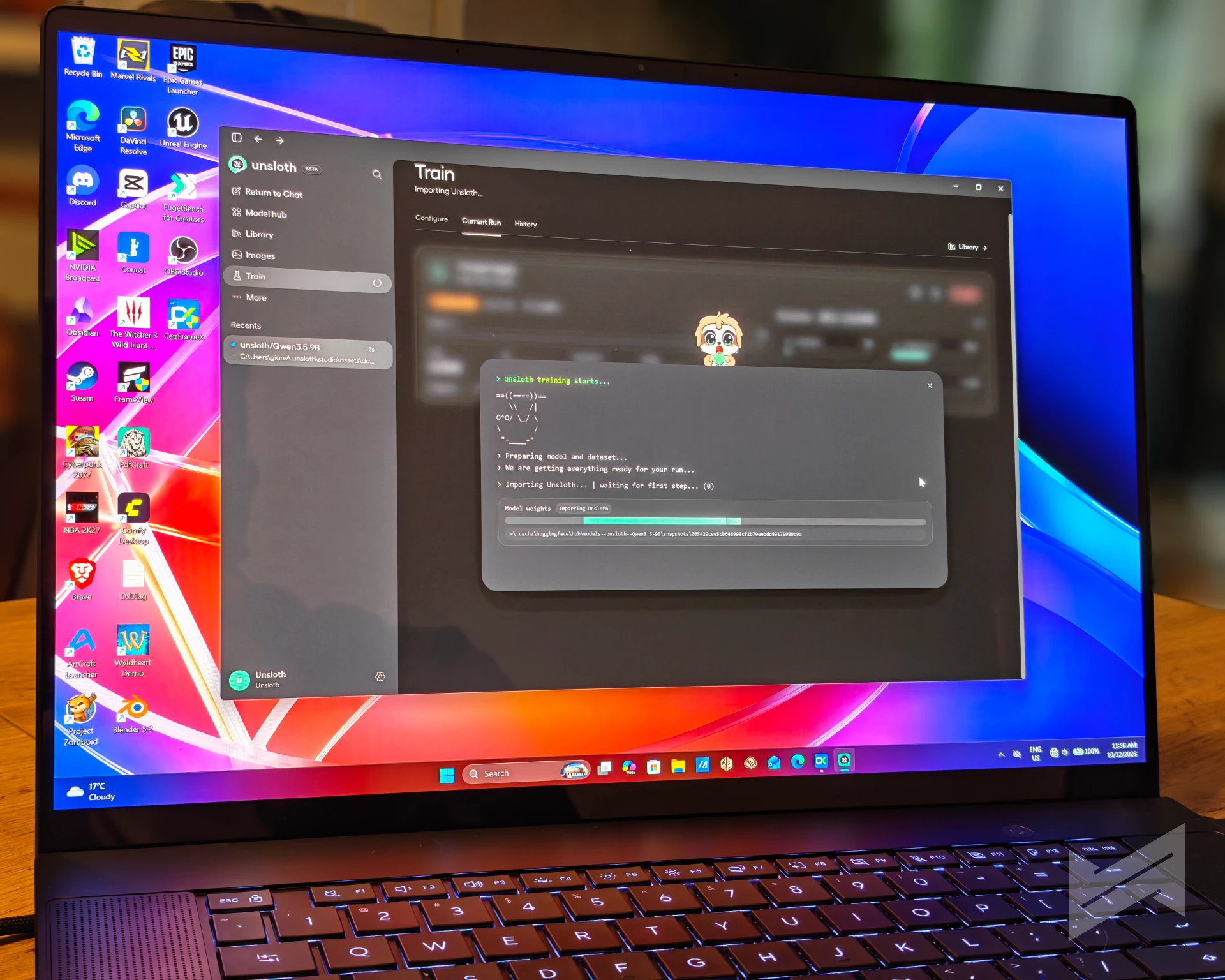
This is the section that justifies the RTX Spark platform, so it is the one we tested hardest. The tools below measure four different things: how long an agent takes to finish a job, how fast a model decodes text once it starts, how quickly a model takes its first token, and how many images a diffusion model can produce per minute.
AgentPerf Local, from Artificial Analysis, is an agentic workload rather than a chat benchmark. It measures the normalized end-to-end time for a multi-step task, which is the number that decides whether an agent tool is usable, and the decode speed it sustains while doing it. Lower is better for completion time, higher is better for decode.
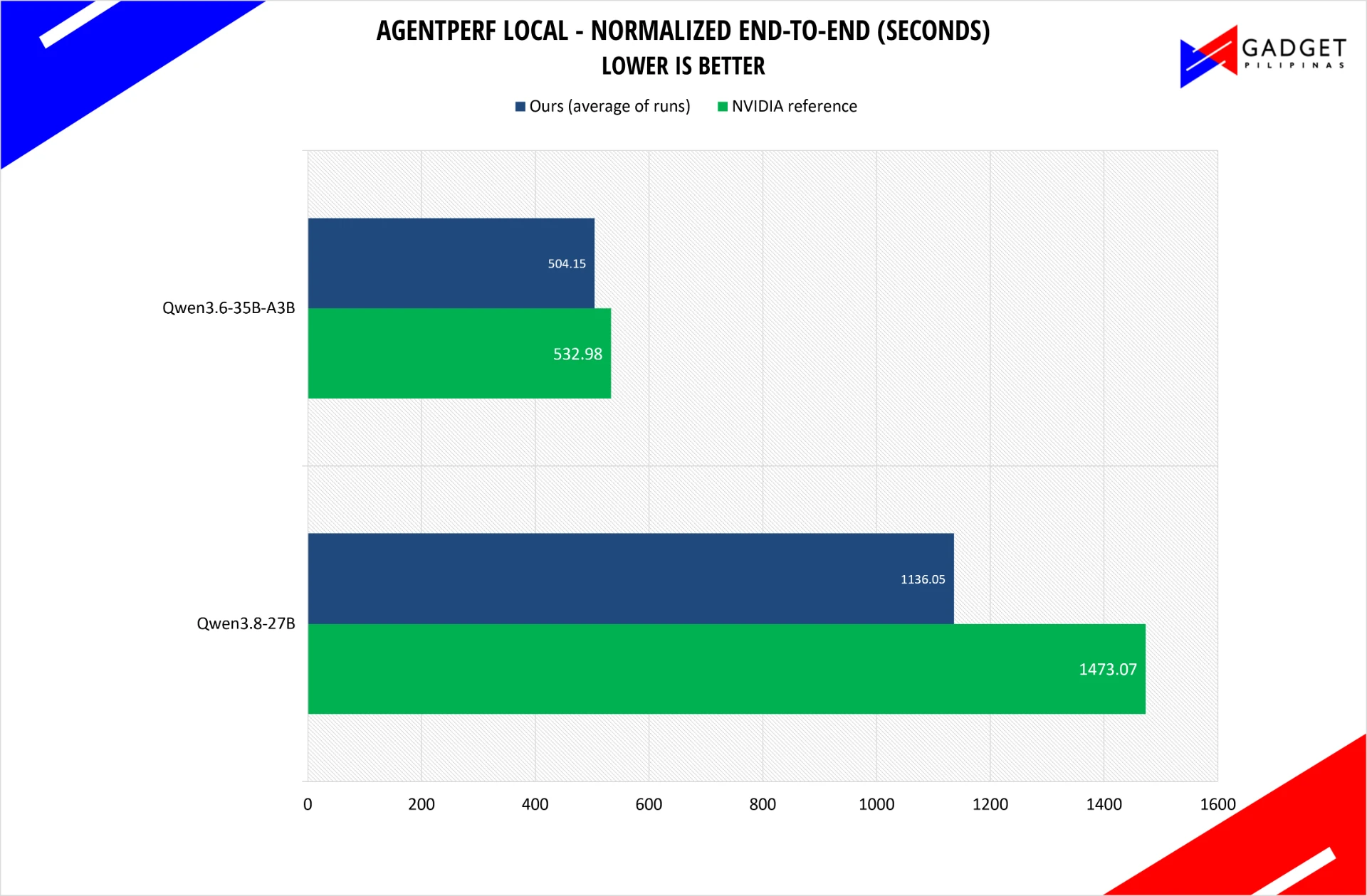
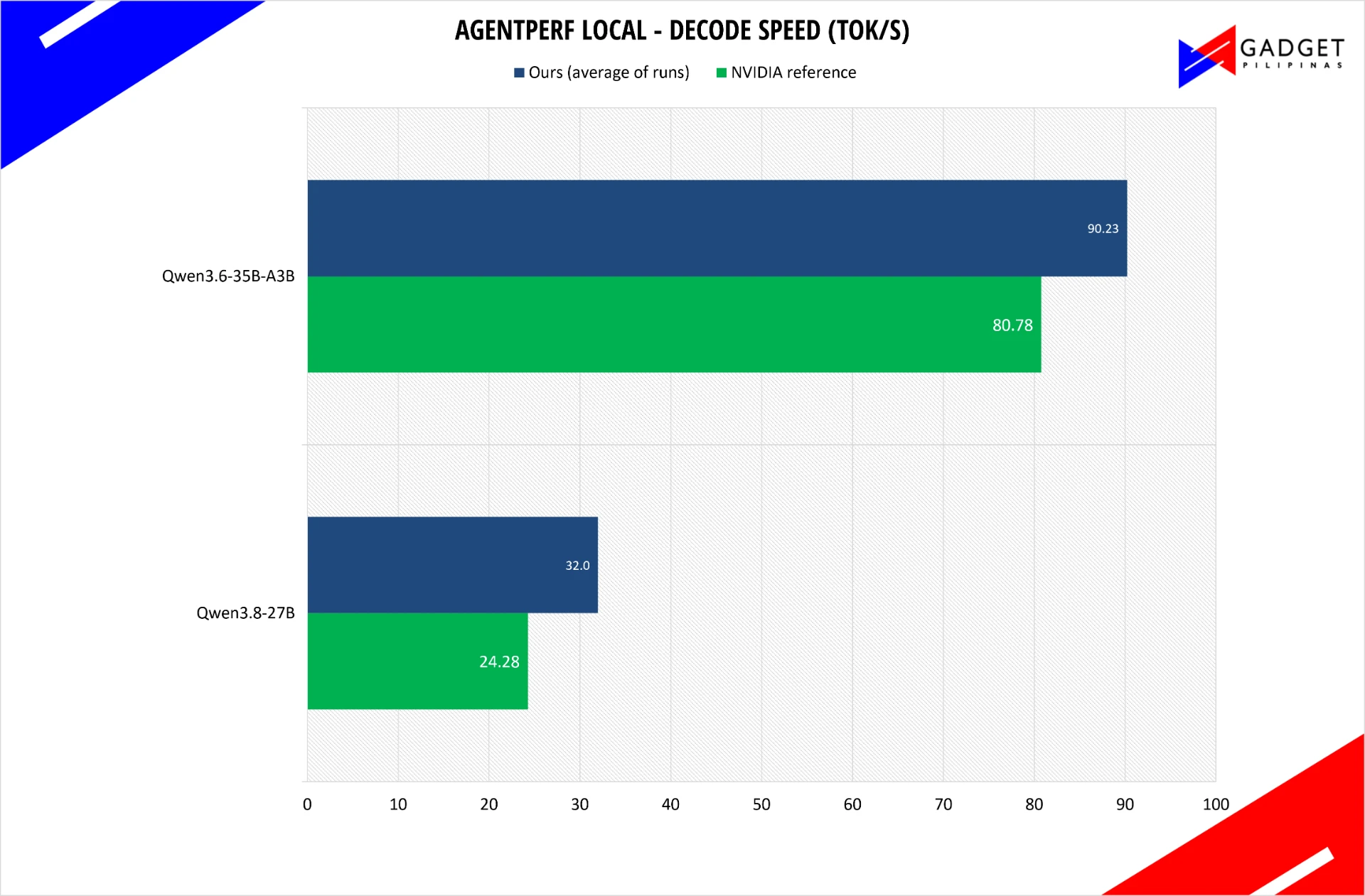
On the 35B-A3B model, which is the interesting one because it activates only a fraction of its parameters per token, our unit finished in 504.15 seconds against NVIDIA’s reference of 532.98 seconds, and it decoded at 90.23 tokens per second against a reference of 80.78. On the larger 27B model the gap in our favor is wider: 1,136 seconds against a reference of 1,473, with decode at 32 tokens per second against 24.28.
SpeedBench measures single-stream decode speed, which is what you feel when you are waiting for a model to answer. It runs one prompt at a time and reports how many tokens per second come back.
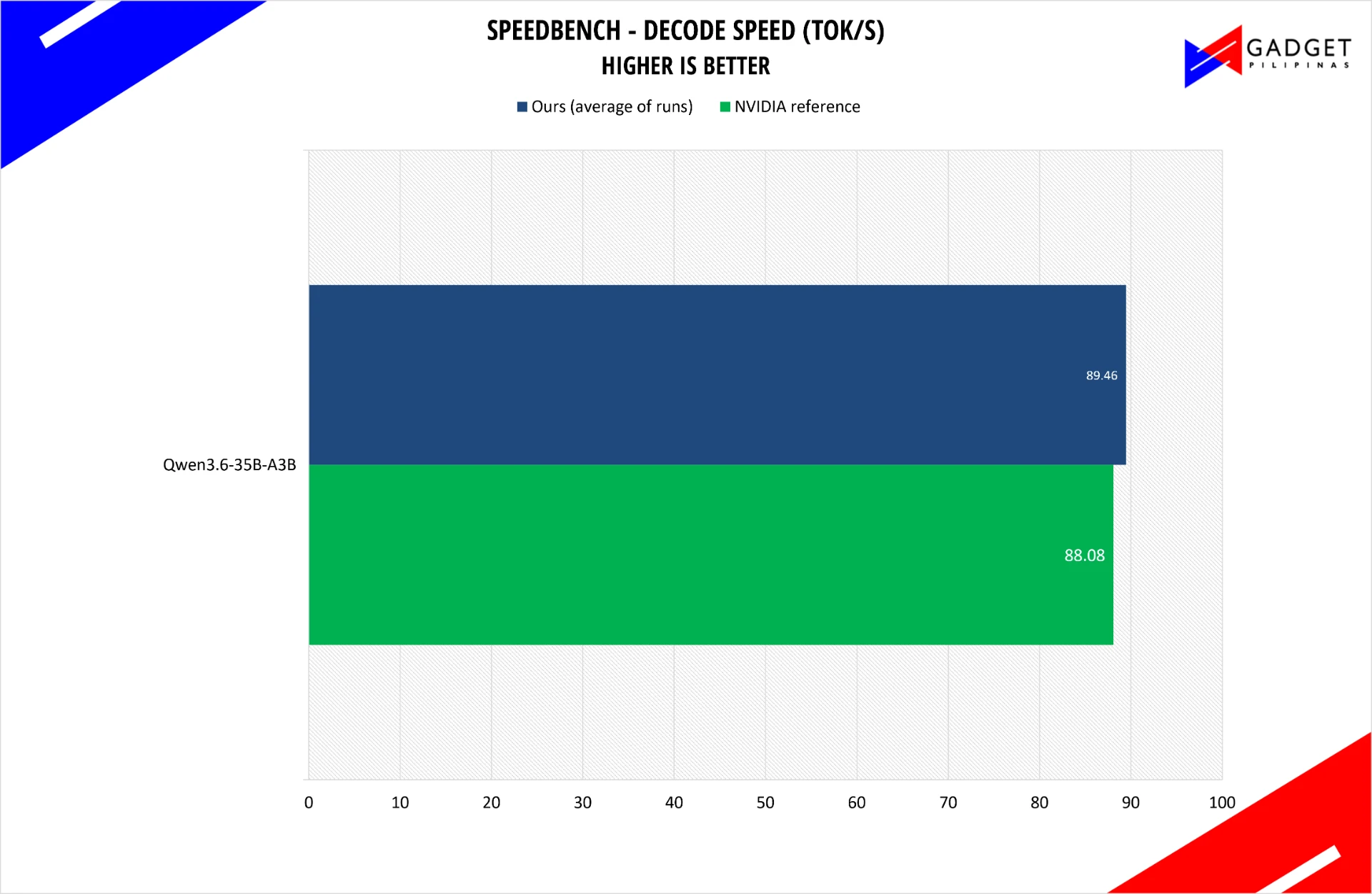
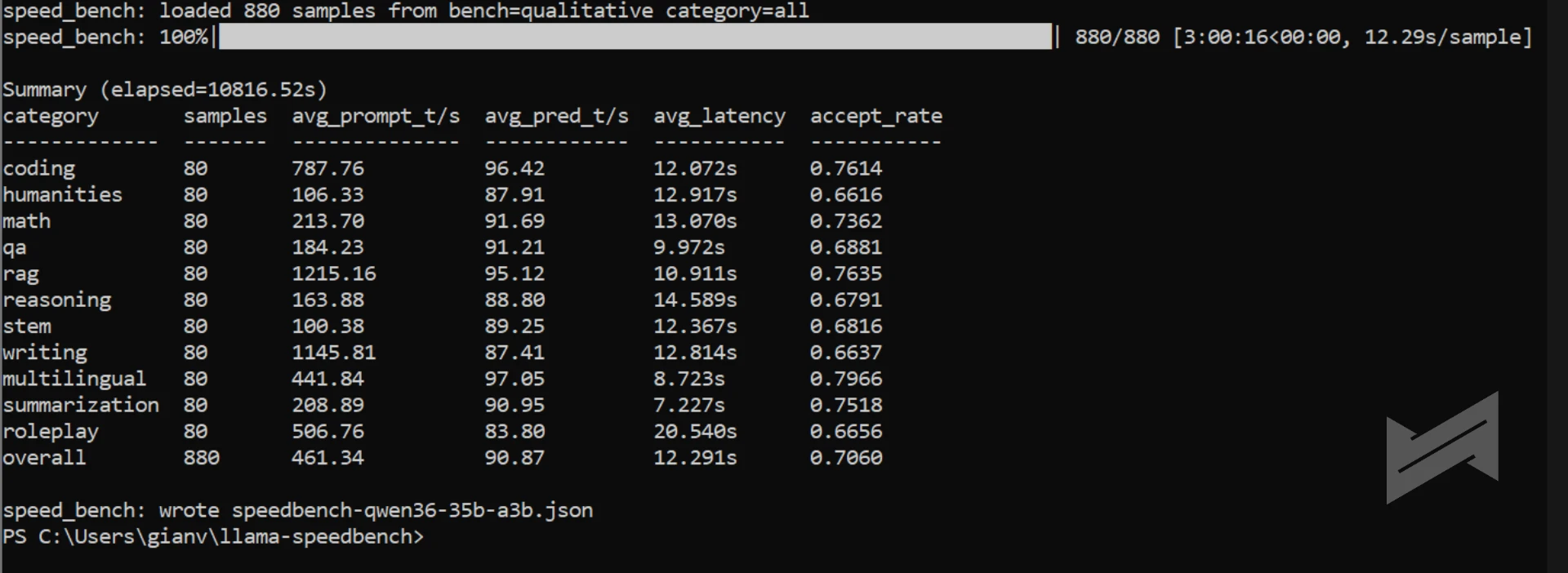
Here we are at parity: 89.46 tokens per second on the 35B-A3B model against a reference of 88.08. The 27B model was skipped on SpeedBench, so we report the 35B result only. We tried our best to run SpeedBench with a 27B model, but it just kept on failing. At the interest of time, we decided to skip it.
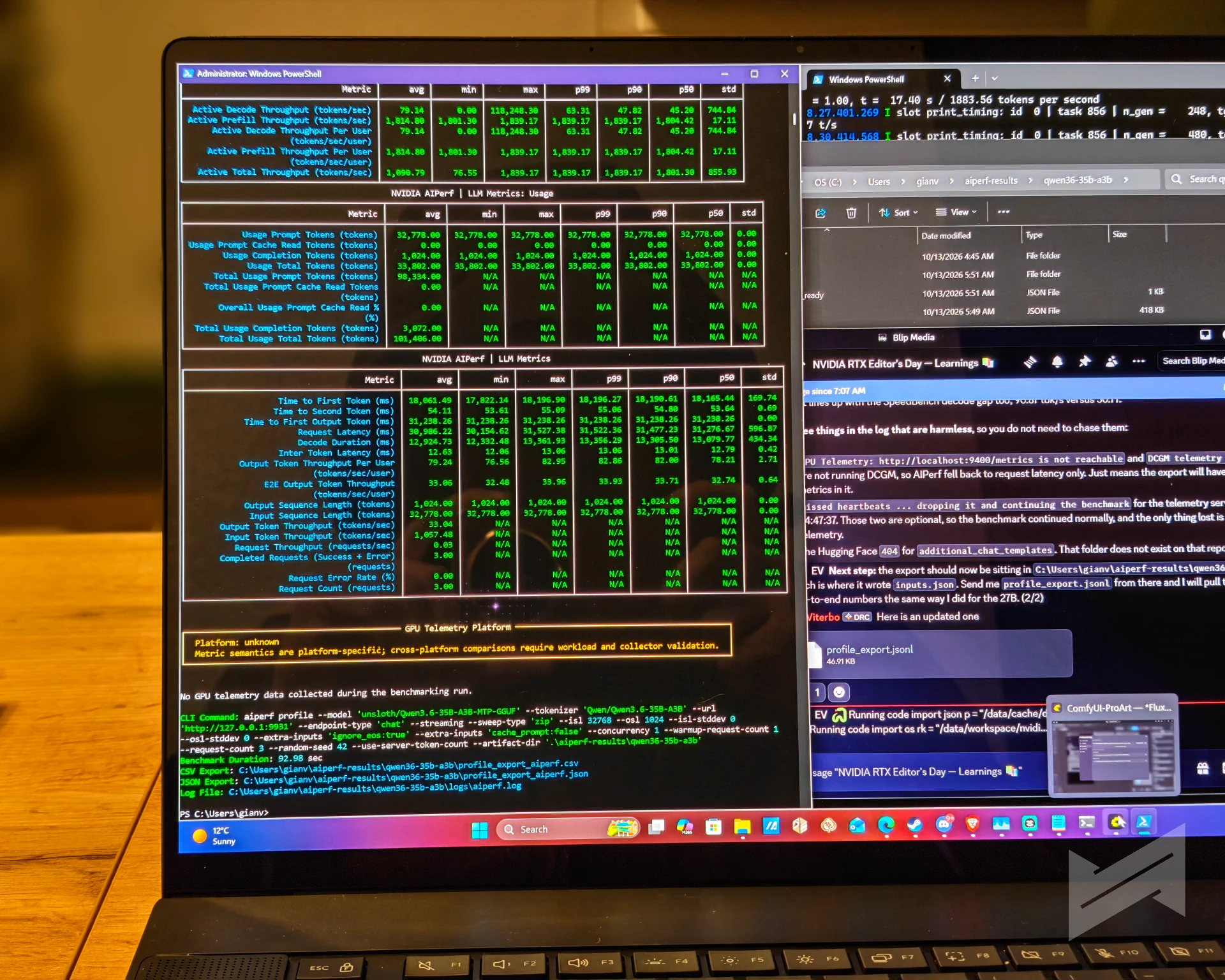
AIPerf measures time to first token and total end-to-end generation at fixed input and output lengths, which is the pair of numbers that describes interactive use of a large context. We tested 16K and 32K input with 1K output.
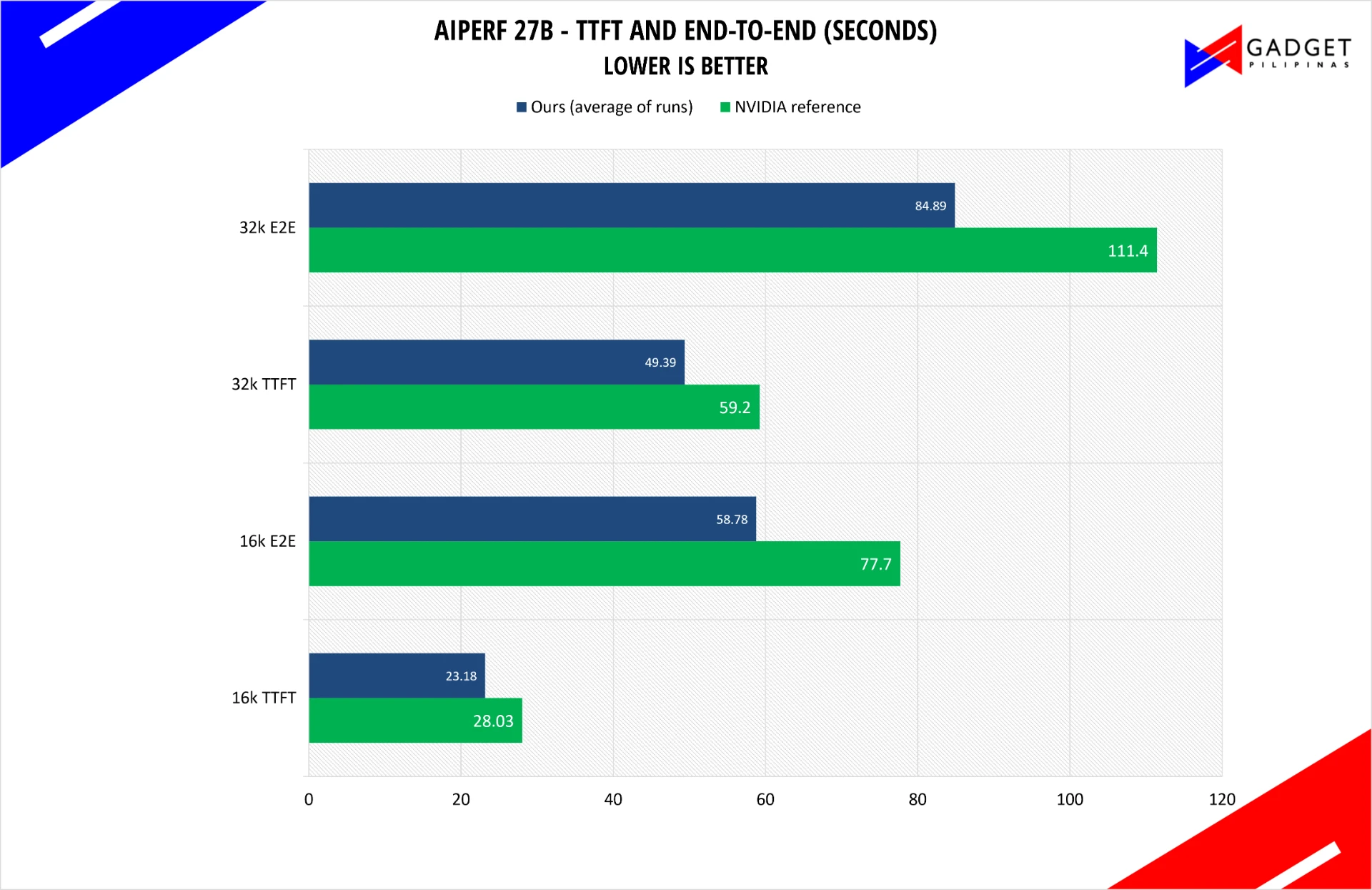
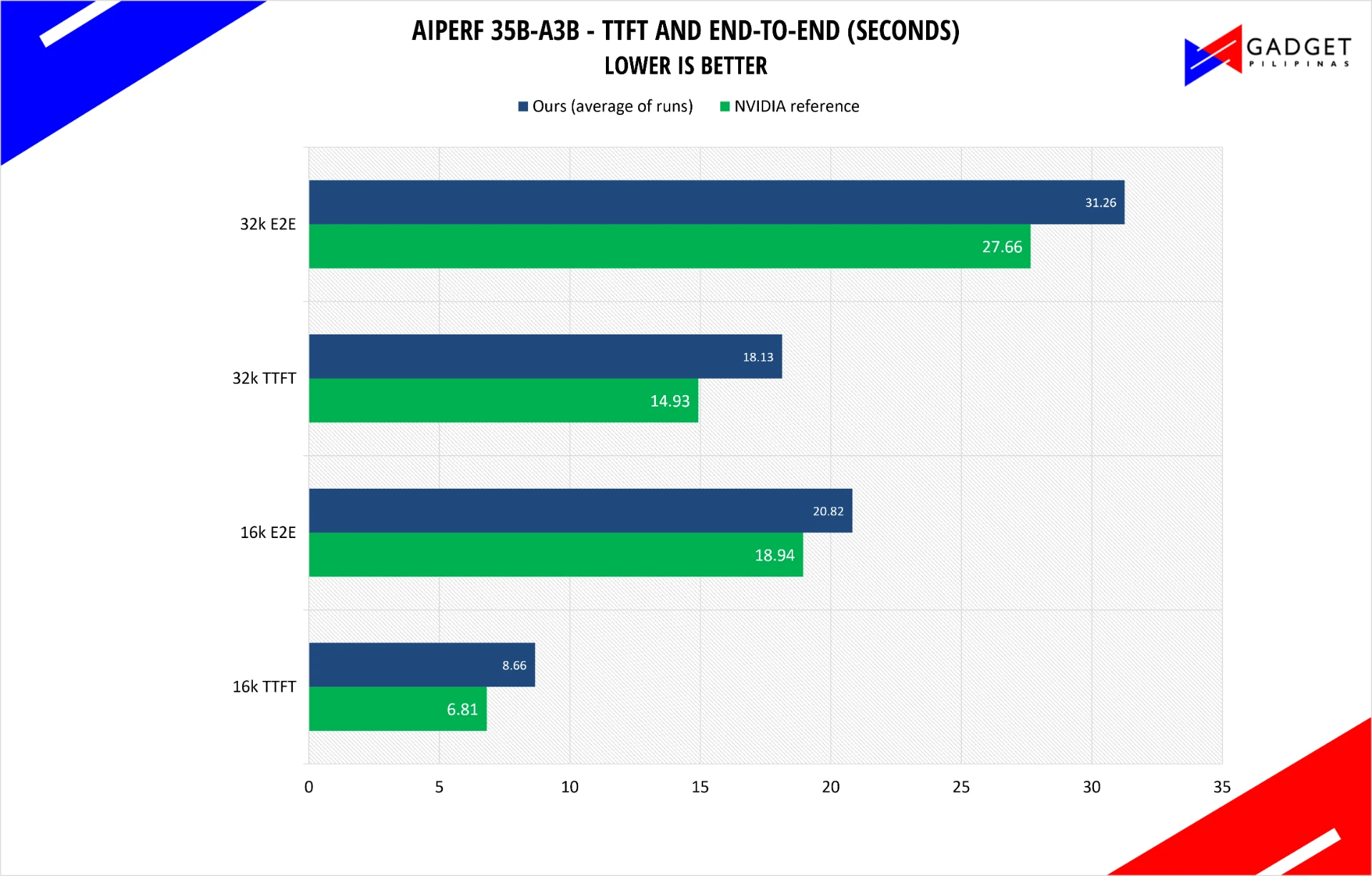
The 27B model beat the reference at both context lengths and by a comfortable margin, 23.18 seconds to first token against 28.03 at 16K, and 49.39 against 59.20 at 32K, with end-to-end times 24% better at both sizes.
The 35B-A3B model went the other way. It took 8.66 seconds to first token against a reference of 6.81, and 20.82 seconds end to end against 18.94. The gap sits almost entirely in prompt processing rather than in decode, which points to a configuration difference in how the model server was launched rather than a hardware deficit, and we are re-running it with that in mind. We would rather report the slower number and explain it than quietly drop the test.
Two exceptions are worth recording. The 64K input tier did not complete on either model. That failure is a server context limit, not a platform limit: the run needs more context than the server was launched with, and it rejects the request instantly rather than running out of memory. And MLPerf Client 2.0.1 publishes no reference figures for its results, so there is no reference side to compare against and nothing to chart. We recorded the numbers anyway, because they are useful as a baseline.
MLPerf image generation ran Flux 2 Klein 4B at 1024 x 1024 in four inference steps and produced 37.71 images per minute, or 2.51 steps per second, with an average end-to-end time of 1.591 seconds including a first step of 0.060 seconds. The setup load and warmup before the run begins costs 175.166 seconds and 37.342 seconds respectively, which is a one-off and not a per-image cost. The legacy MLPerf LLM suite, which NVIDIA itself describes as outdated because its prompts cap at 4K, returned 53.5 tokens per second overall at 0.27 seconds to first token. NVIDIA’s top recommendation for this suite is the Agentic test, and we have not run it yet.
ASUS ProArt P16 64GB RTX Spark – Creator benchmarks
Blender Cycles renders three standard scenes and reports samples per minute, so higher is better. Our comparison reference here is the ASUS ZenBook Duo 2026, which we measured with the same method on an Intel Core Ultra Series 3 machine.
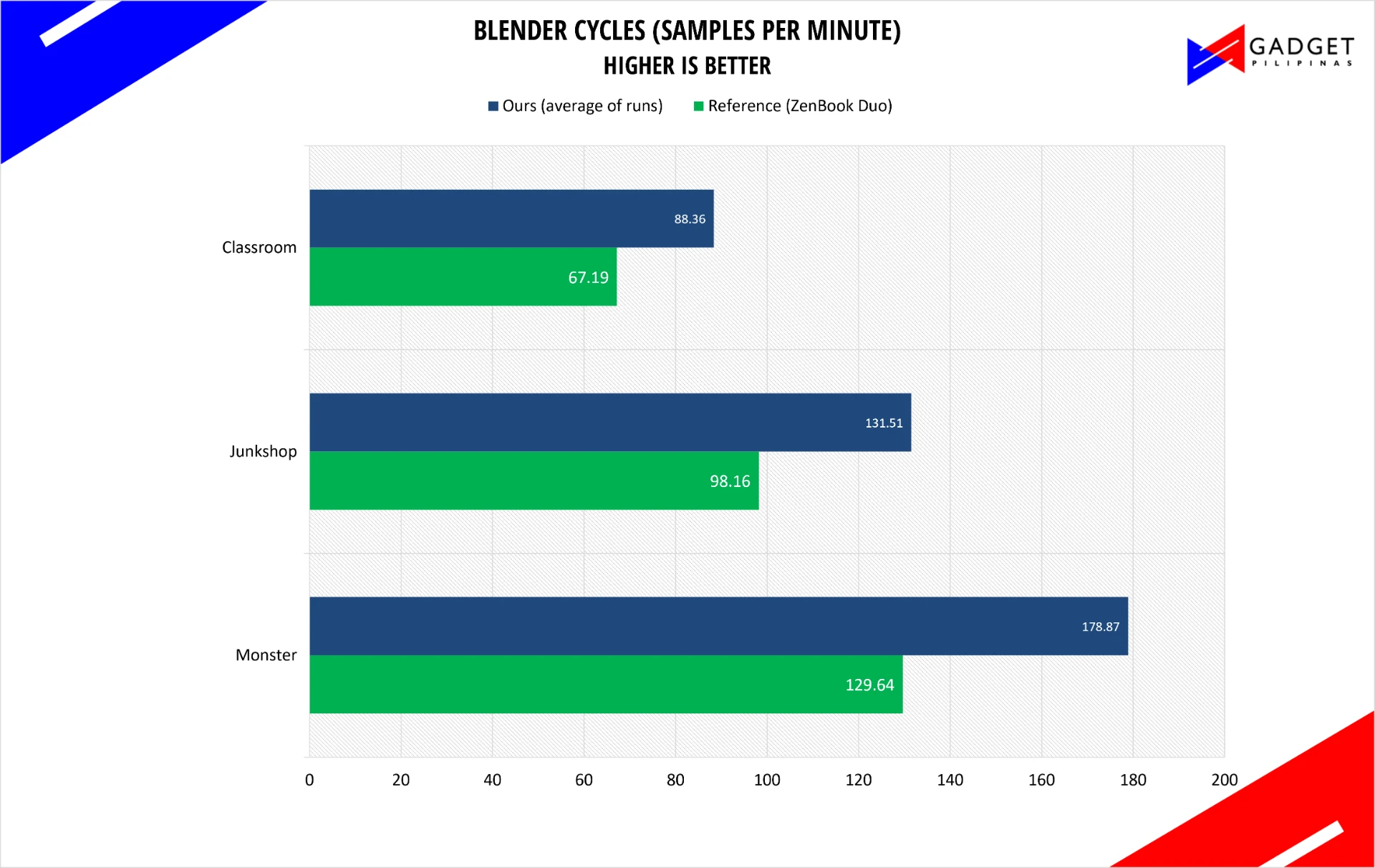
The ProArt P16 is between 31% and 38% faster than the ZenBook Duo depending on the scene: 178.87 against 129.64 samples per minute on Monster, 131.51 against 98.16 on Junkshop, and 88.36 against 67.19 on Classroom. The gap grows with scene complexity, which is what you would expect when the difference is GPU-side.
V-Ray 6 is a renderer that reports vpaths, or samples per second. Our reference here is the Surface Ultra. Take note though that the reference runs on a 128GB unified memory.
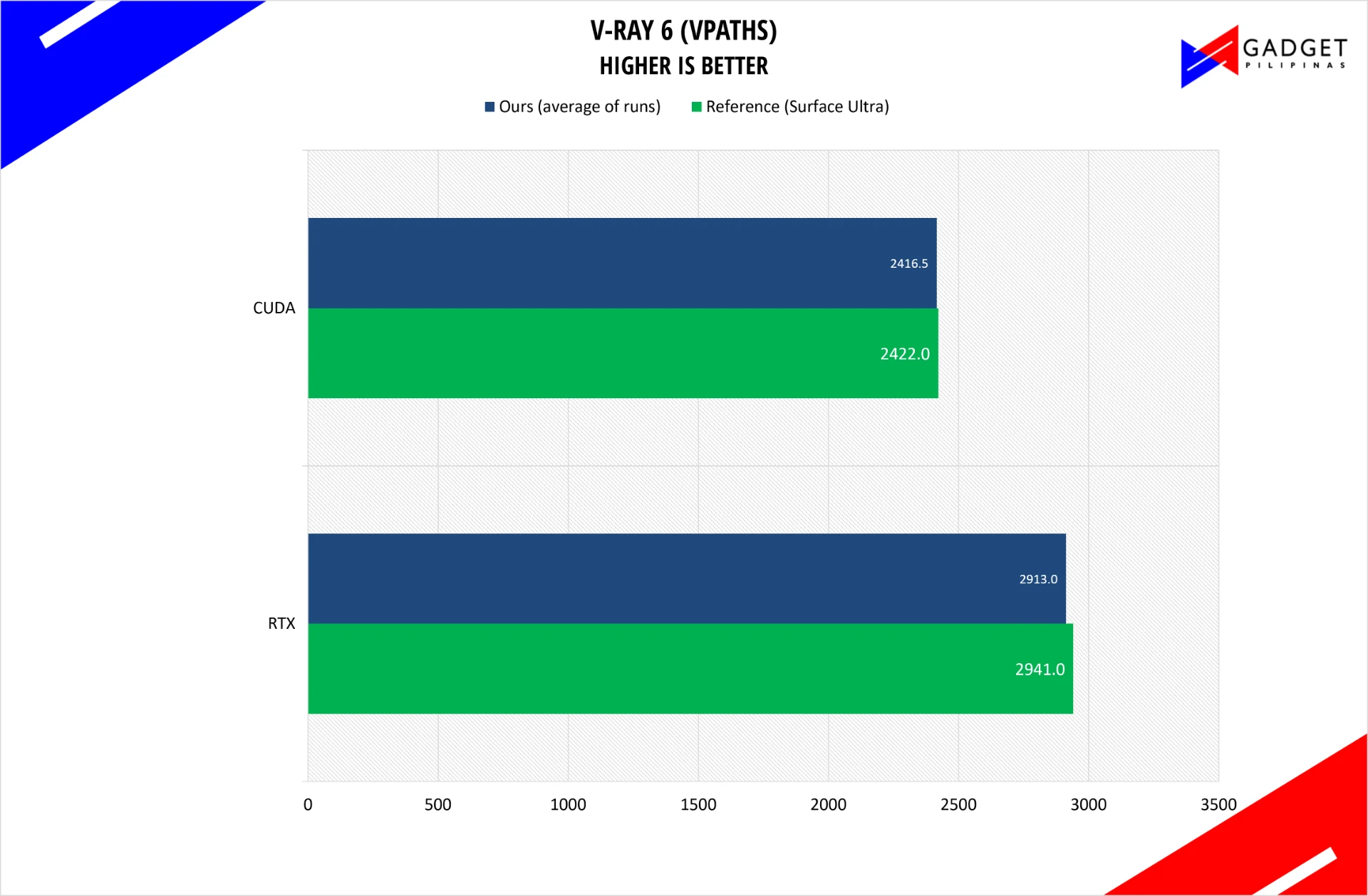
Despite the unified memory parity, we consider this is a draw. We measured 2,913 vpaths in RTX mode against a reference of 2,941, and 2,417 in CUDA mode against 2,422. V-Ray is one of the few places where we could not find daylight between our unit and the comparison machine, and CUDA-mode rendering is exactly where an established discrete GPU architecture would be expected to keep its footing.
PugetBench for Creators runs a scripted DaVinci Resolve timeline and scores how the machine handles it, with an extended pass that stresses GPU effects and AI effects separately. Higher is better. We have split it across two charts because the overall scores and the sub-test scores are three orders of magnitude apart, and putting them on one axis flattens the interesting half.
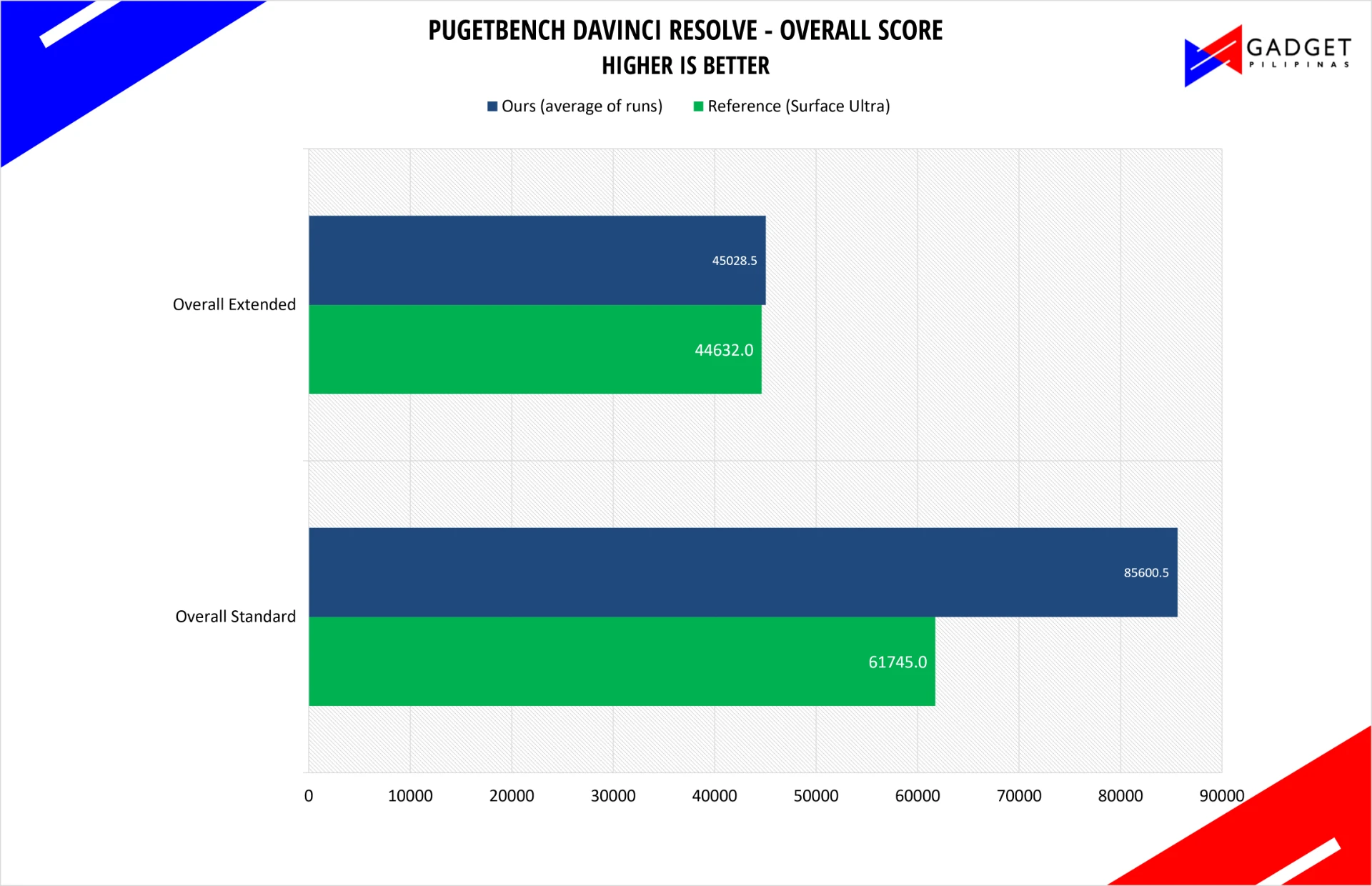
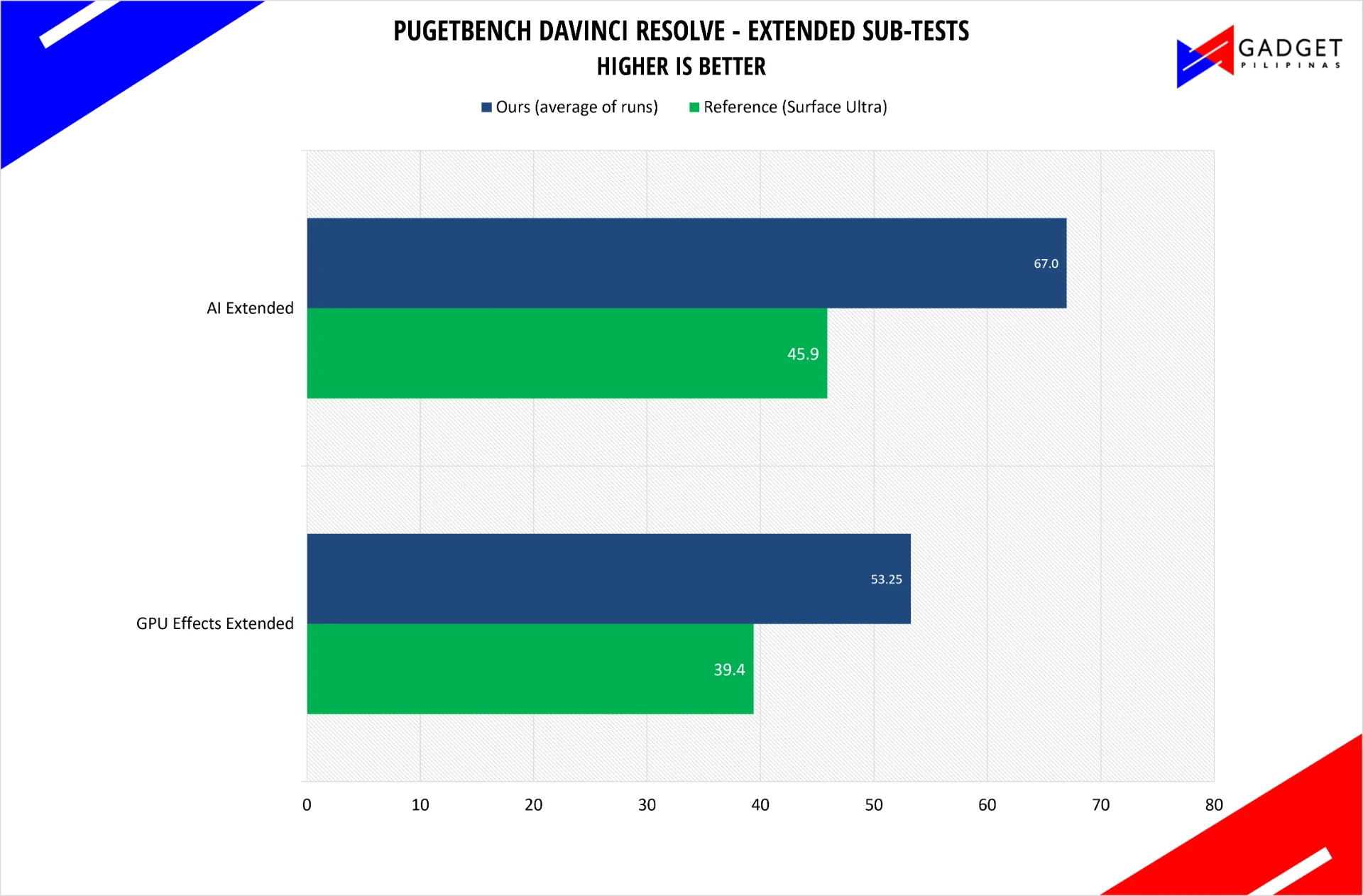
This is the strongest creator result in the review. The overall Standard score came in at 85,600 against a reference of 61,745, a gain of 39%, and the extended sub-tests show where it comes from: 53.25 against 39.4 on GPU Effects Extended, and 67 against 45.9 on AI Extended, which is 46% ahead. The pass that barely moves is Overall Extended, at 45,029 against 44,632, so the advantage is specifically in the effects and AI-driven parts of a grading session, which is exactly where a Blackwell GPU with neural accelerators should win.
Comfy Desktop generates images from a prompt and reports seconds per generation, so lower is better. Read the device label carefully here: NVIDIA’s figures for this test come from the 128 GB ProArt configuration, which has twice our memory.
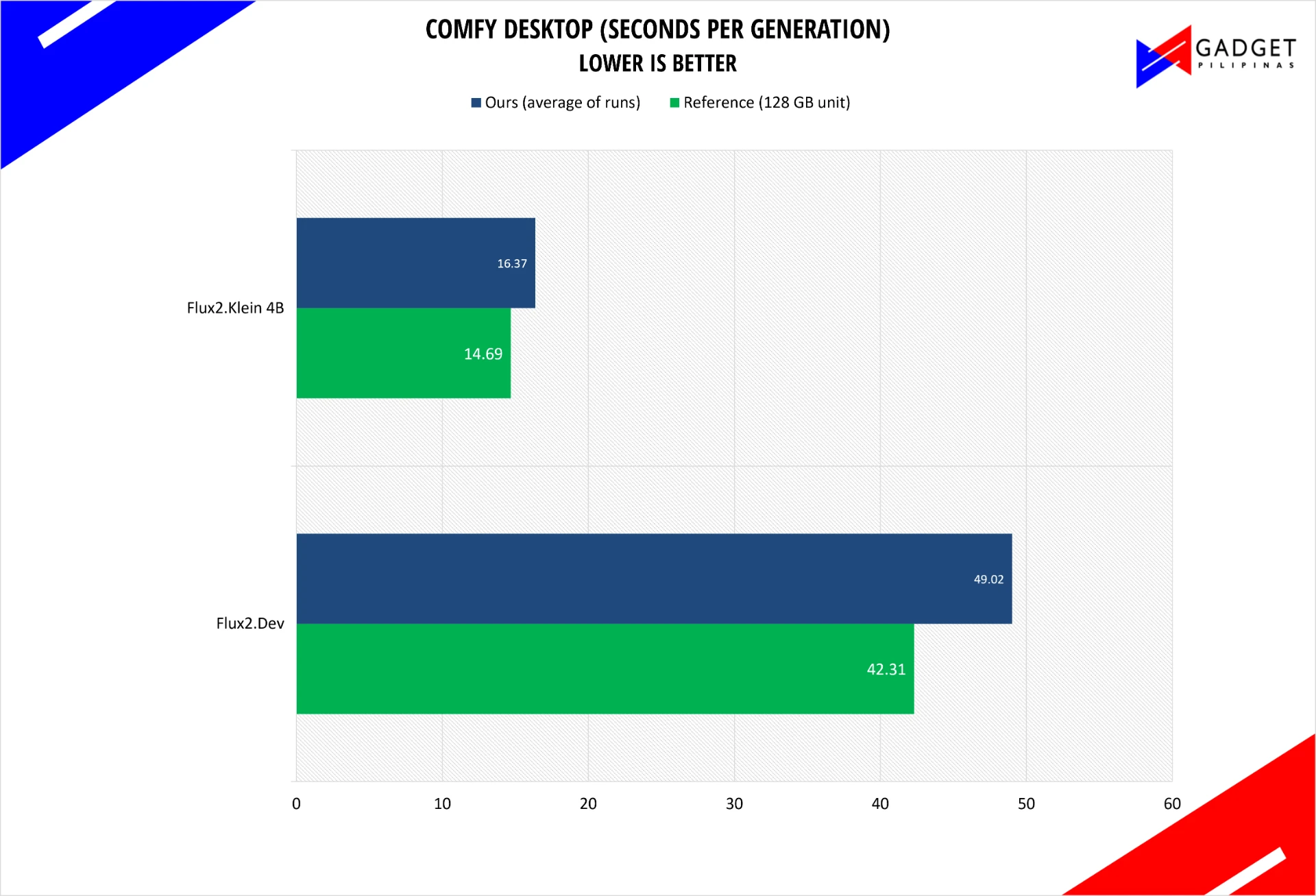
With half the memory of the reference machine, our unit generated Flux2.Dev images in 49.02 seconds against 42.31, and Flux2.Klein 4B images in 16.37 seconds against 14.69. Being within 11% to 16% of a machine with twice the unified memory is a good result, and it is the clearest illustration of why unified memory matters: the smaller configuration still runs the workload, it just runs it a little slower. The LTX 2.5 video model was not applicable to our unit in this round.
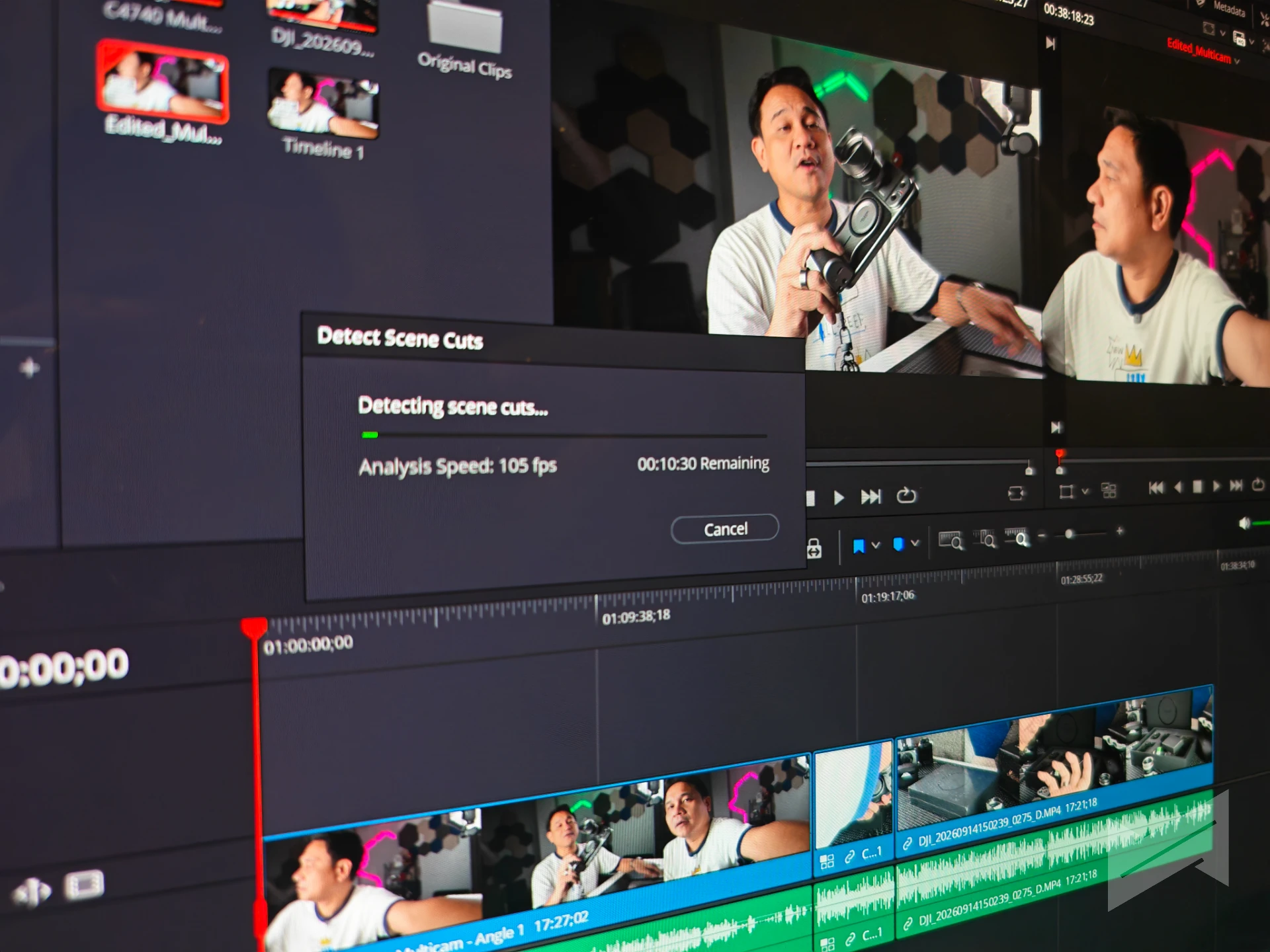
Two observations from real editing work belong here. The AI features in DaVinci Resolve Studio, specifically the Audio Assistant and Live Trim, ran quickly enough to use without breaking your concentration, which is the correct test for an AI feature inside a creative app. Playback consistency was less reliable: we saw stutter in timeline playback at quarter resolution, which is a problem we would want to see fixed before recommending this machine to an editor who lives in Resolve.
3DMark Benchmark Suite
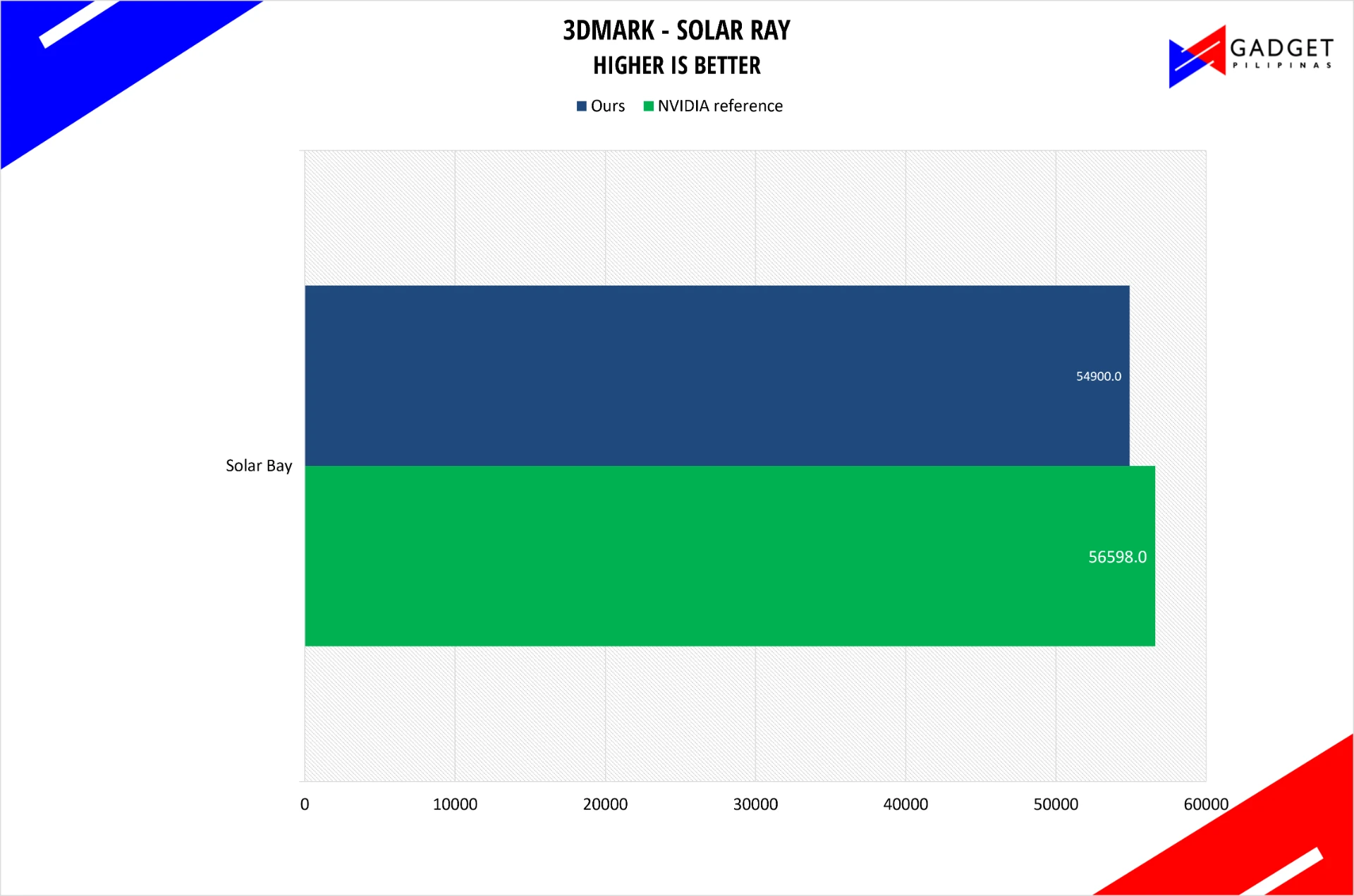
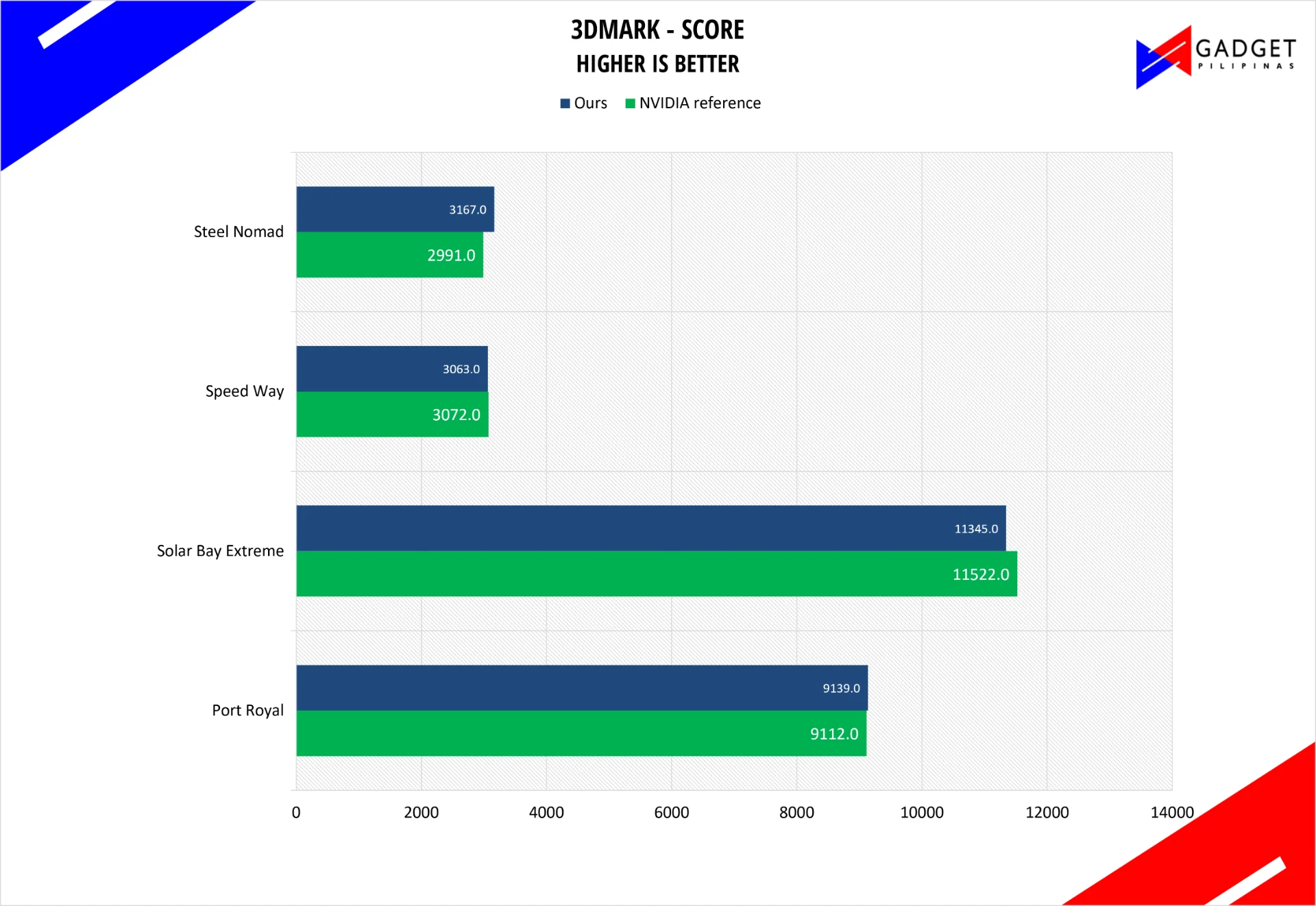
Our unit matched or beat the reference in three of the five tests: 9,139 against 9,112 on Port Royal, 3,063 against 3,072 on Speed Way, and 3,167 against 2,991 on Steel Nomad, which is 6% ahead. It trailed slightly on the two Solar Bay tests, at 54,900 against 56,598 and 11,345 against 11,522. The pattern is narrow but consistent: this is a GPU that renders modern, heavier workloads as well as the reference configuration and slightly less well in the lighter, higher-frame-rate tests, where small differences in sustained clocks matter more.
ASUS ProArt P16 H7607BA 64 GB Battery life
Battery life is the result we are least able to close out at this stage. A 99.9 Wh pack in a 1.77 kg chassis is generous, and our early experience is genuinely positive: battery life has held up well enough in daily use that it stands comparison with the MacBook Pro 14 M5 we use as a reference point for all-day machines. We are not ready to publish a number, and we would rather say that than guess.
For context, our comparison reference for this class of machine is the ZenBook Duo 2026 measured with the same method, which returned 21 hours 13 minutes in its quiet profile on a single 60 Hz screen and 17 hours 30 minutes in Performance. Those are dual-screen-capable figures from a different machine, so treat them as a yardstick, not a target.
Procyon Battery, Standard fan profile
| Scenario | Procyon Battery result | Notes |
|---|---|---|
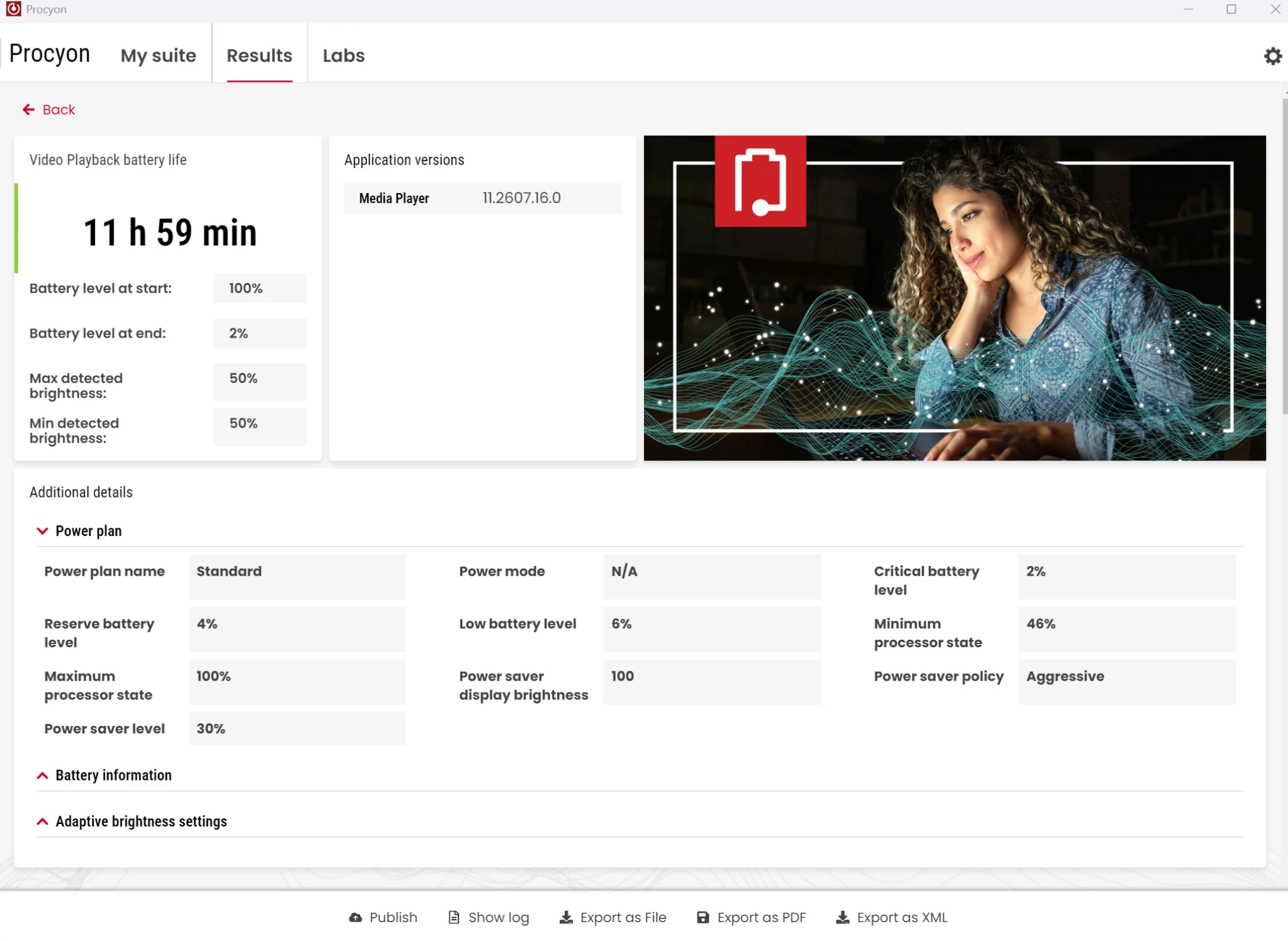
| Video loop playback | 11h 59 min | Standard fan profile, continuous video loop |
| Idle | (pending) | Standard fan profile, screen on, no user activity |
ASUS ProArt P16 H7607BA 64 GB Temperatures
Our thermal numbers come from HWiNFO64 logging during real workloads, with the reading taken from the CPU thermal zone. Two figures define the machine: it idles at 43.6 degrees Celsius, and under a sustained CPU load in Performance mode it averages 76.2 degrees Celsius with a peak of 89.1 degrees. In the quiet profile the same sensor stays far calmer, idling at 47.5 degrees with a peak of 65.1 degrees across the window we captured.
The more useful comparison is matched load. When we line the profiles up at the same CPU utilization, the differences are large and consistent: at 20 to 25 percent utilization the Silent profile holds around 1,674 MHz at 49.1 degrees, Standard runs at 2,053 MHz and 69.0 degrees, and Performance runs at 2,946 MHz and 74.3 degrees. Silent buys you roughly 20 degrees of headroom and pays for it with about 45% of the clock speed. Those are honest, usable settings rather than a token quiet mode.
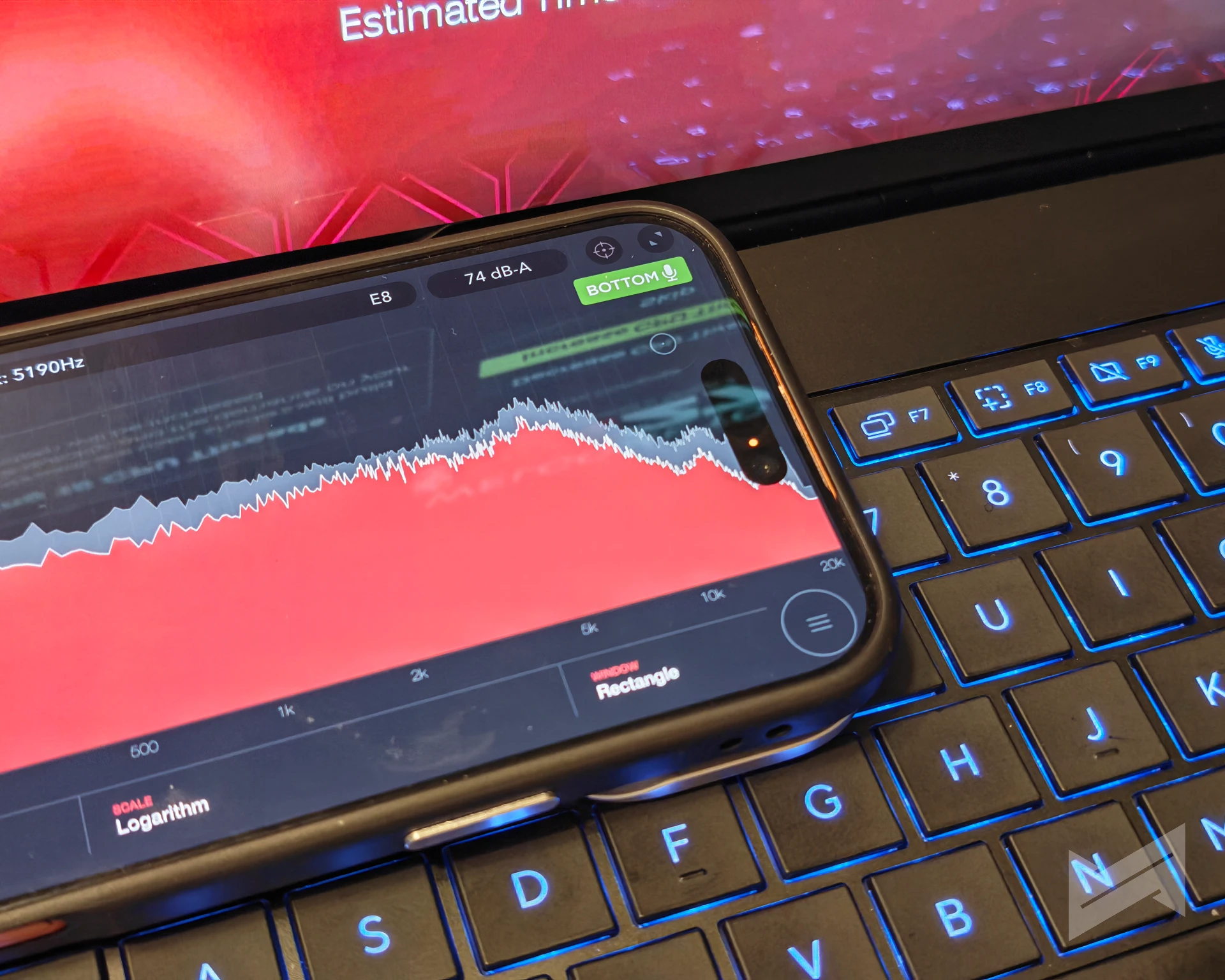
Acoustics are the trade-off. At full load we registered 74 dB-A of fan noise, which is loud, and it is the price of holding clocks this high in a 1.77 kg chassis. The pitch is a broad whoosh rather than a whine, and in Standard and Silent profiles the machine is entirely comfortable to sit next to. One caveat on method: HWiNFO cannot read the CPU or GPU die temperatures on this platform, because both thermal zones report through ACPI rather than through exposed sensors. The figures above are what the platform makes available, and deeper thermal detail has to come from ProArt Creator Hub.
Battery impact on performance
This is the test that matters most for a laptop, and the answer is unusual. We pinned Performance mode on both sides, so the only variable is whether the 140 W adapter was connected, and we ran Blender Cycles, PugetBench for Creators, and the LLM inference test in both states.
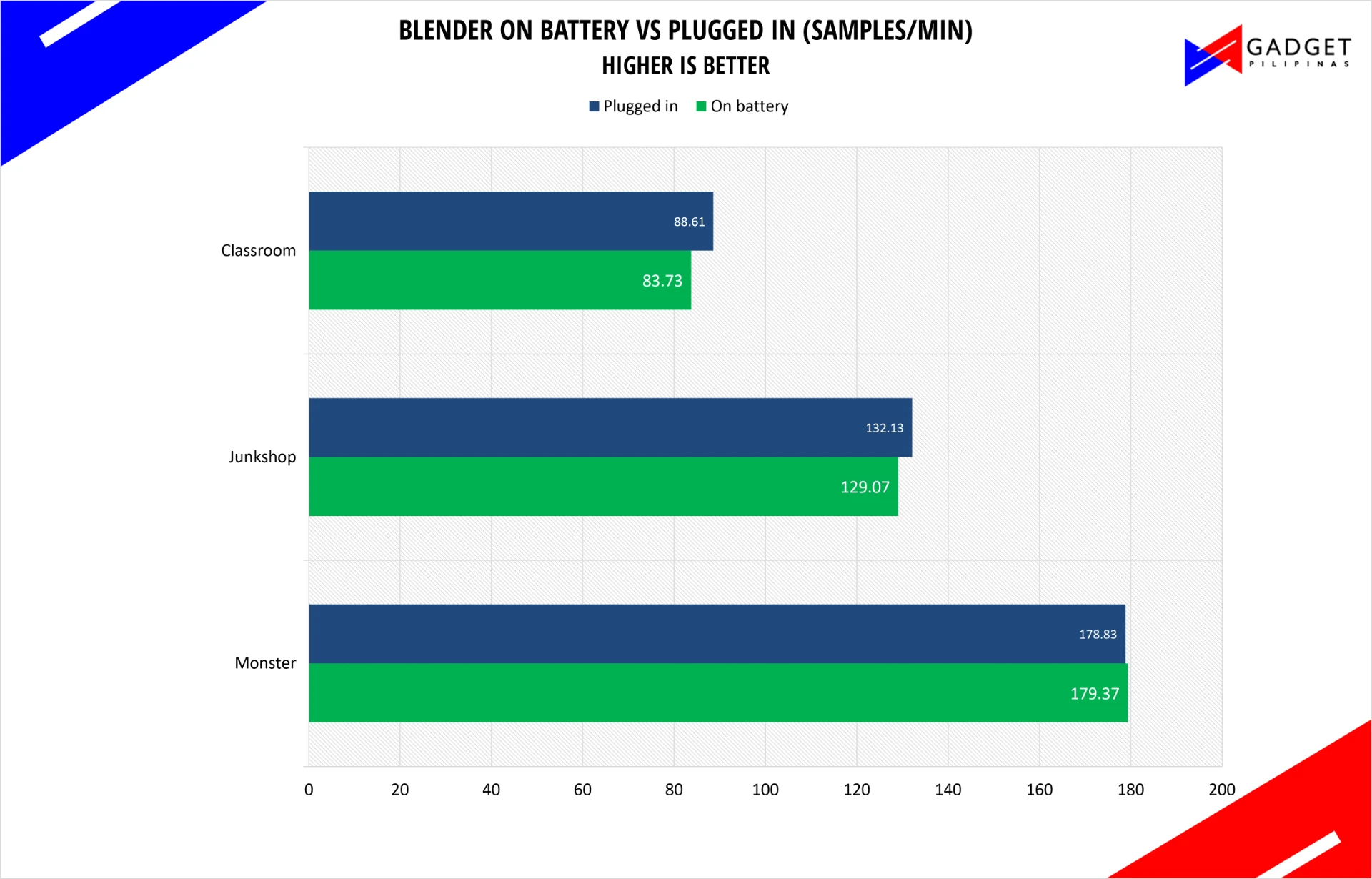
Blender held almost perfectly. On battery we measured 179.37 samples per minute on Monster against 178.83 plugged in, a difference of 0.3% in favor of battery that sits inside run-to-run noise. Junkshop came in 2.3% slower and Classroom 5.5% slower, which is a real but modest cost.
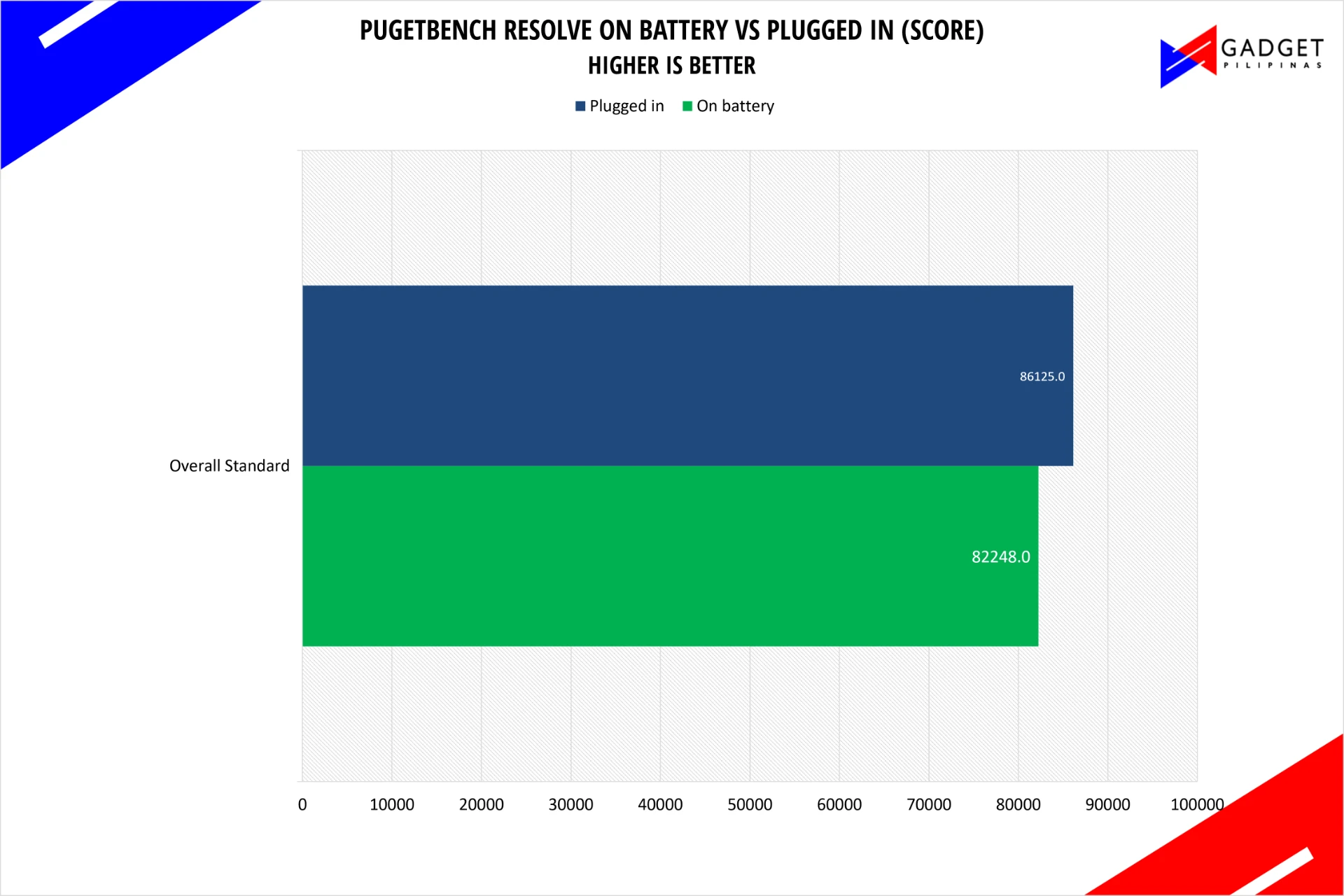
PugetBench cost 4.5% on battery, 82,248 against 86,125. For a creator machine, losing a few percent of a grading session to unplug the laptop is a fair trade, and it is far better than the 30% to 50% collapses we are used to seeing from performance laptops in the same test.
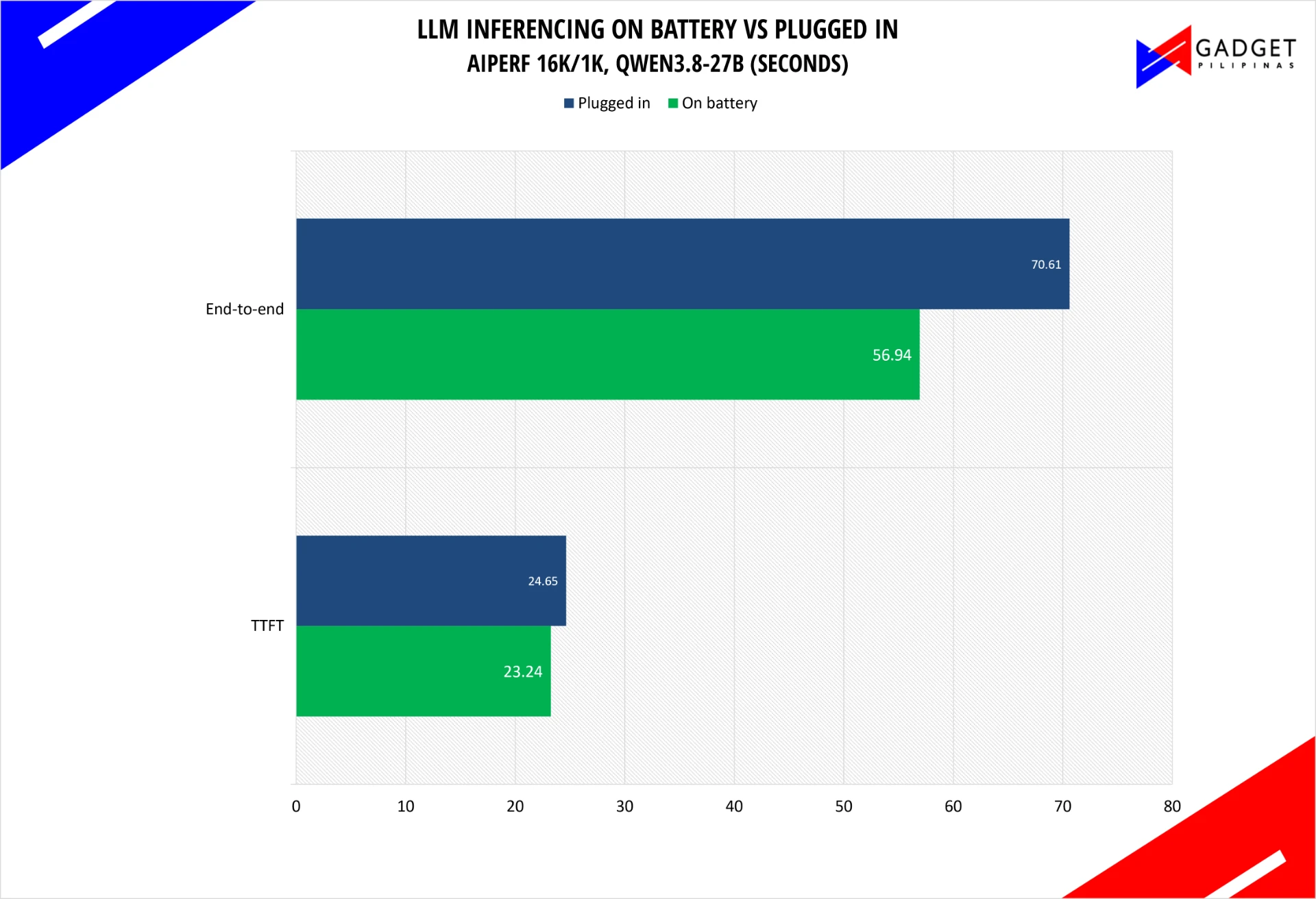
The LLM test is the odd one out, and we are flagging it rather than smoothing it over. Battery came out ahead, at 23.24 seconds to first token and 56.94 seconds end to end, against 24.65 and 70.61 plugged in. The plugged-in run is the same run that contained a 12.8-second inter-chunk stall, which inflates its end-to-end figure, and the battery and plugged labels in our working sheet are still unverified. Treat this comparison as provisional until we re-run it cleanly.
Storage Benchmark
Our review unit carries an M.2 NVMe PCIe 4.0 SSD, and the machine has two M.2 2280 PCIe 5.0 x4 slots in total. We measure storage throughput with CrystalDiskMark, run at both the 1 GB and the 16 GB test size so that the larger pass pushes the drive past its cache and shows what it does once it has to write directly to the flash.
| CrystalDiskMark Storage Benchmark | 1 GB (MB/s) | 16 GB (MB/s) |
|---|---|---|
| SEQ1M Q8T1 (read / write) | 7214.77 / 4019.39 | 1980.70 / 875.52 |
| SEQ1M Q1T1 (read / write) | 2577.23 / 960.10 | 1174.61 / 1238.40 |
| RND4K Q32T1 (read / write) | 379.27 / 325.47 | 360.78 / 329.21 |
| RND4K Q1T1 (read / write) | 49.44 / 68.33 | 32.22 / 67.81 |
ASUS ProArt P16 64GB RTX Spark Gaming Benchmarks
Every game was tested at the settings NVIDIA prescribed. The methodology is loyal to our standard runs: once per fan profile, three times each, with the aggregate of the three runs used as the score. Frame capture came from CapFrameX 1.8.5. We report average frame rate alongside the 1% and 0.2% percentile frame rates, because a game that averages 120 frames per second but drops to 20 in the busy moments does not feel like a 120 frames per second game.
We deliberately kept this first wave narrow. We would rather test three games properly across three profiles than run eight games once and learn nothing about how the machine behaves under sustained load.
NBA 2K27
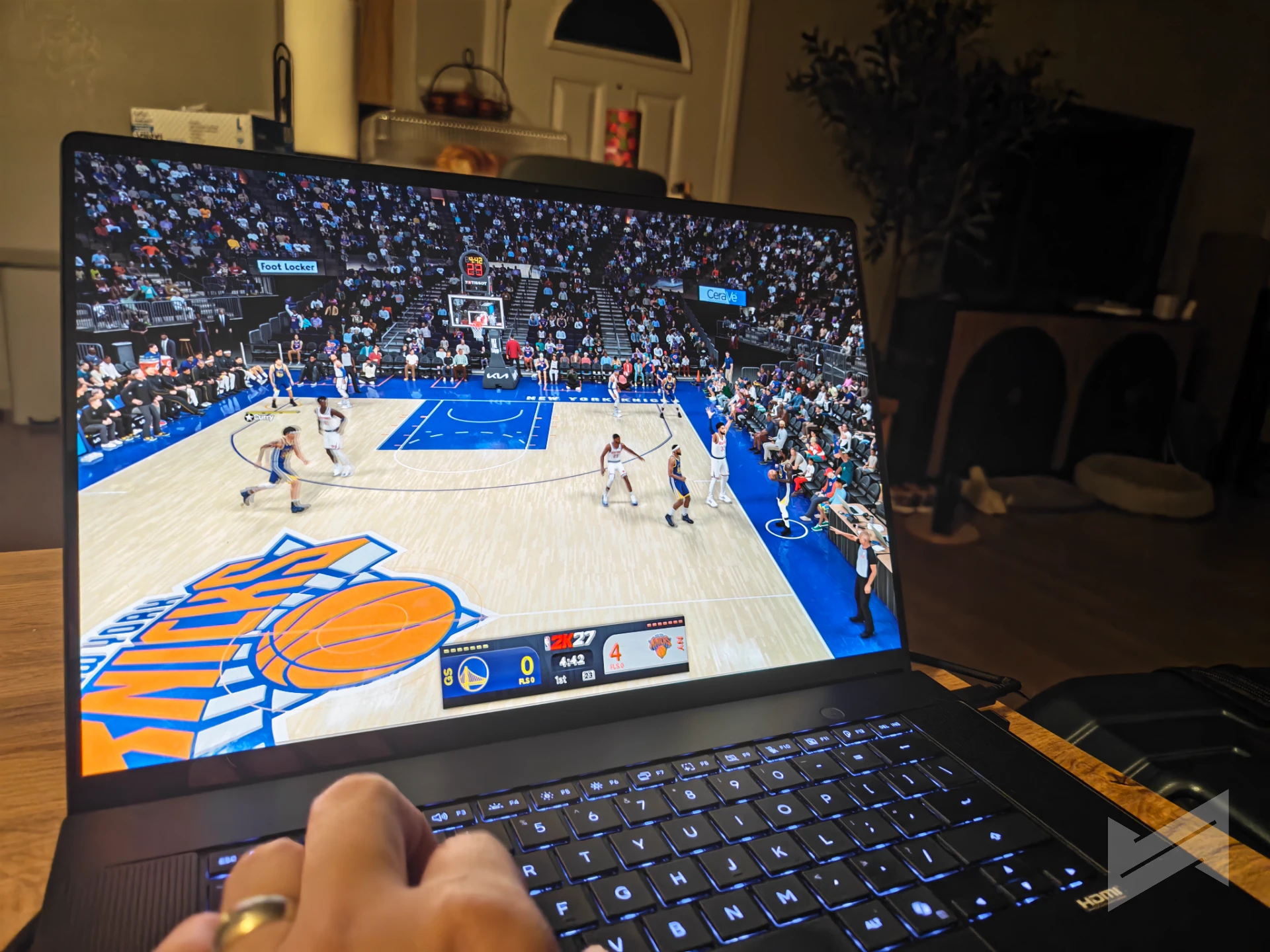
We ran NBA 2K27 at the guide’s prescribed settings with the latest DLSS patch provided by NVIDIA, which is where DLSS 5 does its most visible work in this review. On this platform DLSS 5 pairs super resolution with multi-frame generation, so the GPU renders a minority of the frames on screen. In a title like this one, which is bound as much by CPU-side simulation as by shading, that is what turns a borderline result into a comfortable one.
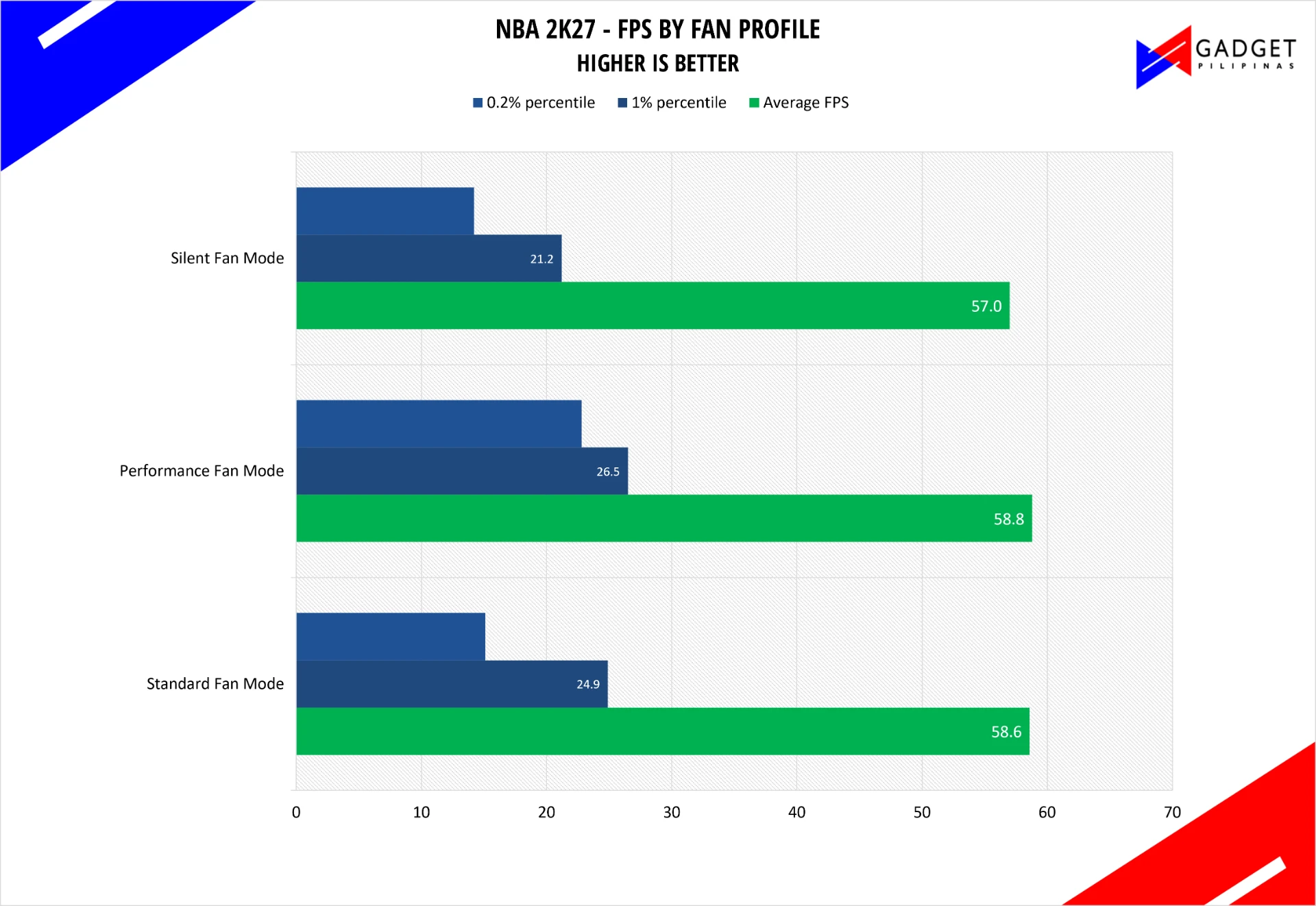
The numbers are consistent across profiles, which is itself the story: 57.0 frames per second in Silent, 58.6 in Standard, and 58.8 in Performance. The Profile barely matters here, which tells us the game is not limited by the power ceiling at these settings. What does improve is frame consistency, where the 0.2% percentile rises from 14.2 frames per second in Silent to 22.8 in Performance, a 60% improvement in the worst moments of a match. NVIDIA publishes no reference figure for this title, so this is our own measurement and we are treating it as a first data point rather than a verdict.
Marvel Rivals
We installed the ARM64 beta build of Marvel Rivals and used the prescribed settings from NVIDIA. The ARM64EC build deserves a mention of its own: it is a reminder that this platform is new enough that some of the software you want is still arriving, and a game that runs natively on ARM64 will behave differently from one running through translation.
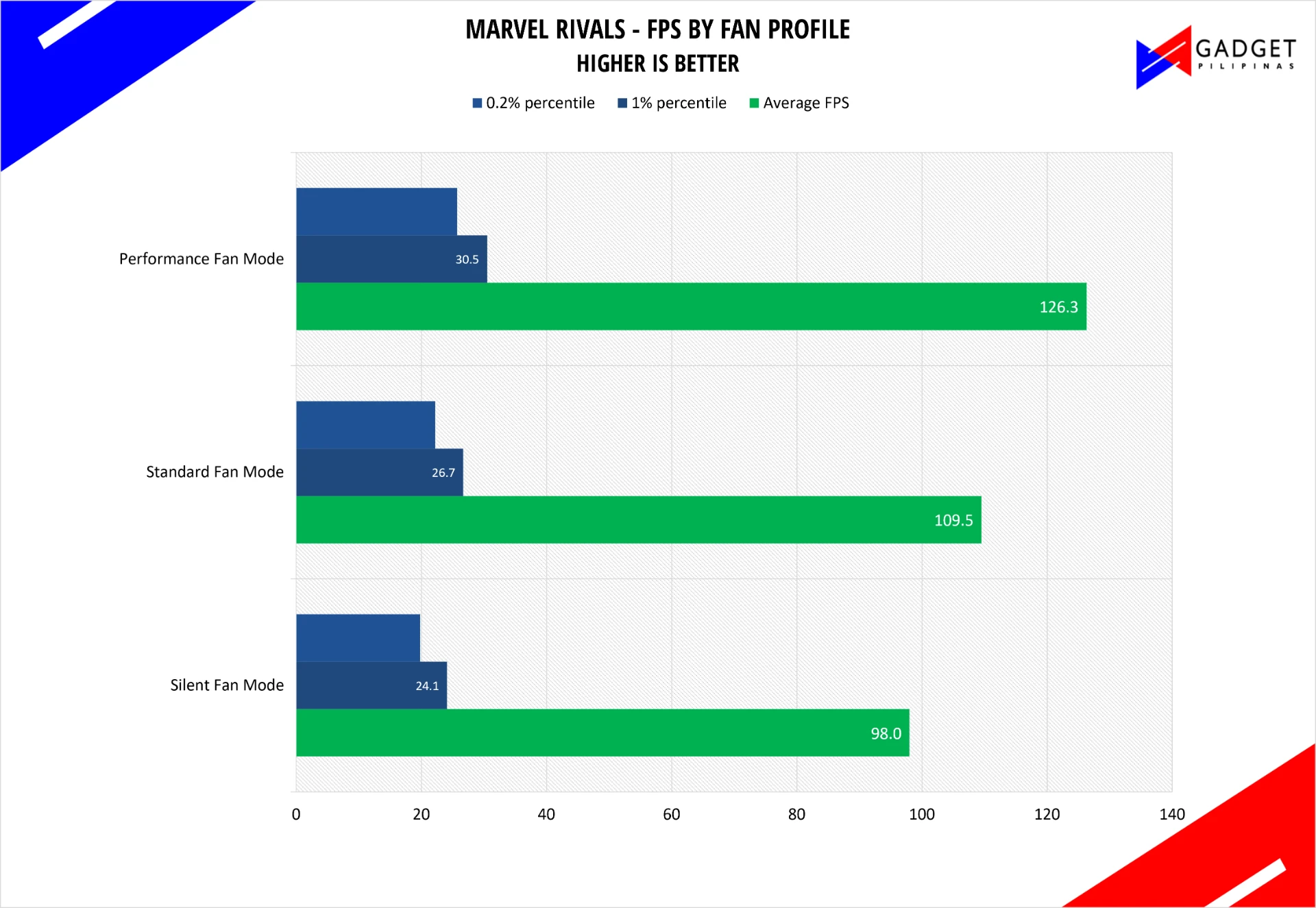
Here the fan profile is the whole story. Silent returned 98.0 frames per second on average, Standard 109.5, and Performance 126.3, which is a 29% gain from the quiet profile to the performance one. The percentile figures track it: 1% percentile of 24.1, 26.7 and 30.5, and 0.2% percentile of 19.8, 22.2 and 25.7. NVIDIA’s reference average for this title is 147 frames per second on our configuration, so our best profile lands about 14% below the reference figure. We would expect some distance here, since the reference captures come from NVIDIA’s own pass on the same hardware, and the beta state of the ARM64 build is a plausible contributor.
Cyberpunk 2077
Cyberpunk 2077 is the one of most important titles in the guide, run at the RT Low preset with DLSS Balanced and 3x frame generation through the built-in benchmark.
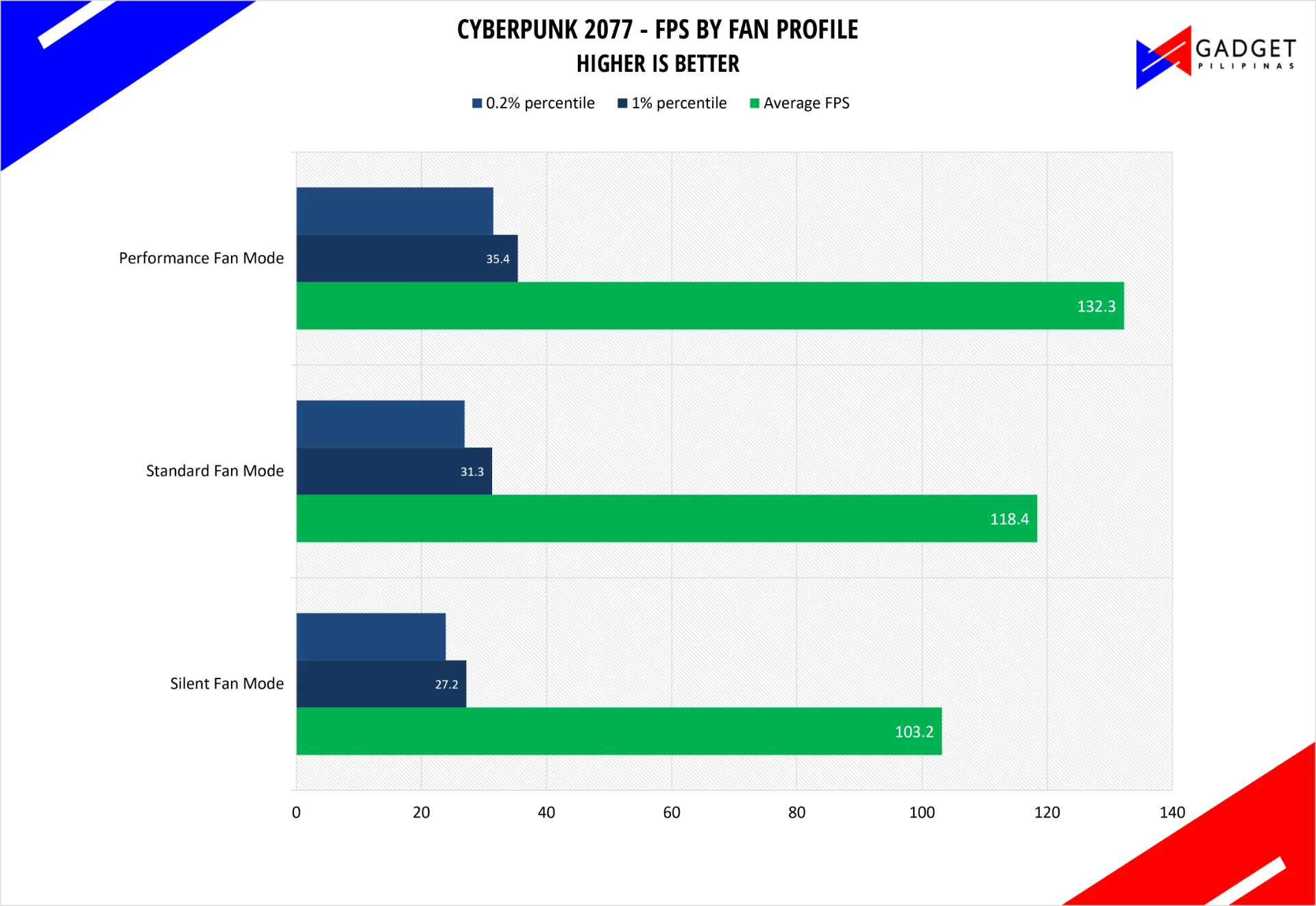
Our best result, 132.3 frames per second in Performance mode, is within 2% of NVIDIA’s reference figure of 135, and that is a good outcome for a case where the reference pass and our pass are not identical runs. Standard mode returned 118.4 and Silent 103.2, so the profile spread is 28%. The percentiles are the more revealing number: the 1% percentile climbs from 27.2 to 35.4 and the 0.2% percentile from 23.9 to 31.5 as you move up the profiles, which means the frame pacing improves alongside the average. Cyberpunk is also the heaviest ray-traced workload in this set, and it is the one where the GPU looked most comfortable.
ASUS ProArt P16 H7607BA 64 GB Verdict
The ASUS ProArt P16 is the most interesting laptop we have tested this year, and not because of any single score. It is interesting because the RTX Spark platform changes what a thin creator laptop is for. A week of work on this machine put local language models, local fine-tuning, and local image generation inside a chassis you would carry to a meeting, at speeds that beat NVIDIA’s own reference figures in agentic workloads and largely match them in rendering. The 1TB storage, however, is barely holding it with all the models we had to install to satisfy our benchmarks and tests.
What it does best is the work that used to require a desktop or a cloud subscription. AgentPerf Local finished 5% faster than the reference on the 35B model and 23% faster on the 27B model, with decode speed 12% and 32% ahead respectively. AIPerf put the 27B model 24% ahead end to end at both 16K and 32K context. PugetBench’s AI Extended sub-test came in 46% ahead of the comparison machine, and Blender Cycles was 31% to 38% faster than the ZenBook Duo we measured ourselves. Those are the numbers to take away.
The second thing to take away is the battery behavior. Blender lost 0.3% on Monster unplugged. PugetBench lost 4.5%. We have never tested a Windows performance laptop that holds its performance this well on battery, and it changes how you use the machine. Combined with the build quality, the port selection including that SD Express reader, the keyboard, and battery life that our early use suggests is genuinely all-day, this is a laptop you can work away from a wall socket on.
The criticisms are real and they are mostly about maturity rather than hardware. Geekbench 6 would not produce usable results on our unit, SuperPI runs through emulation, and the platform’s best behavior depends on finding ARM64 builds of the applications you rely on. DaVinci Resolve playback was inconsistent at quarter resolution, which is the one software problem that would genuinely interrupt an editor’s day. Full load produces 74 dB-A of fan noise. The keyboard deck shows every fingerprint.
None of that changes the conclusion, but it does set the expectation. This is a first-generation platform laptop, and it performs like a machine that has been in the hands of a company that has been building GPUs for thirty years. If you buy it for local AI and creative work on the go, it will do what you are hoping it will do. If you buy it expecting every piece of Windows software to behave exactly as it does on x86, you will spend your first week checking Task Manager and learning which installers to download. That is the trade, and on this evidence it is a trade worth making.
Final score
Gadget PilipinasWhat we like
- Agentic and LLM inference performance that beats NVIDIA's own reference figures on our 64 GB unit
- PugetBench AI Extended 46% and GPU Effects Extended 35% ahead of the comparison machine
- Blender Cycles 31% to 38% faster than the ZenBook Duo 2026 we measured with the same method
- Performance that holds on battery: 0.3% on Blender Monster, 4.5% on PugetBench
- Rigid, well-built chassis with no significant flex
- Three USB 4.0 ports, USB-A, HDMI 2.1 and an SD Express 7.0 reader on a thin laptop
- Keyboard with 1.7 mm travel that is genuinely comfortable for long writing sessions
- Usable quiet profile: roughly 20 degrees cooler than Performance at matched load
Could improve
- DaVinci Resolve playback stutter at quarter resolution
- ARM64 builds still required for the best application behavior, with emulation where they do not exist
- 74 dB-A of fan noise at full load
- The keyboard deck collects fingerprints and oil
- 35B-A3B prompt processing behind the reference, and the 64K AIPerf tier incomplete

Giancarlo Viterbo
Giancarlo Viterbo is a Filipino Technology Journalist, blogger and Editor of gadgetpilipinas.net, He is also a Geek, Dad and a Husband. He knows a lot about washing the dishes, doing some errands and following instructions from his boss on his day job. Follow him on twitter: @gianviterbo and @gadgetpilipinas.
View all articles →Related Reviews
 HONOR 600S Review: Bits of What’s Loved on the HONOR 600 Series in a More Accessible Package
 Keychron C75 HE 8K TMR Keyboard Review
 Samsung Galaxy S26 FE: Great Functional Elegance
 NBA 2K27 Review: A Better Game Than DLSS 5 Suggests
 TECNO Camon Slim 5G Review: The Best-Looking CAMON Yet
 ROG Kithara Review: A HIFIMAN Collaboration for Gamers