












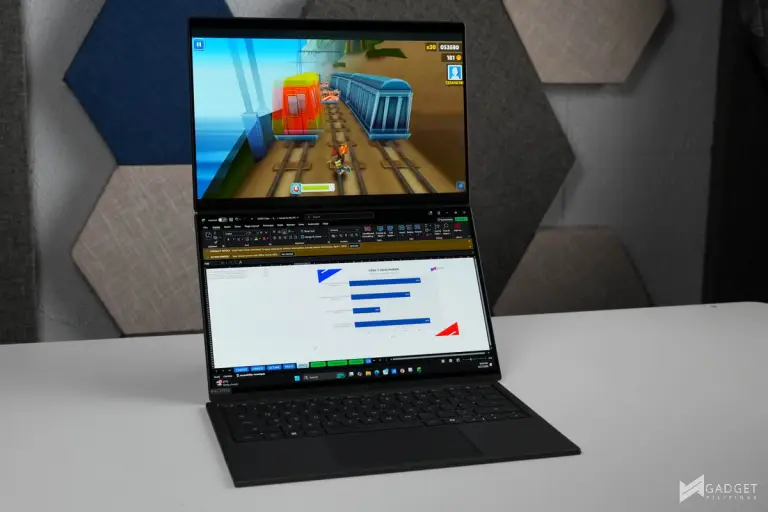
The ASUS Zenbook DUO 2026 makes a very timely comeback with improvements that make it a compelling laptop for professionals and for those who want maximum productivity. With the introduction of the Intel Core Ultra 9 series 3 processors, paired with a redesign and infusion of its signature Ceraluminum material, it addresses the tradeoffs of the last iterations. Let’s see what makes the Zenbook DUO 2026 a standout in today’s market.
Intel Core Ultra Series 3 – Ultra 9 386H CPU

Powering the ASUS Zenbook DUO 2026 is the latest Intel Core Ultra 9 386H processor. It’s one tier below the flagship Core Ultra 9 lineup under the Intel Core Series 3 Panther Lake CPU lineup. It’s a 16-core CPU with a max P-core boost clock of 4.9GHz, just 200MHz below the flagship Ultra 9 388H. Our specific Zenbook DUO UX8407A4 review unit sports an Intel Core i9 386H CPU, 32GB of LPDDR5X-8533 Memory, and a 1TB SSD.
ASUS Zenbook DUO 2026 UX8407A4 – A Closer Look

The ASUS Zenbook DUO 2026 comes in a clean, sleek packaging with only an “ASUS Zenbook” marking on the box in a premium matte black finish.

ASUS includes a 100W Charger, a 1.5-meter Type-C to Type-C charging cable, an ASUS Pen 3.0 stylus, an ASUS Pen 3.0 Charger, and a laptop sleeve. The 100W charger is a huge improvement over the previous generation non-removal Type-C chargers with its detachable cable and noticeably smaller form factor.

ASUS infused its Zenbook DUO 2026 with its signature Ceraluminum design. ASUS calls this colorway moher gray, which has a very nice matte finish and texture. It’s definitely a bit more premium feeling than existing ASUS Ceraluminum laptops.


Port selection is arguably less than average for an ultrabook when it comes to actual port count, with only one USB 3.2 Gen 2 Type-A port, two Thunderbolt 4 ports, one HDMI 2.1 port, and one 3.5mm audio jack. In terms of bandwidth, the two Thunderbolt 4 ports open up multiple options on the Zenbook DUO 2026 with docks, hubs, and even external graphics.


The detachable keyboard can be connected via the POGO pins, which also charge the keyboard, or via Bluetooth. The keyboard can also be charged via USB Type-C. Note that the Type-C port is only for charging and doesn’t serve as an additional USB port when connected via the POGO pins


The detachable keyboard has a surprisingly satisfying typing experience, considering its thin profile and portability, even beating out laptops that have a larger form factor. Tactile feedback is consistent, and the keys don’t wobble as much, even when pressed from the edge. That said, our main gripe with the detachable keyboard is it disconnects when you don’t have a stable connection, either due to the unclean POGO pins or applying pressure that’s strong enough to counter the magnets and slide off the keyboard.

ASUS has made the trackpad on the detachable keyboard of the Zenbook DUO 2026 the largest it possibly can. Despite the thin and portable form factor, the trackpad provides decent tracking and tactile feedback. That said, its size is closer to your average trackpad than the usual large-sized trackpads found on ASUS Zenbook and Vivobook laptops.
ASUS Zenbook DUO 2026 UX8407A4 Display


The ASUS Zenbook DUO, not to be confused with the “Duo,” which has a half-screen, is named DUO because of its dual-screen setup. The integrated stand allows the laptop to be positioned vertically or horizontally with angle adjustments for optimal viewing angles or for comfort.
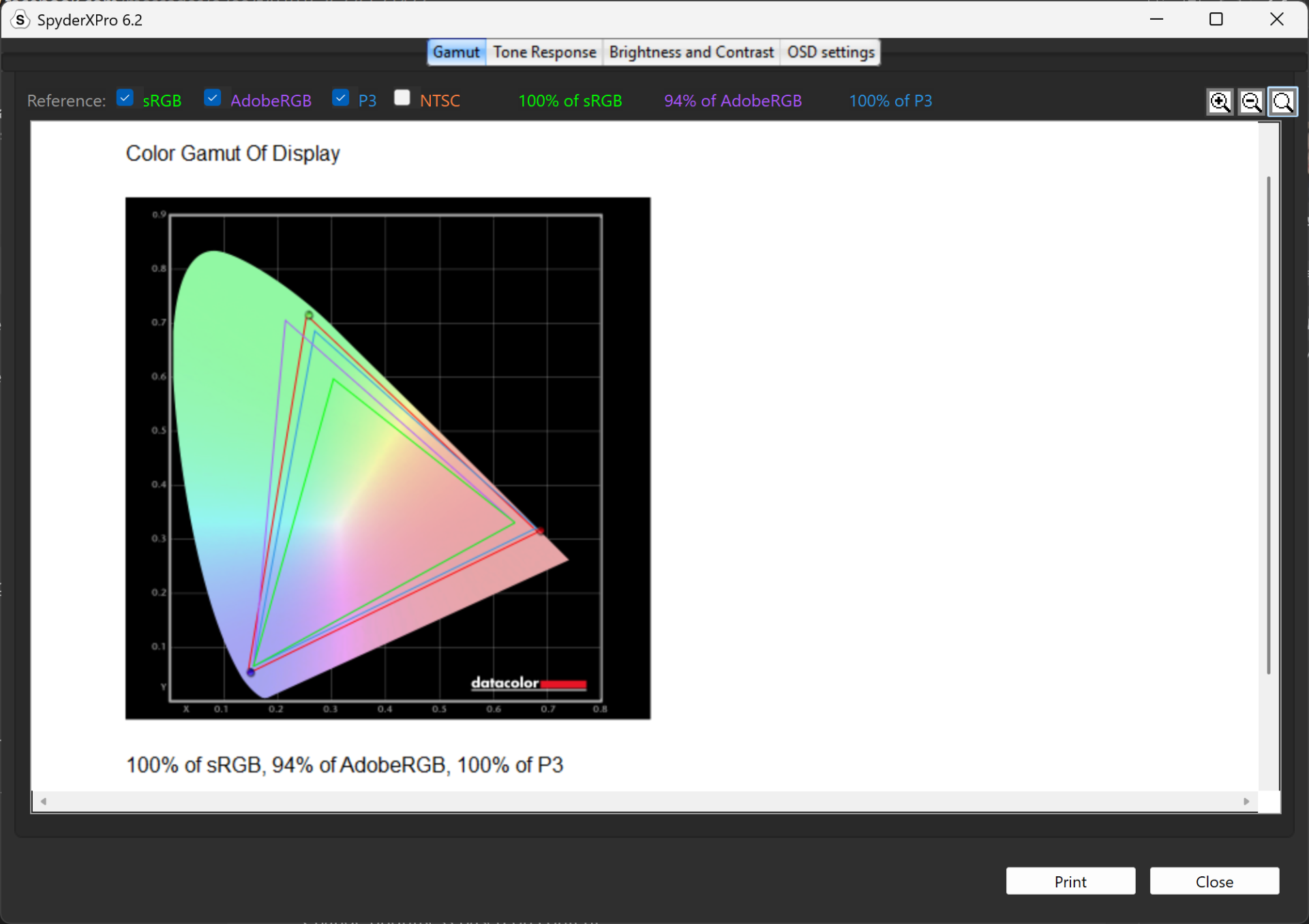
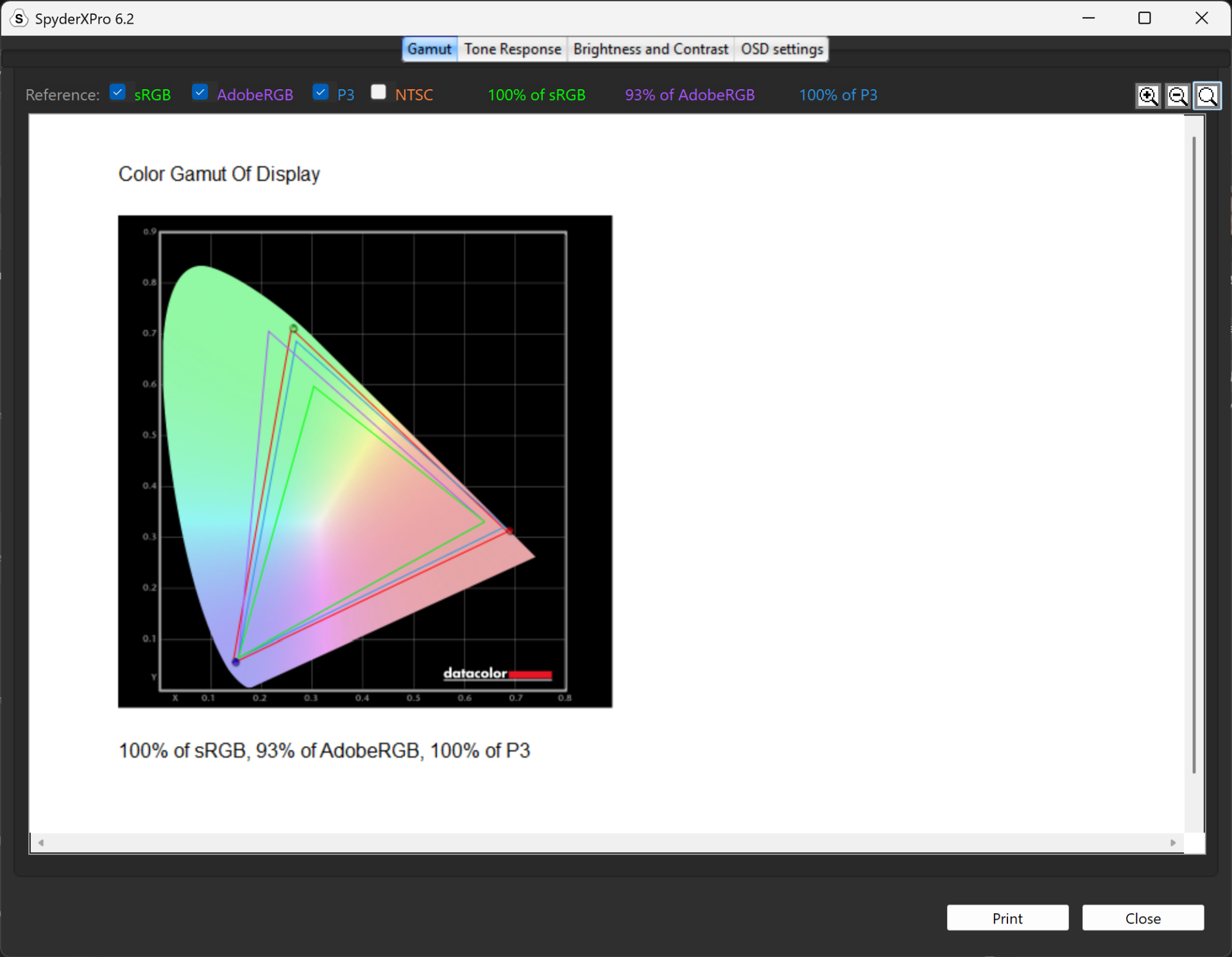
The ASUS Zenbook DUO 2026 is equipped with two 14-inch 2880×1800 ASUS Lumina OLED displays. These displays have a 0.2ms response time, 144Hz refresh rate, and 500 nits of brightness with a peak HDR brightness of 1000 nits. Using our SpyderX Pro Colorometer, we measured 100% sRGB, 93% AdobeRGB, and 100% DCI-P3, albeit the second display had a 94% AdobeRGB rating – this can be attributed to margin of error, as we didn’t notice any color shifting between the two displays. That said, these readings make for a perfect professional color grading, photo editing, and/or video editing with its color accurate displays. The 500 nit brightness means you won’t have to worry about glare, even if the display has a glossy finish, as it’s bright enough to counter this trade-off even when using it outdoors or in bright environments.
Benchmark Setup and Test Methodology

Gadget Pilipinas’ testing philosophy is to provide detail-oriented results as accurately as possible so that our readers can replicate our tests, given that these conditions are met. Different benchmarking apps and sequences are used depending on the tested component or device.
We use CapFrameX 1.7.8 Beta as our primary FPS capture and analysis tool for all our gaming benchmarks. The latest build version of Windows 11 Pro and WHQL-certified drivers are used for our benchmarks. Readings such as temperatures and power draws are recorded using HWINFO64 and OCCT Enterprise.
We benchmarked the ASUS Zenbook DUO 2026 together with its different power settings found in the MyASUS Software – Whisper, Standard, and Performance. The main purpose of benchmarking power profiles is to show how aggressive or conservative the manufacturer is in terms of thermal management. These profiles will affect the CPU and GPUs’ boosting behavior in terms of duration and max clock speed, which will translate to higher scores and stable framerates.
As part of our 2024 laptop benchmark methodology revamp, we’ve changed how these profiles are tested. Synthetic and Productivity benchmarks include all of the power profiles. We decided to drop the silent or power-saving profile for gaming benchmarks as these lowest profiles generally produce unplayable framerates, especially at 1440p and above resolutions. Moreover, games are tested at the laptop’s native resolution as we expect most, if not all, gamers to game on the laptop’s native resolution.
For more information, read our Benchmark Methodology article.
ASUS Zenbook DUO 2026 UX8407A4 Benchmarks
CINEBENCH 2026
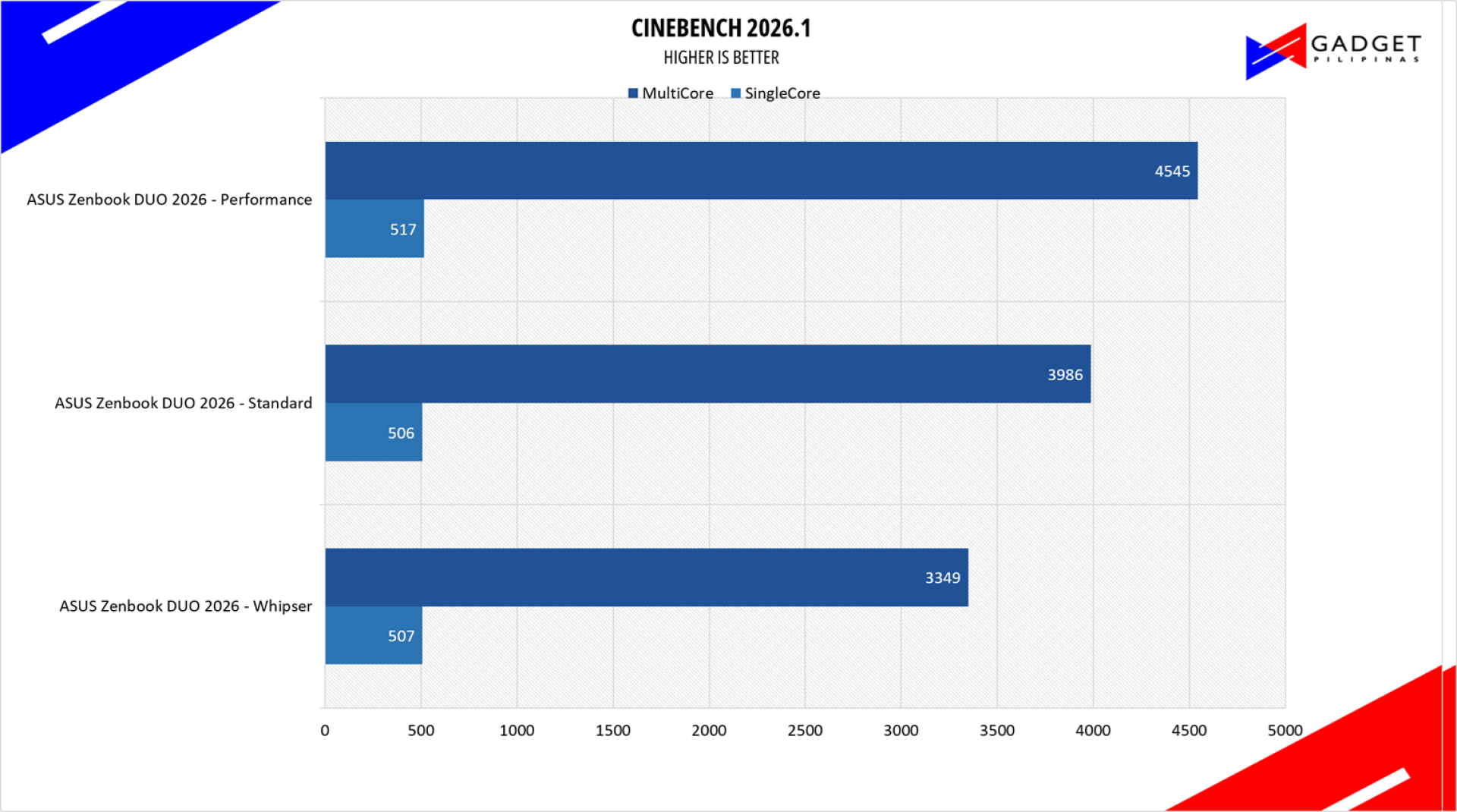
Maxon’s Cinebench benchmark is one of the most iconic benchmark applications used by reviewers and enthusiasts. The latest Cinebench 2026 uses the latest rendering architectures, including Intel’s Embree ray tracing technology and other advanced features from AMD and Intel that allow users to render the same scene on the same hardware.
ADOBE PREMIERE PRO 26 VIDEO EDITING – PROCYON
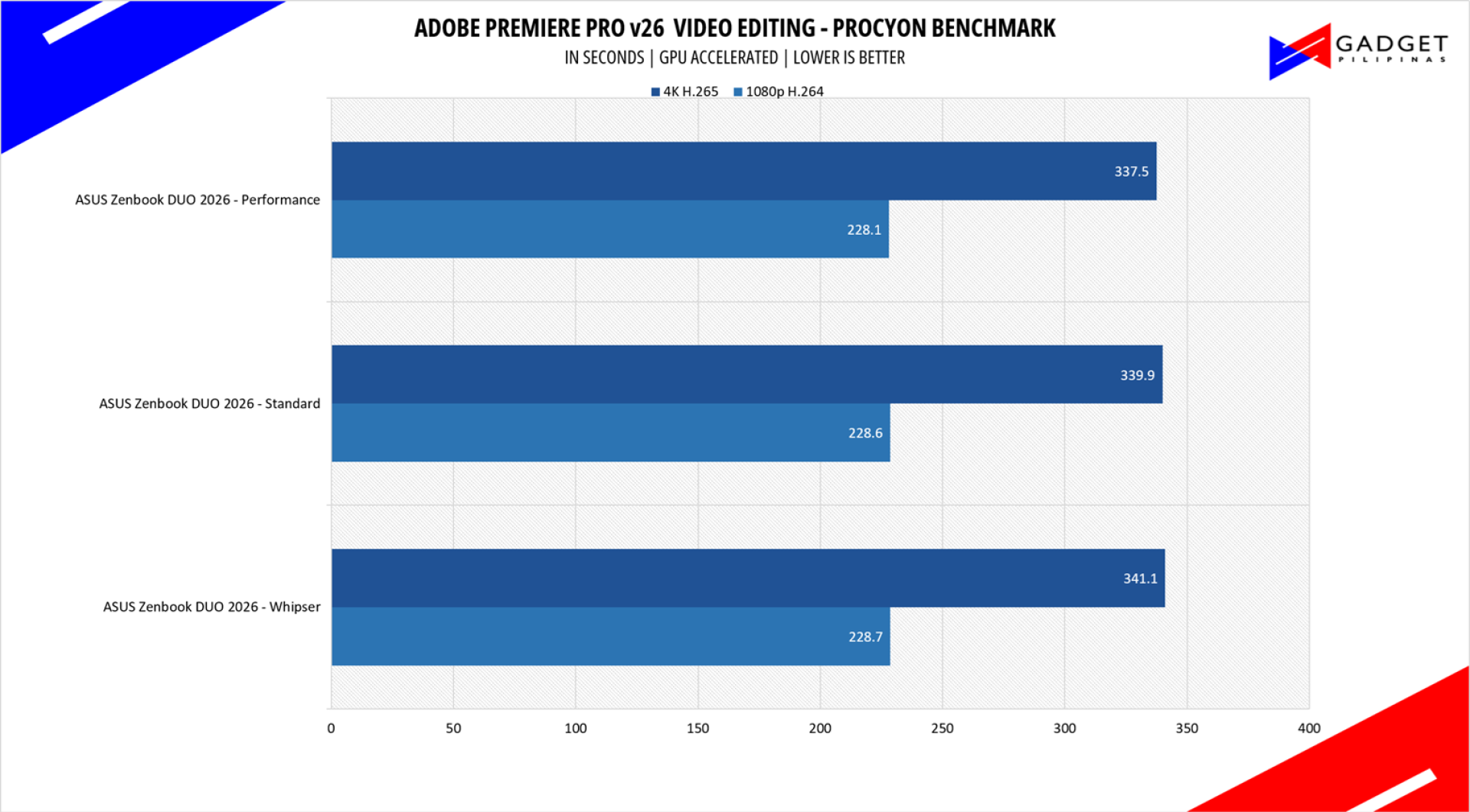
Procyon benchmark suite is developed by the UL, the same team behind 3DMark and PCMark benchmarks. The UL Procycon video editing benchmark uses Adobe Premiere in a typical video editing workflow. The benchmark starts by importing two video project files with various edits, adjustments, and effects – the second project uses several GPU-accelerated effects. Each project is exported in 1080p with H.264 encoding and again in 4K with HEVC H.265. The reported score is based on the time taken to export all four videos.
PCMark10
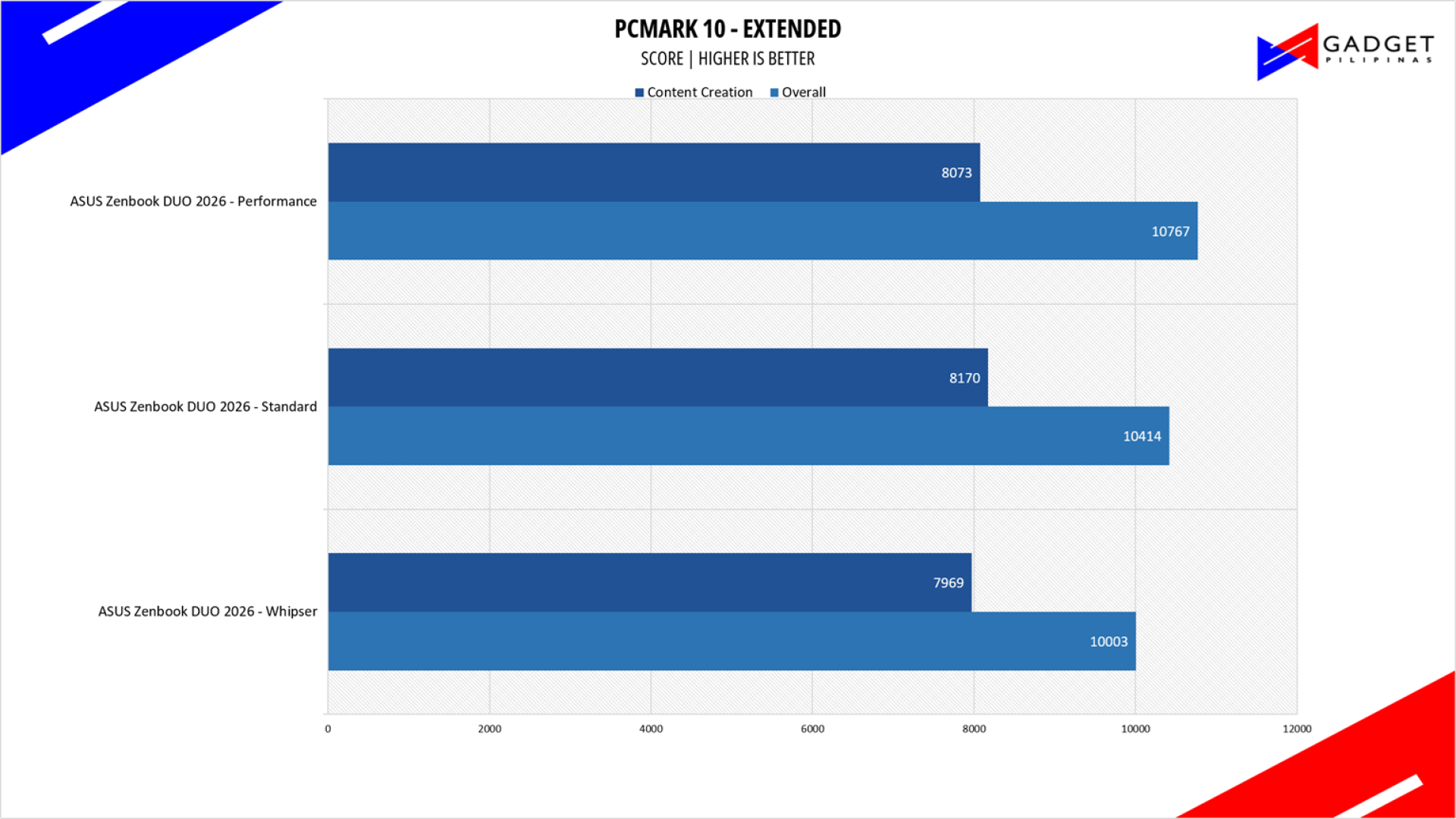
From the same developers of the popular game benchmarking tool 3DMark, PCMark 10 is a benchmarking app for measuring a whole PC’s performance. It covers a wide variety of tests to reflect common tasks performed in a modern workplace. We selected PCMark 10’s extended benchmark and reported both the overall score and Digital Content Creation Score.
V-RAY 6
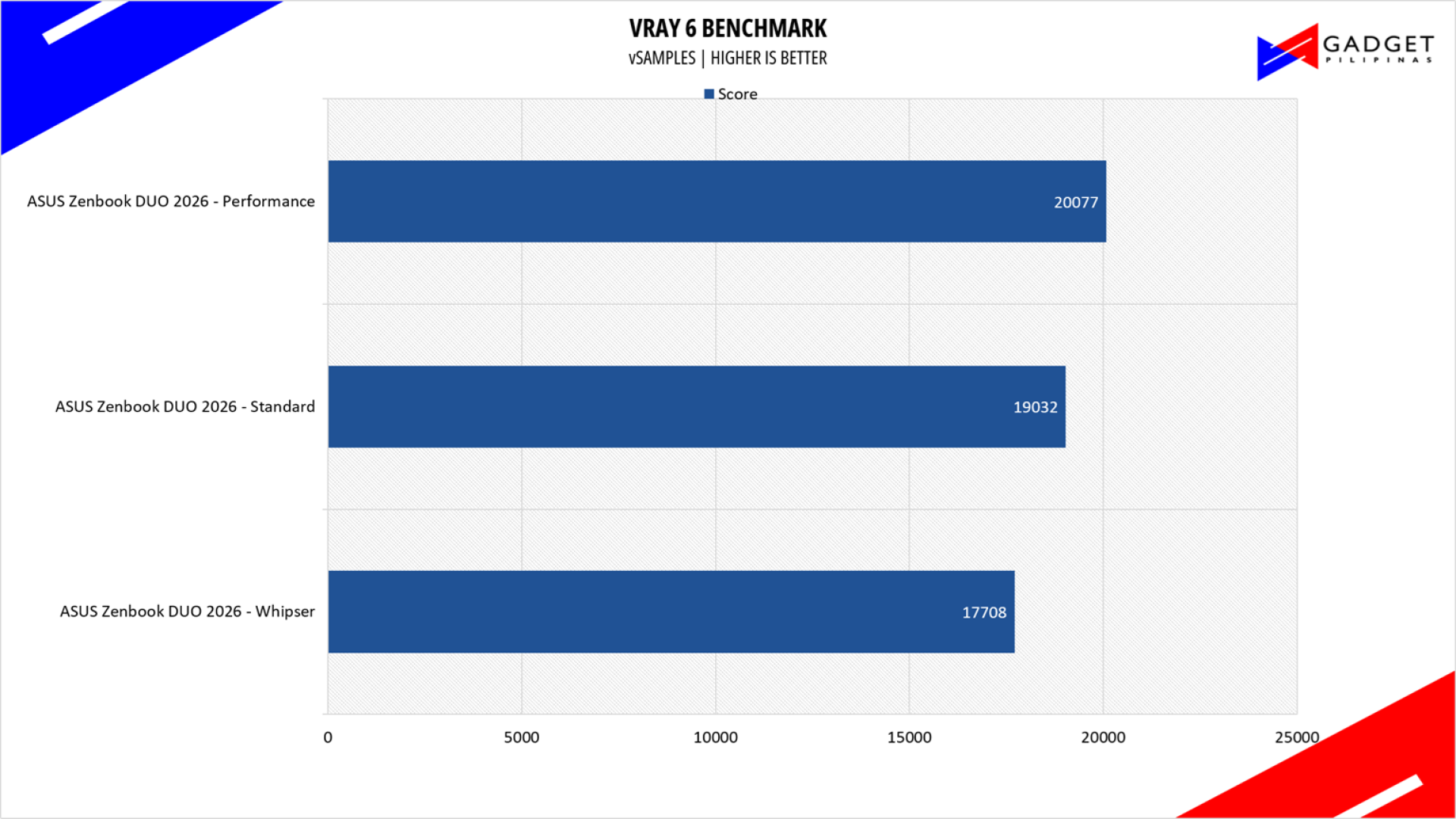
V-Ray Benchmark is a stand-alone version of V-Ray developed by Chaos Group. It is designed to test the CPU and GPU by rendering sample scenes within a fixed amount of time. V-Ray is a plug-in mostly utilized by 3D computer graphics software applications, mainly for industrial design, product design, architecture, film, and video game production. V-Ray is not limited to 64-threads as it supports multi- and mega-threading.
BLENDER
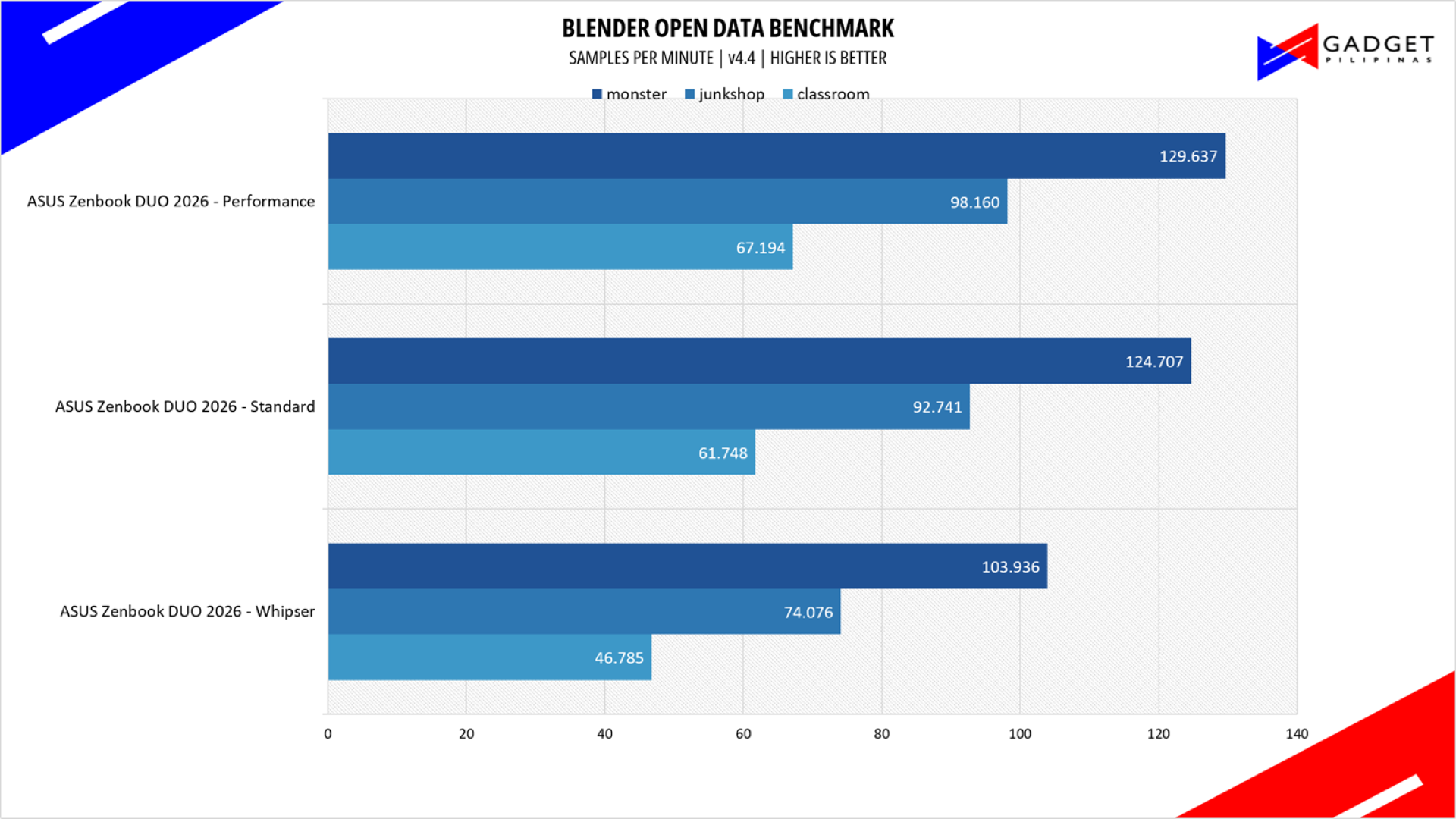
Blender is a widely used, free, open-source 3D creation suite. It supports the whole 3D pipeline process from modeling, rigging, animation, simulation, rendering, and even motion tracking. Blender has become a standard for CPU benchmarks, with the BMW27 and Classroom Scene being the most used. This prompted the company to release Blender Open Data Benchmark in 2018, a benchmark-specific version allowing users to run a preset benchmark and share the results online like 3DMark.
OCCT Enterprise Benchmark
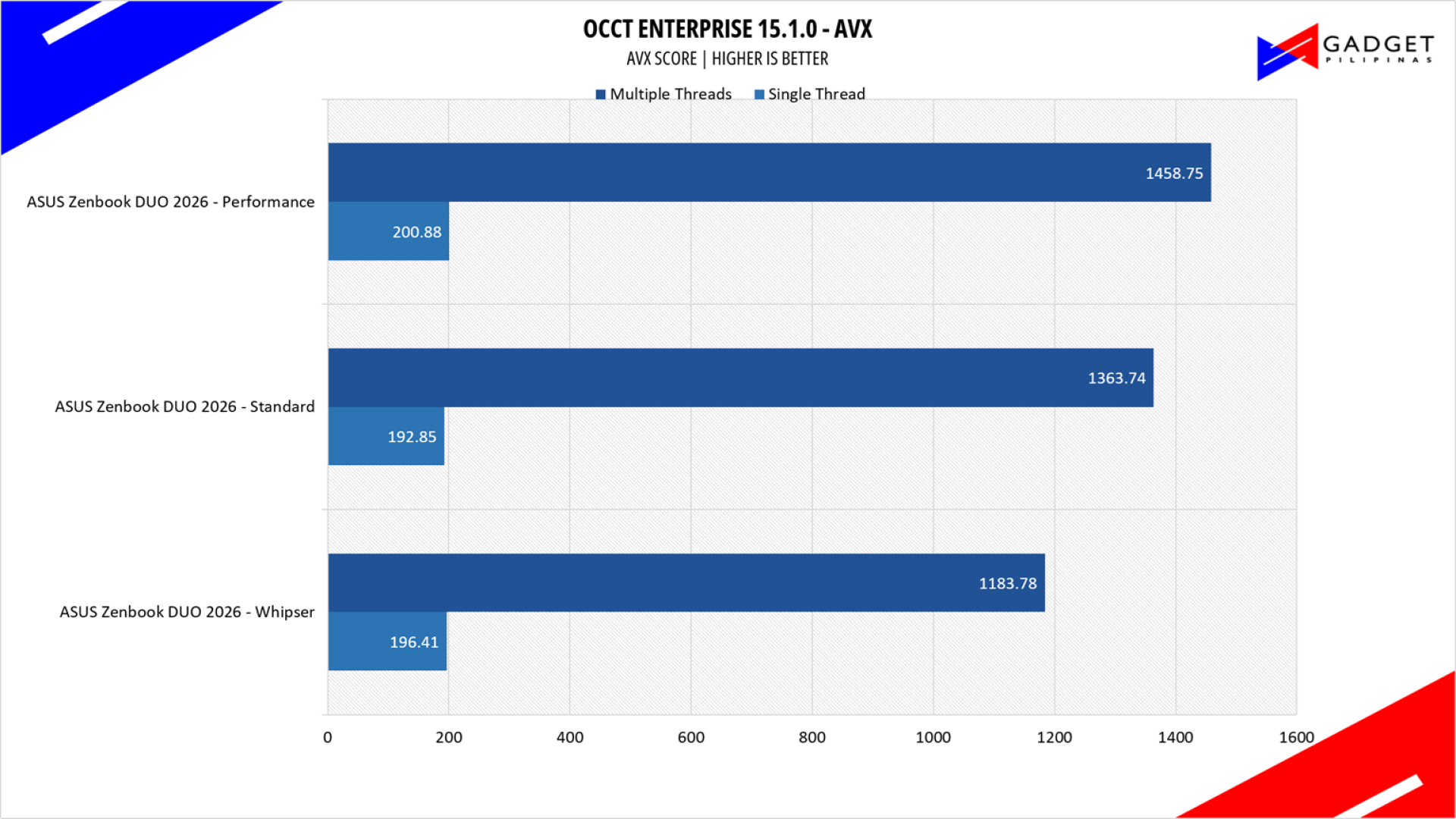
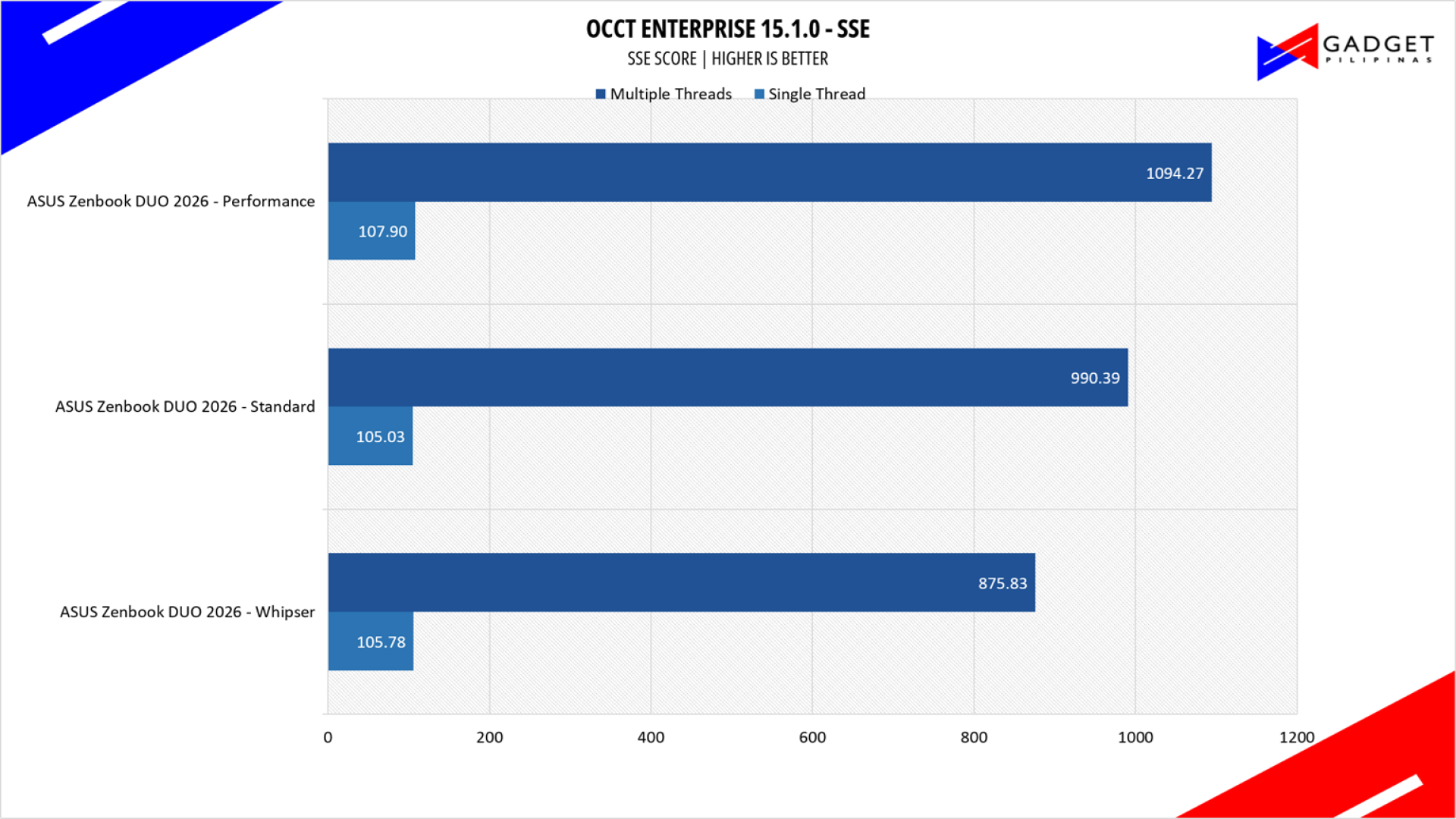
OCCT is a popular benchmark and stability testing tool among overclockers, enthusiasts, and system integrators. OCCT utilizes several specialized instruction sets and algorithms to saturate hardware resources and expose architectural weaknesses.
SuperPI 32M
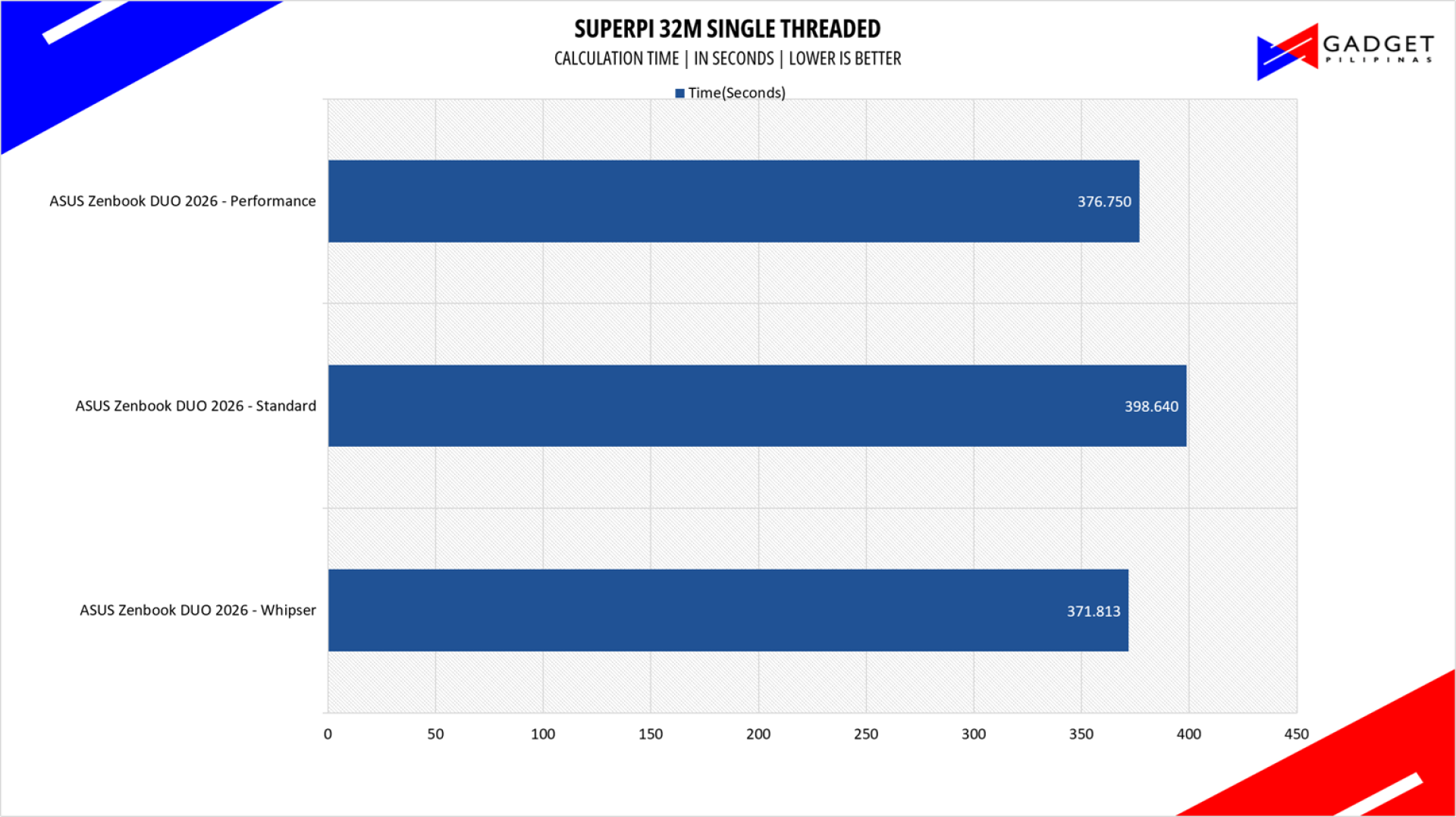
SuperPI is a single-threaded benchmark application that lets the CPU calculate Pi(π) to the nth digit. In this benchmark, we selected the Pi calculation to 32M, the highest available for the app.
wPrime 1024M
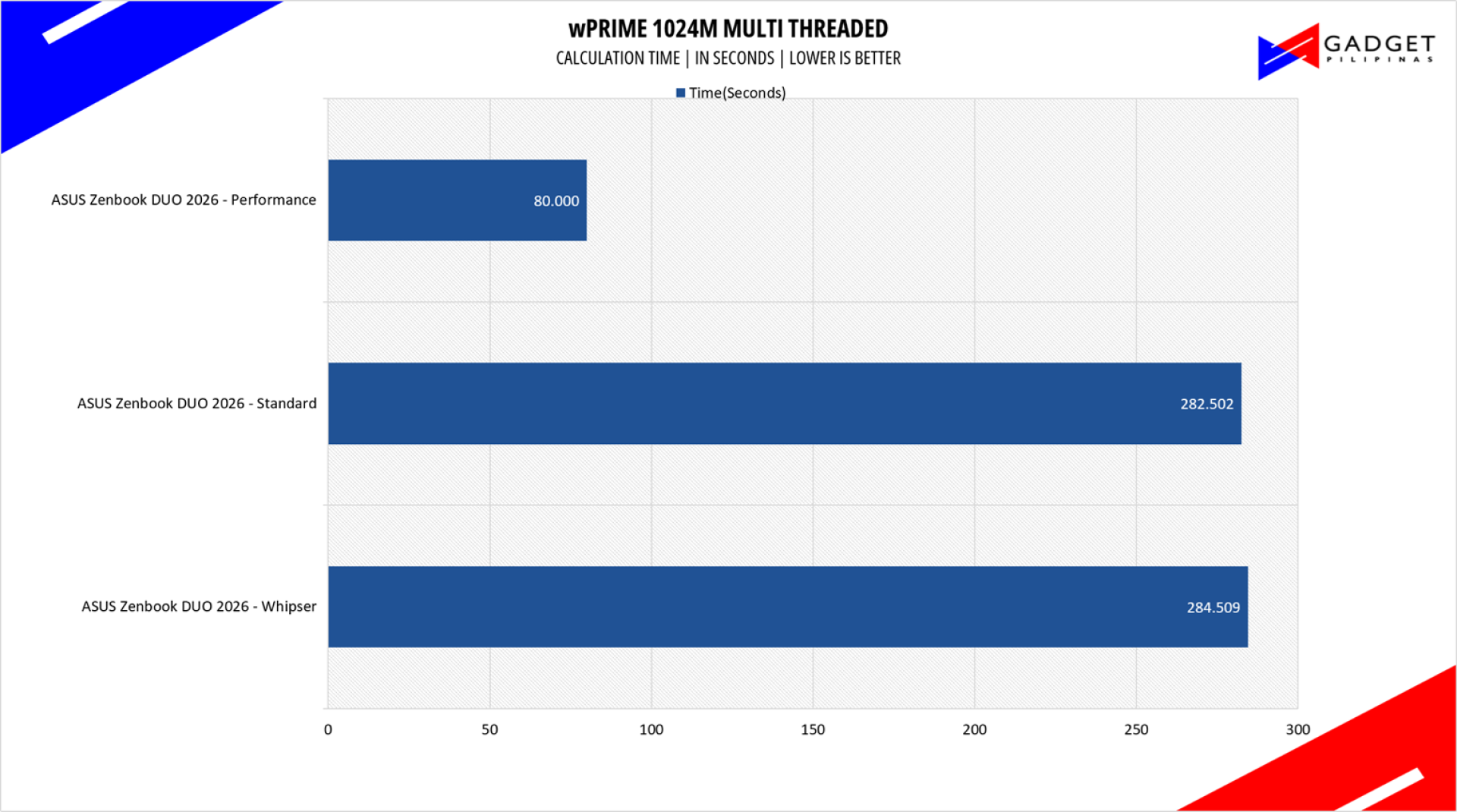
wPrime is a benchmark tool similar to SuperPI, but the former takes on finding prime numbers using Newton’s Method. The benchmark is set to calculate 1024 million prime numbers, and the performance is measured according to calculation time.
GeekBench 6.6
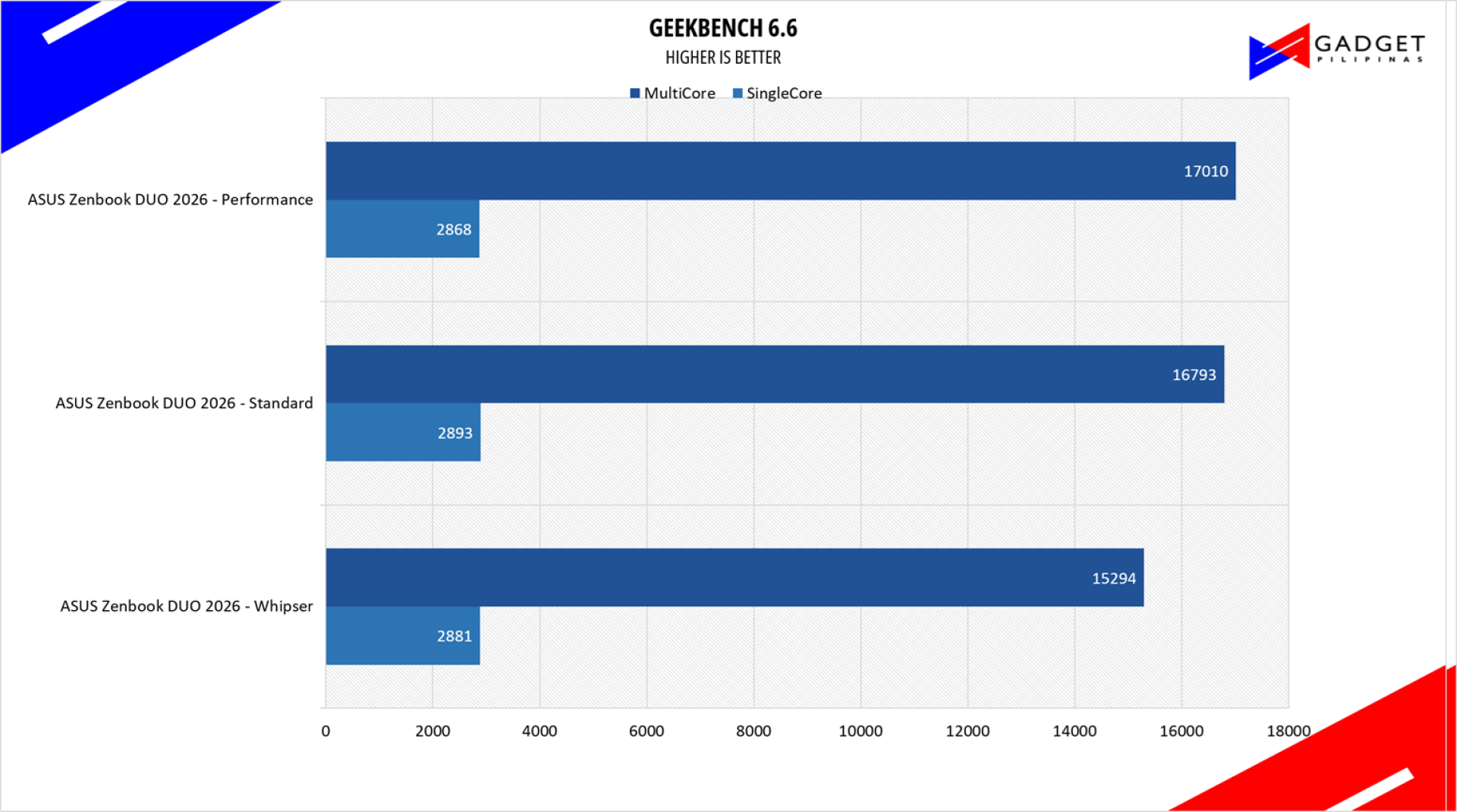
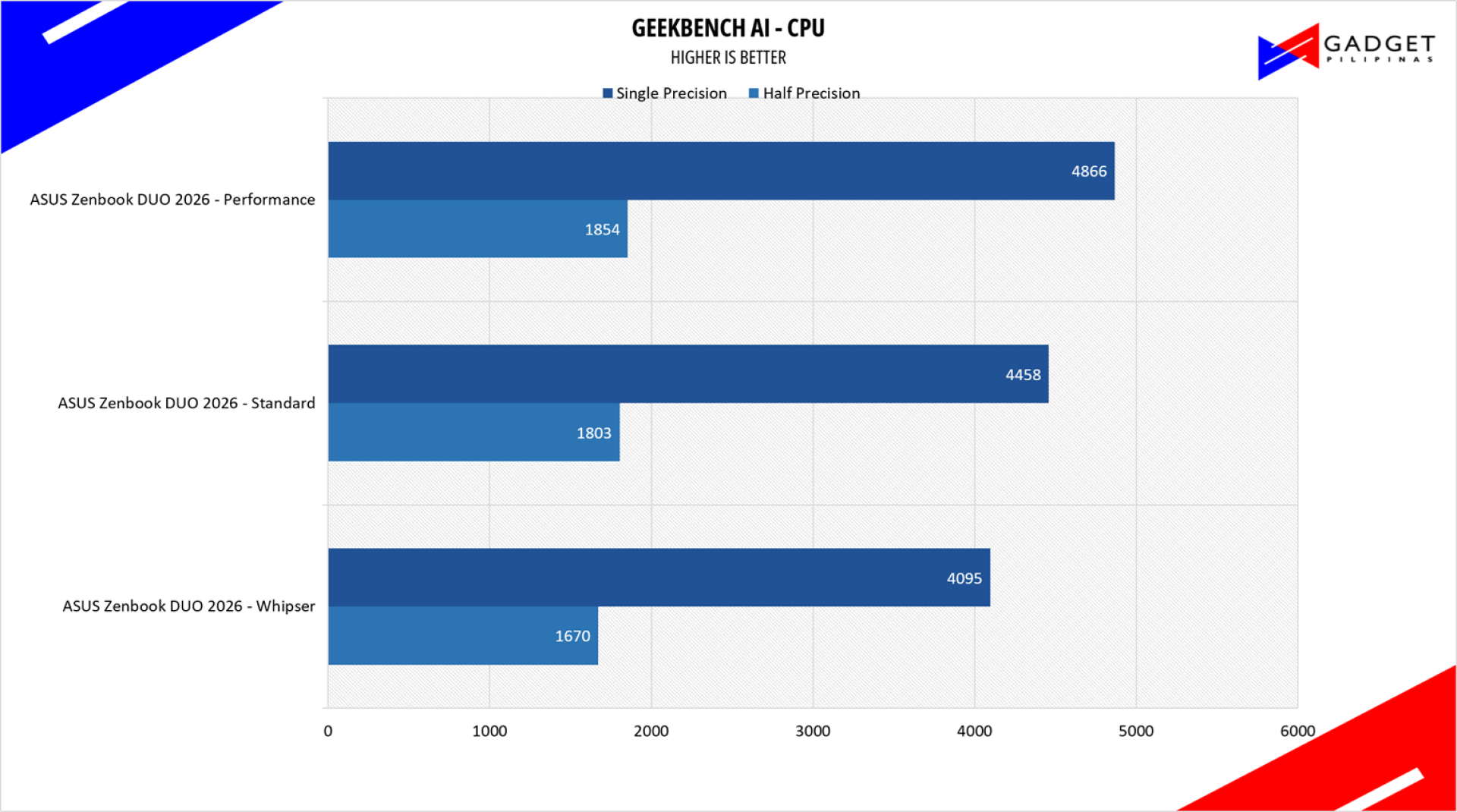
Geekbench is a multi-platform benchmark used to gauge CPU performance and compare it across Windows, Mac, and Mobile. Geekbench 6 is the latest version and doesn’t rely on memory as much as the previous Geekbench 4, making it a great tool to measure both single-core and multi-core CPU performance.
CORONA RENDERER
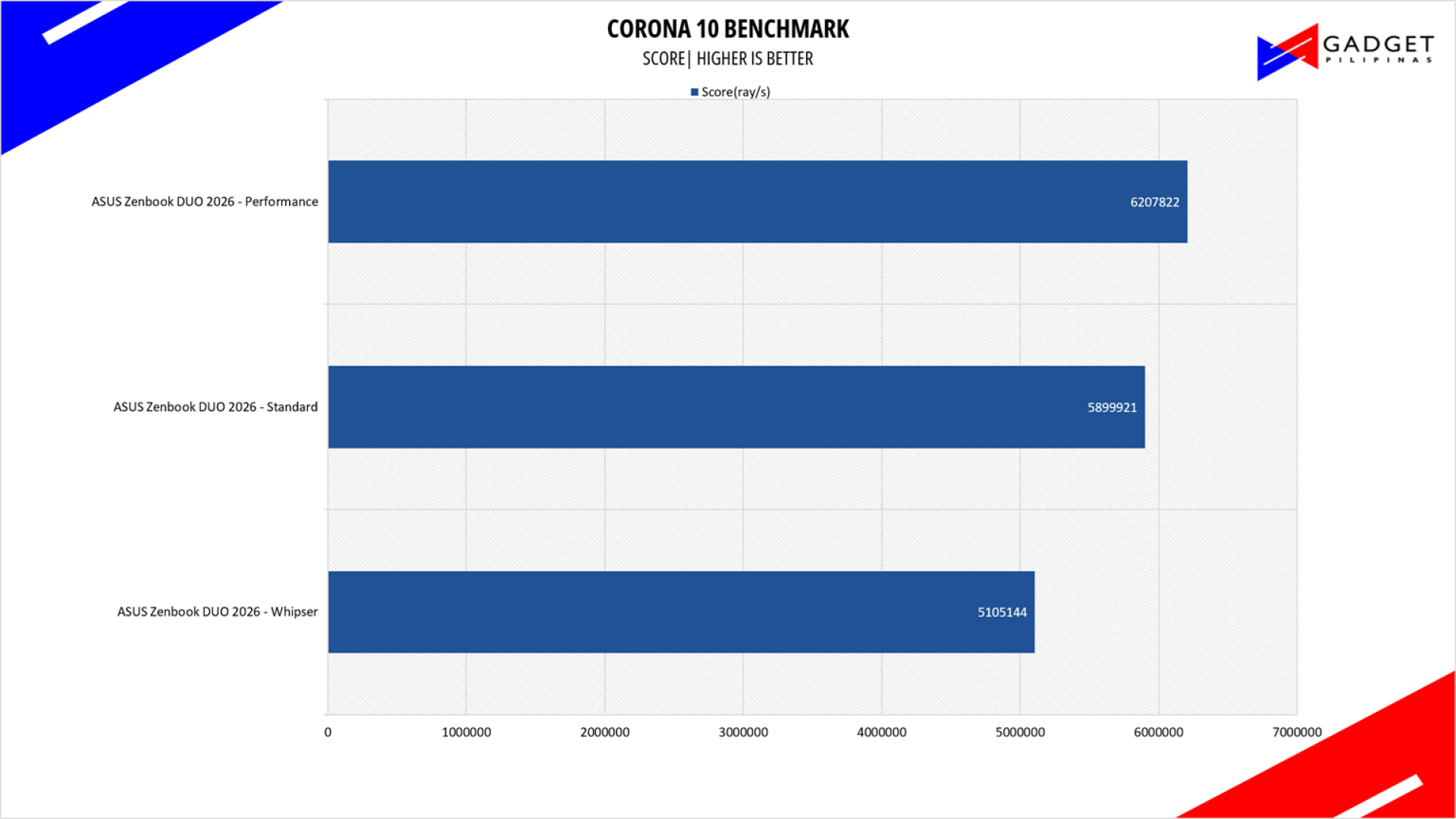
Corona Renderer is an unbiased photorealistic render available for Autodesk 3Ds Max, Maxon Cinema 4D, and as a stand-alone application. Its popularity, similar to Blender, led Chaos Group to develop a benchmark version of the app, which runs using Corona Renderer 1.3. Workstation systems, especially CPUs, can utilize Corona Benchmark as up to 72 threads can be used in the benchmark, making it very suitable for CPUs across various price segments.
BapCo CROSSMARK
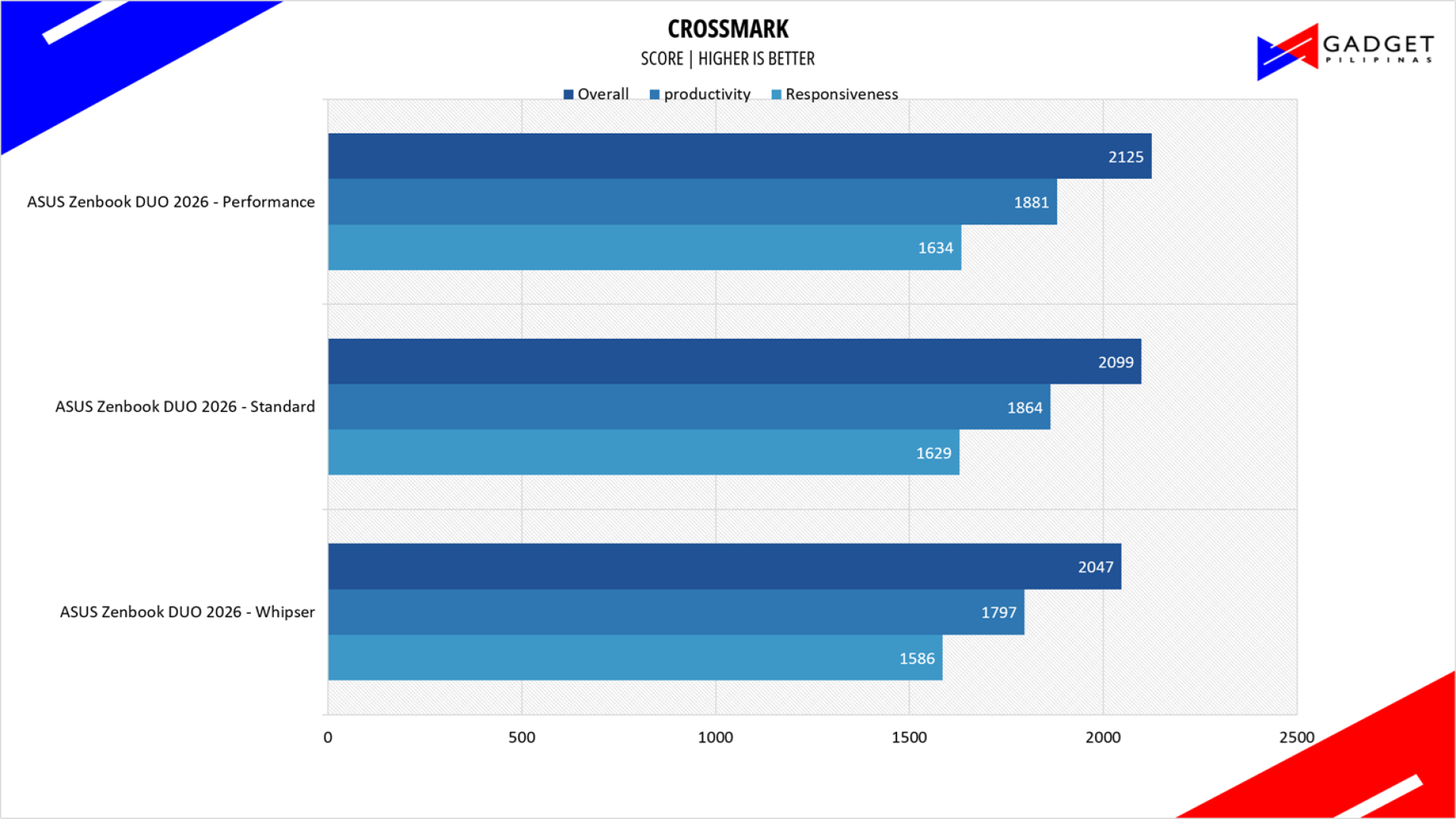
Crossmark is one of the few native cross-platform benchmark tools available for Windows, Android, Linux, ChromeOS, iOS, and macOS. It measures overall system performance and system responsiveness using models of real-world applications, making it a great comparison point across multiple platforms.
OCTANE 2.0 PLUS

Octane 2.0 is a benchmark that measures a JavaScript engine’s performance by running multiple tests representing different use cases of JavaScript applications. While Google Octane is retired and no longer maintained, it is still a good representation of today’s dynamic, interactive web applications. Our Octane 2.0 benchmark is run on Microsoft’s latest Chromium-based Edge browser.
ASUS Zenbook DUO 2026 UX8407A4 SSD Benchmark
ASUS Zenbook DUO 2026 UX8407A4 Battery Life & Temps
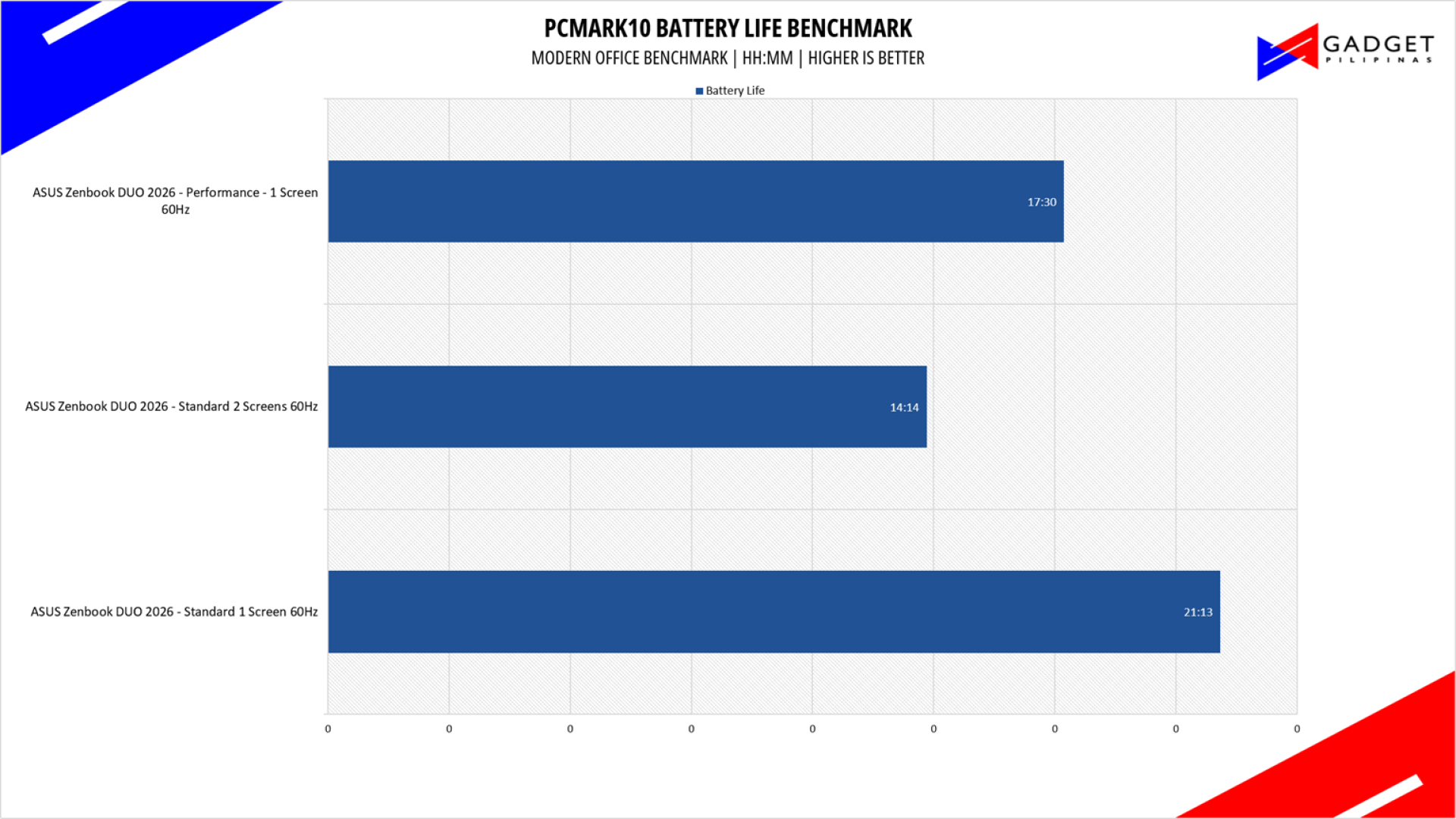
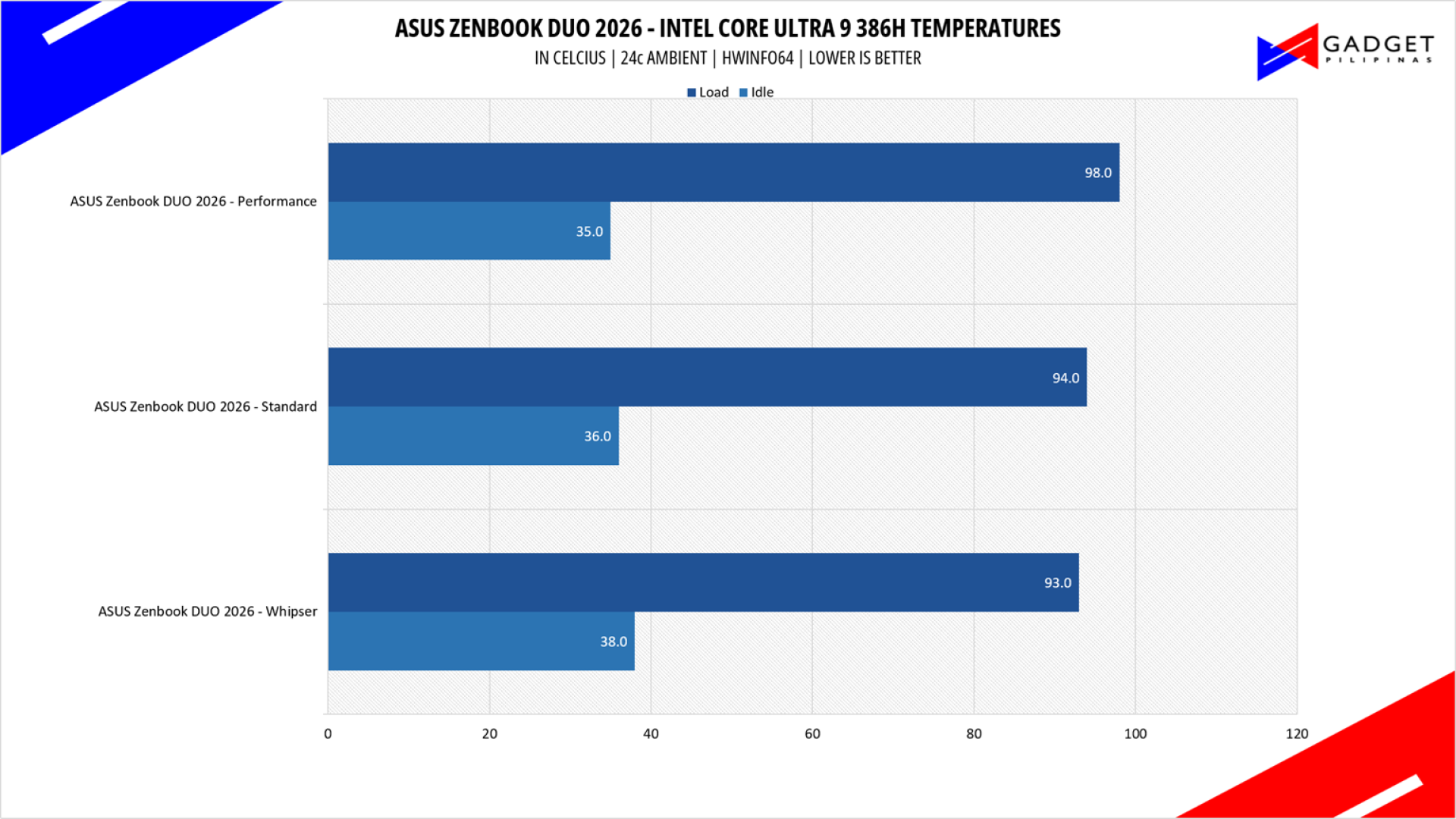
The ASUS Zenbook DUO 2026 left us stunned with its incredible battery, beating most, if not all, of the ultrabooks available in the market despite its two-screen handicap. This is thanks to the hefty 99wHr battery, where most ultrabooks only sport less than 72wHrs, which is paired with the improved efficiency of the Intel Core Series 3 processors. We clocked in 21 hours of battery life when using one screen on the Standard profile; using two screens left us with 14 hours of battery life, which is still more than enough to last you an entire workday.
Conclusion – Barebones Performance-Oriented Laptop

The ASUS Zenbook DUO 2026 has crossed the what used to be a gray line between gimmick and actual usable feature, with the accumulated improvements coming from the first Zenbook DUO iteration. The combination of the newly released Intel Core Ultra Series 3 CPU, Lumina Pro OLED display, ASUS Ceraluminum design, and beefier 99wHr battery makes a perfect combination of performance, portability, and efficiency, with it beating most ultrabooks in two out of three categories. It sacrifices the thickness of what you would get in a typical Zenbook in exchange for an additional display and far better battery life than most of ASUS’s entire lineup.
The ASUS Zenbook DUO 2026’s dual-screen experience is mainly thanks to the top-tier hardware that drives these two displays, but what makes it addictive and convenient are the MyASUS and ScreenXpert software. These two software are frankly considered bloatwares on a regular Zenbook or Vivobook laptop, but with the Zenbook DUO 2026, they’re essential for an all-rounded, seamless experience, which makes the Zenbook DUO a versatile companion for various use-cases.
The main concern with the ASUS Zenbook DUO 2026 is the price. Its previous iterations have been notoriously expensive that it literally was the price of two ultrabooks. But the overall aforementioned improvements on the Zenbook DUO 2026, paired with the current AI-induced RAM and SSD price hikes, make the ASUS Zenbook DUO 2026’s Php 179,995 price tag actually justifiable, especially since you’re getting a 32GB+1TB configuration. That said, it’s still more expensive than a Zenbook + Zenscreen OLED setup, but the convenience the ASUS Zenbook DUO 2026 brings is far worth the premium, especially if you’re used to using more than 1 display in your home or office setup.

Grant Soriano
Grant is a Financial Management graduate from UST. His passion for gadgets and tech crossed him over in the industry where he could apply his knowledge as an enthusiast and in-depth analytic skills as a Finance Major. His passion allows him to earn at the same time help Gadget Pilipinas' readers in making smart, value-based decisions and purchases with his reviews and guides.
View all articles →Related Reviews
 ANKER soundcore Liberty 5 Pro: Great ANC for calls and music
 REDMI Note 17 Pro Max Review: Titan Power That Goes the Distance
 realme 16T 5G Review: An 8000mAh Battery With a Price
 OPPO Find X9 Ultra Review: The Camera Phone to Beat in the Philippines
 HP Smart Tank 580 Review: Affordable Everyday Printing Without the Cartridge Cycle
 DJI Osmo 360 II Review: A Small Price Bump for a Big Step Forward