

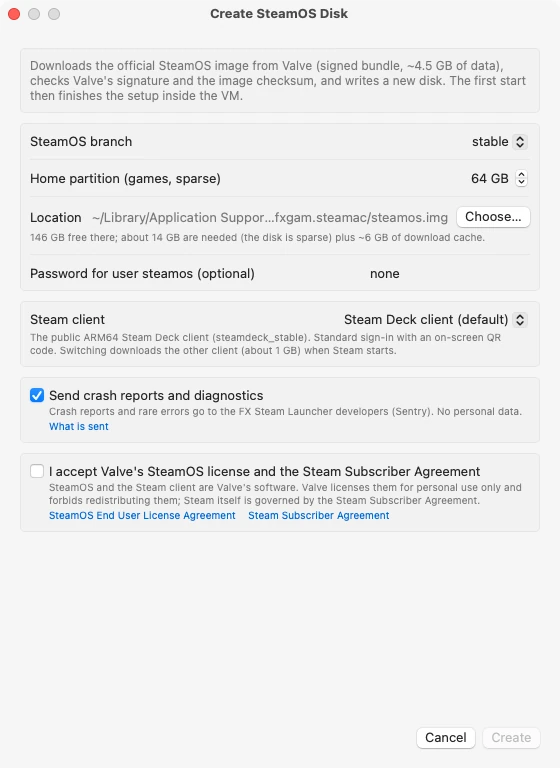
A project called steamac is doing something that was supposed to be awkward: it runs Valve’s official ARM64 SteamOS, the Steam Frame build, inside a lightweight virtual machine on Apple silicon. The result is full SteamOS on Mac hardware, with Proton handling Windows games on the GPU through Metal.
This is not a compatibility layer bolted onto macOS. SteamOS boots in a microVM built on Hypervisor.framework and libkrun, and the launcher downloads Valve’s own signed image, checks the signature and checksum, and writes it to a sparse disk. No Docker, and no third-party SteamOS fork.
What you need to run SteamOS on Mac
The requirements are short. An Apple silicon Mac running macOS 15 or later, and about 20GB free to create the disk, which breaks down as roughly 14GB of disk plus a 6GB download cache. The disk is sparse, so it grows as you install games rather than claiming the maximum up front.
The app is signed and notarized by Apple. Virtual CPU count and memory are sized for your Mac automatically, and you can override them, though the launcher warns when you over-commit. GPU memory is budgeted alongside VM memory, which stops a game from pushing the Mac into swap.
How the graphics actually get to the GPU
The stack is long but it resolves cleanly. Inside SteamOS, Proton 11 translates DirectX into Vulkan. Venus carries those Vulkan calls out of the virtual machine through virtio-gpu. On the Mac side, virglrenderer replays them onto a Vulkan driver that runs on Metal. SteamOS sees a GPU called “Virtio-GPU Venus (Apple M4 Max)” with Vulkan 1.4 support.
x86 games run through FEX, a JIT that translates x86 to ARM64. Apple silicon can do strong memory ordering in hardware, so a guest kernel patch exposes it through PR_SET_MEM_MODEL and FEX switches it on rather than emulating memory barriers in software. That last detail is a large part of why this performs at all.
You pick the final Vulkan driver in Settings, Advanced, Vulkan driver. KosmicKrisp is Mesa on Metal 4 and needs macOS 26 or newer; it is the default where available. MoltenVK is the UTM fork with steamac’s patches for geometry shaders, transform feedback and million-entry descriptor heaps, and it works on every supported Mac.
What people are actually running
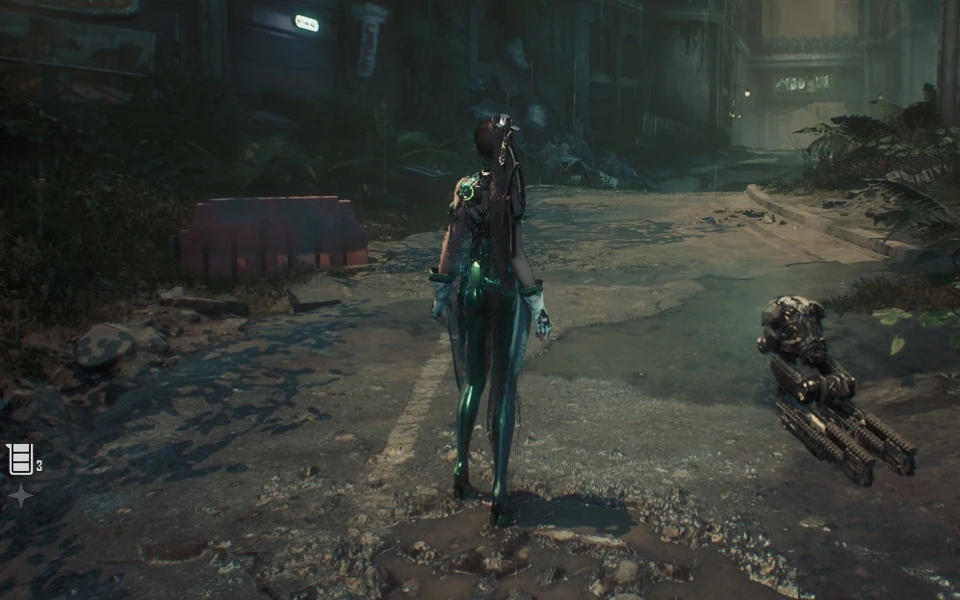
The project documents real titles rather than a vague claim of compatibility. Death’s Door was the first game to run, on DirectX 11 through DXVK. Heroes of Might and Magic: Olden Era plays seven minutes without a single error. Diplomacy is Not an Option runs as Windows x86-64 through Proton 11 and FEX. Stellar Blade Demo and Resident Evil 2 work on DirectX 12. Dragon’s Dogma 2 runs on KosmicKrisp on M2 and newer chips.
All of it is GPU accelerated, and controllers behave properly. Every gamepad macOS recognizes arrives inside SteamOS as the same kind of controller, so a DualSense, DualShock 4 or Xbox pad works with rumble. Audio goes out through CoreAudio to any output, including AirPods and external DACs, and the launcher supports multichannel output up to 12 channels.

Which Mac to use, based on the project’s own numbers
The site does not publish a recommended-model list, so the honest way to answer is to read its benchmarks. It has three reference points, and they separate cleanly.
Best case: an M4 Max or M5 Max MacBook Pro. Stellar Blade Demo holds 60 FPS at 1280×800 on an M4 Max with MoltenVK. An M5 Max runs Dragon’s Dogma 2 at around 40 FPS at 720p on KosmicKrisp. If you want DirectX 12 games to be comfortable rather than merely playable, this is the tier to buy, and the 16-inch model with the larger thermal envelope is the safer choice for long sessions.
The floor: an M1 Max. On the same Stellar Blade Demo, an M1 Max gives roughly 29 FPS with KosmicKrisp and about 18 FPS with MoltenVK. That is the clearest demonstration of the two drivers in the project’s data, and it also tells you an M1 Max is a real but marginal DirectX 12 machine. DirectX 11 is a different story: on an M1 Max, Death’s Door’s title screen reaches around 117 FPS with the experimental DXMT path, against roughly 41 before.
DirectX 11 is where older hardware stays comfortable. If your library is mostly DirectX 9, 10 and 11 titles, an M1 Pro, M1 Max, M2 or M3 will do the job. The limit is DirectX 12, not the base silicon.
Two buying notes follow from that. First, some DirectX 12 work needs M2 or newer, since Dragon’s Dogma 2 only runs on KosmicKrisp on those chips. Second, unified memory matters more than usual here, because the virtual machine and the game share it. The project budgets GPU memory with VM memory, so a machine with more headroom avoids the swap pressure that turns a playable game into a stuttering one.
The limits are stated plainly
DirectX 12 runs at feature level 12_0 on KosmicKrisp and 11_0 on MoltenVK, with shader model 6.0 on both. Games that require 12_1 or shader model 6.6, which includes most Unreal Engine 5 titles, will not start. Anti-cheat systems that block virtual machines will keep you out. New effects stutter for 50 to 100 milliseconds while Metal compiles the pipeline, and then they are cached, even across VM restarts.
Shader compilation on first run is the other thing to expect. Stellar Blade Demo took about 28 minutes on an M1 Max with KosmicKrisp, and Dragon’s Dogma 2 went from 62 minutes to about 8.5 minutes once version 1.9.4 moved to multithreaded compilation with an on-disk cache.
Where the project is now
The changelog reads like a project that is being actively fought for rather than announced. Version 1.8 brought feature level 12_0 on KosmicKrisp. 1.8.2 and 1.9.1 chased down GPU timeouts at Steam’s start on M3 and newer, and stopped Path of Exile 2 and The Witcher 3 losing their GPU. 1.9 added Russian and Simplified Chinese to the launcher and multichannel audio. 1.9.2 introduced an experimental DirectX 11 to Metal path through DXMT. 1.9.4 got Dragon’s Dogma 2 running at all.
That pattern matters if you are deciding whether to try it. This is a working, signed, no-Docker route to SteamOS on Mac hardware, and the remaining gaps are specific and documented instead of mysterious. If your library leans DirectX 11 and you already own an Apple silicon Mac, there is little risk in testing it. If you are buying a machine for DirectX 12 gaming, buy the Max chip and the memory headroom, not the base model.

Gadget Pilipinas
Founded in 2009 by Gian Viterbo, Gadget Pilipinas is one of Philippines’ top sources for news, tutorials, reviews and tips about the latest trends in technology, gadgets, games, social and digital media and cyber culture.
View all articles →