



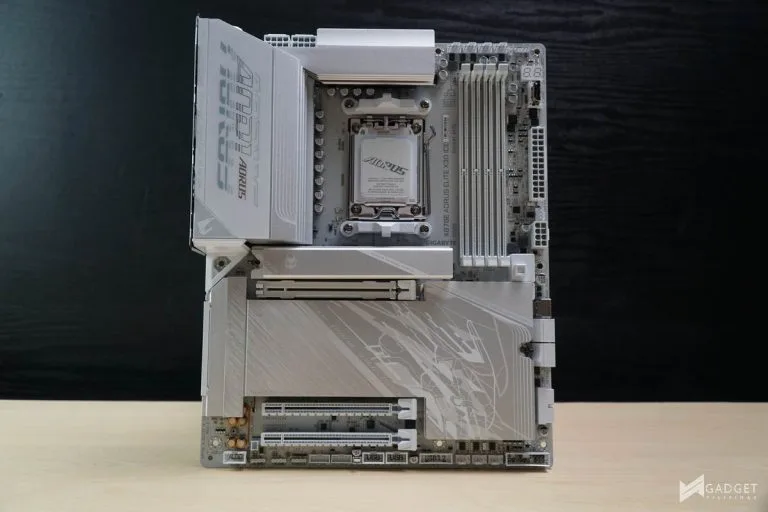
AMD’s continued support of the AM5 socket with the launch of the AMD Ryzen 7 9850X3D brings new life to the platform as it incentivizes its board partners to release new motherboards. The Gigabyte X870E Aorus Elite X3D ICE is one of the latest boards from its X3D lineup, specifically tailored to take advantage of new AMD Ryzen 9000 X3D series CPUs.
Gigabyte X870E Aorus Elite X3D ICE Motherboard – A Closer Look
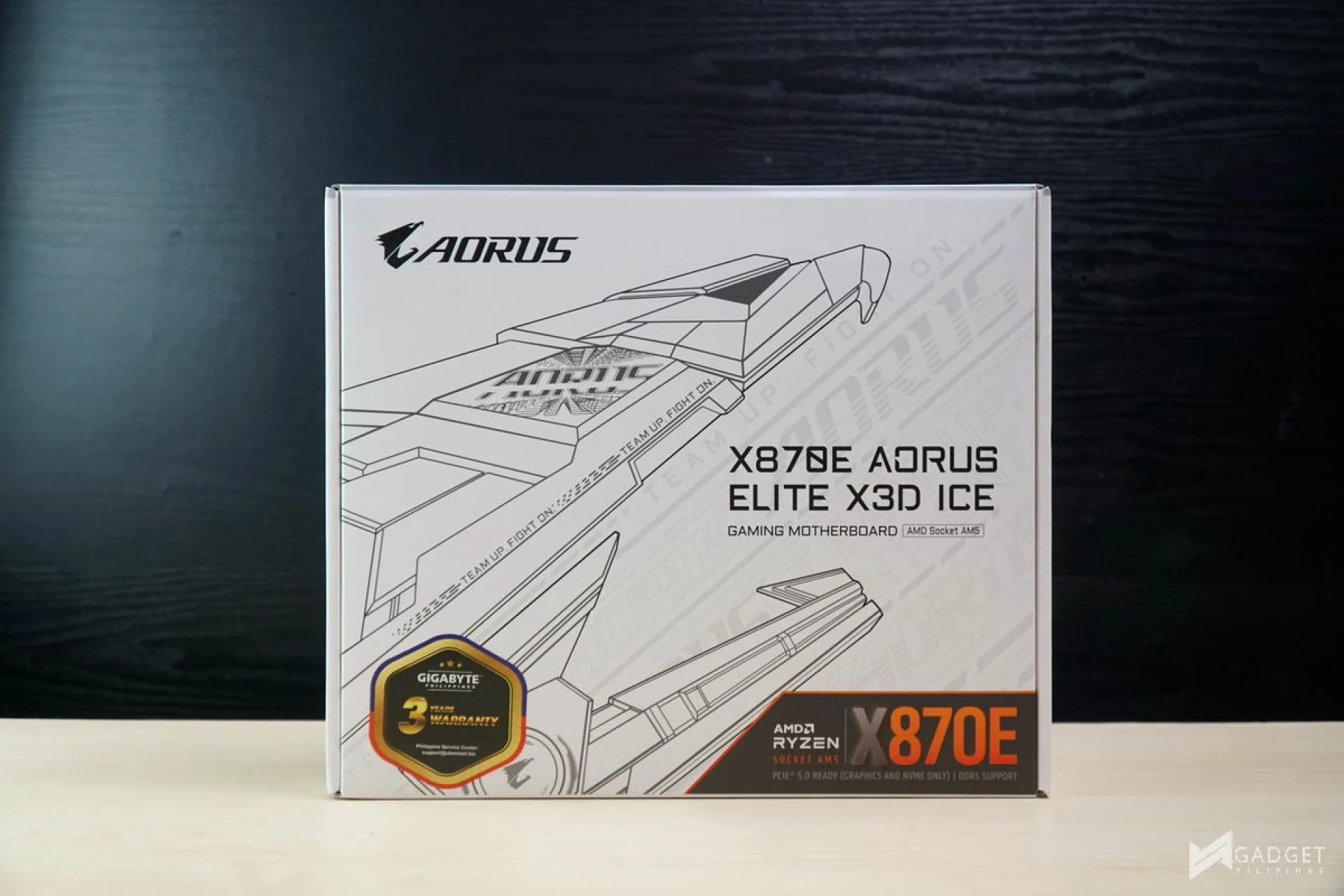
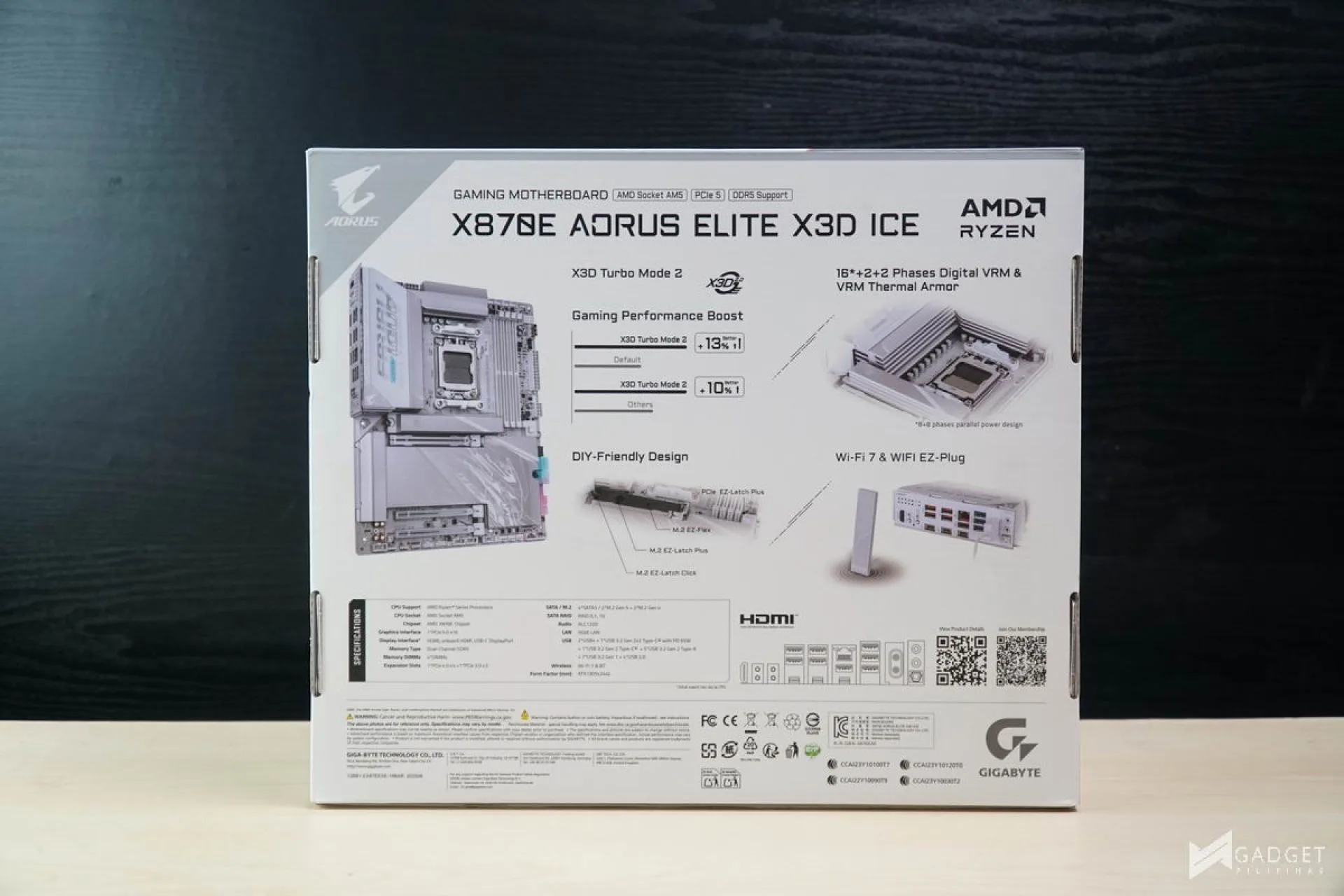
The Gigabyte X870E Aorus Elite X3D ICE sports your typical Gigabyte Aorus Packaging. The ICE moniker means that it’s a variant – similar to ASUS and its glacial series. The back shows the key features of the X870E Aorus Elite X3D ICE, especially its signature X3D turbo mode, a BIOS setting which can only be toggled if there’s an X3D CPU installed.
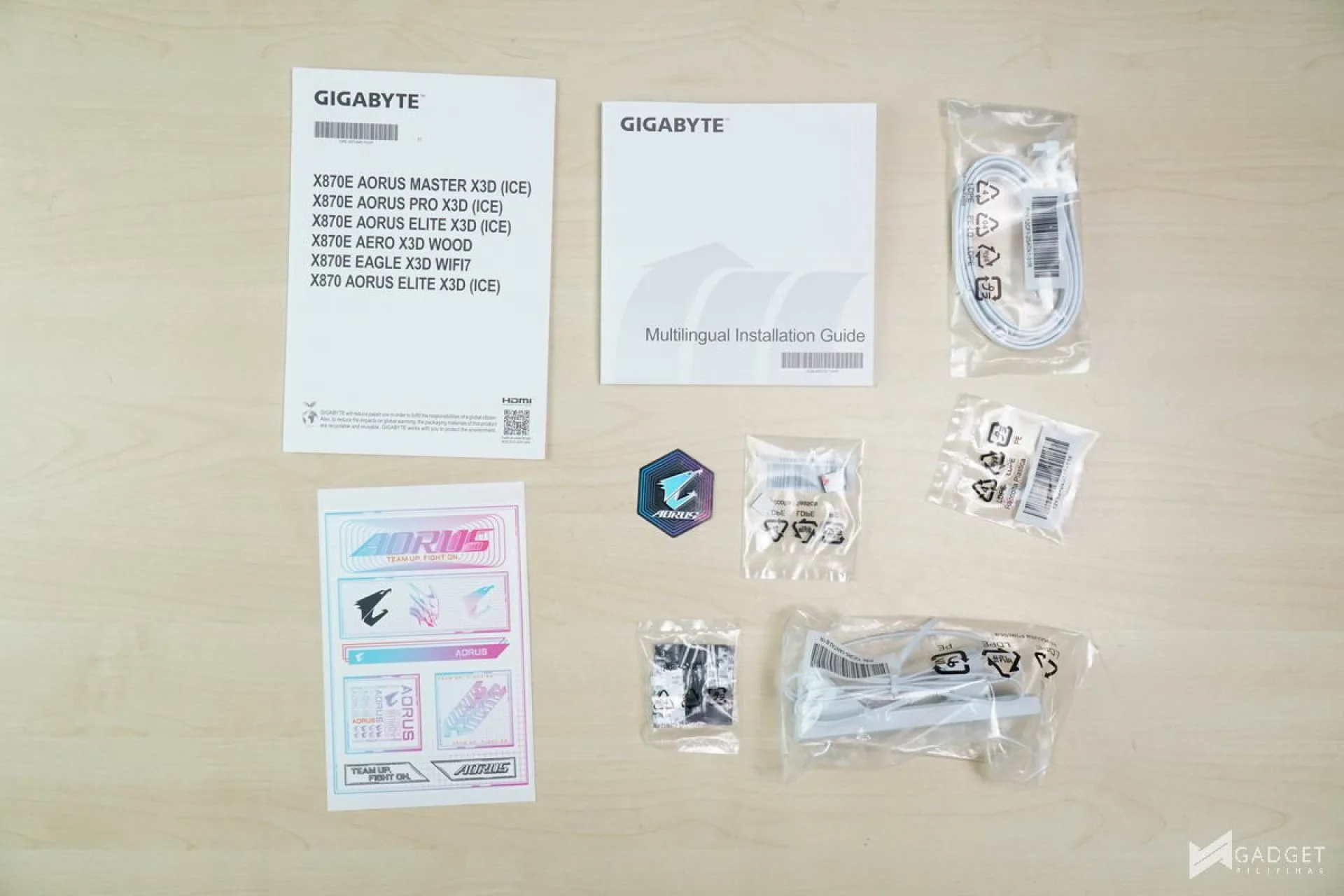
Here is the packaging contents of the Gigabyte X870E Aorus Elite X3D ICE
- 2 x SATA 6Gb/s cables
- 1 x Wi-Fi 7 EZ Plug antenna
- 1 x Quick Start guide
- 1x Sticker pack
- 1x M.2 thermal pad
- 1x M.2 EZ Latch kit
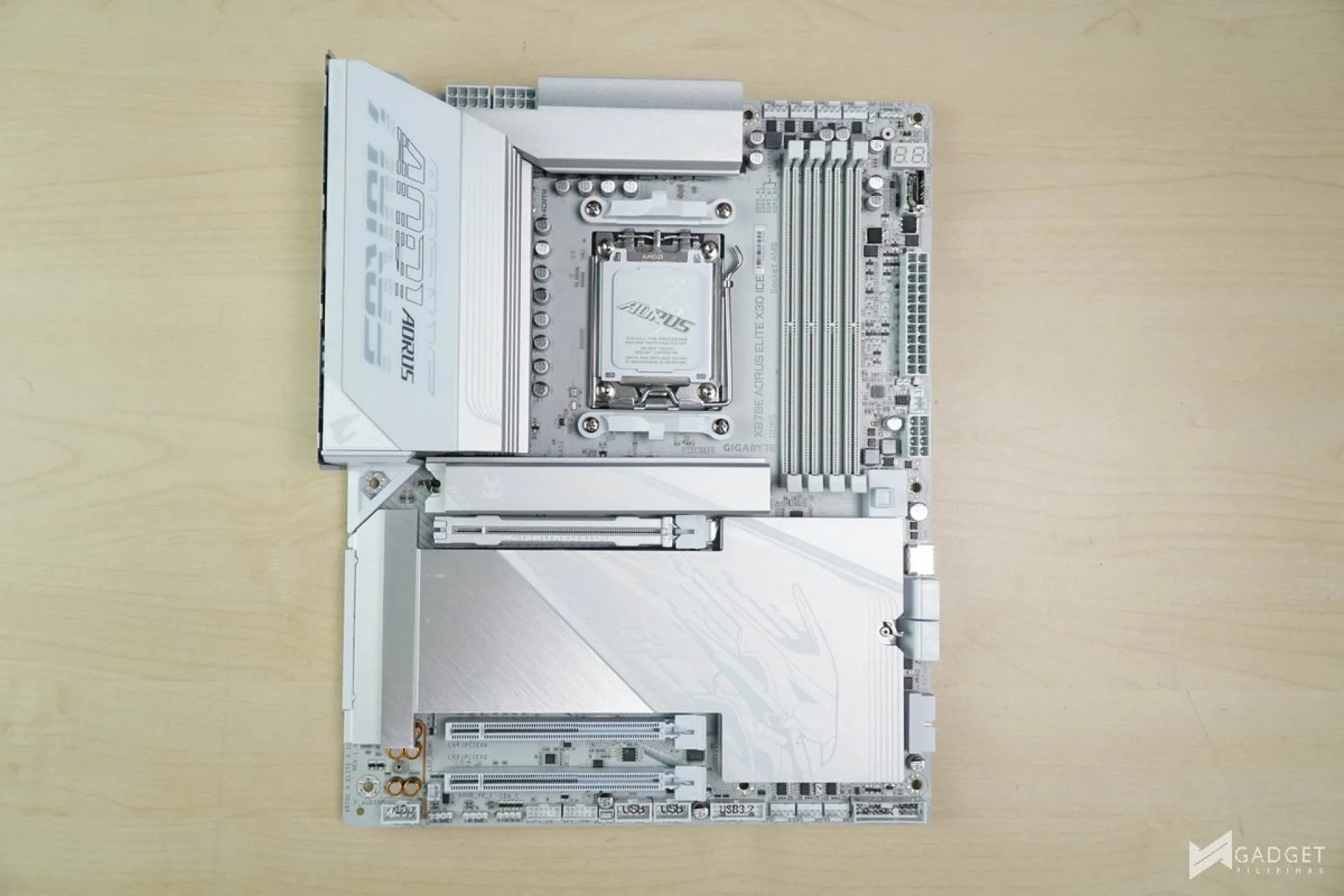
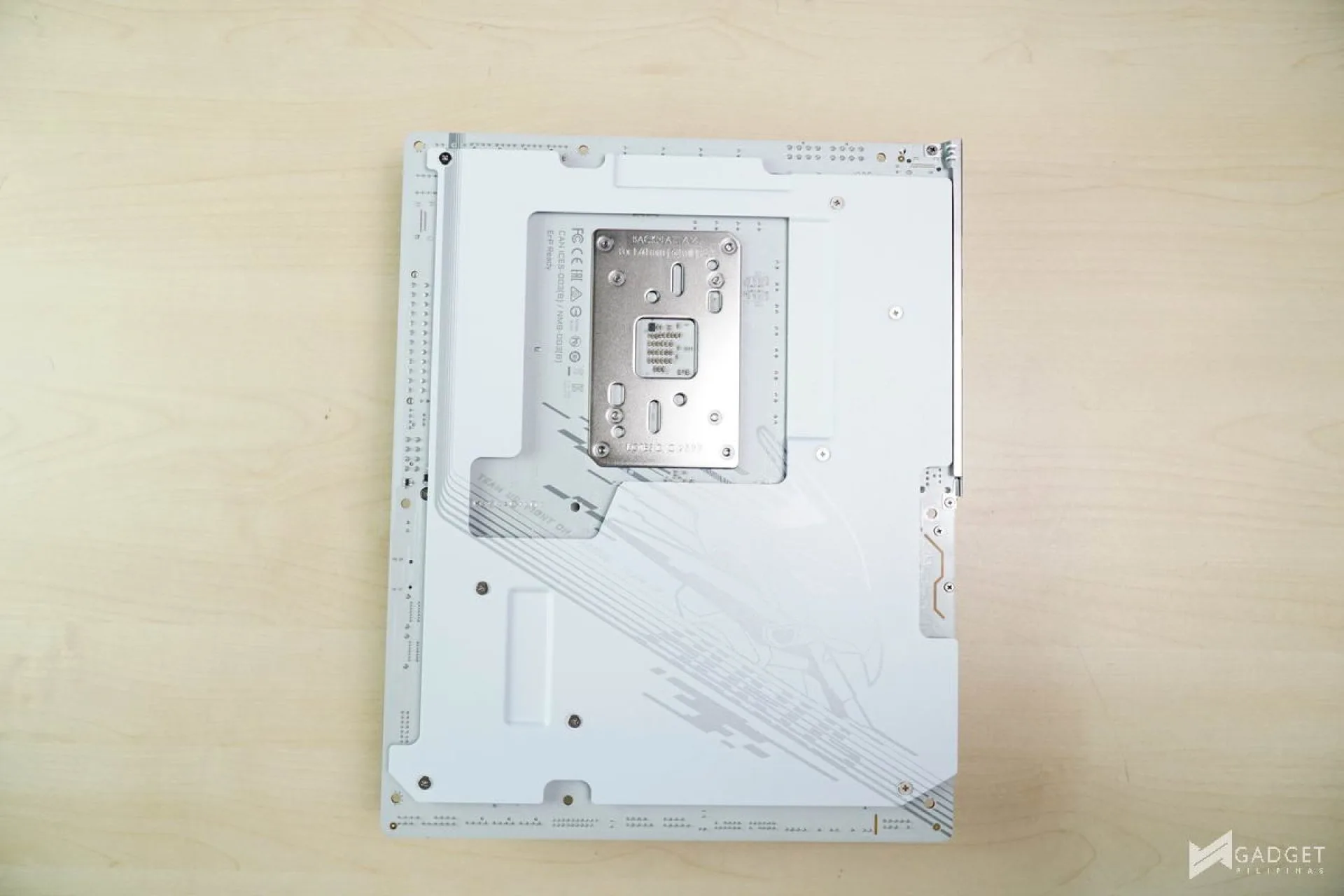
Gigabyte X870E Aorus Elite X3D ICE features a two-tone white and silver design with the silver heatsinks serving as an accent throughout the motherboard. The back also has a design and marks the return of the shielded back cover, which was previously only exclusive to higher-end Aorus Master and AI TOP motherboards.
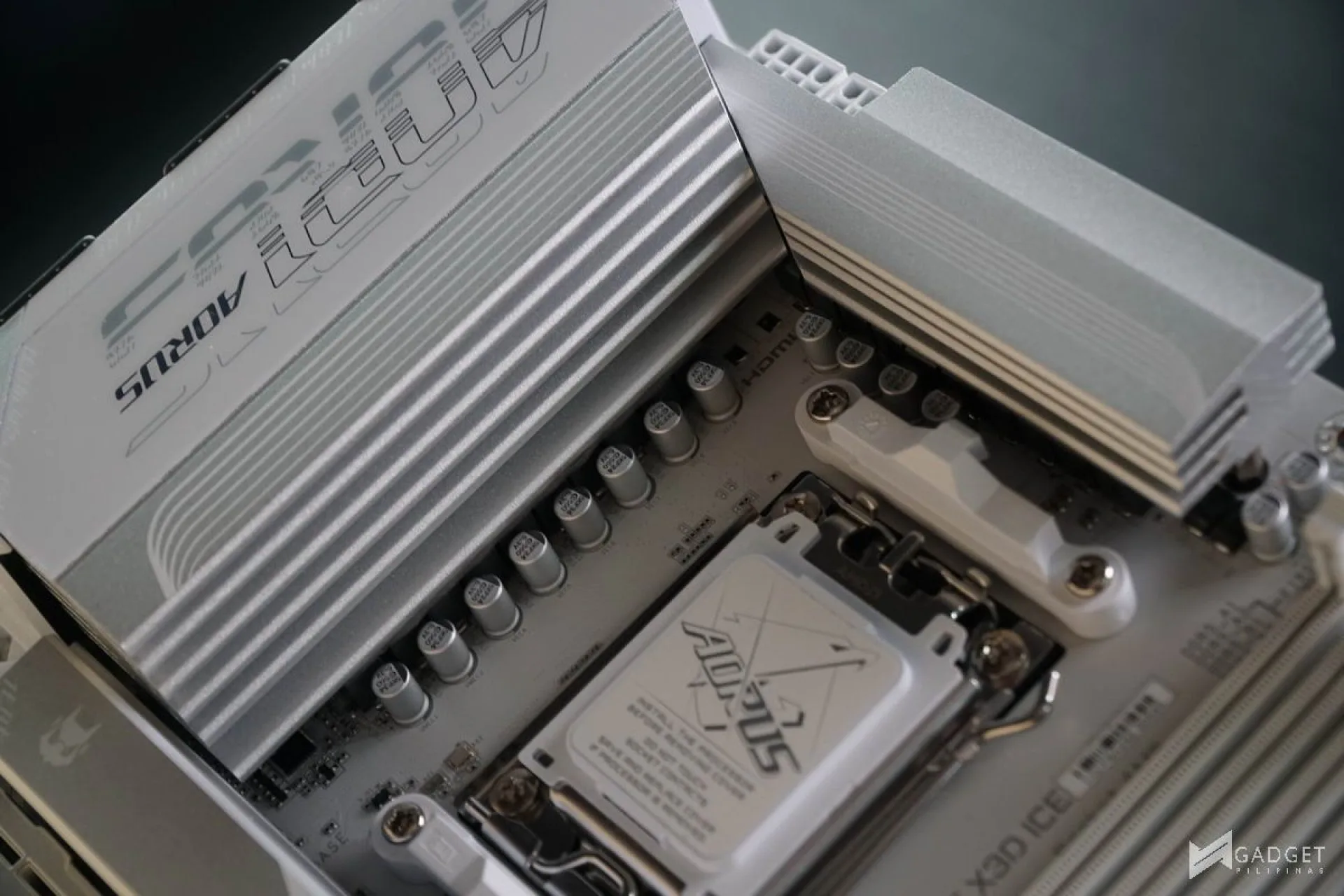
The Gigabyte X870E Aorus Elite X3D ICE features 16+2+2(SPS 80A + SPS80A + DrMOS 60A) VRM design running in a parallel power phase design. Gigabyte has a 2x Copper, 8-layer PCB for the Gigabyte X870E Aorus Elite X3D ICE motherboard for durability and stability. The VRM setup should be more than enough to handle even the Ryzen 9 9950X3D2 CPU.

Max memory support on the Gigabyte X870E Aorus Elite X3D ICE is up to DDR5-9000 with up to 4x DDR5 256GB sticks. Gigabyte motherboards also feature the AORUS AI Snatch and X3D Turbo Mode 2.0 to automatically overclock and tweak both your RAM and X3D CPU for optimal performance.
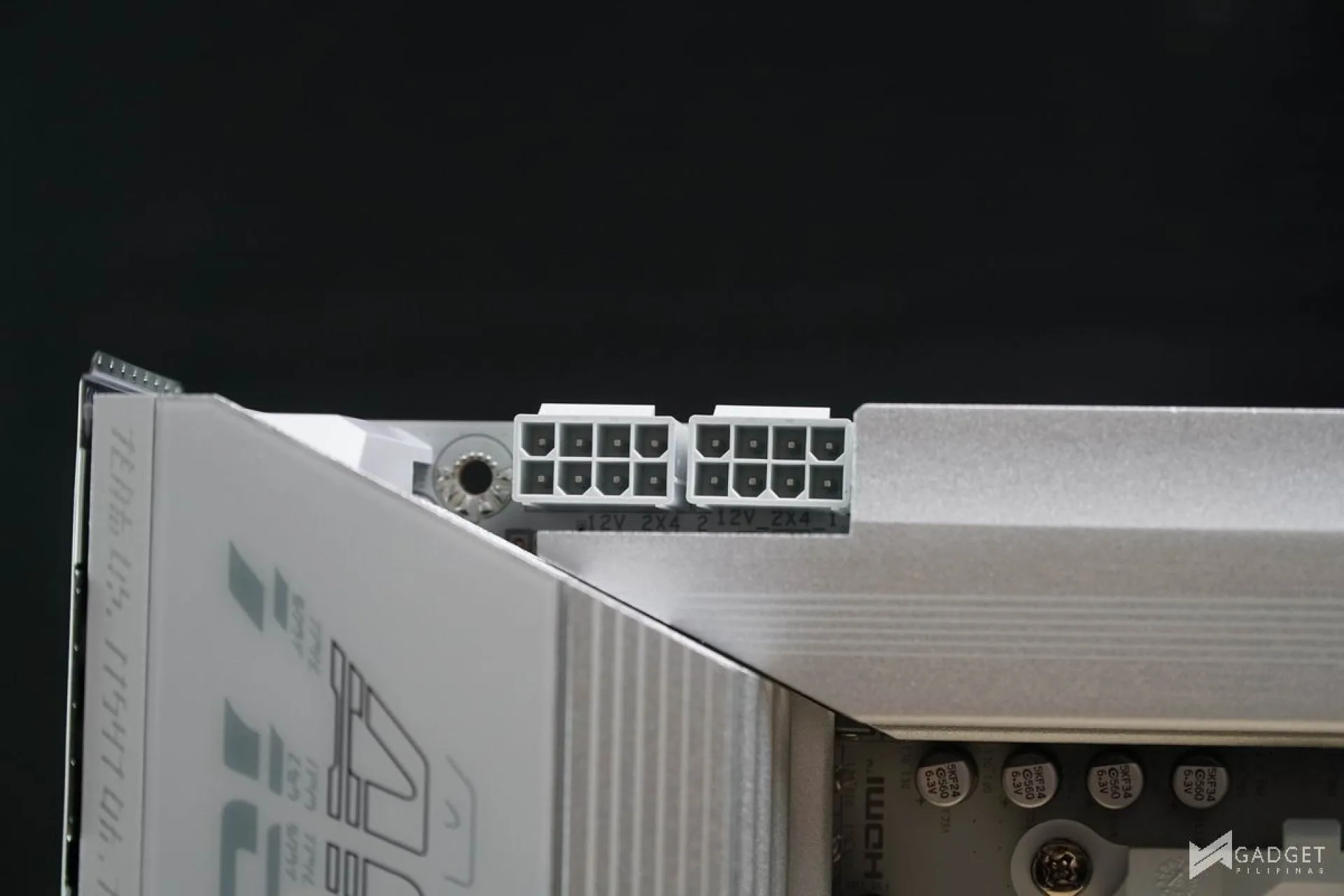
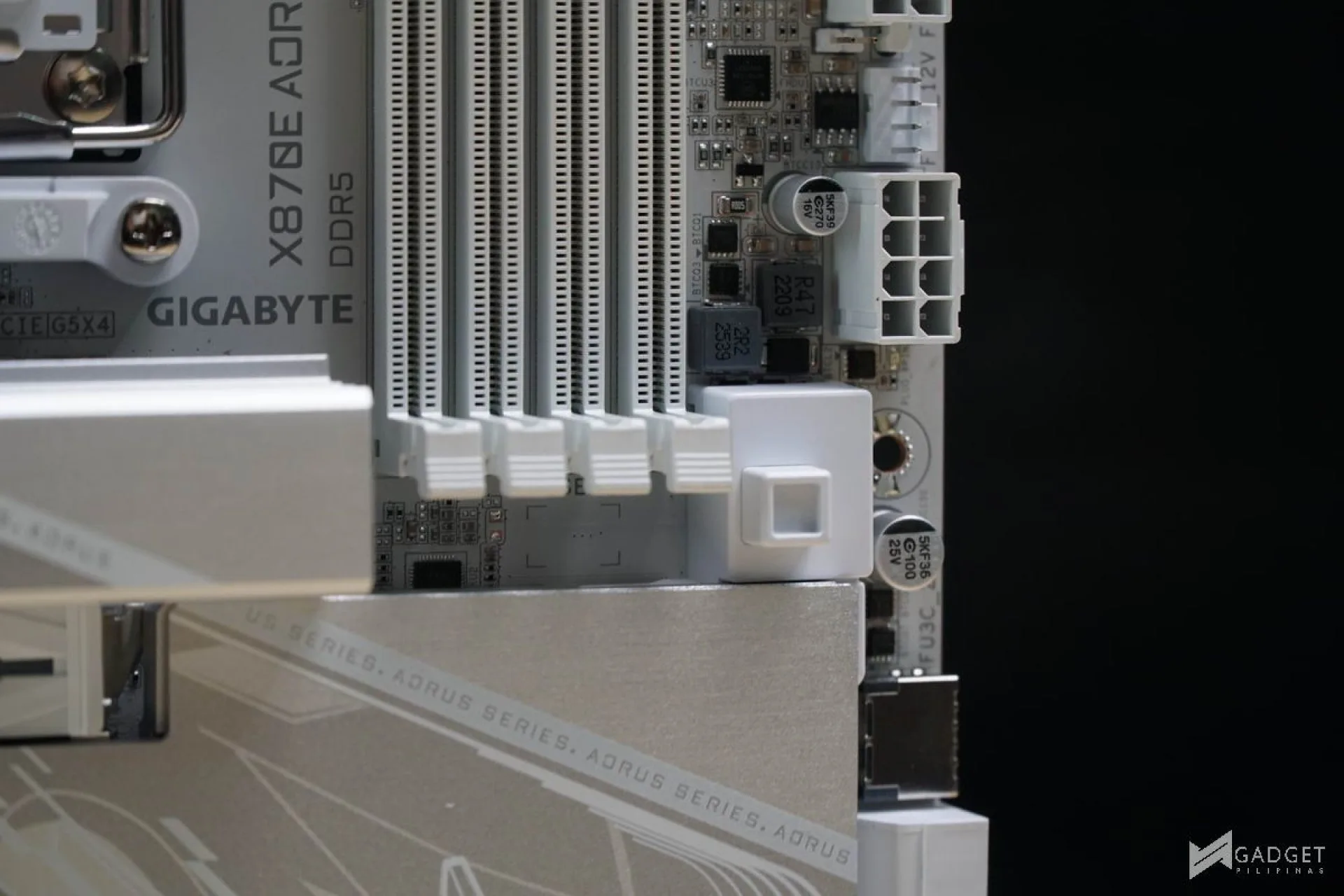
You have two 8PIN EPS 12V UD power connectors that have solid pins for enhanced power conductivity and thermal dissipation. The UD power connectors also have solid pins for better signal transmission and reduced metal wear from repeated connections.
There’s an additional 8-pin PCIe power connector to power the front QC-USB 65W Type-C port.
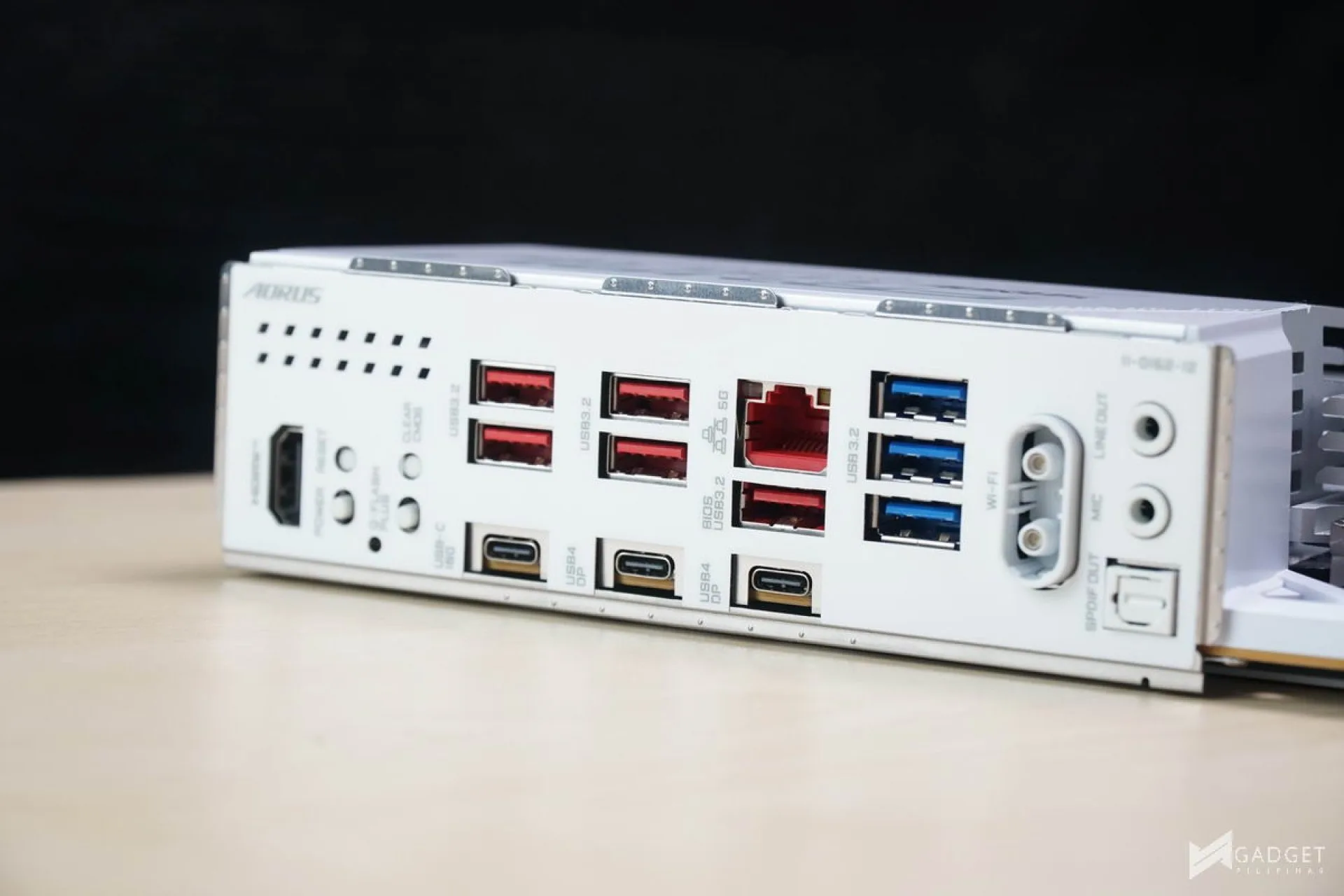
Port selection is generous on the Gigabyte X870E Aorus Elite X3D ice. The rear IO sports five USB 3.2 Gen 2 Type-A ports, two USB 4 ports with DisplayPort support, one USB 3.2 Gen 2 Type-C port, three USB 3.2 Gen 2 Type-A ports, one Q-Flash Plus button, one Clear CMOS button, one HDMI port, two audio jacks, one S/PDIF connector, and one EZ Latch Wifi 7 antenna.
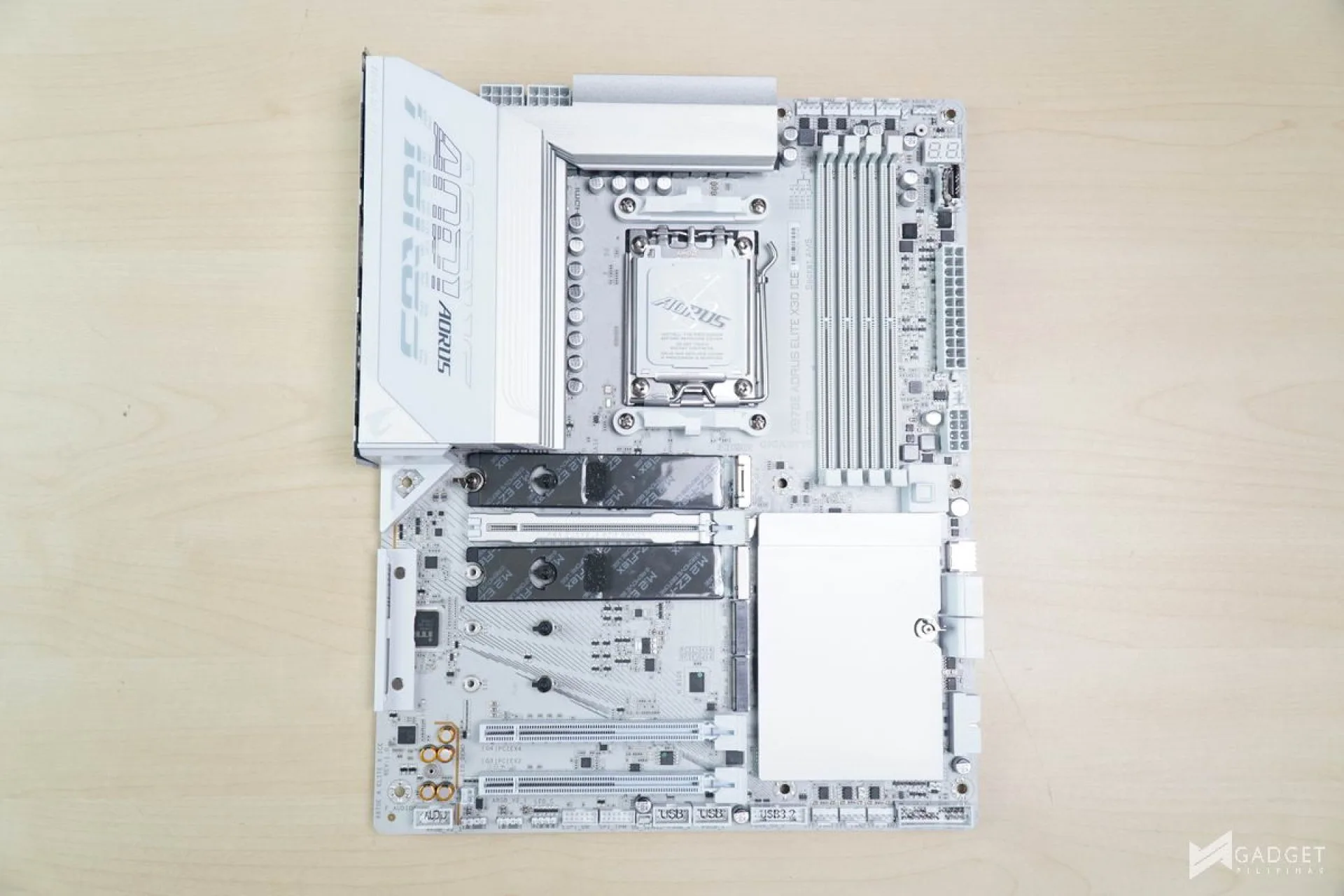
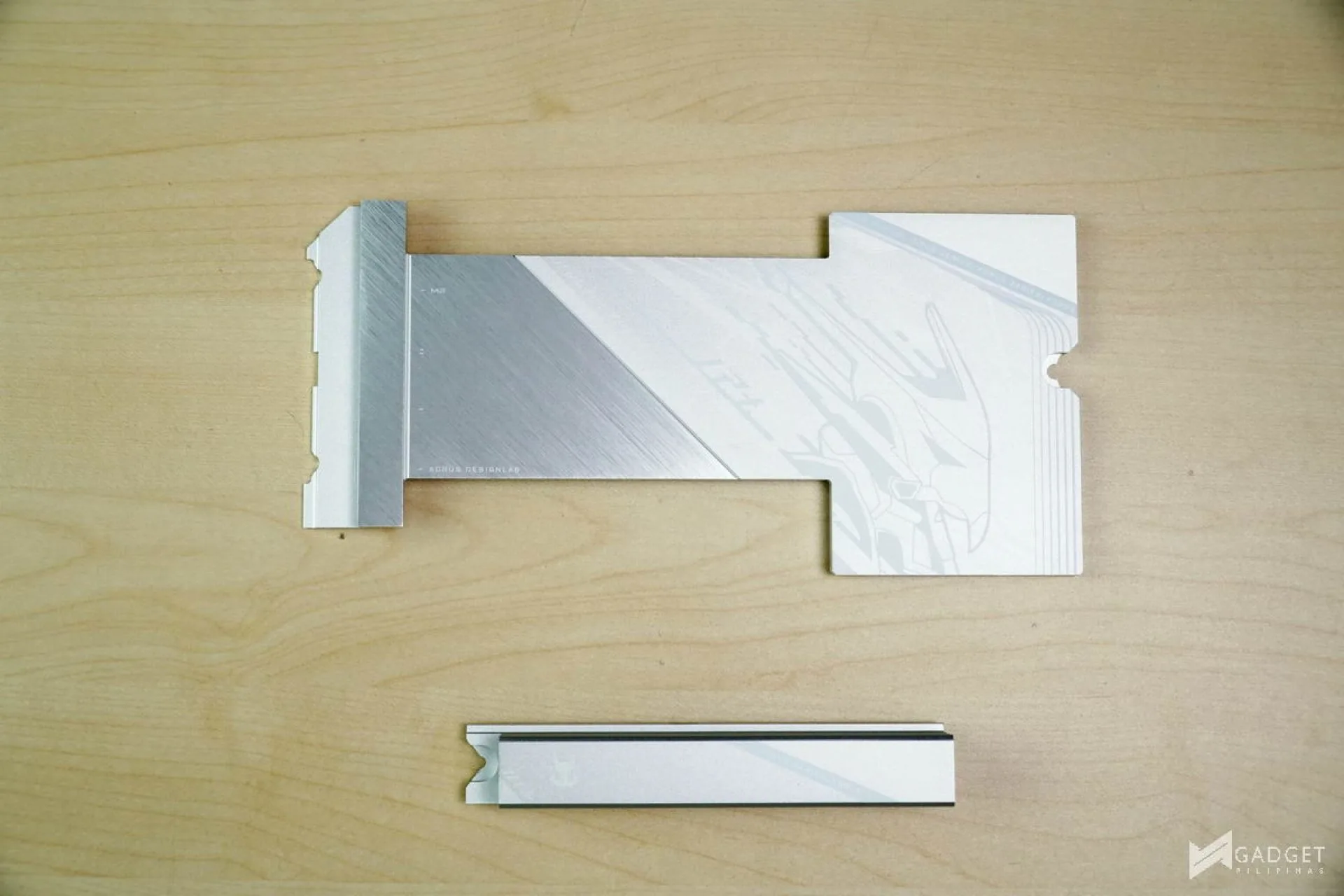
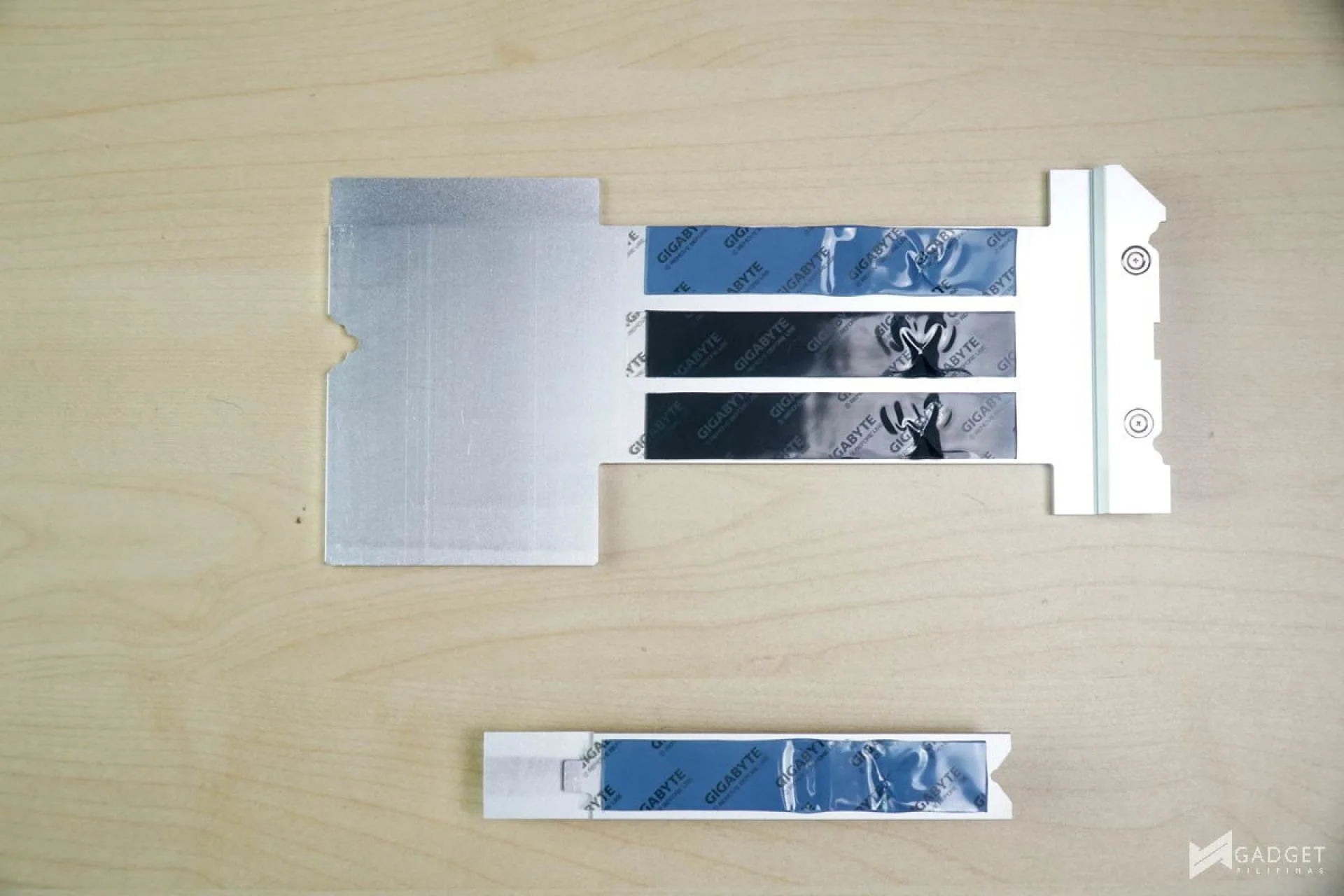
Continuing the robust connectivity, the Gigabyte X870E Aorus Elite X3D ICE has four M.2 slots, two of which support PCIE Gen 5 SSDs. Unlike the X870E Aorus Master, which is a higher-tier motherboard with its Master moniker, the X870E Aorus Elite X3D ICE doesn’t have any PCIE bifurcation when you populate all SSD slots.
Like most motherboards, only the top-most M.2 slot has a dedicated heatsink while the rest are shared. Not to mention the hassle of needing to remove your GPU first to access the rest of the M.2 slots.
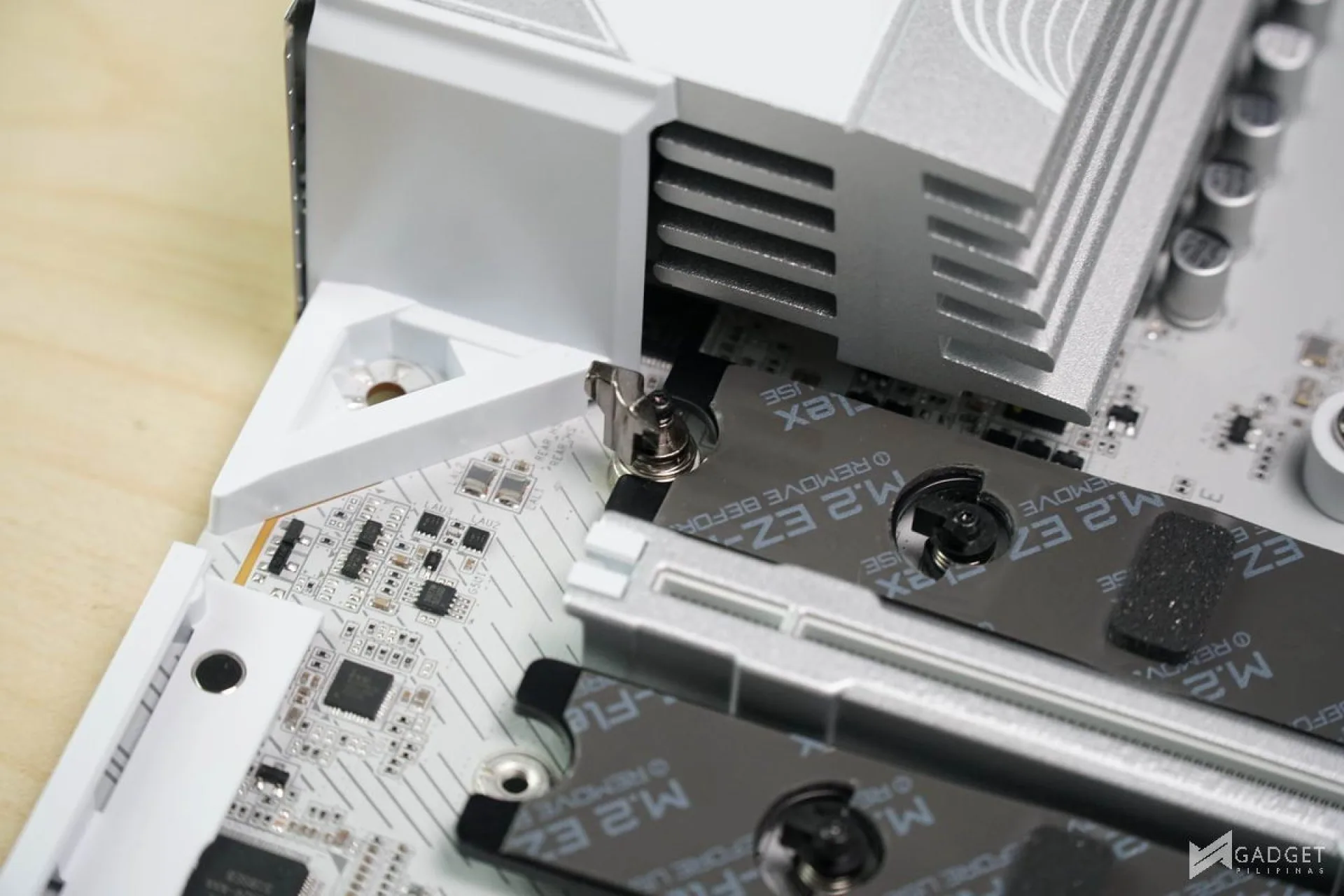

The Gigabyte X870E Aorus Elite X3D ICE has a lot of quality of life and toolless solutions for a hassle-free assembly process. PCIE EZ-Latch Plus lets you disconnect anything connected to the top-most PCIE x16 slot with a button located on the RAM slots. M.2 EZ-Latch Click and M.2 EZ-Latch Plus are the screwless solutions for the M.2 SSDs and heatsinks.
Benchmark Setup and Test Methodology
Gadget Pilipinas’ testing philosophy is to provide detail-oriented results as accurately as possible so that our readers can replicate our tests, given that these conditions are met. Different benchmarking apps and sequences are used depending on the tested component or device.
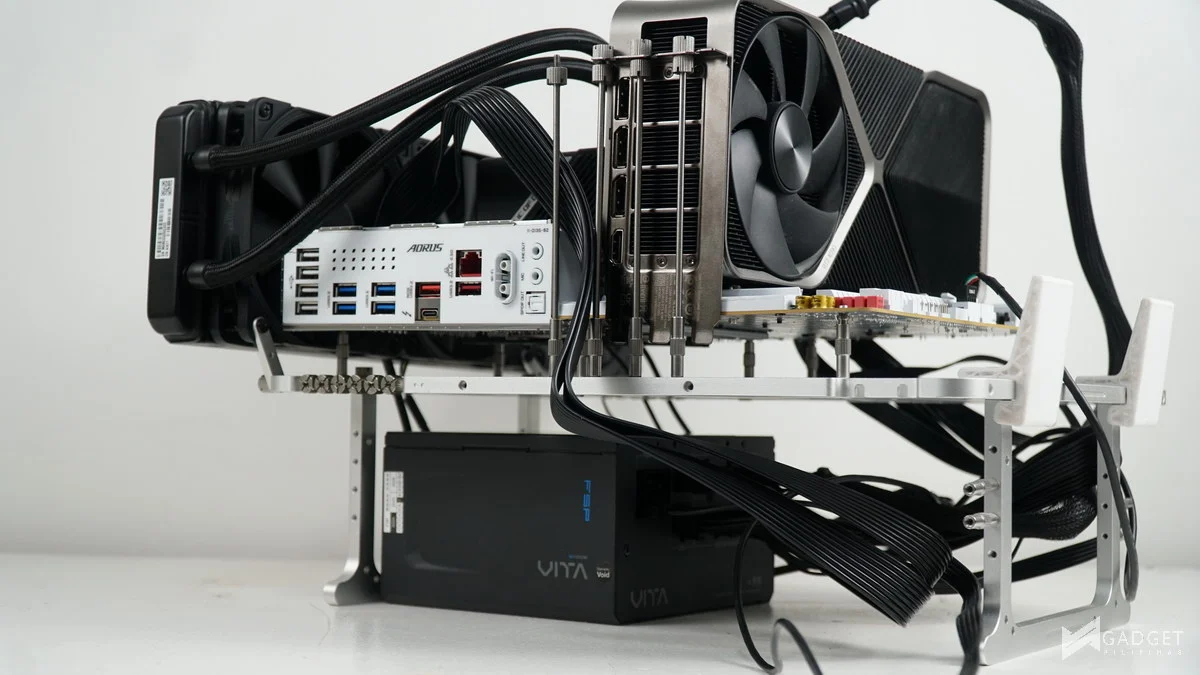
| CPU | AMD Ryzen 7 9850X3D |
| COOLER | RYUJIN II 360mm V2 – NT-H2 Thermal Paste |
| MOTHERBOARD | MSI MPG X870E CARBON WIFI |
| MEMORY | Trident Z Neo 32GB(2x16GB) DDR5-6000 CL28 |
| GPUs | NVIDIA GeForce RTX 5090 Founders Edition |
| STORAGE | Kingston Renegade 2TB NVME SSD |
| POWER SUPPLY | FSP VITA GM1000W Gold ATX 3.1 |
| OPERATING SYSTEM | Windows 11 Pro Build 25H2 |
| CASE | Open Benchtable V2 |
We use CapFrameX 1.8.4 BETA as our primary FPS capture and analysis tool for all our gaming benchmarks. The latest build version of Windows 11 Pro and WHQL-certified drivers are used for our benchmarks. Readings such as temperatures and power draws are recorded using HWINFO64, and other relevant software for cross-checking.
For more info, read our Review and Benchmark methodology article.
Gigabyte X870E Aorus Elite X3D ICE Benchmarks
3DMark – Firestrike, Timespy, and CPU Profile
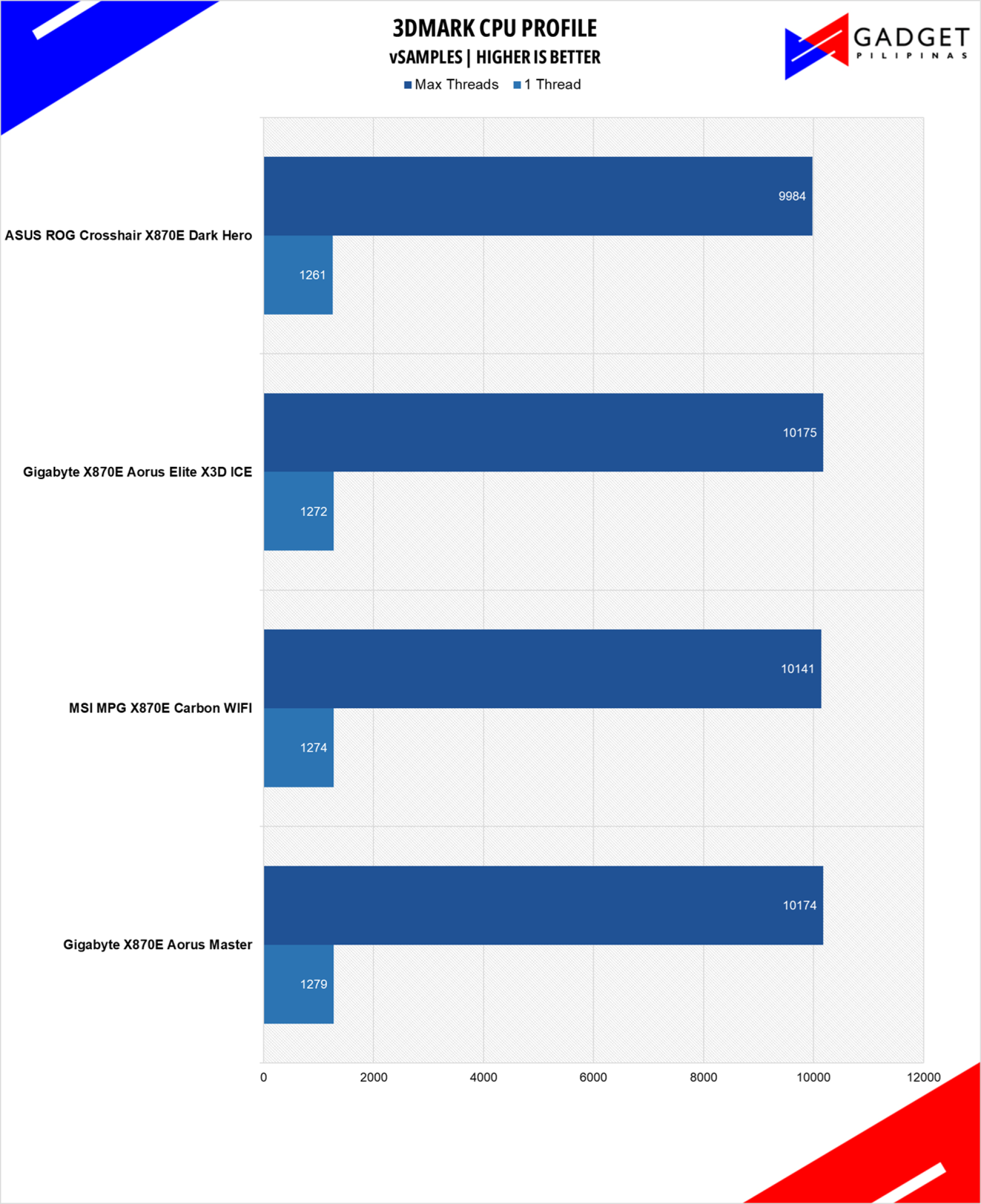
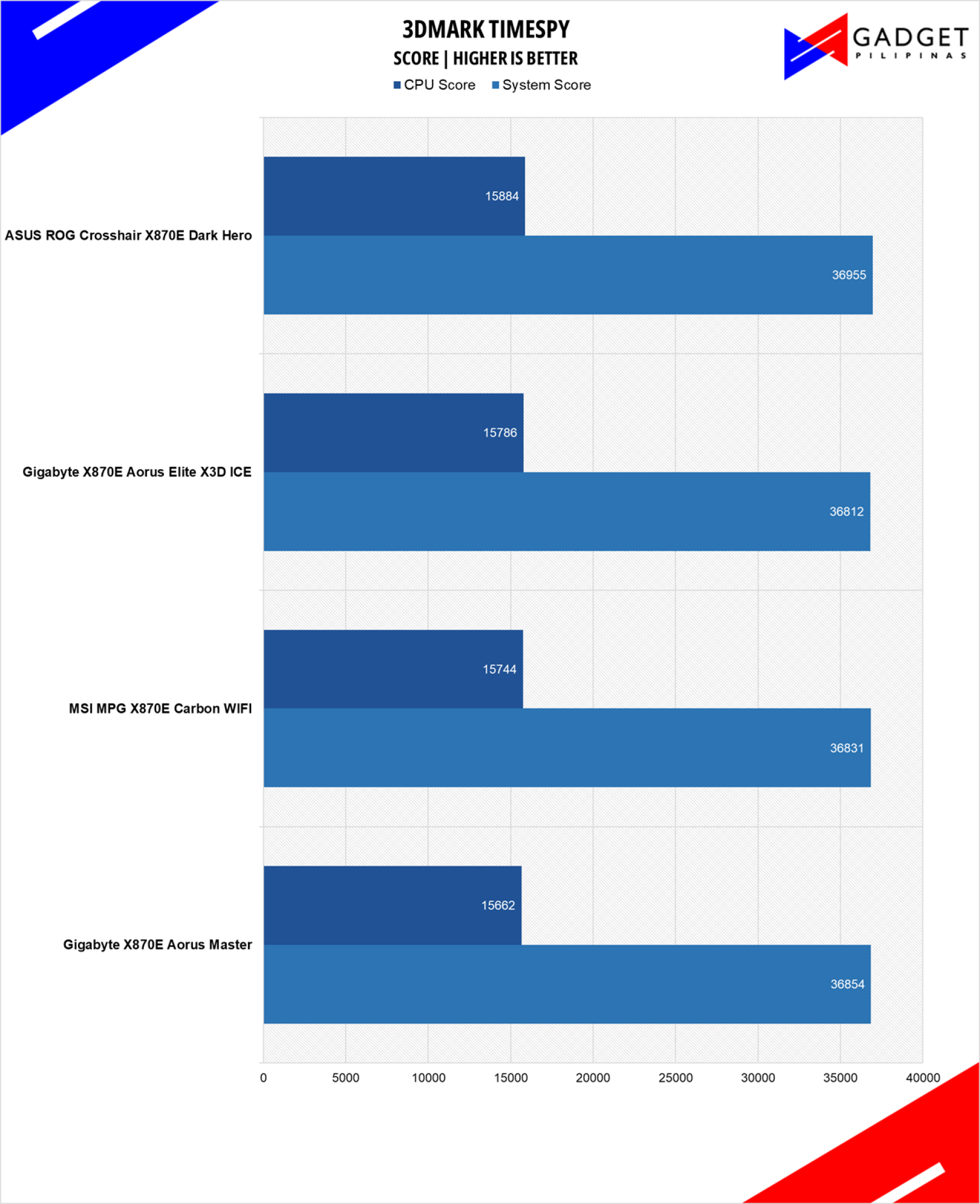
3DMark is the go-to benchmark for gamers because of the ability to share and compare results online.
SuperPI 32M
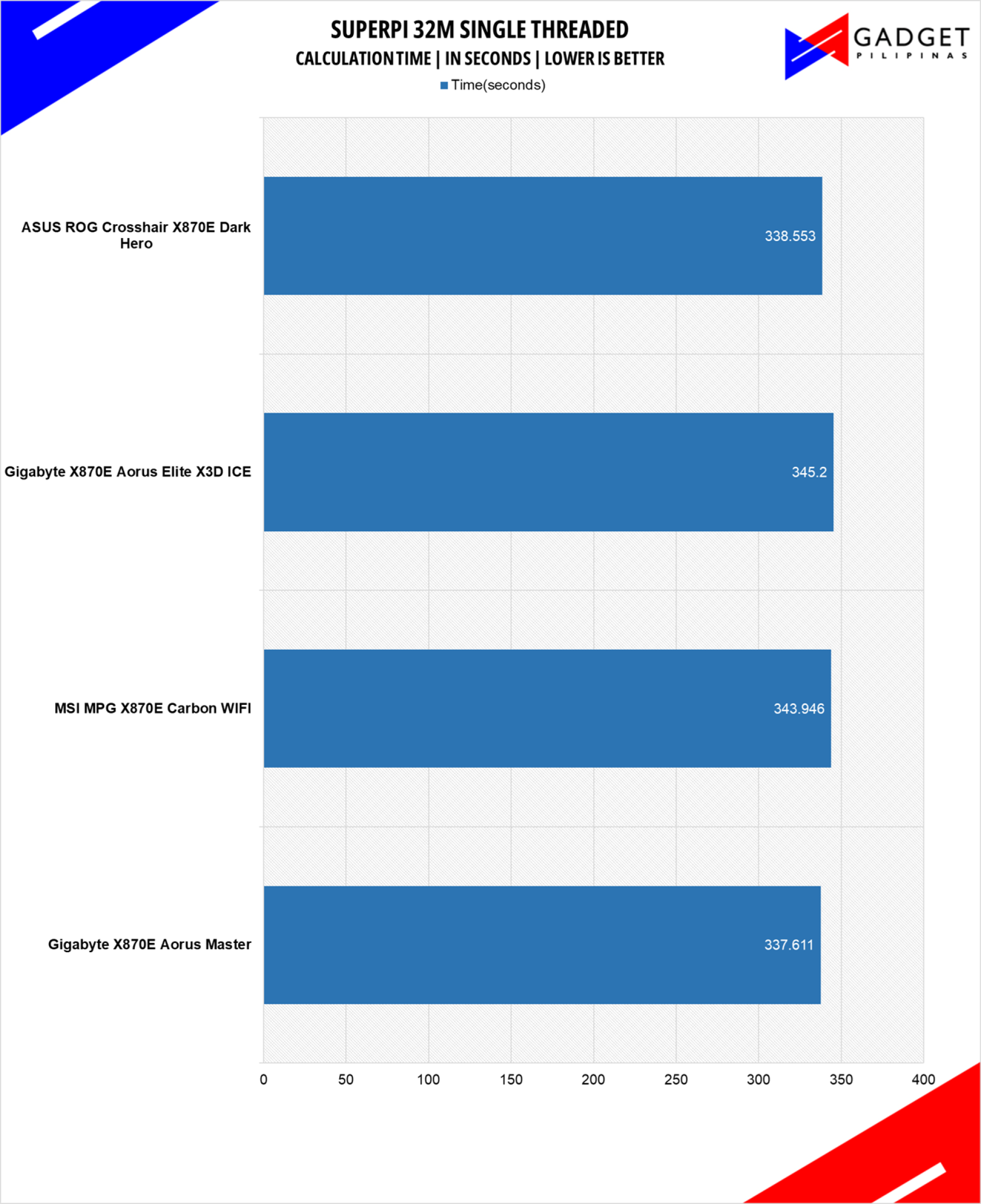
SuperPI is a single-threaded benchmark application that lets the CPU calculate Pi(π) to the nth digit. In this benchmark, we selected the Pi calculation to 32M, the highest available for the app.
CINEBENCH 2024.1
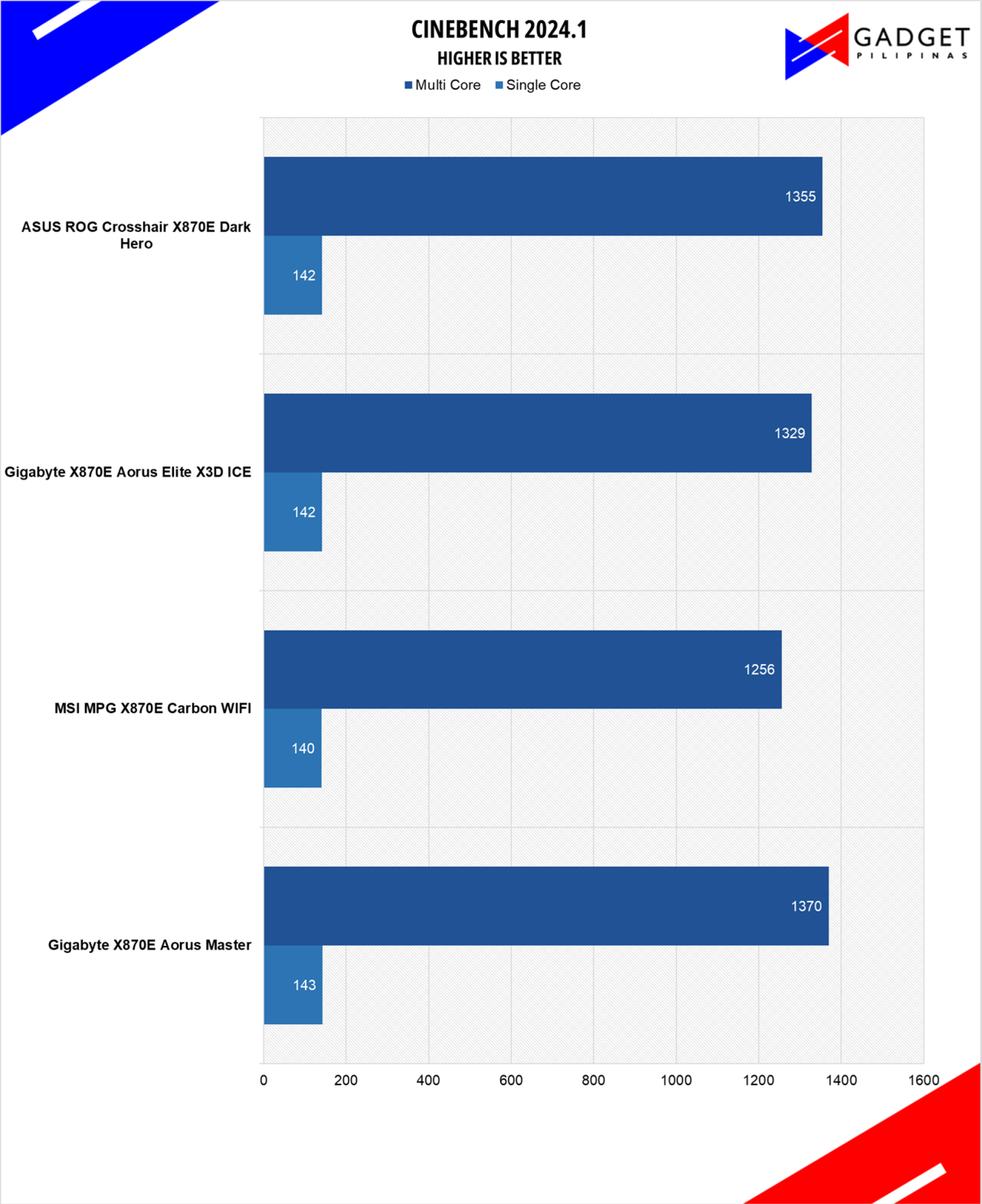
Maxon’s Cinebench benchmark is one of the most iconic benchmark applications used by reviewers and enthusiasts. The latest Cinebench R23 uses the latest rendering architectures, including Intel’s Embree ray tracing technology and other advanced features from AMD and Intel that allow users to render the same scene on the same hard.
ADOBE PREMIERE PRO v26 – PROCYON
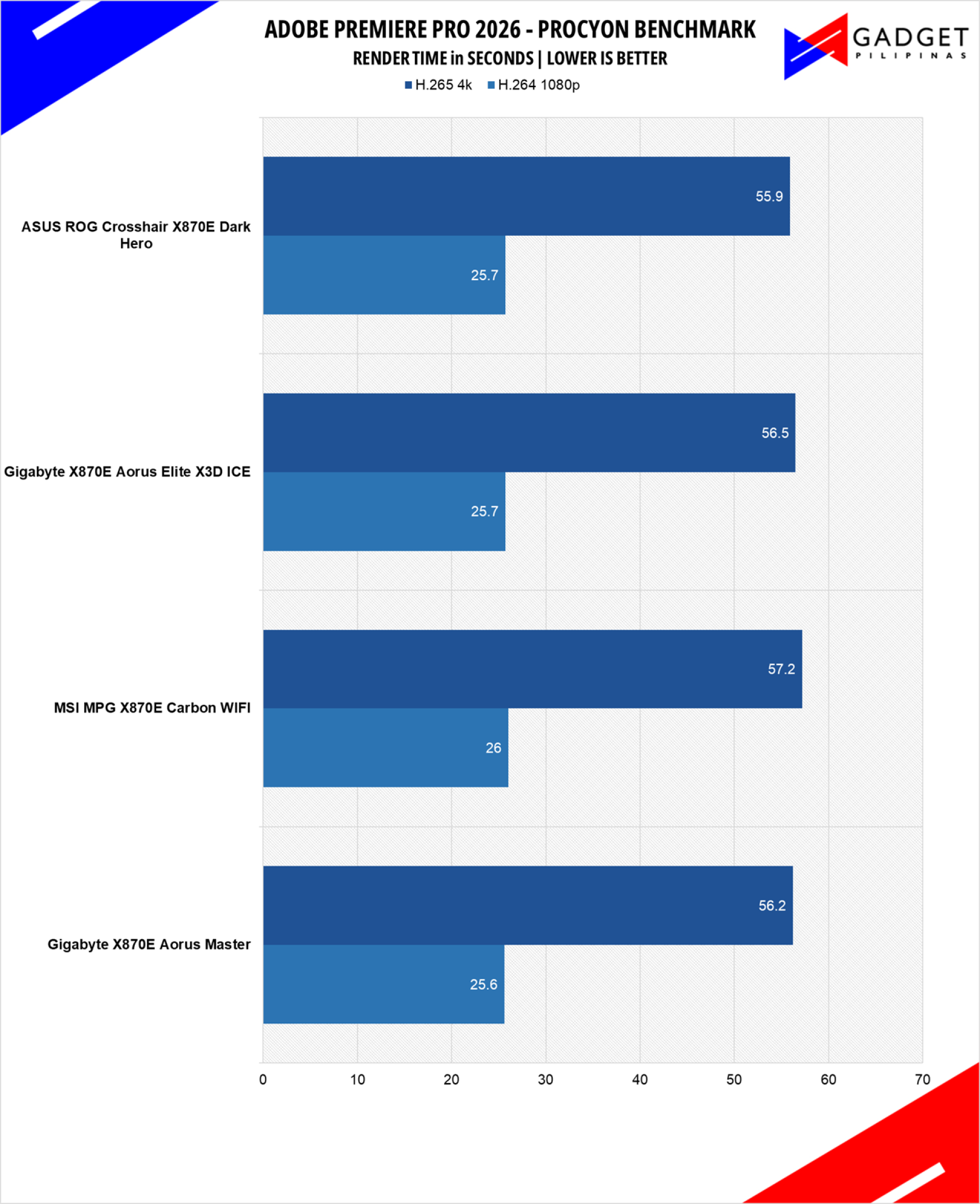
Procyon benchmark suite is developed by the UL, the same team behind 3DMark and PCMark benchmarks. The UL Procycon video editing benchmark uses Adobe Premiere in a typical video editing workflow. The benchmark starts by importing two video project files with various edits, adjustments, and effects – the second project uses several GPU-accelerated effects. Each project is exported in 1080p with H.264 encoding and again in 4K with HEVC H.265. The reported score is based on the time taken to export all four videos.
OCCT Enterprise Benchmark
OCCT is a popular benchmark and stability testing tool among overclockers, enthusiasts, and system integrators
wPrime 1024M
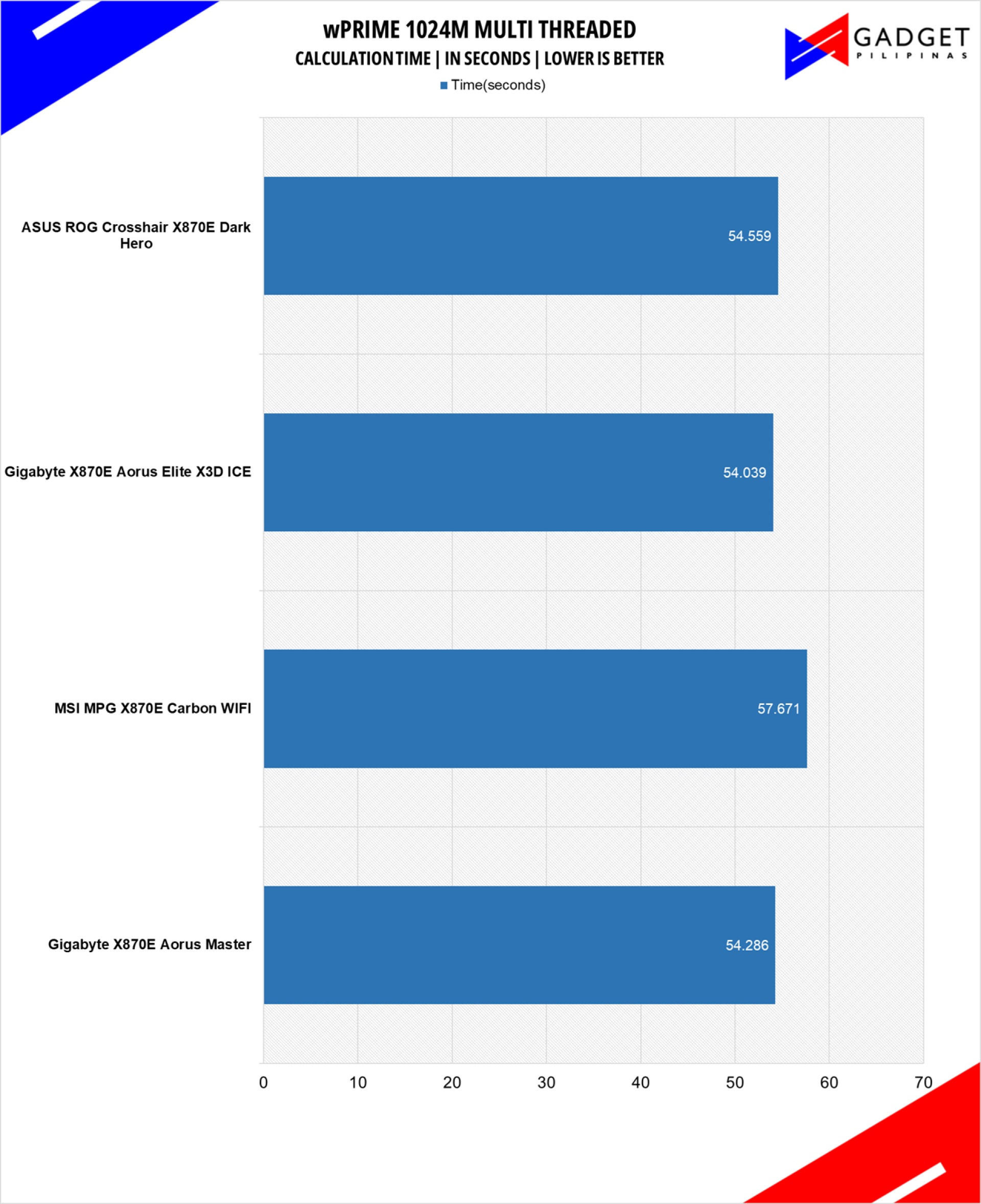
wPrime is a benchmark tool similar to SuperPI, but the former takes on finding prime numbers using Newton’s Method. The benchmark is set to calculate 1024 million prime numbers, and the performance is measured according to calculation time.
V-RAY 6
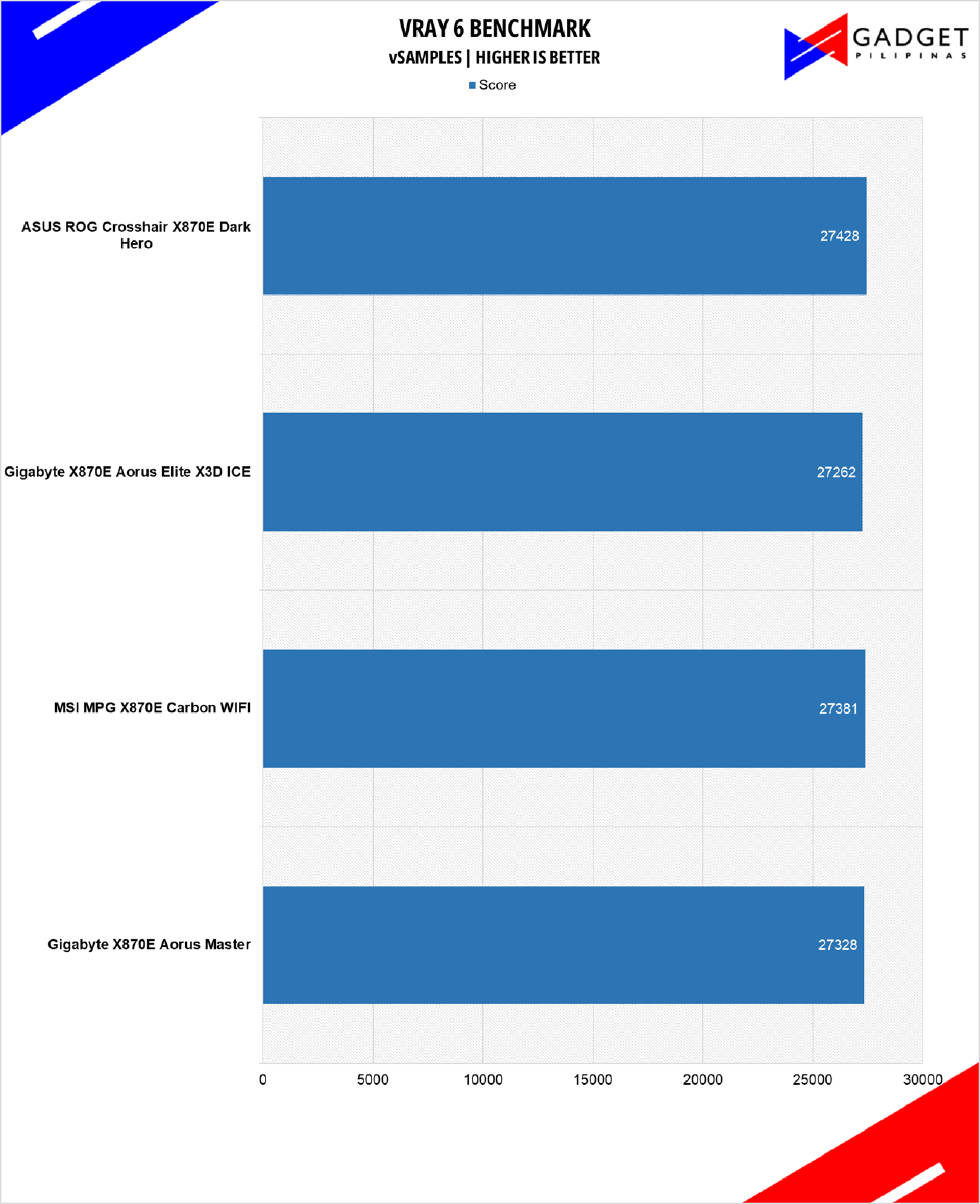
V-Ray Benchmark is a stand-alone version of V-Ray developed by Chaos Group. It is designed to test the CPU and GPU by rendering sample scenes at a fixed amount of time. V-Ray is a plug-in mostly utilized by 3D computer graphics software applications, mainly for industrial design, product design, architecture, film, and video game production. V-Ray is not limited to 64-threads as it supports multi and mega-threading.
BLENDER
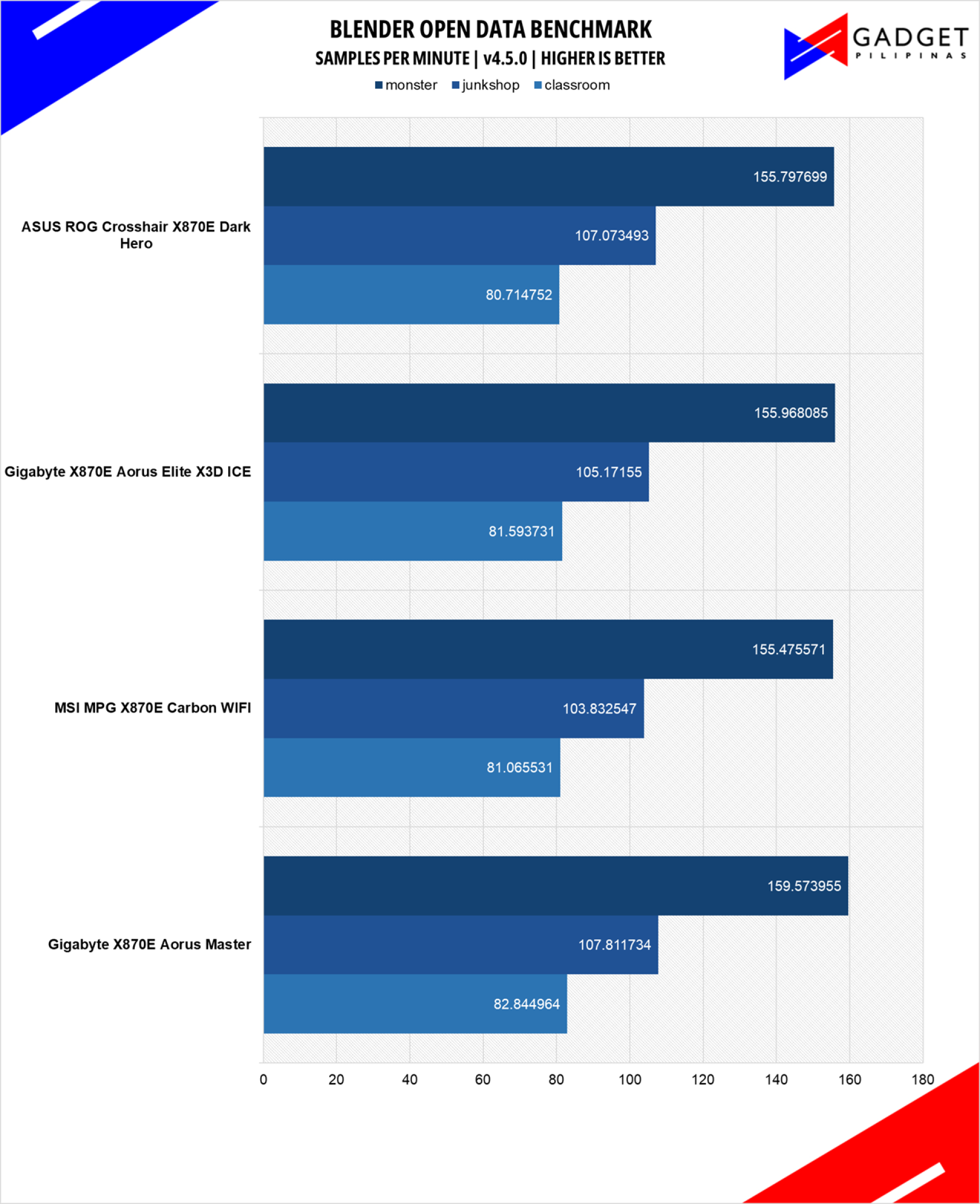
Blender is a widely used, free, open-source 3D creation suite. It supports the whole 3D pipeline process from modeling, rigging, animation, simulation, rendering, and even motion tracking. Blender has become a standard for CPU benchmarks, with the BMW27 and Classroom Scene being the most used. This prompted the company to release Blender Open Data Benchmark in 2018, a benchmark-specific version allowing users to run a preset benchmark and share the results online like 3DMark.
GeekBench 6.5
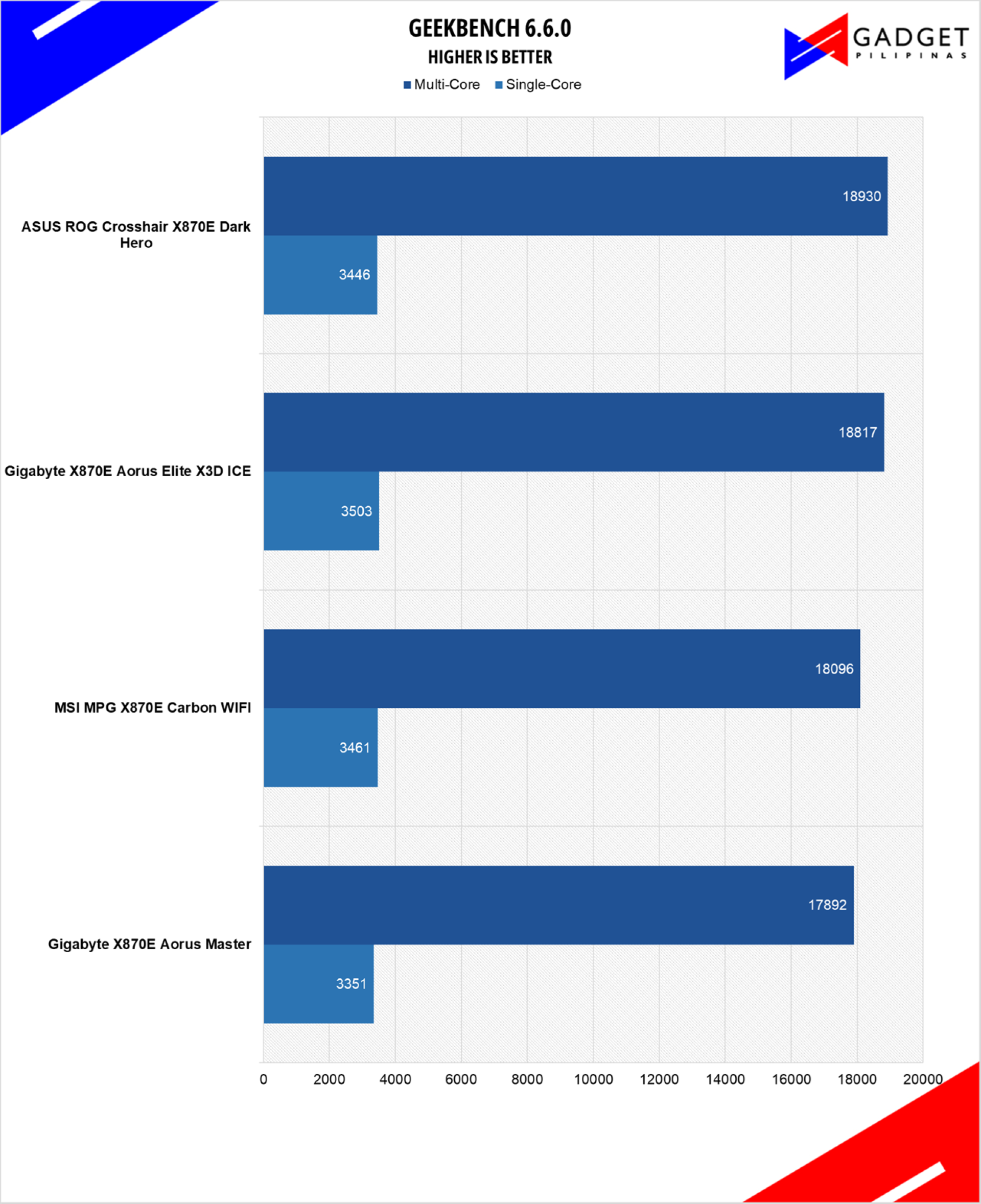
Geekbench is a multi-platform benchmark used to gauge CPU performance and compare it across Windows, Mac, and Mobile. Geekbench 6 is the latest version and doesn’t rely on memory more than the previous Geekbench 4, making it a great tool to measure both single-core and multi-core CPU performance.
PCMark10
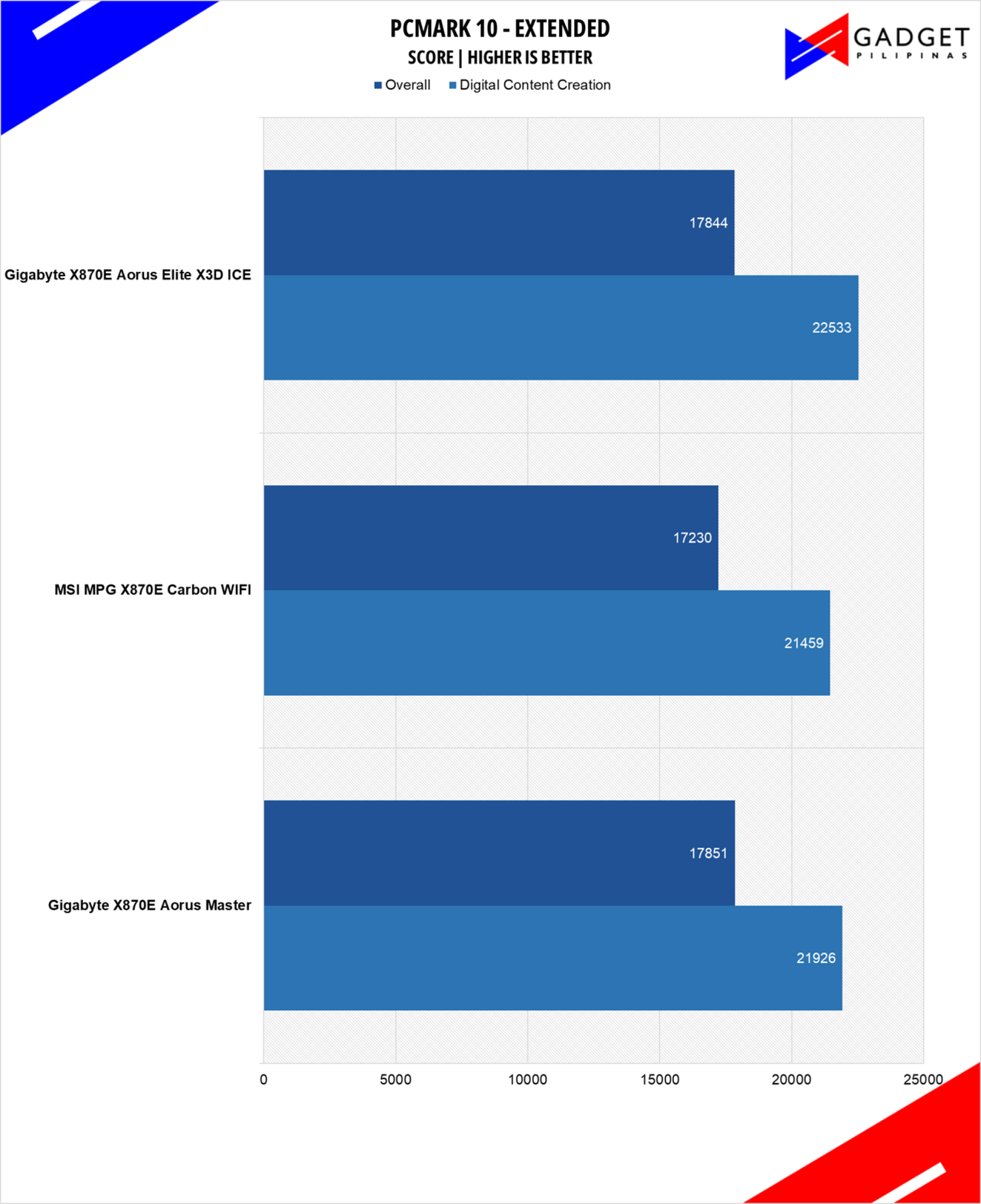
From the same developers of the popular game benchmarking tool 3DMark, PCMark 10 is a benchmarking app for measuring a whole PC’s performance. It covers a wide variety of tests to reflect common tasks performed in a modern workplace. We selected PCMark 10’s extended benchmark and reported both the overall score and Digital Content Creation Score.
CORONA RENDERER
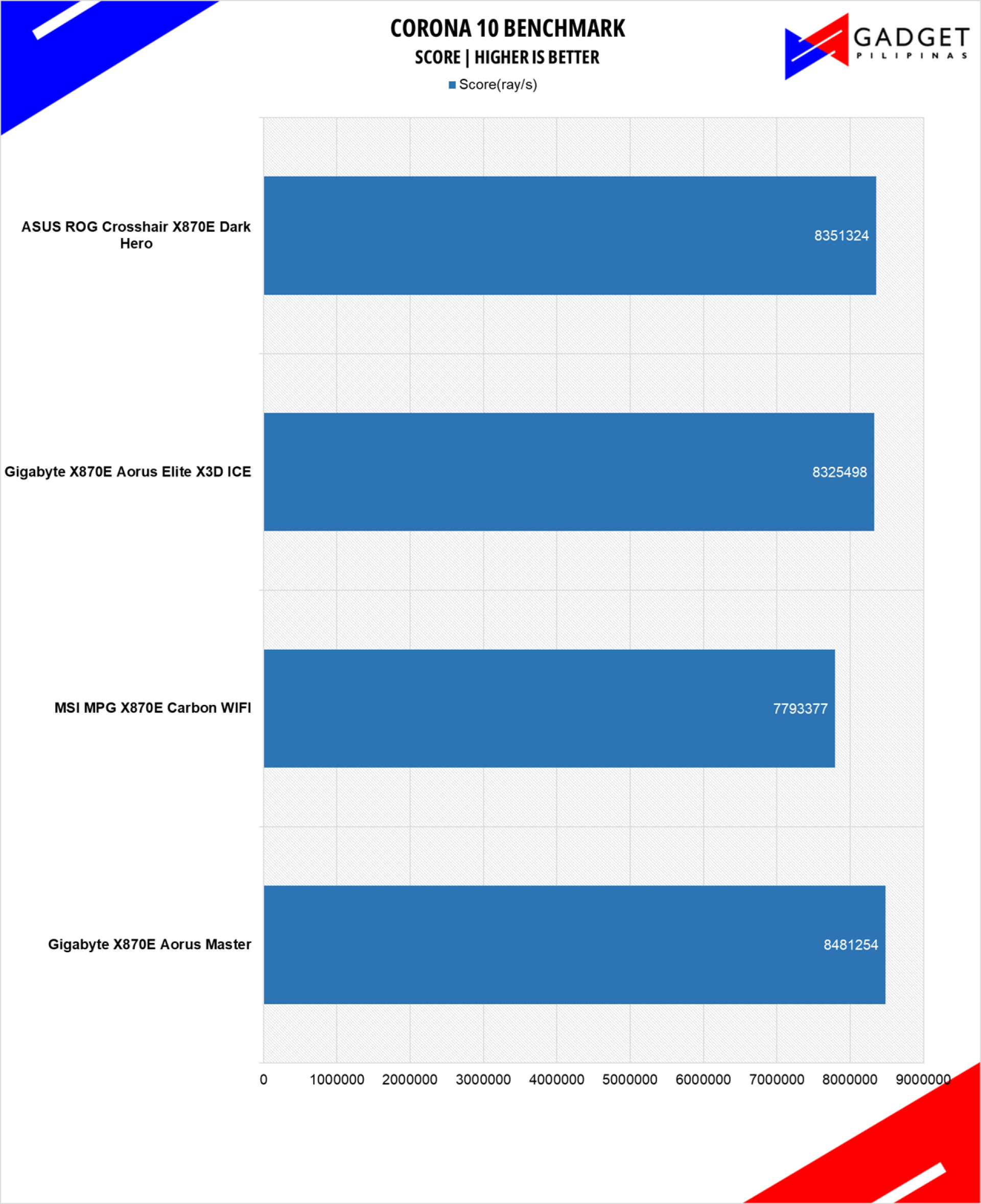
Corona Renderer is an unbiased photorealistic render available for Autodesk 3Ds Max, Maxon Cinema 4D, and as a stand-alone application. Its popularity, similar to Blender, led Chaos Group to develop a benchmark version of the app which runs using Corona Renderer 1.3. Workstation systems, especially CPUs, can utilize Corona Benchmark as up to 72 threads can be used in the benchmark, making it very suitable for CPUs with various price segments.
PassMark 10.2
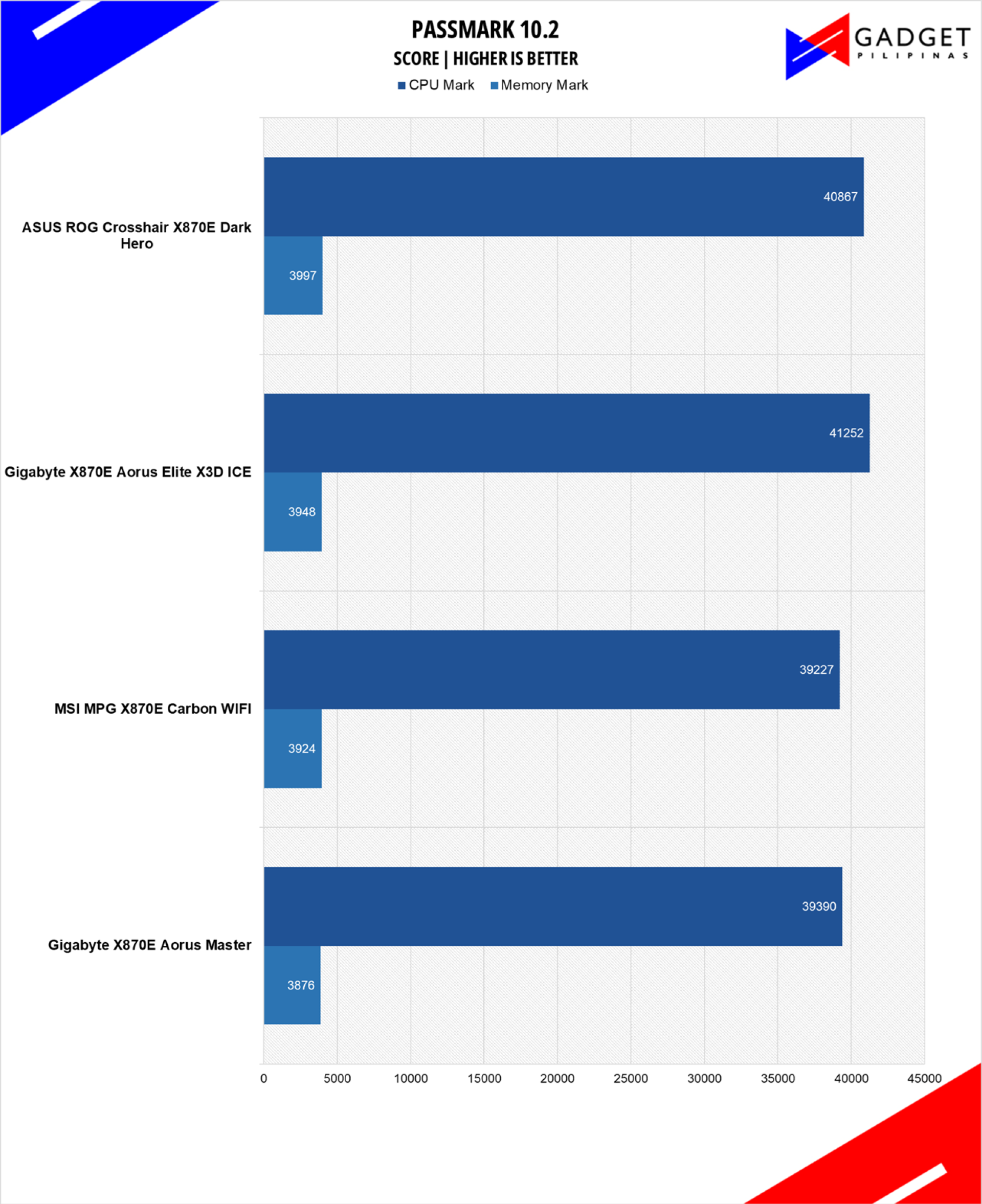
Passmark 10 provides a comprehensive suite of tests that evaluate various aspects of a system’s performance, including CPU, GPU, memory, and disk performance. Its automated testing process makes it accessible and efficient for reviewers to conduct benchmarks and analyze the performance of different systems.
BapCo CROSSMARK
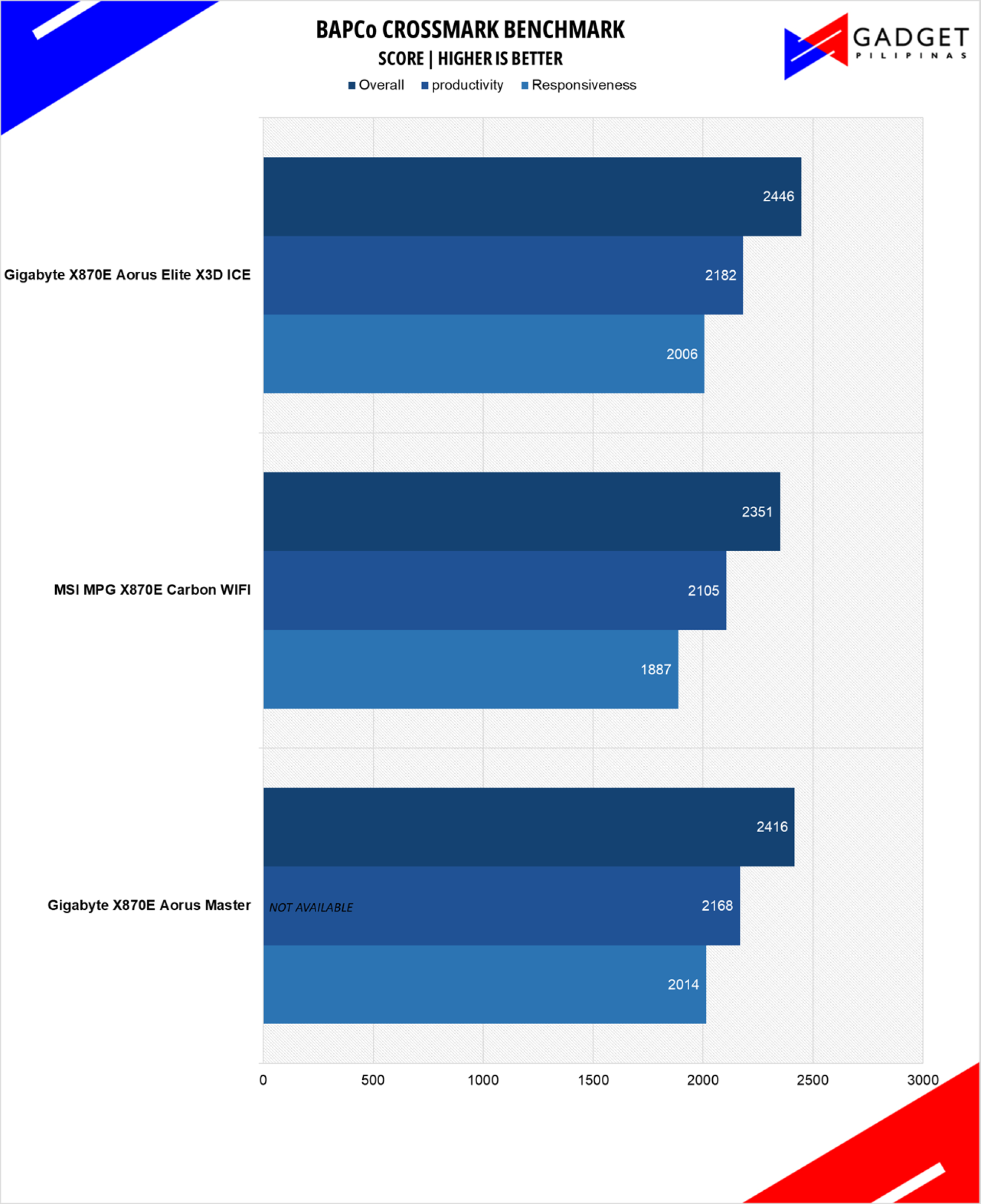
Crossmark is one of the few native cross-platform benchmark tools available for Windows, Android, Linux ChromeOS, iOS, and macOS. It measures overall system performance and system responsiveness using models of real-world applications, making it a great comparison point across multiple platforms.
HANDBRAKE
Handbrake is a top-rated open-source video conversion software that is used by professionals, enthusiasts, and even reviewers as a reference point, mainly because of its wide variety of media codecs. The rise of streaming and blogging makes video content, both encoding and transcoding, important for these people, regardless of whether they’re seasoned professionals or just starting out. Handbrake also takes advantage of AVX-512 and OpenCL to accelerate certain types of media codecs. Our Handbrake benchmark converts a 500MB MP4 video to H.264 to measure the processor’s performance.
OCTANE 2.0 PLUS
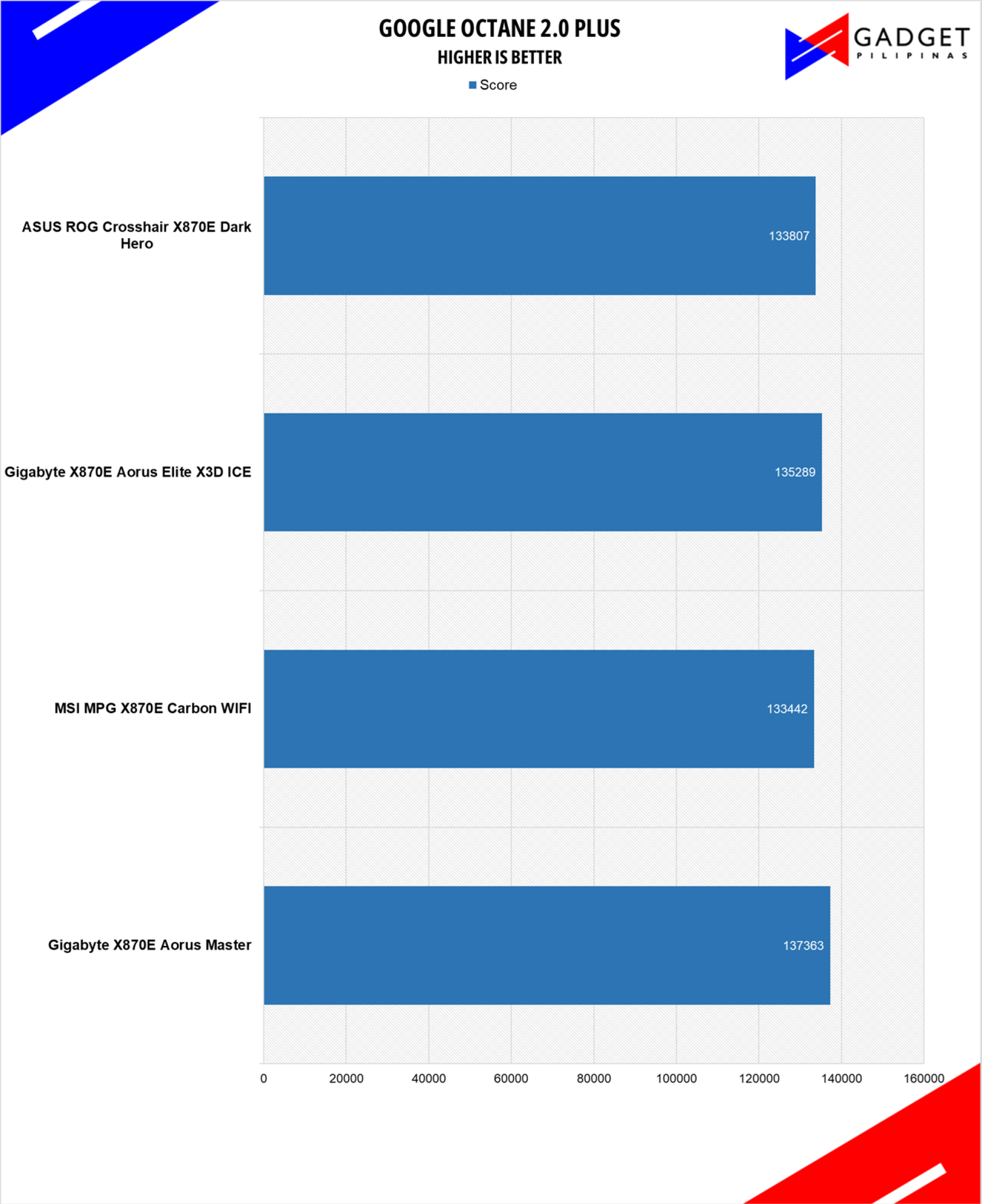
Google Octane 2.0 is a benchmark that measures a Javascript engine’s performance by running multiple tests representing different use cases of JavaScript applications. While Google Octane is retired and no longer maintained, it is still a good representation of today’s dynamic, interactive web applications. Our Google Octane 2.0 runs on Microsoft’s latest Chromium-based Edge browser.
Gigabyte X870E Aorus Elite X3D ICE Temps
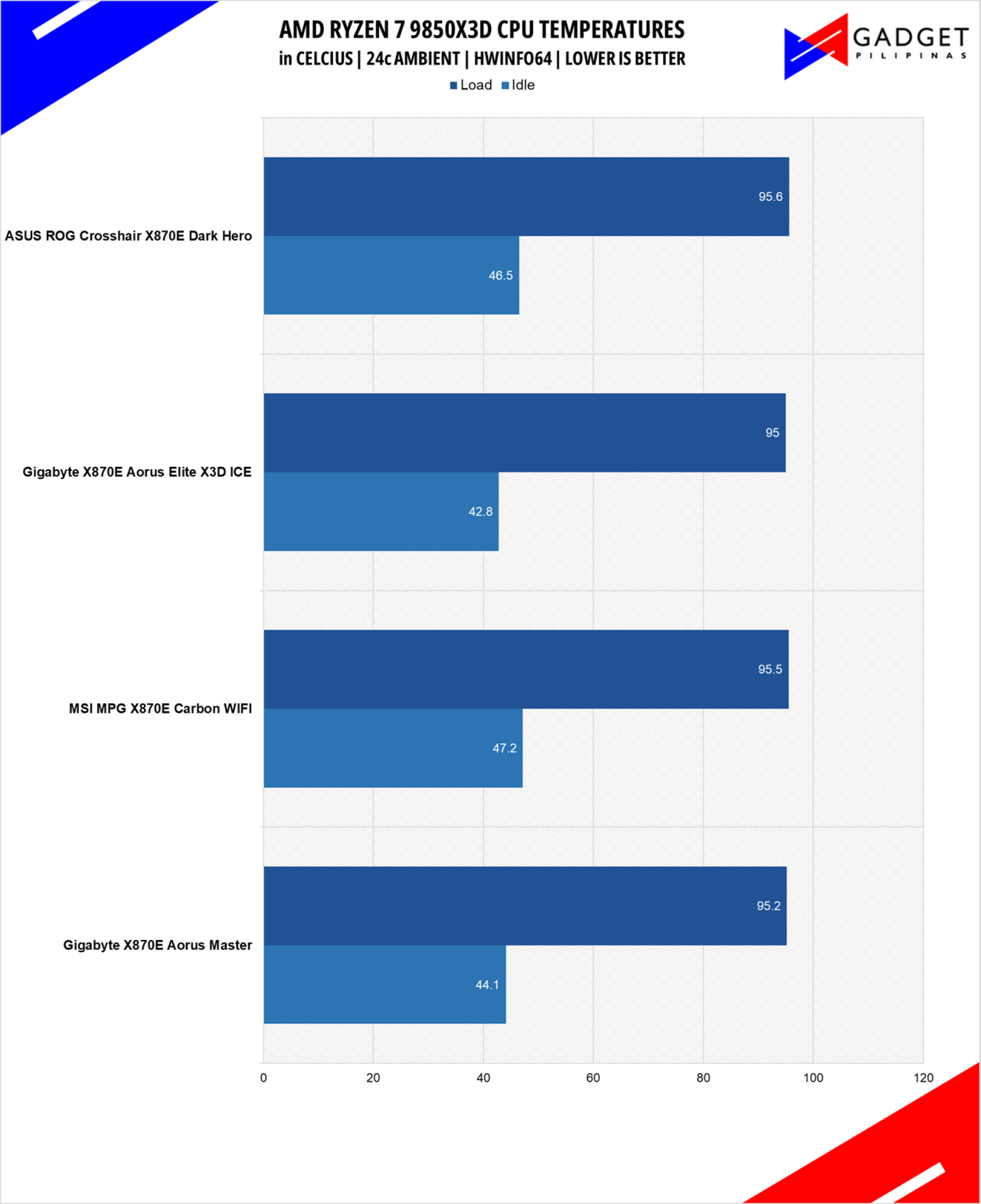
There’s a considerable performance improvement on the Gigabyte X870E Aorus Elite X3D ICE at 42.8°C idle and 95°C peak temps, compared to the Gigabyte X870E Aorus Master. That said, the VRM configuration and larger heatsink make the X870E Aorus Elite X3D ICE the coolest in our test suite, albeit there’s a 1°C delta over the rest of our motherboards.
Conclusion
The Gigabyte X870E Aorus Elite X3D ICE solves the X870E Aorus Master’s bifurcation limitation by providing a full x16 bandwidth for the GPU, even with all the M.2 slots populated. Pair that with the robust USB configuration, and WIFI 7 support, and the Gigabyte X870E Aorus Elite X3D is a dream motherboard for content creators and professionals. It has one of the best IO configurations in a motherboard without the absurd price tag. The Gigabyte X870E Aorus Elite X3D ICE should be your top motherboard choice if your main priority is connectivity and performance, and it’s well worth the premium price, backed by durability, aesthetics, and versatility.

Grant Soriano
Grant is a Financial Management graduate from UST. His passion for gadgets and tech crossed him over in the industry where he could apply his knowledge as an enthusiast and in-depth analytic skills as a Finance Major. His passion allows him to earn at the same time help Gadget Pilipinas' readers in making smart, value-based decisions and purchases with his reviews and guides.
View all articles →Related Reviews
 Samsung Galaxy S26 FE: Great Functional Elegance
 NBA 2K27 Review: A Better Game Than DLSS 5 Suggests
 TECNO Camon Slim 5G Review: The Best-Looking CAMON Yet
 ROG Kithara Review: A HIFIMAN Collaboration for Gamers
 ROG Gjallar Review: ROG’s First Soundbar Gets the Priorities Right
 PLDT StreamTV+ Review: Cinema in a Box, at a Price