ASUS is rolling out new Mac-friendly features to its ProArt display line to streamline color-critical workflows for users of MacBook, Mac mini, and Mac Studio systems. The updates are focused on a tighter integration with macOS, refined color management, and expanded connectivity to meet the demands of professional creators.
Introduction to Mac-Friendly ProArt Features
ASUS is adding macOS support for its DisplayWidget Center software, new M Model P3 color presets, and other enhancements that align ProArt monitors more closely with recent Mac hardware. These changes are designed to improve productivity for creative professionals who rely on accurate color, responsive controls, and flexible connectivity in multi-display setups.
DisplayWidget Center and Mac Integration
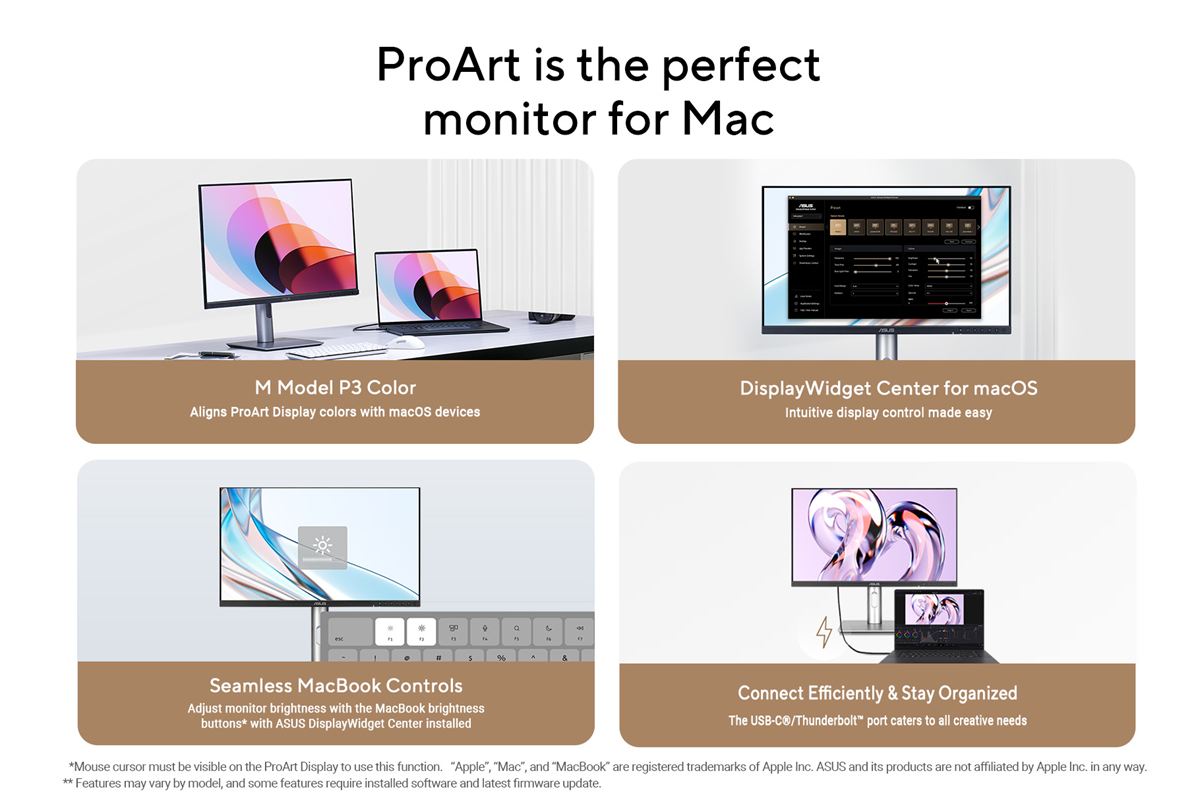
The updated ASUS DisplayWidget Center now runs on macOS, giving users a software-based control panel to tweak brightness, contrast, and color temperature directly from their Mac. When installed, users can use the shortcut keys on their MacBook to adjust ProArt display brightness.
The new M Model P3 color setting is also tuned to match the color performance of connected MacBooks, helping ensure consistent visuals across built-in and external screens during tasks such as photo editing and video production. This is intended to reduce color discrepancies that can appear when shifting work between a Mac display and a desktop monitor.
Color Accuracy, Calibration, and Management
Each ProArt display is factory-calibrated to Calman Verified standards and can reach up to Delta E<1 color accuracy, and with many models offering a wide 99% DCI-P3 gamut for detailed, true-to-life images. This baseline calibration gives color professionals a more reliable starting point for grading, retouching, and design.
ProArt Calibration software supports both SDR and HDR modes on macOS, storing color profiles in the monitor’s internal scaler and generating ICC profiles for ProArt displays, other monitors, and MacBook screens. Administrators managing multiple screens can use ProArt Color Center, an online tool that tracks calibration dates and schedules recalibrations across different locations and configurations.
Performance, Connectivity, and Multi-Device Workflows
Select ASUS ProArt models offer up to a 240 Hz variable refresh rate. The high-resolution, high-pixel-density panels aim to fully showcase the graphics capabilities of current Mac systems during intensive creative workloads.
Connectivity options include USB-C, HDMI, and DisplayPort as well as daisy-chain support on compatible MacBook models for streamlined cable management and multi-monitor setups. The displays can function as USB hubs and built-in Auto KVM allows users to switch between two connected MacBooks or PCs using a single keyboard and mouse wired to the monitor.
Ergonomics, Eye Comfort, and Daily Use
ASUS ProArt displays ship with ergonomic stands that support tilt, swivel, and height adjustments, along with a quick-release mechanism for fast, screw-free VESA wall mounting. Such features cater to studios and offices where screens must be repositioned frequently or mounted in flexible configurations.
The displays feature TÜV Rheinland-certified Flicker-free and Low Blue Light technologies to reduce eye strain during long editing and grading sessions. Users can activate a blue light filter from the OSD, with a 0–100% slider to fine-tune the balance between comfort and color-critical work.
Creative Cloud Bundle and Availability
In select regions, the purchase of an ASUS ProArt Display includes a complimentary three-month Adobe Creative Cloud offer that covers apps such as Lightroom, Photoshop, Premiere Pro, Illustrator, Substance 3D, Adobe Stock, and Acrobat Standard, with a stated value of USD 803.85.
The various plan components are redeemed separately, can be tied to new or existing Adobe accounts, and must be claimed by August 31, 2026.
Frequently Asked Questions (FAQ)
Q: Which Mac users are these ProArt updates aimed at?
A: The new features target creative professionals using MacBook, Mac mini, and Mac Studio systems who need accurate color, smoother motion, and more integrated control over external ProArt displays.
Q: What is M Model P3 color on ASUS ProArt displays?
A: M Model P3 is a preset that tunes ProArt monitors to closely match the P3 color performance of connected MacBooks, improving consistency between laptop and external screens for color-critical tasks.
Q: Is the Adobe Creative Cloud offer available worldwide?
A: The bundled three-month Adobe Creative Cloud promotion applies only in select regions, carries a defined redemption period through August 31, 2026, and can be redeemed once per eligible customer.
Q: Which ProArt Models support the new features?
A: ASUS DisplayWidget Center runs on the latest ProArt monitor models once the software is installed, while earlier models listed below will require a firmware update.
(PA16USV, PA24ACRV, PA248CRV, PA248QFV, PA27ACRV, PA27JCV, PA27UCGE, PA278CFRV, PA278QGV, PA279CRV, PA32KCX, PA32QCV, PA32UCDM, PA32UCE)
The PA278CGRV, PA279CRV, PA27JCV, PA32QCV, and other new ProArt monitors support M Model P3 color, though certain models—such as the PA279CRV and PA27JCV will require a firmware update to enable it.
For more information, click here.

Emman has been writing technical and feature articles since 2010. Prior to this, he became one of the instructors at Asia Pacific College in 2008, and eventually landed a job as Business Analyst and Technical Writer at Integrated Open Source Solutions for almost 3 years.