










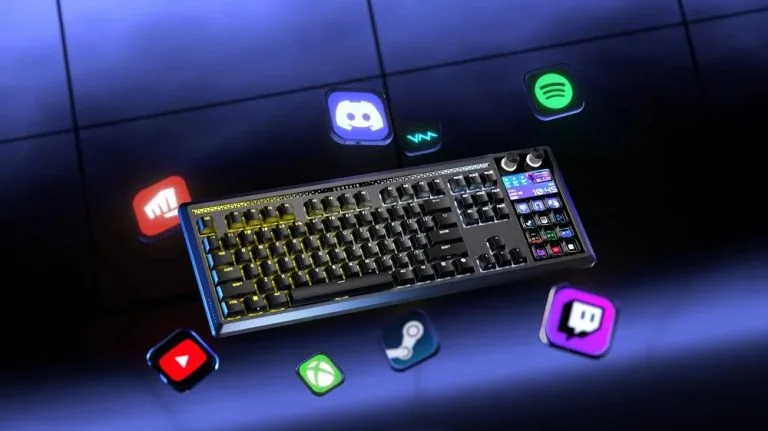
Imagine a keyboard and a Stream Deck. Now, combine the two. That’s the Corsair GALLEON 100 SD. Using mechanical performance with native Stream Deck integration and a built-in display, it’s aimed at replacing scattered macro pads, dials, and monitoring widgets with a single input surface that keeps hands and eyes anchored on the main device in front of the user.
Integrated Stream Deck Controls

The main feature of the Corsair GALLEON 100 SD is the fully embedded Stream Deck interface the offers 12 customizable shortcut keys and two multi-function rotary dials within natural reach of the main typing area. These controls are designed from the ground up as part of the keyboard rather than as a bolt-on accessory, allowing users to trigger actions, adjust settings, or switch modes without shifting posture.
Each Stream Deck key supports icons, folders, multi-page layouts, and Multi Actions, for complex command chains to execute on a single press for tasks such as in-game rotations, inventory access, launching apps, or audio control. The ecosystem connects to the Elgato Marketplace, extending functionality with plugins that tie into streaming tools, productivity platforms, and other creator-focused software.
Integrated LCD for Live Feedback

There’s also a full-color LCD panel with a 720×1280 resolution, and delivers system and session information directly on the keyboard surface. It can be used for various purposes, from monitoring performance metrics, stream chat, platform status, timers, or custom visuals without the need for a secondary monitor or having to do frequent alt-tabbing.
Mechanical Performance and Typing Experience

Despite the heavy focus on control and monitoring, the Corsair GALLEON 100 SD remains as a high-performance gaming keyboard with 8,000 Hz hyper-polling via CORSAIR AXON for ultra-low latency input. Its FlashTap SOCD handling supports cleaner directional inputs and advanced techniques. You also get dedicated modes, Game Mode options, and macro recording features.
The board ships with pre-lubed CORSAIR MLX Pulse linear switches tuned for smooth, consistent actuation and reduced wobble, paired with gasket mounting and six layers of sound dampening to deliver a refined yet responsive feel. Enthusiasts can hot-swap compatible 3‑pin or 5‑pin switches to further tailor travel, weight, and acoustics to personal preference.
Design, Comfort, and Connectivity

The Corsair GALLEON 100 SD boasts a premium layout with per-key RGB backlighting, an ambient mood bar, and the integrated LCD, all working together to give the device a distinctive presence on the desk. It also comes with a cushioned palm rest for longer gaming, streaming, or editing sessions, and uses durable PBT keycaps to maintain texture and legend clarity over time.
For connectivity, the keyboard features USB passthrough with a conveniently placed USB‑C port. When combined with onboard controls and display, the keyboard becomes both the functional and aesthetic anchor of a modern gaming or creator setup.
Software, Profiles, and Workflow Flexibility
Keyboard specific features can be configured via the CORSAIR Web Hub, including performance tuning, lighting control, and onboard profile management.
Stream Deck actions are created and adjusted through the familiar Elgato Stream Deck software, where users can drag and drop commands, install plugins, and apply community-made profiles within minutes.
Pricing
The Corsair GALLEON 100 SD is priced at USD 349.99 (or around PHP 20,700 when directly converted).
Frequently Asked Questions (FAQ)
Q: What makes the Corsair GALLEON 100 SD different from standard gaming keyboards?
A: It combines a full Stream Deck interface, dual rotary dials, and an integrated LCD with a high-performance mechanical platform, effectively merging macro pad, monitoring screen, and keyboard into one device.
Q: How can gamers and streamers use the integrated Stream Deck keys?
A: Users can assign icons, folders, pages, and Multi Actions to the 12 keys to handle ability rotations, inventory shortcuts, scene switching, audio controls, and app launches with single-press commands.
Q: How is customization managed without traditional software installs?
A: Keyboard functions, lighting, and onboard profiles are handled through the browser-based CORSAIR Web Hub, while Stream Deck actions and plugins are configured via the Elgato Stream Deck app.
Q: Who is the Corsair GALLEON 100 SD designed for?
A: It targets gamers, streamers, and creators who want centralized control, visual feedback, and mechanical performance in a single desktop command center instead of multiple separate devices.

Emman Tortoza
Emman has been writing technical and feature articles since 2010. Prior to this, he became one of the instructors at Asia Pacific College in 2008, and eventually landed a job as Business Analyst and Technical Writer at Integrated Open Source Solutions for almost 3 years.
View all articles →