












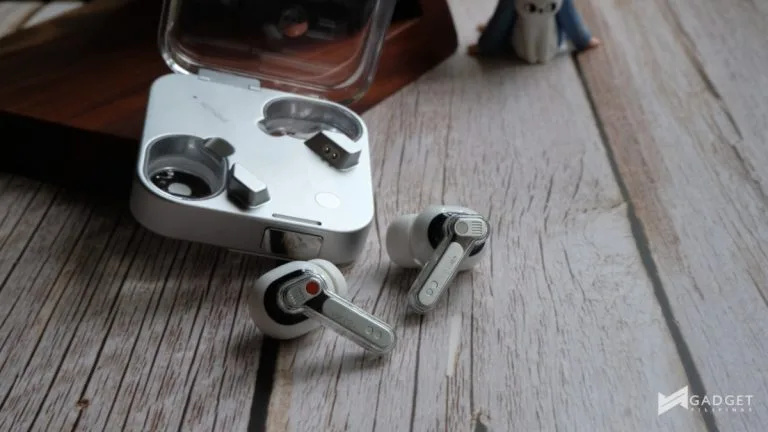
Nothing recently introduced the Nothing Ear (3), its latest flagship TWS earbuds offering. The earbuds surprised everyone by introducing the Super Mic, a noise-cancelling microphone found on the case. It brings a Talk button, which you press to activate the feature, and is said to offer a clearer voice quality.
But just how Super can the Super Mic get and the Nothing Ear (3) as a whole? Here’s my experience with the latest TWS earbuds from Nothing.
Nothing Ear (3) Review
Unboxing Experience
The Nothing Ear (3) has a familiar unboxing experience, in line with Nothing and its more recent products. If you’re curious about it and the inclusions, you can watch it below:
It’s really a run-of-the-mill experience, but it’s a joy to see how Nothing has continued it’s own take in presenting products – from the pull tab and how it presents the included ear tips.
Design and Build Quality
If you’ve watched the unboxing experience and/or stayed updated with news, the Nothing Ear (3) brings a fresh take on the established flagship Nothing Ear design. At the center of this is the more metallic approach to the case and even the earbuds.

The company explains that this is to align the metallic aesthetic of its latest flagship products, namely the Nothing Phone (3) and Headphone (1). The latter stands out the most with the aluminum used for the earcups, especially in its white colorway.

The more metallic case is heavier than its plastic predecessors, but it honestly looks more premium. Despite the metallic case, though, the case features the iconic transparent plastic on the lid and where the earbuds sit when they charge.

It especially looks better in person. However, I was quite surprised to see that the underside is still shows the white plastic of previous cases. I understand that this could be to keep the wireless charging support, which I would prefer they retain. However, I would’ve preferred even a paint job for the exposed white plastic parts with a similar color, just to retain a more unified design.

Yes, the earbuds do still have the iconic transparent plastic outer, but they now have polished metal accents underneath. Again, familiar but different. The company also claims that the earbuds have a custom Metal-Insulator-Metal (MIM) antenna, improving radiated power and signal sensitivity.
The earbuds and charging case are confirmed to be IP58 rated, meaning you can wear it at the gym and use them in light rain. These ensure that you have peace of mind for everyday use.

The change to a silver metal (at least for the White colorway), like for the charging case, is very welcome and gives it a more premium feel. However, the text on the facade seems a bit less noticeable. I’m uncertain if it’s because of the silver metal finish it was printed on, or a thinner and smaller Nothing font face, or maybe a mix of both.
Comfort, Ergonomics, and Experience
The Nothing Ear TWS earbuds have always been my favorite TWS earbuds to wear to date, because of their lightweight and ergonomic design. Thankfully, the earbuds of the Nothing Ear (3) are pretty the same as its predecessors.
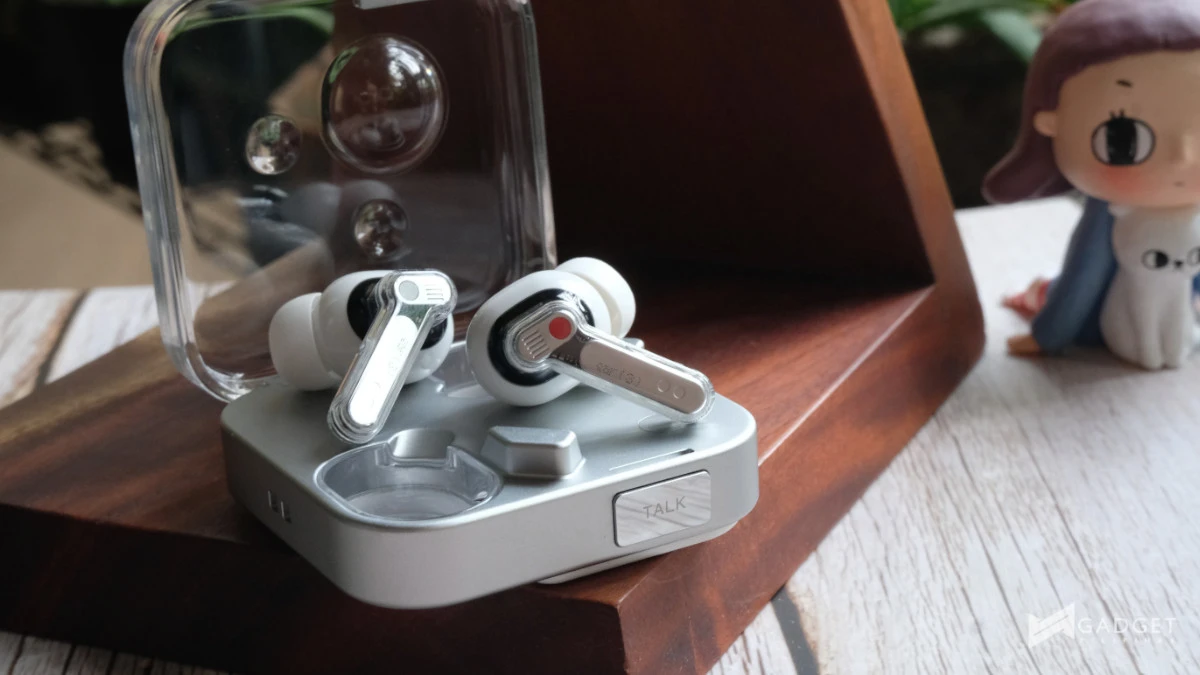
It’s still just as comfortable, secure, and lightweight. With the right-sized eartips, I was able to get through using the earbuds until they died on me without noticeable fatigue, even in the ear canal.
The Nothing Ear (3) connects via Bluetooth 5.4 and supports the LDAC codec. The former offers a reliable and strong connection. However, there are spells where it does get pretty choppy, like in busy malls and crosswalks, but this could be mostly because of other electronics working.
The earbuds also feature real-time adaptive noise cancellation of up to 45dB, Transparency Mode, and Environmental Noise Cancellation. This is thanks to three directional microphones with a bone-conduction VPU (voice pick up) sensor.

The ANC is enough to tune out the conversations in coffee shops. It helps when you want to be out and about but still want to focus on finishing up work or catching up on your reading.
One little gripe with the charging case, though, is that if you prefer to keep it in your bag with a lot of things or in your pocket, you’ll have to be mindful of where the Super Mic Talk button faces. I found myself accidentally pressing on it, especially when rummaging through my bag, causing the audio to cut out from the earbuds. If you can keep it in a case, that would be best.
Sound Quality
The Nothing Ear (3) is equipped with redesigned 12mm dynamic drivers with a PMI dome and a thick TPU surround.
Like its other audio offerings, Nothing’s Ear (3) offers a V-shaped or Harman tuning with higher bass. The company also includes Dynamic Bass Enhancement for those who want even more bass in their audio.

That said, though, the V-tuning on the Ear (3) didn’t seem to have as much murkiness in the mid-tones as other TWS earbuds in the market. I was able to clearly hear the full range of instruments on tracks like Tracy Chapman’s Fast Car, Polyphia’s Playing God, Dirty Loops’ Run Away, and KAI’s Rover.
The latest TWS earbuds also feature Static Spatial Audio, which creates a 3D sound stage and puts you in the middle of it. It drastically widens the soundstage of the earbuds, and I found myself using it occasionally when I’m indoors and just stationary, like in a coffee shop or at home.
When walking around and being out in the city, the feature disorients me. I found myself turning it off.
I don’t mind the higher bass and Harman tuning in the earbuds, but in case you prefer a more neutral tuning, there’s the Nothing X app, which I’ll get to later in the article.
Microphone Performance
The microphone is where I was most curious because of the innovative Super Mic feature built into the charging case of the Nothing Ear (3).
The Super Mic offers better and clearer audio than the earbuds themselves do. Nothing claims that you can use it for most major apps like Zoom, Teams, Google Meet, WhatsApp, and WeChat, to name a few.
For voice recording, it is supported in native voice memo apps like iOS Voice Memos and third-party video apps like Blackmagic.
Nothing clarifies that the Super Mic isn’t optimized for in-app voice messages in messaging apps like WhatsApp, WeChat, and more, or used in native video recording on Android/iOS.

This, though, works with Nothing’s own Essential Space for quick voice notes and to help keep track of your ideas throughout your day.
The lack of more support for Super Mic, especially in other third-party apps, is very disappointing. However, I also understand that for it to work with non-Nothing apps, like the native camera app on other devices, other companies will need to support the feature.
Here are sample audios from three different places:
Surprisingly and disappointingly, the Super Mic isn’t quite built for use outside. It slightly improves the audio quality when in places like a coffee shop, but you can clearly hear the improvement in my indoor test.
It seems like a good feature on paper, but with the audio quality, coupled with the lack of third-party support, it seems a bit underbaked, especially for everyday users and its likely use case scenario.
On top of that, the mic quality of the earbuds doesn’t sound the best.
Battery
The Nothing Ear (3) is said to offer up to:
- up to 38 hours – with charging case and ANC off
- up to 22 hours – with charging case and ANC on
- up to 10 hours – earbuds with ANC off
- up to 5.5 hours – earbuds with ANC on
This is a drastic leap, especially with ANC off from the Nothing Ear (1). The original Ear offered up to 4 hours without ANC on the earbuds and up to 4 hours with ANC on.
Based on my personal experience with the Nothing Ear (3), the advertised 5.5 hours with ANC on is pretty accurate. You can squeeze in a bit more from the 55mAh batteries on the Ear (3) earbuds if you’re out and about and switch between ANC on and off every now and then.
In comparison, last year’s earbuds were equipped with 46mAh batteries that were said to offer 5.2 hours of playback with ANC on.
Meanwhile, the case offers a 500mAh battery, which is identical to the Nothing Ear introduced last year, and a minor upgrade from the Nothing Ear (2).
It seems like Nothing focused on improving the battery life on the earbuds, and I’m not one to complain about it, because I’d prefer longer battery life on the earbuds themselves.
Software
The Nothing Ear (3), like all of Nothing’s audio and smartwatch offerings, is supported by the Nothing X app. It works with iOS and Android devices, but offers a smoother connection with Nothing devices.

Like I mentioned before in my Nothing Headphone (1) review, Nothing X is among the best apps built for audio devices out there. The UI is clean and straightforward, while offering a good amount of deep customization.
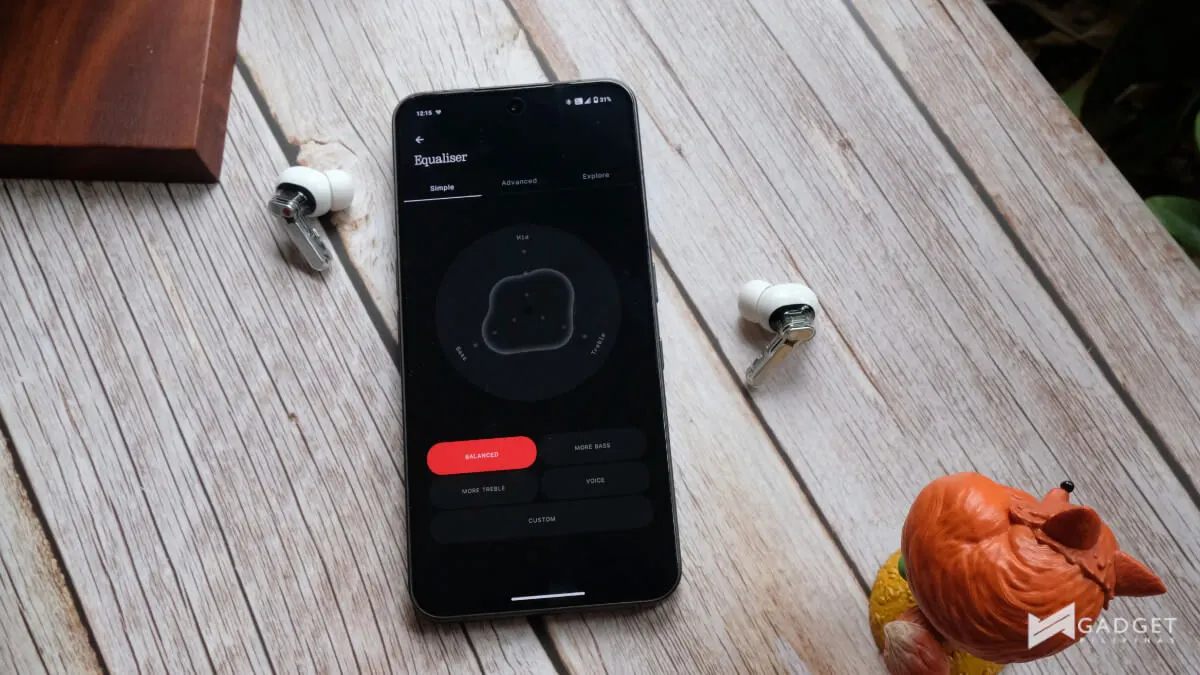
The Nothing Ear (3) shares the level of customization for buttons and audio tuning as its predecessors. This is a godsend for those who are more finicky and particular with how they want their audio devices to sound.

Additionally, the app allows you to download EQ settings from other users via Nothing Playground or even friends who use Nothing audio products via a QR code. This is perfect if you don’t quite know the ins and outs of getting the right EQ and want to have a starting point to getting your unique sound.

Aside from EQ, you can also remap the capacitive buttons on the stem of the earbuds.

Other features in the app, which work best with a Nothing phone, include enabling Essential News to stay on top of the latest topics you choose every day, and access to ChatGPT or your default AI assistant.
Verdict
The Nothing Ear (3) is available in the Philippines for PHP 10,399. The price tag is quite a leap from the 2024 Nothing Ear, which was introduced at PHP 8,990. The question is, is it worth the upgrade and worth the PHP 1,409 price hike?
I think it depends. If you’re coming from the Nothing Ear from last year and don’t really mind the Super Mic feature, you can pass on the Ear (3). However, if you have the Ear (2) or even older and looking to upgrade, the Ear (3) is worth checking out. Yes, even with the price hike.

The familiar and fresh design and larger battery on the earbuds could be worth the upgrade.
However, its innovative Super Mic feels like an experiment that needs a bit more polishing and third-party support. Its current iteration feels highly specific. I’m not sure if everyone will be able to use it as often as one would think.
If you’ve been curious about the Nothing Ear series, I think this could be a good introduction for the same previously mentioned reasons. Although you can always check out the 2024 Ear if you think the Super Mic is a feature you think you’ll hardly utilize.
You can check out the Nothing Ear (3) via Digital Walker, Beyond the Box, open_source by Beyond the Box, and online via Nothing PH Lazada and Shopee.
Nothing Ear (3) Review: How Super Can It Get?
Gadget PilipinasWhat we like
- Lightweight earbuds
- Improved battery life on the earbuds
- Nothing X is still among the best software
- Advanced EQ on Nothing X is detailed
- Premium design
Could improve
- Super Mic lacks third-party support
- Super Mic quality is just decent at best
- Mic quality on the earbuds isn't the best

Ram Ronquillo
Ram found his love and appreciation for writing in 2015 having started in the gaming and esports sphere for GG Network. He would then transition to focus more on the world of tech which has also began his journey into learning more about this world. That said though, he still has the mentality of "as long as it works" for his personal gadgets.
View all articles →Related Reviews
 ANKER soundcore Liberty 5 Pro: Great ANC for calls and music
 REDMI Note 17 Pro Max Review: Titan Power That Goes the Distance
 realme 16T 5G Review: An 8000mAh Battery With a Price
 OPPO Find X9 Ultra Review: The Camera Phone to Beat in the Philippines
 HP Smart Tank 580 Review: Affordable Everyday Printing Without the Cartridge Cycle
 DJI Osmo 360 II Review: A Small Price Bump for a Big Step Forward