The Logitech G515 Rapid TKL is a slim, wired-only evolution of their low-profile lineup. It promises the same blistering speed as its “heavyweight” rivals but in a form factor that won’t put a strain on your wrists or clutter your desk. But does the lack of wireless and the shift to magnetic switches make it a “must-buy,” or not? Let’s find out.
Logitech G515 Rapid TKL – Let’s Take a Look
What’s in The Box?
The Logitech G515 Rapid TKL comes with a rubber USB-C to USB-A cable and user documentation. The keyboard is well packaged and is snug inside the box, lessening the chance of major damage to the keyboard when shipping. I just wish for the inclusion of a keycap puller for ease of maintenance.

Design and Build Quality
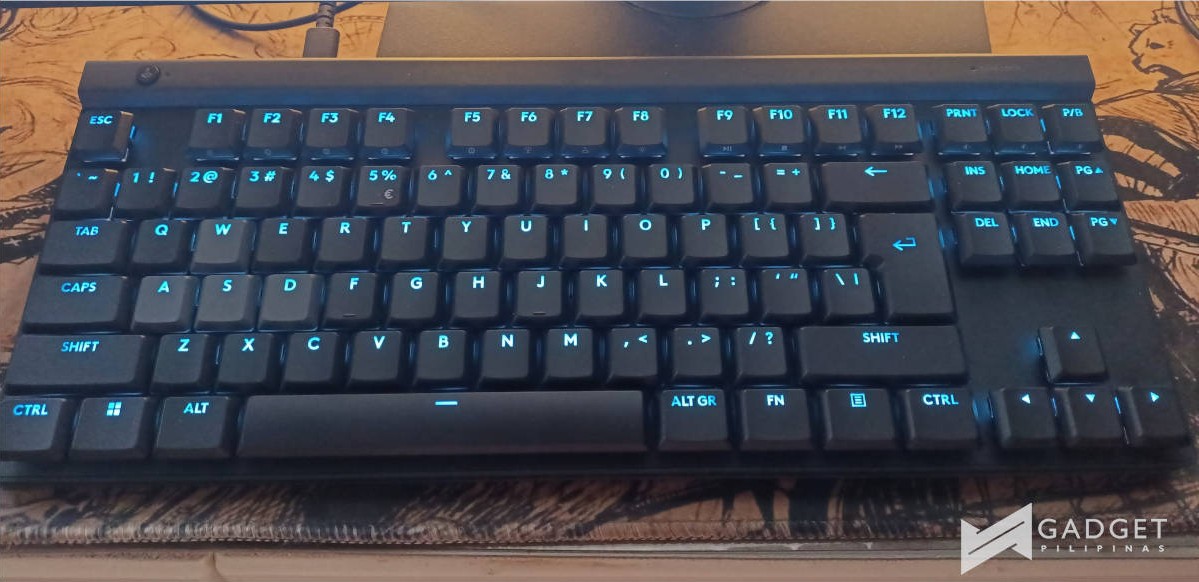
The Logitech G515 Rapid TKL maintains the sleek, minimalist aesthetic Logitech has pushed over the years. At just 22mm tall, it is one of the thinnest gaming keyboards on the market. The G515 doesn’t need a wrist rest because it sits so low to the desk, which is a win for those who prefer a clean, ergonomic setup without the extra clutter.

Build quality is surprisingly solid for such a thin device. It is not easy to bend the keyboard, and accidentally dropping it from a reasonable height won’t damage it. The Logitech G515 Rapid TKL features a stainless steel top plate and internal sound-dampening layers that eliminate unwanted sounds often found in thinner boards. The keycaps are double-shot PBT, providing a textured matte finish that feels premium and resists the “gamer shine” of cheaper ABS plastic.

The layout is a standard Tenkeyless (TKL), so you lose the Numpad but keep the dedicated arrow keys and Function row. However, unlike the wireless G515 model, the “Rapid” version is strictly wired. This might be a dealbreaker for desk-aesthetic purists, but for the target audience of competitive gamers, a wired connection ensures the lowest possible latency.
However, a lack of additional features, like additional control buttons and knobs are a downside for me. I like to use my keyboard as a quick volume controller or for other shortcuts that can control my audio listening experience while working. The lack of a wireless mode option is also a bummer if you are on the go and want a more discreet setup when working outside.


Another downside is that there isn’t much customization possible with this keyboard. We believe the switches to be non-replaceable and the PCB to be non-hot-swappable because Logitech does not sell replacements or verify compatibility with any other third-party magnetic switches, even if you may physically remove the switches. Additionally, it is very challenging to remove the switches from the PCB, as you might need to disassemble the whole keyboard to do it.

Performance: The Magic of Magnetism
A highlight feature here is the low-profile magnetic analog switches. Traditional mechanical switches have a fixed actuation point. The Logitech G515 Rapid TKL’s magnetic switches allow you to customize this on a per-key basis from 0.1mm to 2.5mm.


In my testing with titles like Counter-Strike 2 and Valorant, setting the WASD keys to the shallowest 0.1mm actuation felt nearly instantaneous. More importantly, the Rapid Trigger feature, which resets the key the moment you lift your finger rather than waiting for it to pass a fixed reset point, makes counter-strafing feel incredibly fluid.
Logitech has also included its version of SOCD (Simultaneous Opposite Cardinal Directions) called KEYCONTROL, which allows for priority inputs.
Actual User Experience
Using the Logitech G515 Rapid TKL for extended sessions is a pleasant and quiet experience. The switches are linear and smooth, and the multi-layered dampening means you won’t annoy your teammates (or housemates) with loud clacking.
The low-profile height is the real MVP here. Because you don’t have to “reach up” for the keys, there is significantly less fatigue in the hands and wrists during marathon sessions of Resident Evil 4 Remake or DOOM: The Dark Ages.

As for work-related tasks. After using it to write a handful of articles, I can say this keyboard delivers the same pleasant experience it brings during gaming. I personally don’t like noisy clacking keyboards, and this one surprisingly passes that test for me with flying colors. Also, given the shallow key travel and good keycap spacing, this helps in improving my typing speed as it lessens the space my fingers have to travel across the keyboard.
Software: The G Hub App
To get the most out of the Logitech G515 Rapid TKL, you’ll need Logitech G Hub. This is where you’ll fine-tune the actuation points, toggle Rapid Trigger, and customize the LIGHTSYNC RGB.

One of the cooler features is the ability to assign multiple actions to a single key based on how far you press it. For example, a light press could make your character walk, while a full bottom-out could trigger a sprint. It takes some getting used to, but for complex MMOs or tactical shooters, it opens up a new layer of control.

Although a fairly simple app to use, it is also bloated with things that are not really important to casual users like me. It also has a clunky UI that does not look good when you navigate through it.
Logitech G515 Rapid TKL – Verdict
The Logitech G515 Rapid TKL is clearly built for the gamer who wants the smooth feel of magnetic switch performance without the “gamer-clunky” aesthetic. It’s a specialized tool that focuses on speed and safe saving ergonomics. But if you just wanna use it for work, it also delivergreat experience.
The typing feel is smooth and quiet, the build quality feels premium despite the thinness, and the performance benefits of Rapid Trigger are tangible, especially for FPS players. However, the lack of wireless connectivity and the omission of dedicated media controls at this price point might give buyers pause.
If you are a fan of low-profile boards, Hall Effect tech, and are looking for a great typing experience, the Logitech G515 Rapid TKL is a good choice. Pricing is approximately PHP 8,000 – 9,000.

Started his freelancing adventure in 2018 and began doing freelance Audio Engineering work and then started freelance writing a few years later.
Currently he writes for Gadget Pilipinas and Grit.PH.
He is also a musician, foody, gamer, and PC enthusiast.