Gen 5 SSDs have slowly come down in price following cheaper NAND Flash and Controllers, which also run relatively cooler compared to the first batch of Gen 5 SSDs that launched about two years ago. The TeamGroup T-Force GA PRO Gen5 SSD is one of the cheaper SSD options with speeds that are slightly higher than the max Gen4 speed, hence its competitive pricing. Let’s see if the T-Force GA Pro SSD justifies its small premium over current Gen4 SSDs.
TeamGroup T-Force GA PRO Gen5 SSD


TeamGroup’s T-Force Gaming line has a signature packaging style with a dominant black packaging and the red corner with the white T-Force Logo in the top left corner. There’s a sticker on the upper right corner indicating the variant. At the back, you have a cutout of the SSD which showcases the side of the SSD that has the sticker of the serial and model.


Opening the package shows the GA Pro SSD itself and the patented graphene heatsink. The graphene heatsink supposedly helps in heat dissipation. The TeamGroup T-Force GA Pro will be benchmarked with the graphene heatsink installed, as it’s the SSD’s unique feature, which supposedly also helps the drive perform optimally.

The TeamGroup T-FORCE GA PRO SSD uses an InnoGrit IG5666 controller, the same controller found on the higher-end and much faster GC Pro and GE Pro SSDs. The InnoGrit IG566 is rated up to 14GB/s read and 11GB/s write with support up to 16TB NAND flash – hence it is also being used on higher SKUs.
While the T-FORCE GA PRO SSD is considered a budget SSD in the Gen 5 category, it still has a DRAM cache, specifically the SK Hynix H5AN8G6NOJ DDR4 1GB module. This is paired with TeamGroup’s proprietary 3D TLC NAND flash and 4K LPDC(Low-Density Parity-Check Code) for extended lifespan and better stability.

The TeamGroup TFORCE GA PRO is available at 1TB, 2TB, 4TB, and 8TB capacities, all of which have the included patented graphene sheet. The 8TB capacity has another variant that includes a heatsink fan instead of a graphene sheet. All storage capacities sport the same up to 10,000MB/s read and 8,500 MB/s write speeds with a higher TBW endurance as you go up in capacity. Our specific TFORCE GA Pro 1TB SSD has a rated 600TBW lifespan.
Benchmark Setup and Test Methodology

Gadget Pilipinas’ testing philosophy is to provide detail-oriented results as accurately as possible so that our readers can replicate our tests, given that these conditions are met. Different benchmarking apps and sequences are used depending on the tested component or device.
CPU | AMD Ryzen 7 9800X3D |
| COOLER | ASUS ROG RYUJIN II 360mm V2 – Noctua NT-H2 Thermal Paste |
| MOTHERBOARD | Gigabyte X870E Aorus Master |
| MEMORY | GSkill Trident Z Neo 32GB(2x16GB) DDR5-6000 CL28 |
| GPUs | Nvidia RTX 5090 Founders Edition |
| STORAGE | Kingston Renegade 2TB NVME SSD |
| POWER SUPPLY | FSP VITA GM1000W Gold ATX 3.1 |
| OPERATING SYSTEM | Windows 11 Pro Build 24H2, VBS off |
| CASE | Open Benchtable V2 |
For our Storage benchmarks, we use the latest versions of CrystalDiskMark, AS SSD, PCMark10, and OCCT. Each benchmark application is used to measure a specific aspect of the device being benchmarked while also serving as a counter-check for our results, as some tests overlap. We use CrystalDiskInfo and HWinfo for monitoring the SSD’s health and temperatures.
For more info, read our Review and Benchmark methodology article.
TeamGroup T-Force GA PRO 1TB SSD Benchmarks
THROUGHPUT Performance
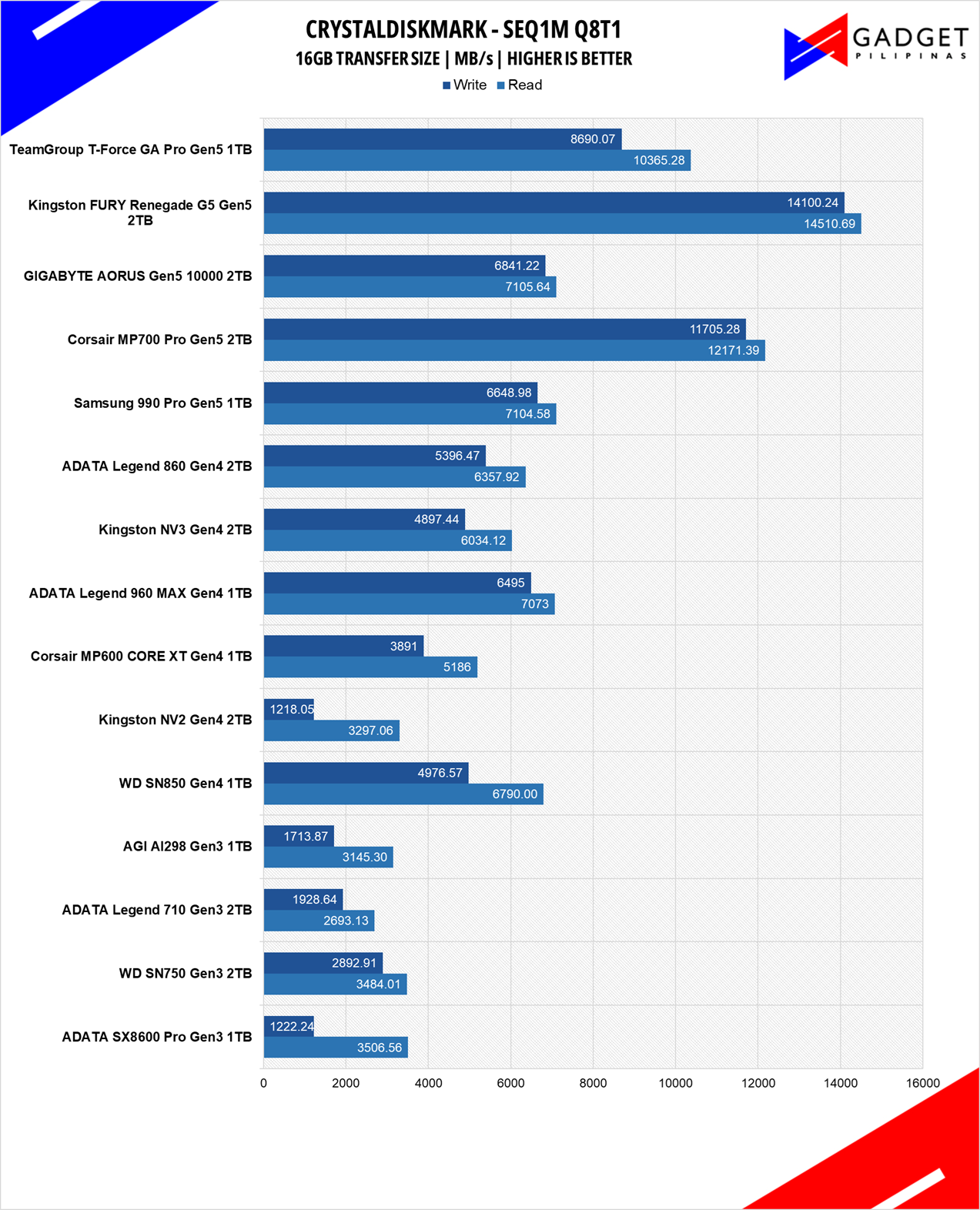


Developed by Noriyuki Miyazaki, CrytalDiskMark is a free benchmark tool that is being used by thousands of experts. This tool measures SSDs’ sequential read and write speeds. That means how fast files can be read from and written to the drive, usually measured in MB/s.
IOPS Performance
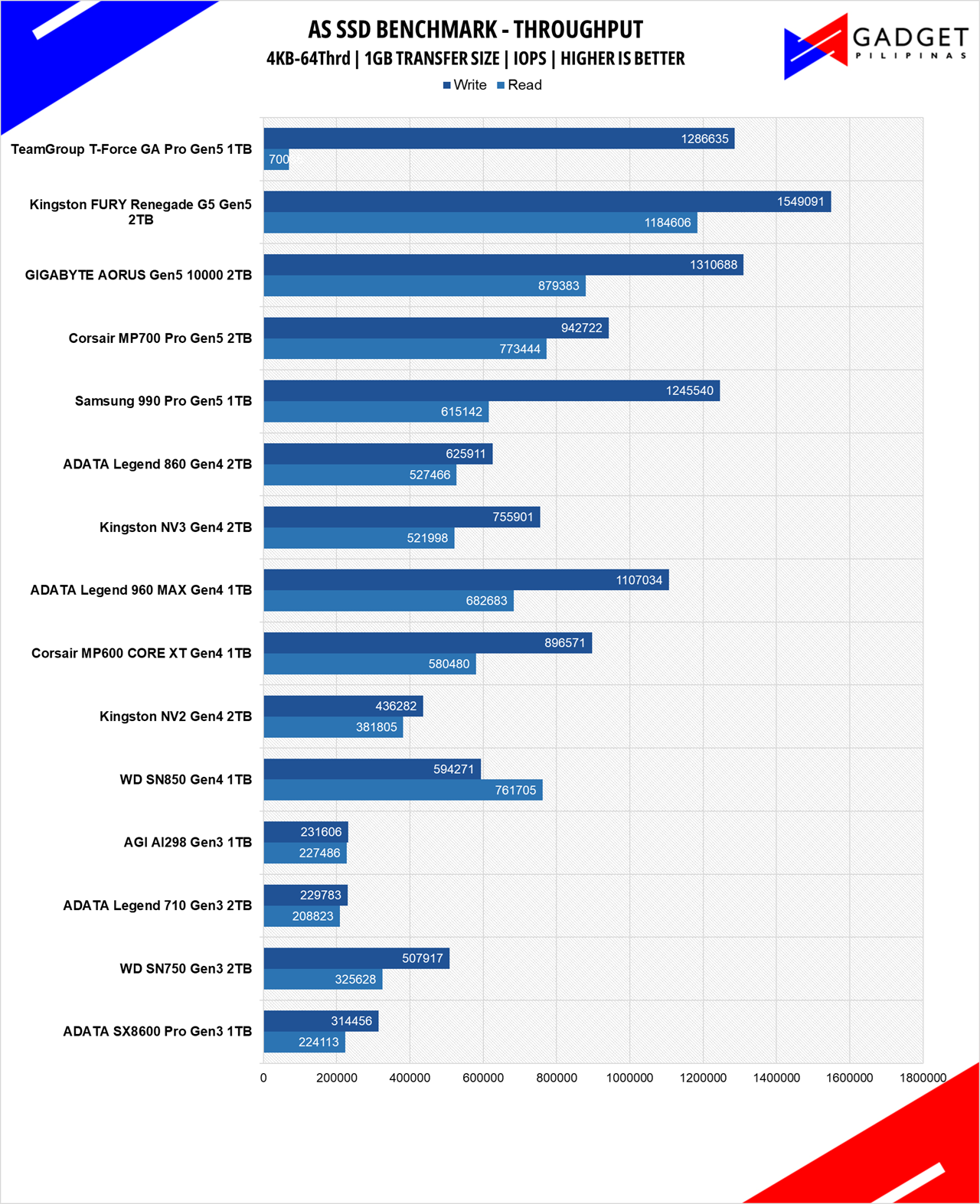
IOPS or Input/Output Operations Per Second is a measure of how many inputs or outputs an SSD can perform in a short period. IOPS is a useful parameter to measure how fast it can process small amounts of workload that are similar to real-world usages, such as loading a webpage and launching apps.
ACCESS TIME


Access time or latency is just as crucial as sequential, random, and IOPS for an SSD. It wraps up all the values from the previous performance and shows the SSD’s responsiveness, whether it be for small or heavy workloads. AS SSD’s Copy benchmark simulates copying various file types, namely, ISOs, Games, and applications. Different file types result in different transfer speeds.
PCMark10 Storage Benchmark
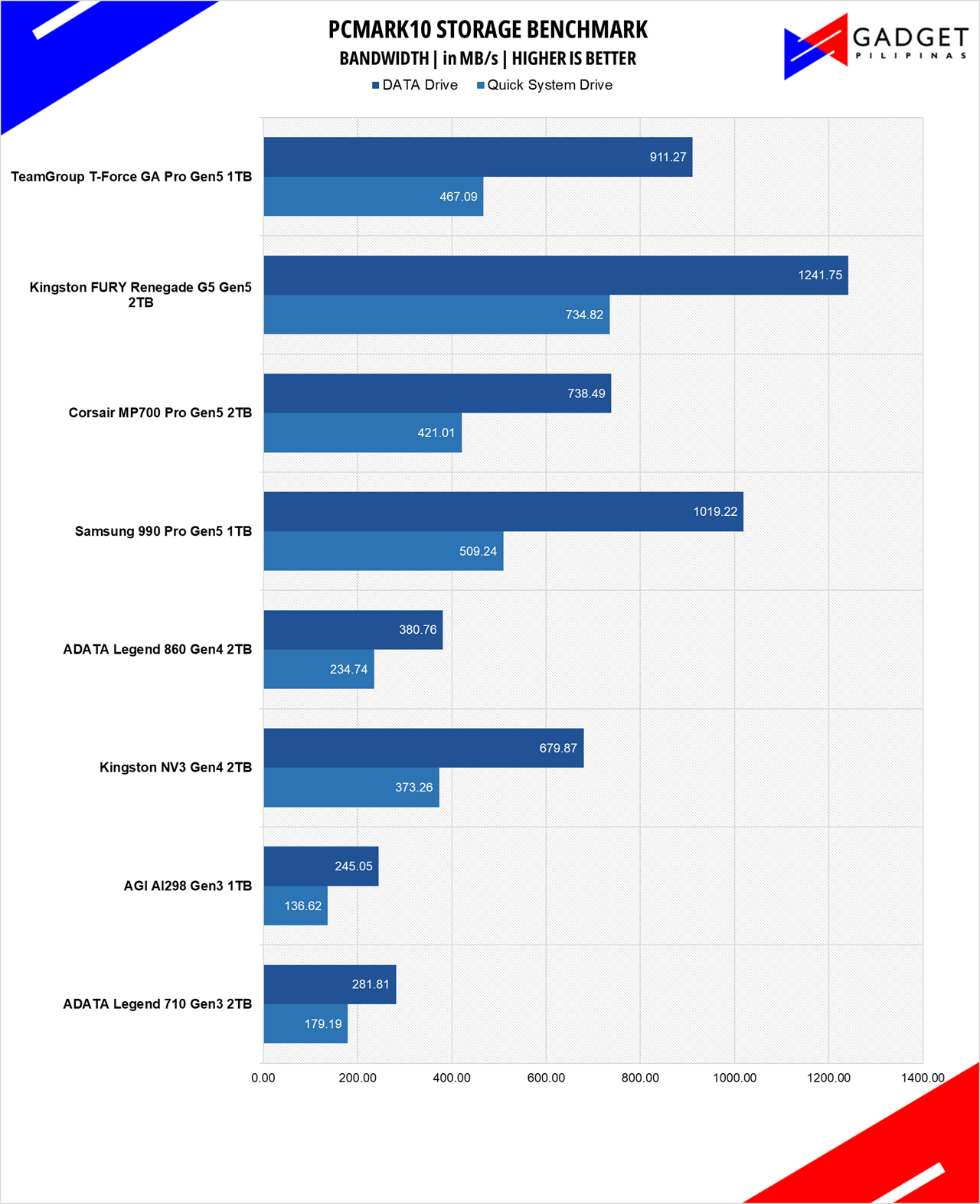
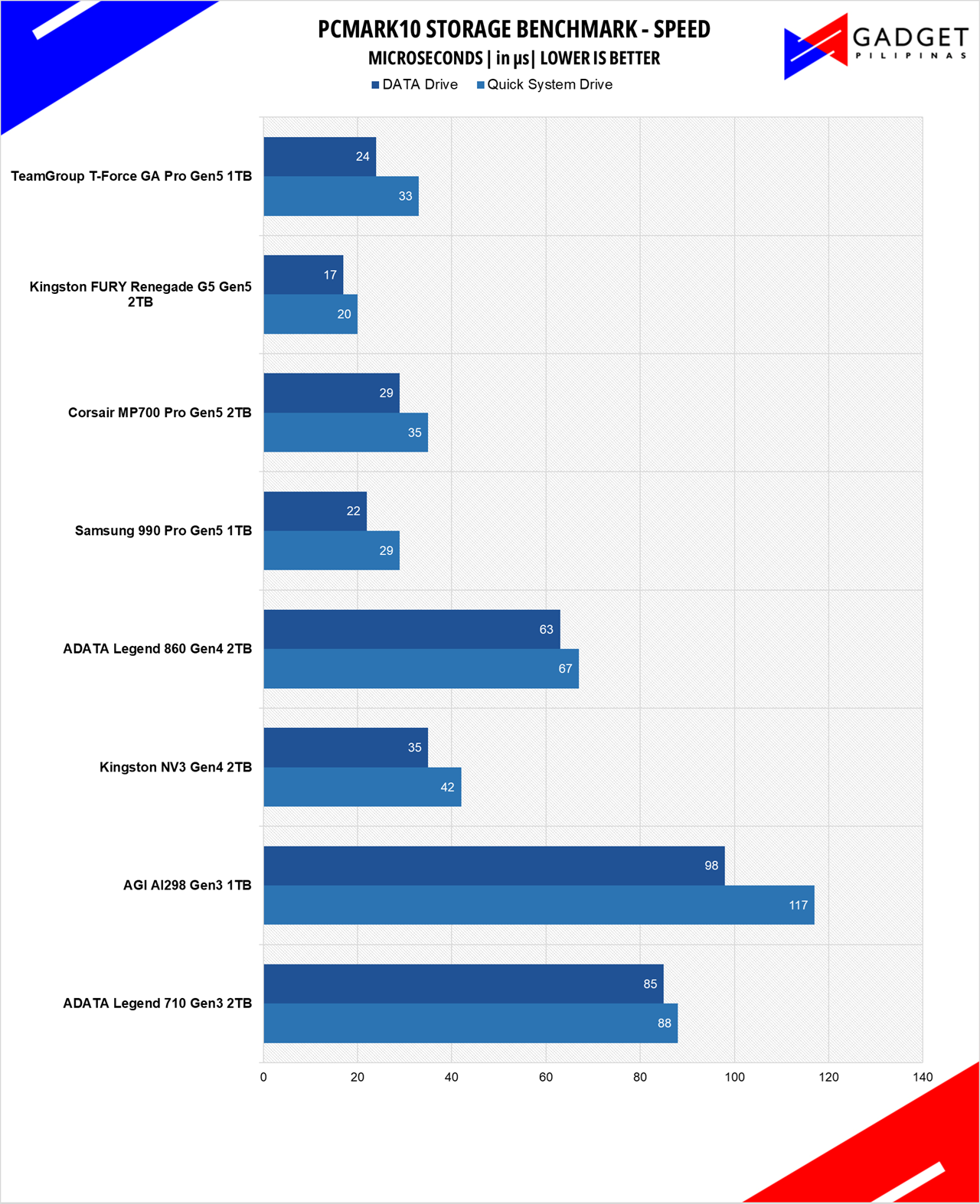
PCMark 10 Quick System Drive and Data Drive benchmarks uses diverse workloads for sustained, and random performance which gives a more rounded “overall” peformance of the drive being tested as these test suites simulates day-to-day “snappiness” and common workloads.
TeamGroup T-Force GA PRO Gen5 SSD Temperatures
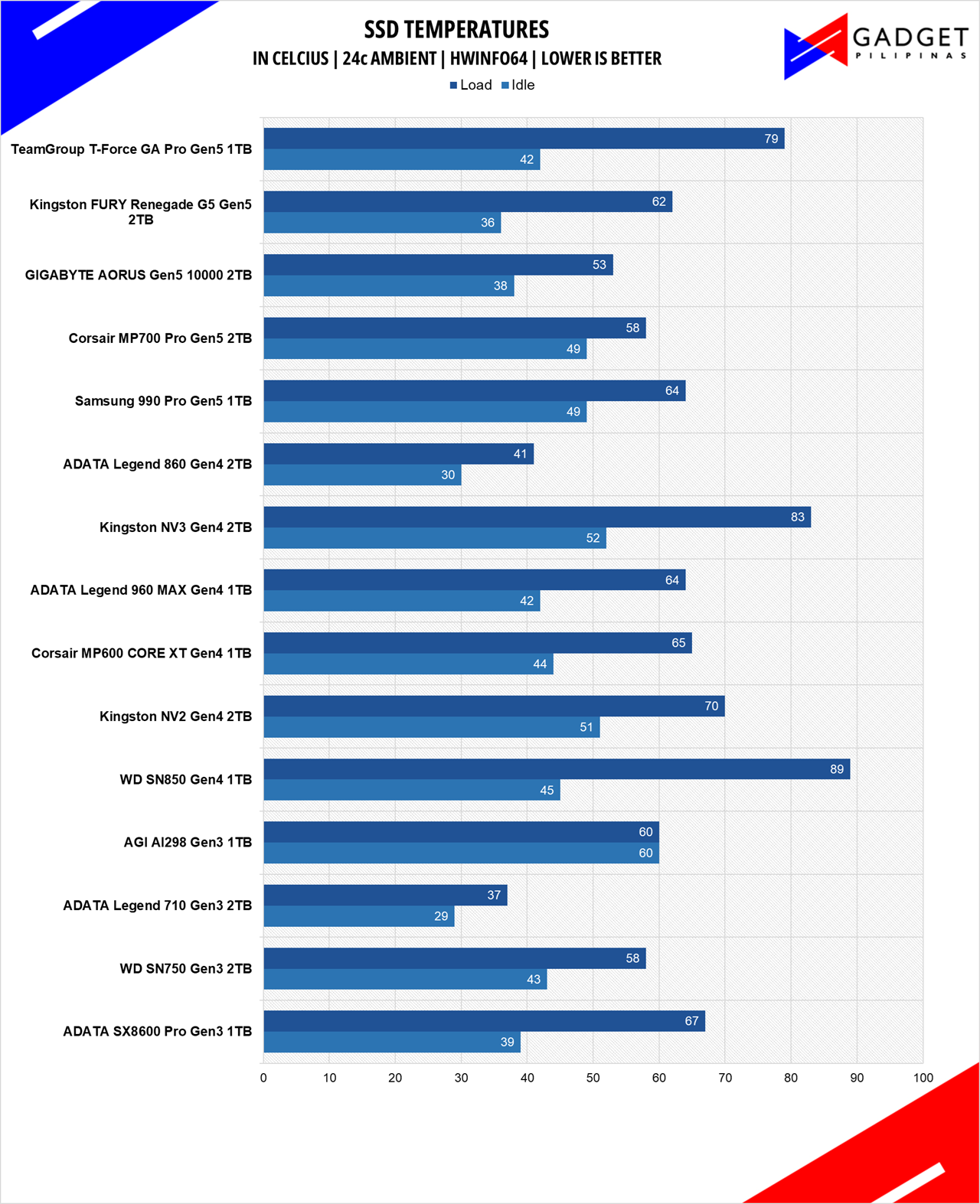
Looking at our temperatures at first glance, it’s hard to quantify the value of the patented graphene sheet with a 79°c peak temperature. That said, this peak temp make sense as the TForce GA Pro is cooled with only that thin metal as opposed to the rest of the Gen 5 SSDs in our benchmark suite, each of which has their own large heatsink, and in other models, even their own fan.
Conclusion

Editor’s Note: This review was finished before the November DRAM and SSD global price hike.
The TeamGroup T-Force GA Pro 1TB SSD is priced at Php 6,650, and at that price, it’s about a Php 1,000 to 1,500 premium over 1TB SSDs running at max 7,500MB/s Gen4 x4 bandwidth. Its pricing sits in between the 1TB and 2TB Gen4 SSD price range, mostly DRAM-less solutions and/or SSDs that don’t even maximize the Gen4 bandwidth. It’s the lowest, if not one of the lowest priced Gen5 x4 SSDs in the market that has a DRAM Cache in a market flooded with DRAMless and QLC SSDs.
Despite the higher temperatures, the TeamGroup T-Force GA Pro 1TB SSD is handicapped by using a much smaller cooling solution compared to dedicated heatsinks on the higher-end drives. Moreover, the T-Force GA Pro 1TB can keep up with its bigger brothers, especially under sustained workloads and low queue depth tests, making it a solid all-rounder SSD thanks to the balance of using a scalable InnoGrit controller, a DRAM cache, and in-house NAND flash. That said, temps can be lowered, especially if you install the GA Pro SSD in a slot with your motherboard’s dedicated SSD heatsink – though your mileage may vary depending on your SSD placement, especially if the slot is underneath the PCI-E x16 slot.
The TeamGroup T-Force GA Pro 1TB SSD is a great Gen5 SSD to splurge on, especially if you want a quality OS drive and want to utilize your PCI-E Gen5 NVMe slot. The small premium over 1TB Gen4 SSDs is justified by its considerable performance improvements that manage to keep up with higher-end Gen5 SSDs. So, if you happen to have a motherboard that supports PCI-E Gen 5 x4 SSDs and are looking for a Gen5 SSD as their OS or Game Drive, then the TeamGroup T-Force GA Pro 1TB SSD is a solid option.

Grant is a Financial Management graduate from UST. His passion for gadgets and tech crossed him over in the industry where he could apply his knowledge as an enthusiast and in-depth analytic skills as a Finance Major. His passion allows him to earn at the same time help Gadget Pilipinas' readers in making smart, value-based decisions and purchases with his reviews and guides.