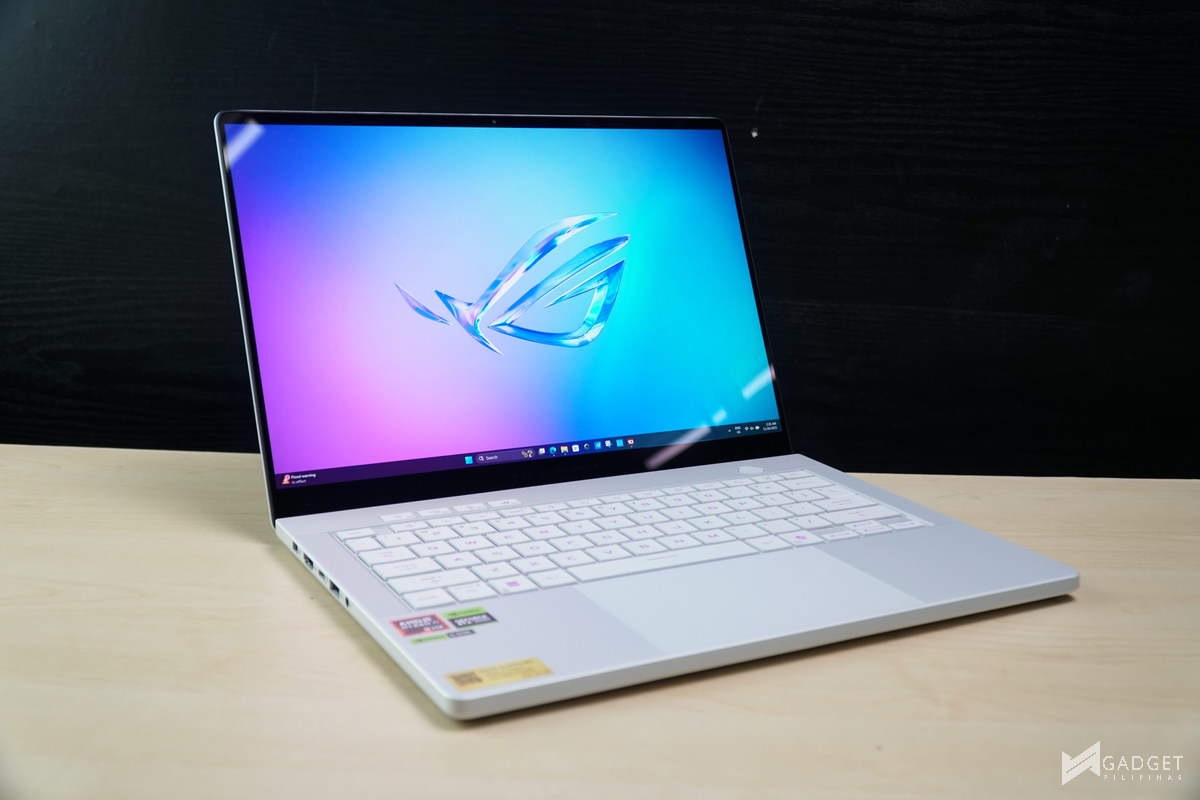
The overhaul of last year’s ASUS ROG Zephyrus G14 was a welcomed change, with the design transition from Anime Matrix to Slash lighting, and, more importantly, the thinner profile that makes it much closer to an ultrabook than a barely “thin-and-light” gaming laptop. That said, last year’s model wasn’t entirely perfect, with a power-hungry configuration – it had an awkward release timing, featuring a Ryzen 9 8945HS CPU instead of the newer Ryzen AI CPUs found on the arguably better-spec ASUS TUF Gaming A14 at the time. Well, let’s see if the 2025 Zephyrus G14’s internals make a big difference and seal the deal.
ASUS ROG Zephyrus G14 2025 Configurations
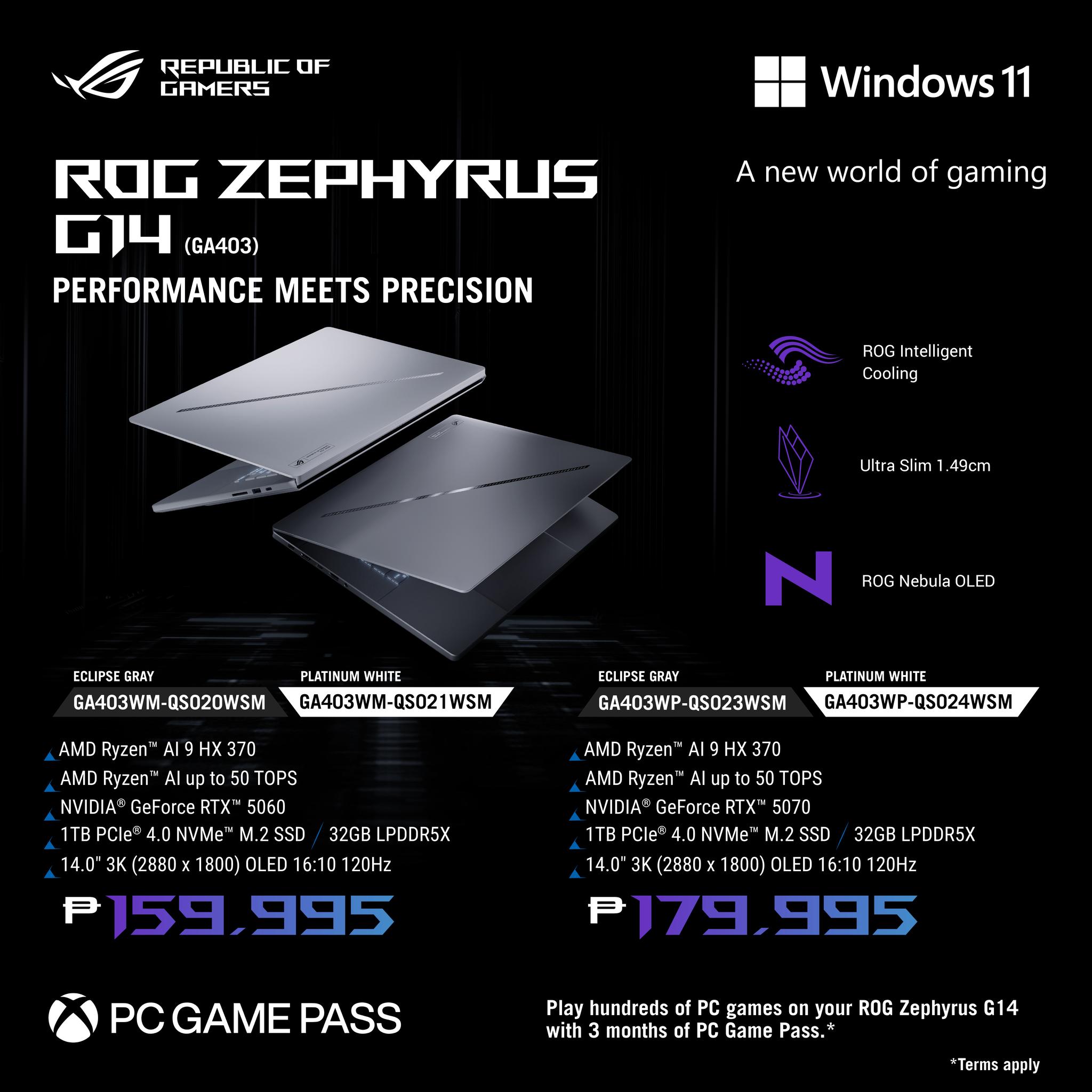
The Philippine market offers only two variants of the ASUS ROG Zephyrus G14 2025, with the GPU being the only difference. Php 159,995 gets you a Ryzen AI 9 HX 370, 32GB LPDDR5X-7500 memory, 1TB PCI-E Gen4 SSD, and an NVIDIA GeForce RTX 5060 90W. For an additional Php 20,000, you get an NVIDIA GeForce RTX 5070 90W.
The ASUS ROG Zephyrus G14 2025 is one of the few laptops in the Philippine market that come with both an upgraded, newer generation CPU and GPU over the previous generation. This makes the Zephyrus G14 2025 an interesting product, as most laptops only sport either a CPU or GPU upgrade, depending on the release timeline. That said, the dual-component upgrade also comes with a much higher cost, specifically a Php 26,000 and a Php 15,000 increase over the 2024 Zephyrus G14.
ASUS ROG Zephyrus G14 2025 – A Closer Look
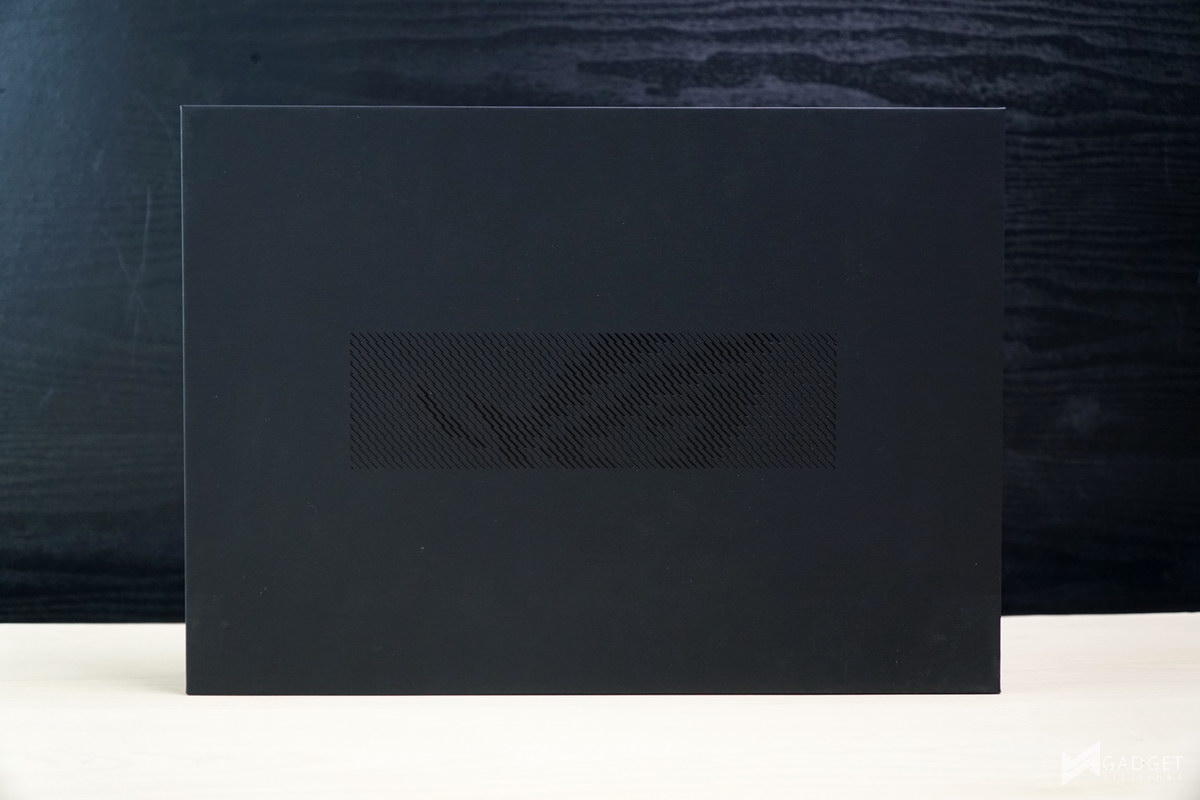
Packaging of the ROG Zephyrus G14 2025 is pretty much the same as the rest of the 2025 ASUS ROG Laptops we’ve seen so far. You have a compact, all-black, eco-friendly packaging with the secondary box sporting the same eco-friendly design as opposed to the previous Zephyrus two-tone signature color.
The ASUS ROG Zephyrus G14 2025 uses the new box-style plug for its AC adapter. ASUS still includes a separate Type-C charger, albeit this year’s charger is only 90W, a downgrade from the 2024’s 100W Type-C charger.
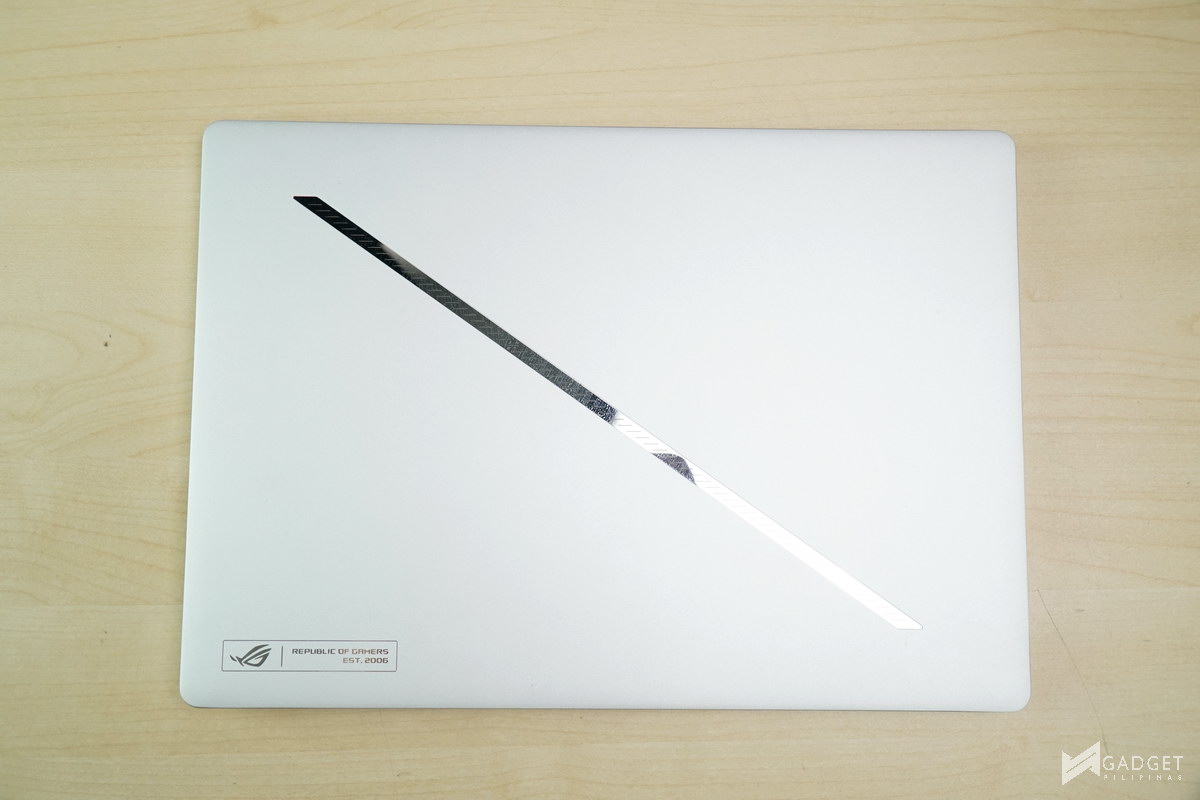

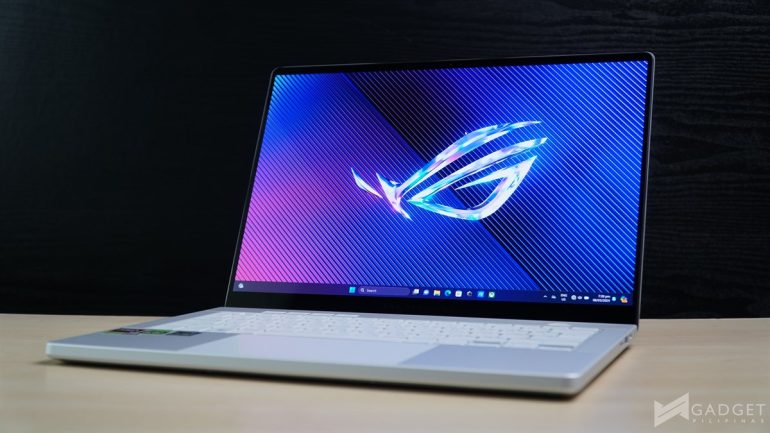
ASUS kept the same ROG Zephyrus G14 design for the 2025 iteration. Our specific review sample is the Moonlight White Colorway. The Zephyrus G14 2025 is also available in the Eclipse Grey colorway.
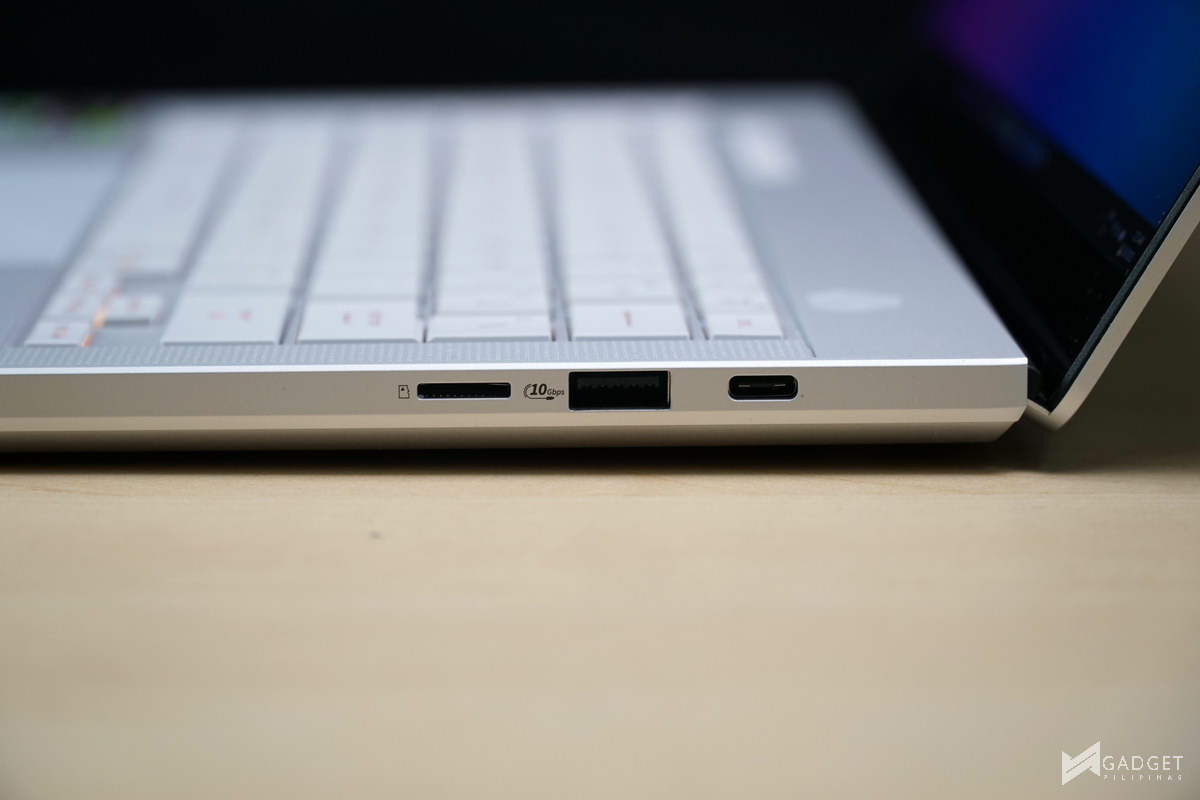
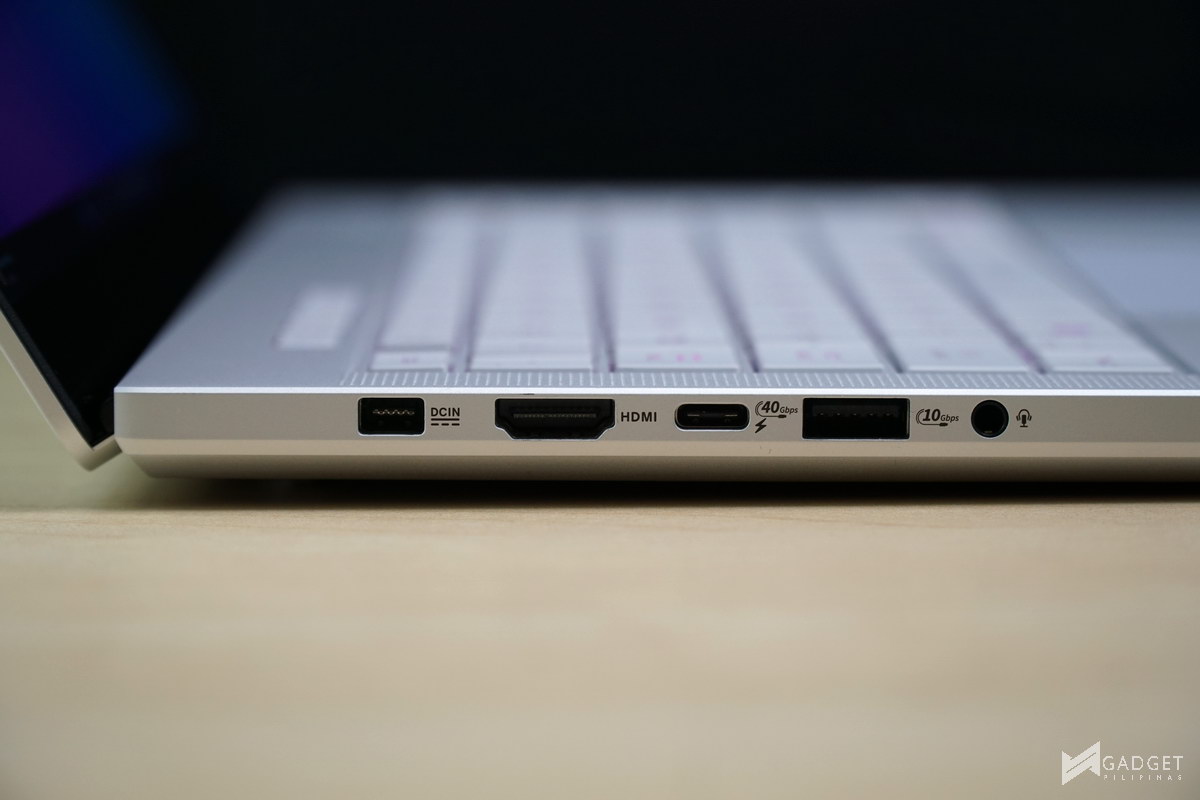
Port selection hasn’t changed since last year’s model. The right side houses one USB 4 Type-C port, one USB 3.2 Gen 2 Type-A port, and one microSD card reader. The left has the majority of the ports, namely DC-in, HDMI 2.1 port, one USB 3.2 Gen 2 with support for DisplayPort over Type-C, one more USB 3.2 Gen 2 Type-A port, and one audio jack. With the faster AMD Ryzen AI 9 HX 370, ASUS could’ve easily changed one

ASUS retained the same 14-inch keyboard layout on the ASUS ROG Zephyrus G14. The right control has been replaced with the Microsoft Copilot button on the ASUS ROG Zephyrus G14, as it’s also Copilot PC certified thanks to the AI capabilities of the Ryzen AI 9 HX 370 and NVIDIA GeForce RTX 5070 Laptop GPU.
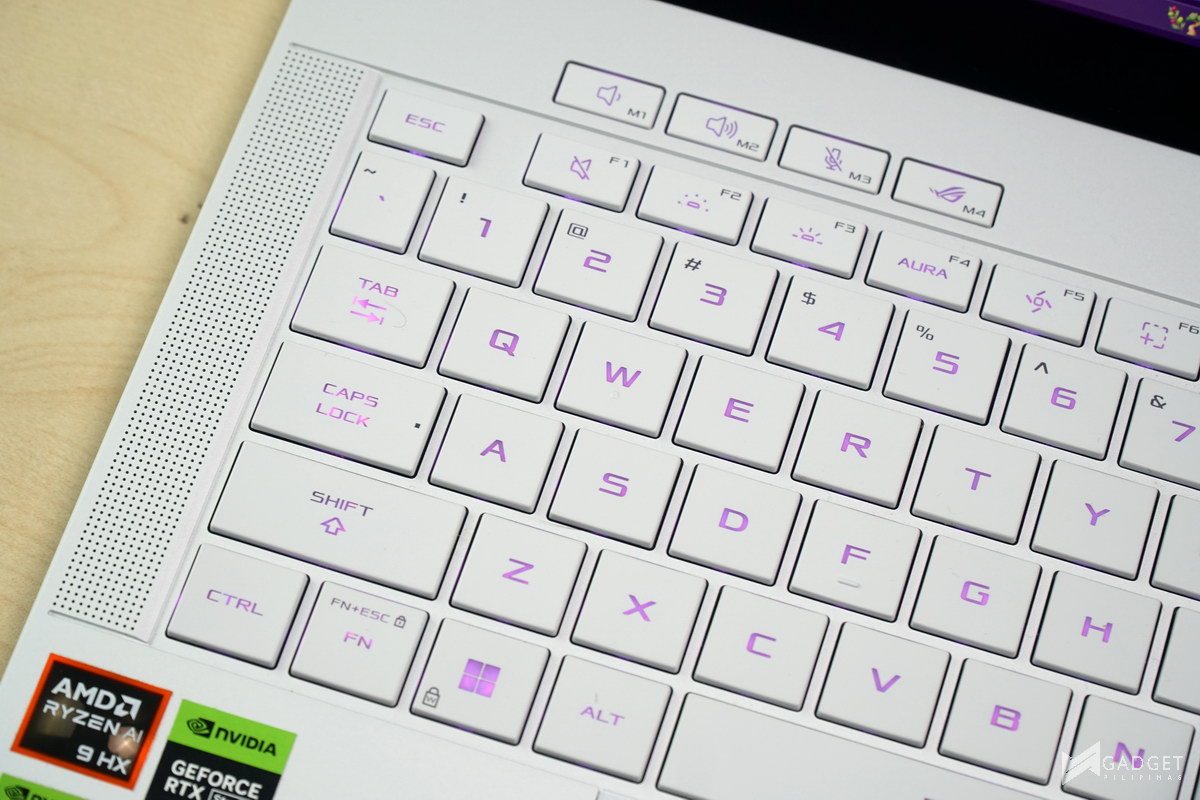

The ASUS ROG buttons are on the top left, while the power button is located at the opposite side. You also have the same superb speakers located at the edges of the keyboard deck, which provide one of the best audio experiences available for a 14-inch gaming laptop.

The ASUS ROG Zephyrus G14 2025 still has the same trackpad, which ASUS was able to maximize the space, making it even larger than some 15-inch laptop trackpads.
ROG Slash Lighting

As mentioned in the previous 2024 Zephyrus G14 review, the shift from the iconic Anime Matrix to the Slash Lighting is a bittersweet moment. Whether you like it or not is up to you. The ROG Slash Lighting invokes a unique professional aesthetic, whereas the Anime Matrix is much more customizable to make your own G14 unique.

The ROG Slash Lighting on the Zephyrus G14 is made up of 68 capsules and 28 mini LEDs, divided into 7 sections, which you can customize via the ASUS Armoury Crate software. There are five themes available with 15pre-loaded animations to choose from.
Display

The biggest upgrade from the 2023 to the 2024 Zephyrus G14 is the ROG Nebula Display that is also present in this year’s model. It’s a 14-inch 2880×1800 16:10 120Hz 0.2ms OLED panel with support for G-Sync and MUX Switch with Advanced Optimus.
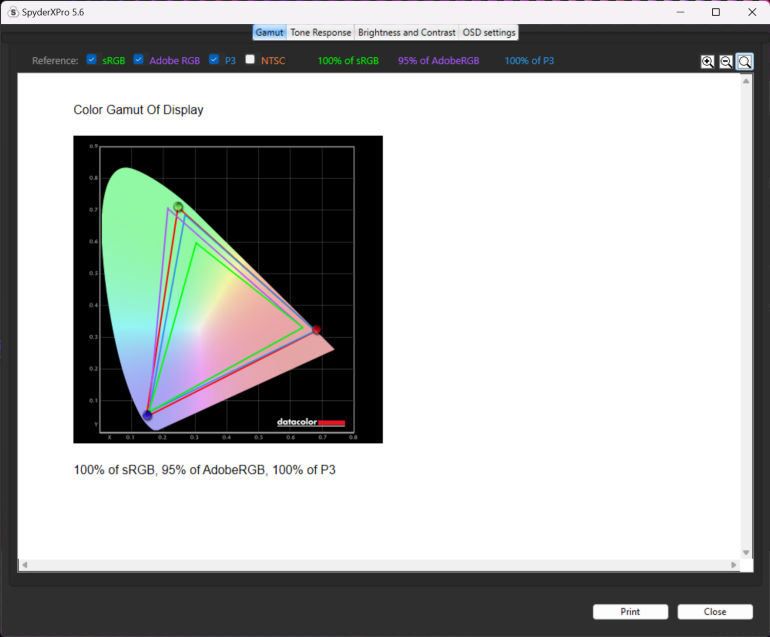
The Zephyrus G14 2025 remains one of the most color-accurate displays in a 14-inch form factor, more so for 14-inch gaming laptops, as we measured 100% sRGB, 95% AdobeRGB, and 100% DCI-P3 coverage using our SpyderX Pro display analysis too. We also measured a peak brightness of 400 nits, which is slightly lower than the 2024 variant’s 426 nits. That said, it’s still well over the 300 nit baseline, and the glossy coating makes it feel brighter, albeit it is a double-edged sword in well-lit environments due to the potential glare depending on the light source and angle.
Armoury Crate
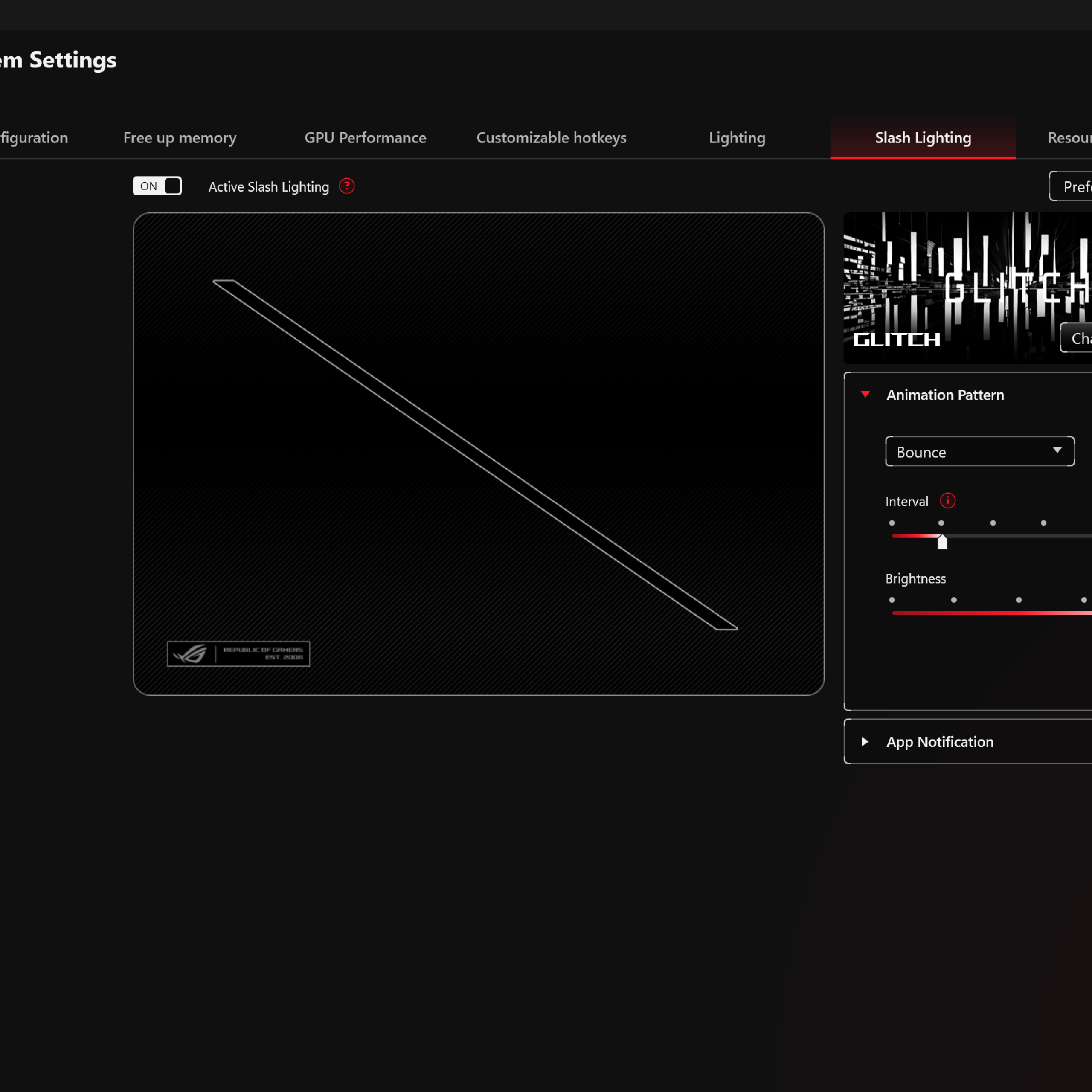
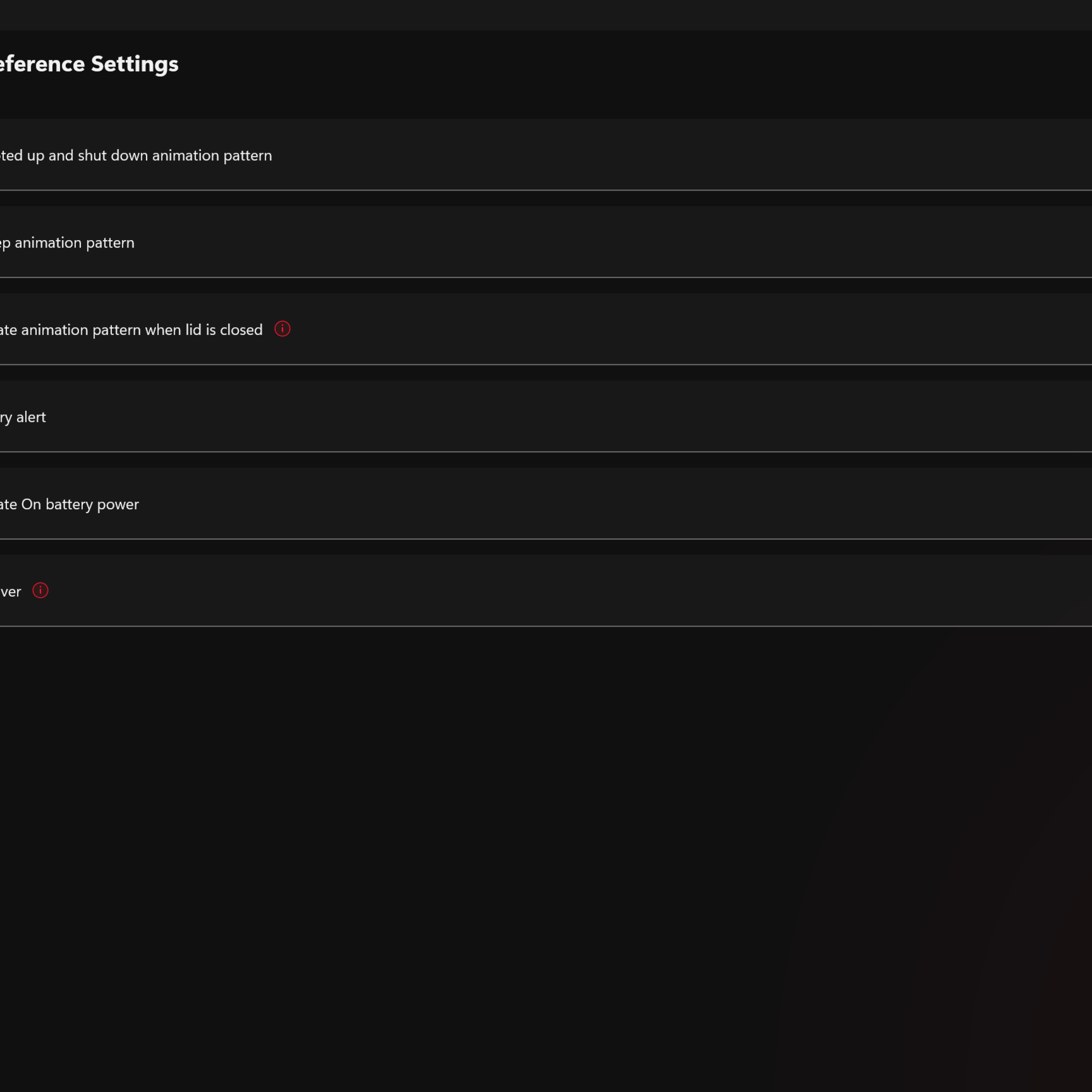
Armoury Crate holds everything you need to customize the ASUS ROG Zephyrus G14 GU403 2024. Apart from the power profiles which we’ll use to benchmark the gaming laptop, you’ll likely spend most of your time customizing the ROG Slash Lighting inside the app. That said, there isn’t much to do with the lighting apart from choosing a preset and setting the brightness – a considerable downgrade compared to the Anime Matrix design. That said, it would’ve been much better if it was RGB lighting as you can customized the colors to represent an app or the laptop’s state. That said, we look forward to more customization options in the next iteration.
Benchmark Setup and Test Methodology
Gadget Pilipinas’ testing philosophy is to provide detail-oriented results as accurately as possible so that our readers can replicate our tests given that these conditions are met. Different benchmarking apps and sequences are used depending on the tested component or device.
We use CapFrameX 1.7.5 Beta as our primary FPS capture and analysis tool for all our gaming benchmarks. The latest build version of Windows 11 Pro and WHQL-certified drivers are used for our benchmarks. Readings such as temperatures and power draws are recorded using HWINFO64, and OCCT Enterprise.
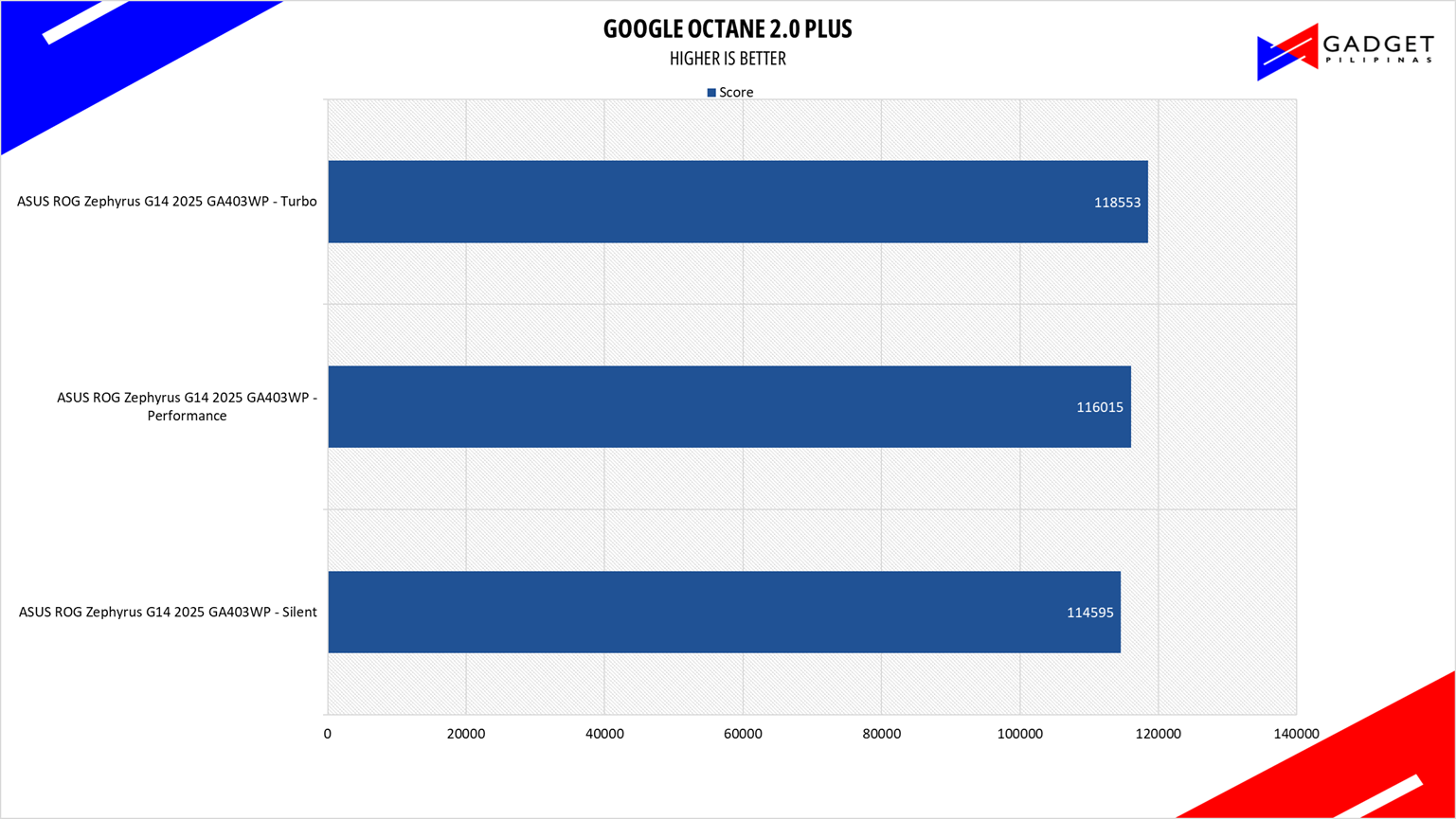
We benchmarked the ASUS ROG Zephyrus G14 GA403WP together with its different power settings found in the ASUS Armoury Crate Software – Silent, Performance, and Turbo. The main purpose of benchmarking power profiles is to show how aggressive or conservative the manufacturer is in terms of thermal management. These profiles will affect the CPU and GPUs’ boosting behavior in terms of duration and max clock speed which will translate to higher scores and stable framerates.
As part of our 2024 laptop benchmark methodology revamp, we’ve changed how these profiles are tested. Synthetic and Productivity benchmarks include all of the power profiles. We decided to drop the silent or power-saving profile for gaming benchmarks as these lowest profiles generally produce unplayable framerates, especially at 1440p and above resolutions. Moreover, games are tested at the laptop’s native resolution(in the G14’s case, 1800p) as we expect most, if not al gamers to game on the laptop’s native resolution.
For more information read our Benchmark Methodology article.
ASUS ROG Zephyrus G14 2025 Synthetic and Productivity Benchmarks
OCCT Benchmark
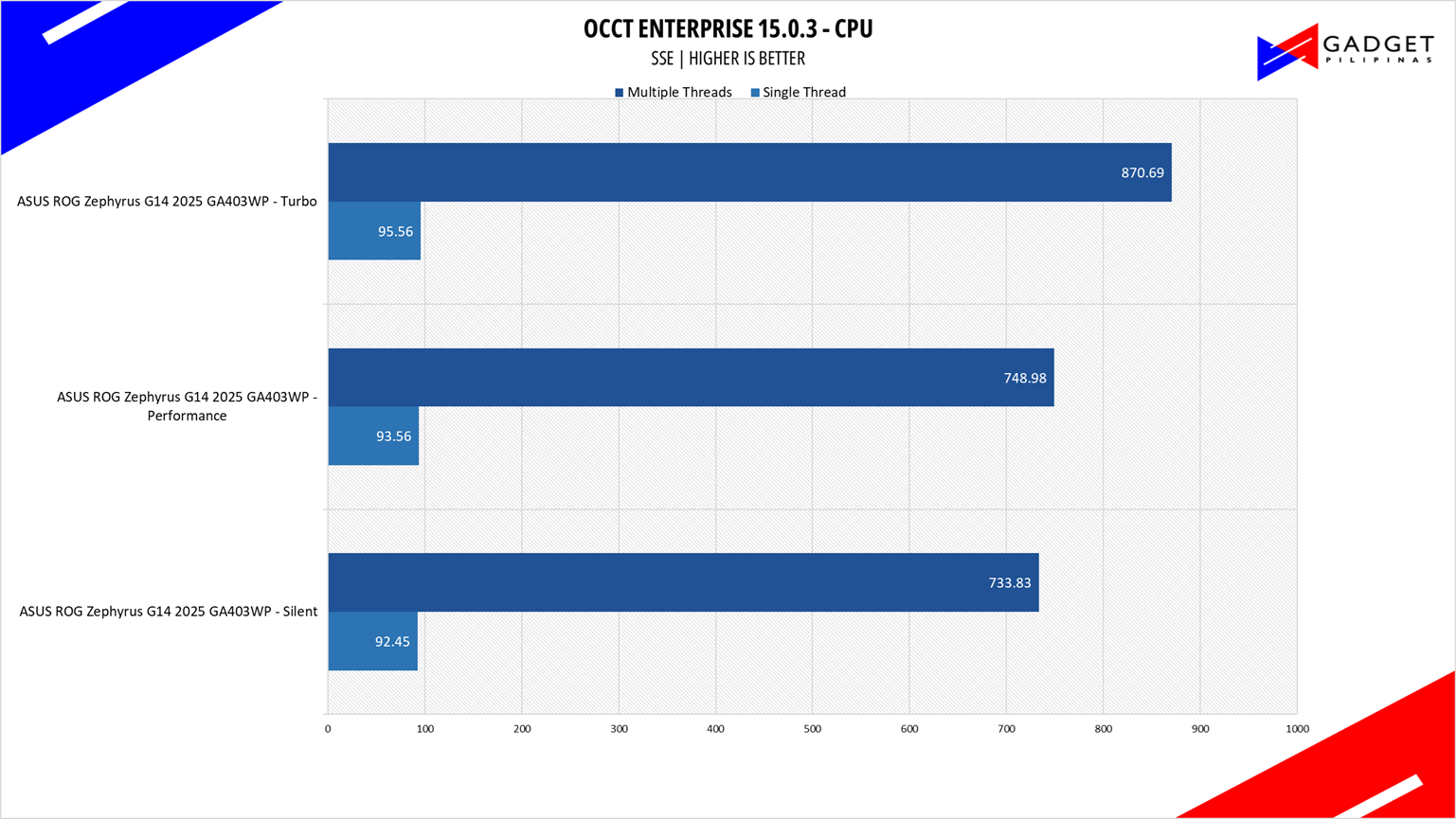
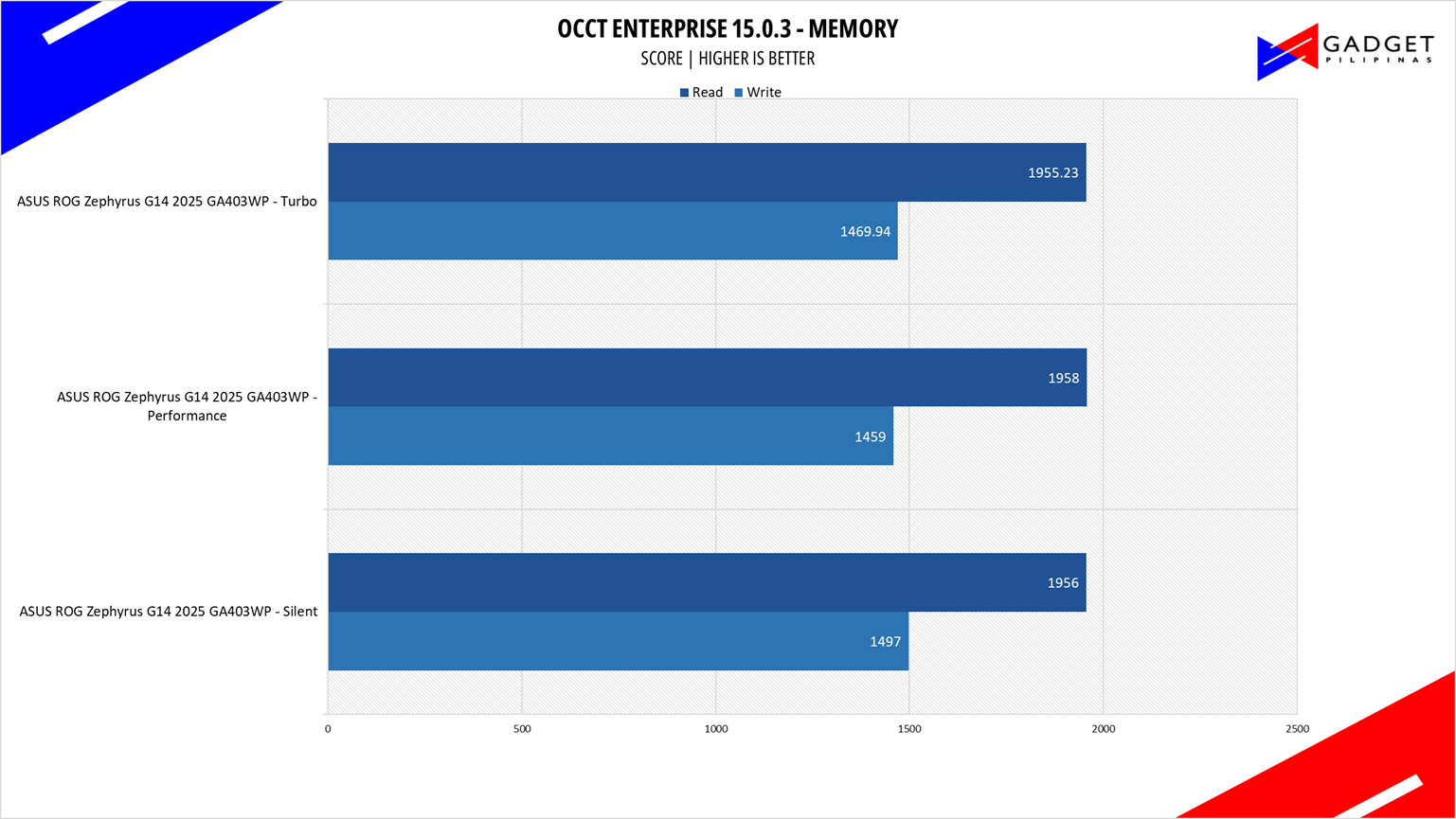
OCCT is a popular benchmark and stability testing tool among overclockers, enthusiasts, and system integrators.
CINEBENCH 2024

Maxon’s Cinebench benchmark is one of the most iconic benchmark applications used by reviewers and enthusiasts. The latest Cinebench 2024 uses the latest rendering architectures, including Intel’s Embree ray tracing technology and other advanced features from AMD and Intel that allow users to render the same scene on the same hard.
PROCYON

Procyon benchmark suite is developed by the UL, the same team behind 3DMark and PCMark benchmarks. The UL Procycon video editing benchmark uses Adobe Premiere in a typical video editing workflow. The benchmark starts by importing two video project files with various edits, adjustments, and effects – the second project uses several GPU-accelerated effects. Each project is exported in 1080p with H.264 encoding and again in 4K with HEVC H.265. The reported score is based on the time taken to export all four videos.
PCMark10
From the same developers of the popular game benchmarking tool 3DMark, PCMark 10 is a benchmarking app for measuring a whole PC’s performance. It covers a wide variety of tests to reflect common tasks performed in a modern workplace. We selected PCMark 10’s extended benchmark and reported both the overall score and Digital Content Creation Score.
V-RAY 6

V-Ray Benchmark is a stand-alone version of V-Ray developed by Chaos Group. It is designed to test the CPU and GPU by rendering sample scenes at a fixed amount of time. V-Ray is a plug-in mostly utilized by 3D computer graphics software applications mainly for industrial design, product design, architecture, film, and video game production. V-Ray is not limited to 64-threads as it supports multi and mega-threading.
BLENDER

Blender is a widely used, free, open-source 3D creation suite. It supports the whole 3D pipeline process from modeling, rigging, animation, simulation, rendering, and even motion tracking. Blender has become a standard for CPU benchmarks with the BMW27 and Classroom Scene most used. This prompted the company to release Blender Open Data Benchmark in 2018, a benchmark-specific version allowing users to run a preset benchmark and share the results online like 3DMark.
SuperPI 32M

SuperPI is a single-threaded benchmark application that lets the CPU calculate Pi(π) to the nth digit. In this benchmark, we selected the Pi calculation to 32M, the highest available for the app.
wPrime 1024M
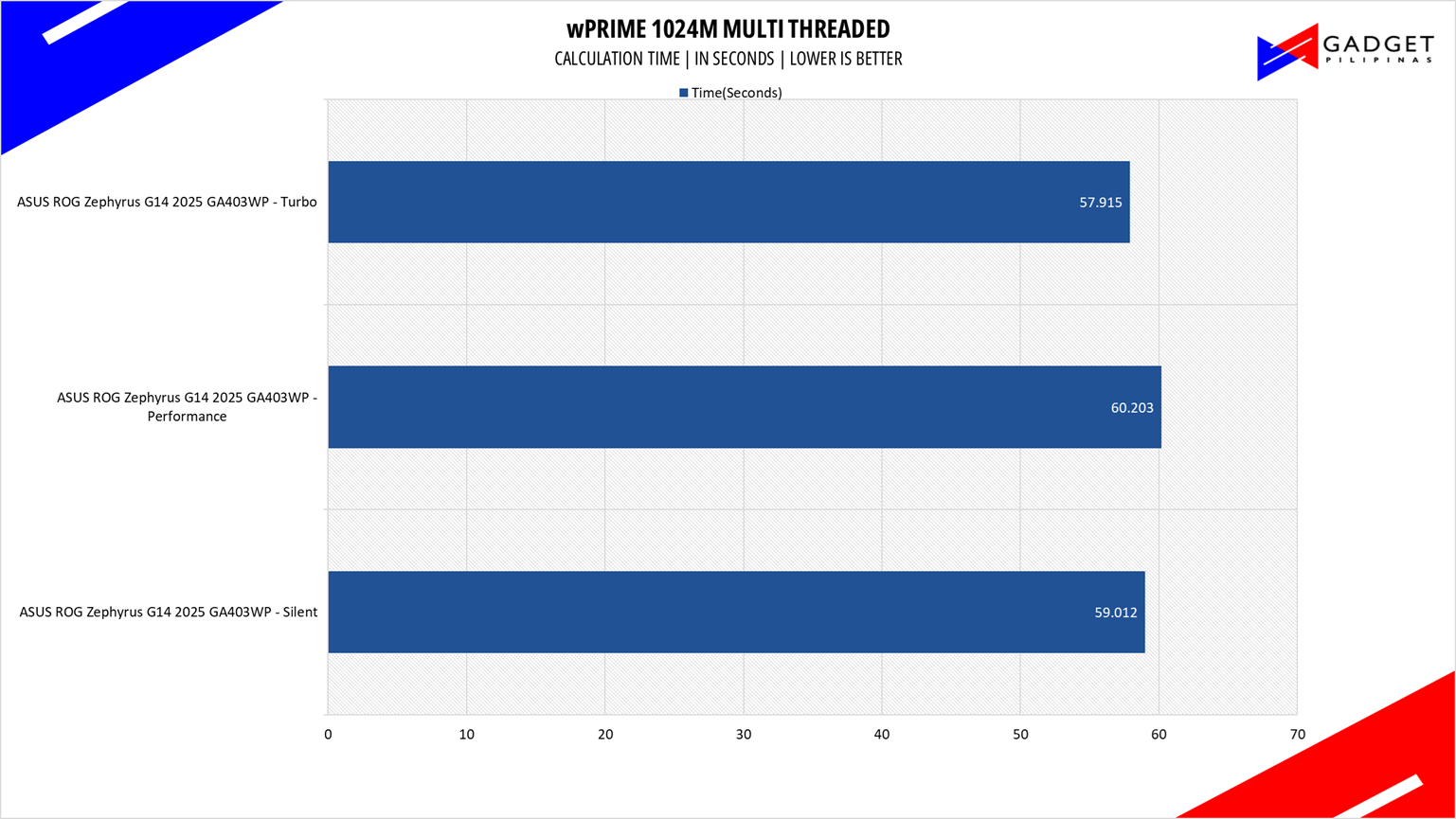
wPrime is a benchmark tool similar to SuperPI, but the former takes on finding prime numbers using Newton’s Method. The benchmark is set to calculate 1024 million prime numbers, and the performance is measured according to calculation time.
GeekBench 6.5

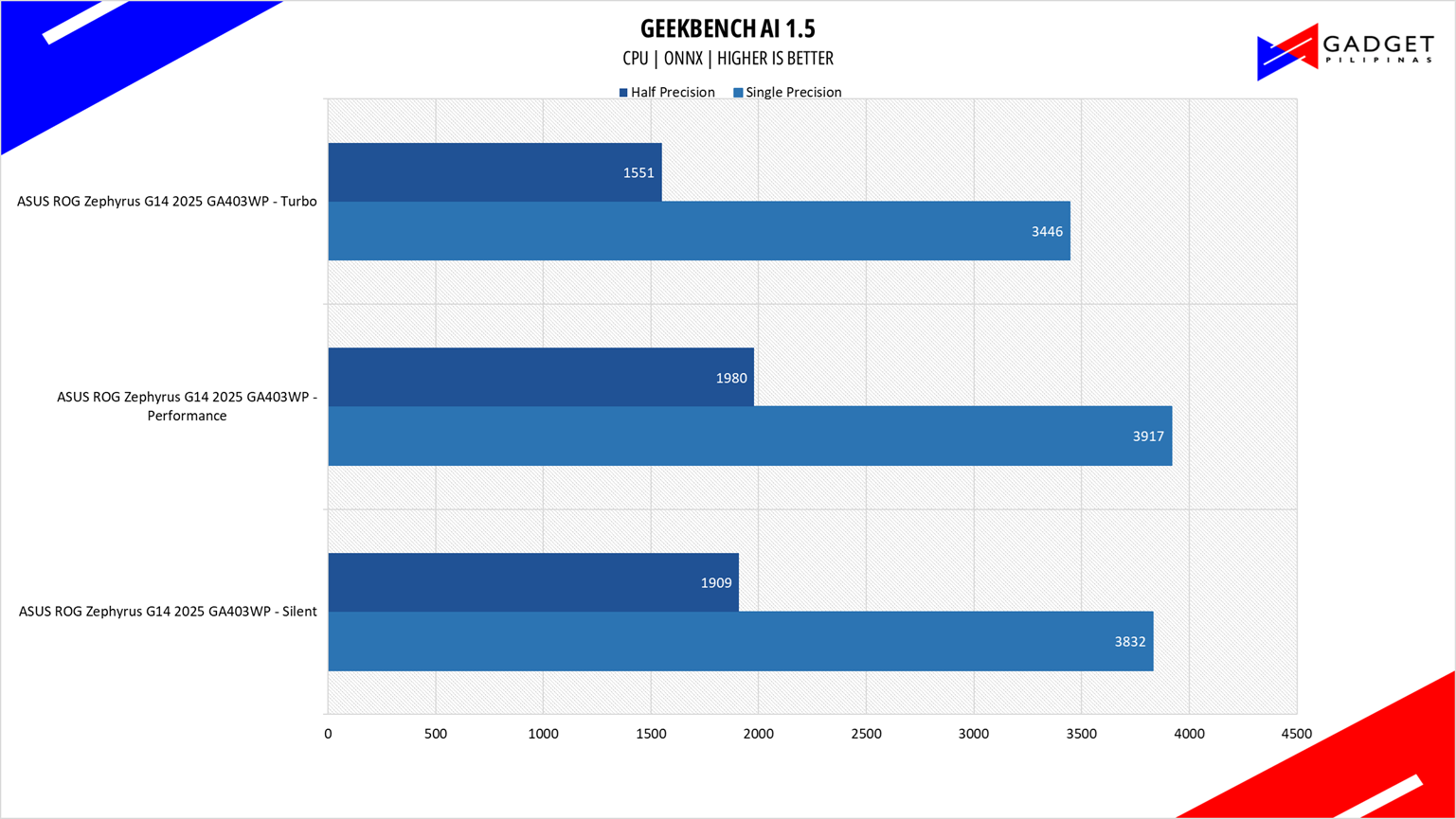
Geekbench is a multi-platform benchmark used to gauge CPU performance and compare them across Windows, Mac, and Mobile. Geekbench 6 is the latest version and doesn’t rely on memory more than the previous Geekbench 4, making it a great tool to measure both single-core and multi-core CPU performance.
3DMark Firestrike and TimeSpy
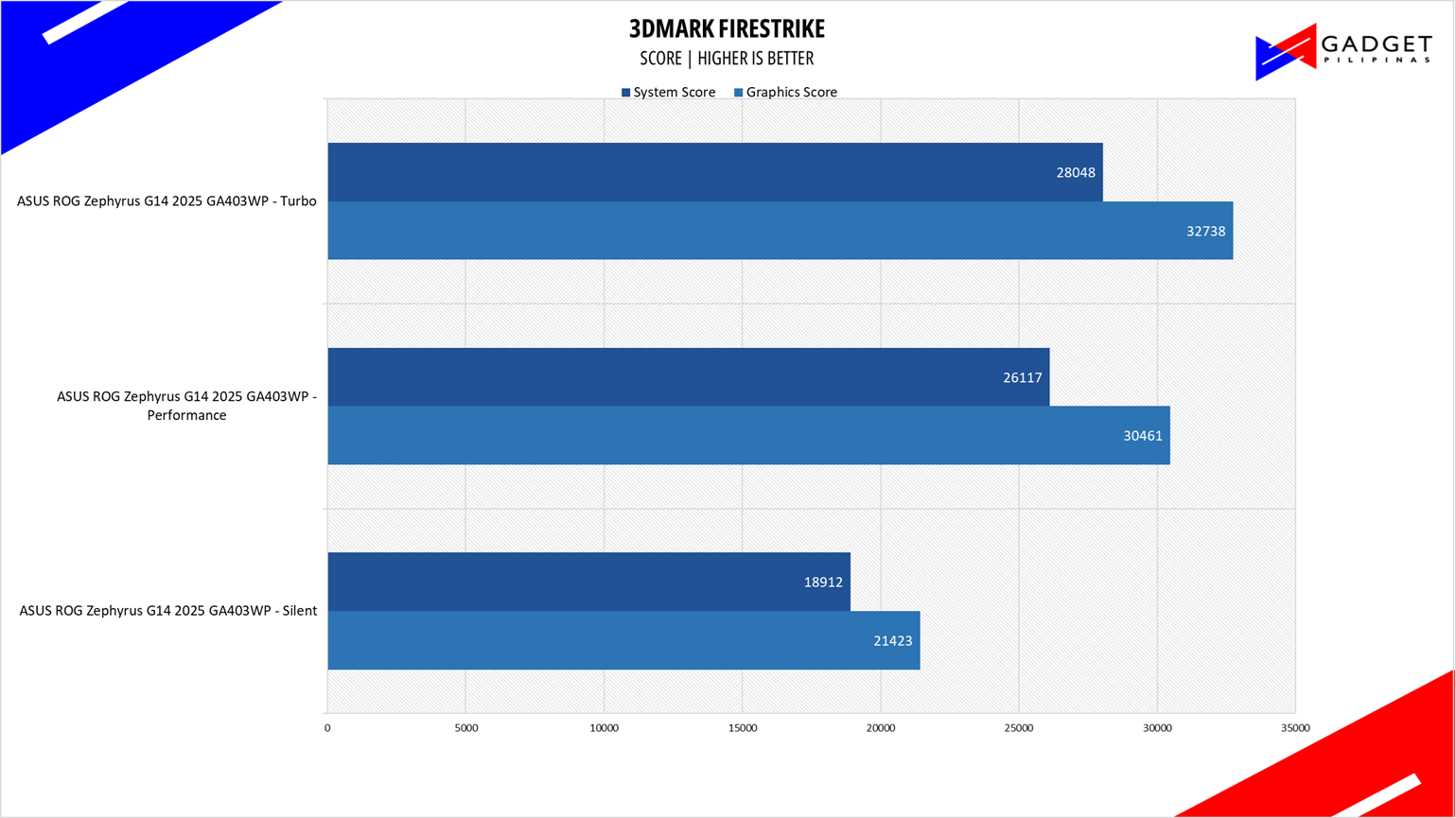
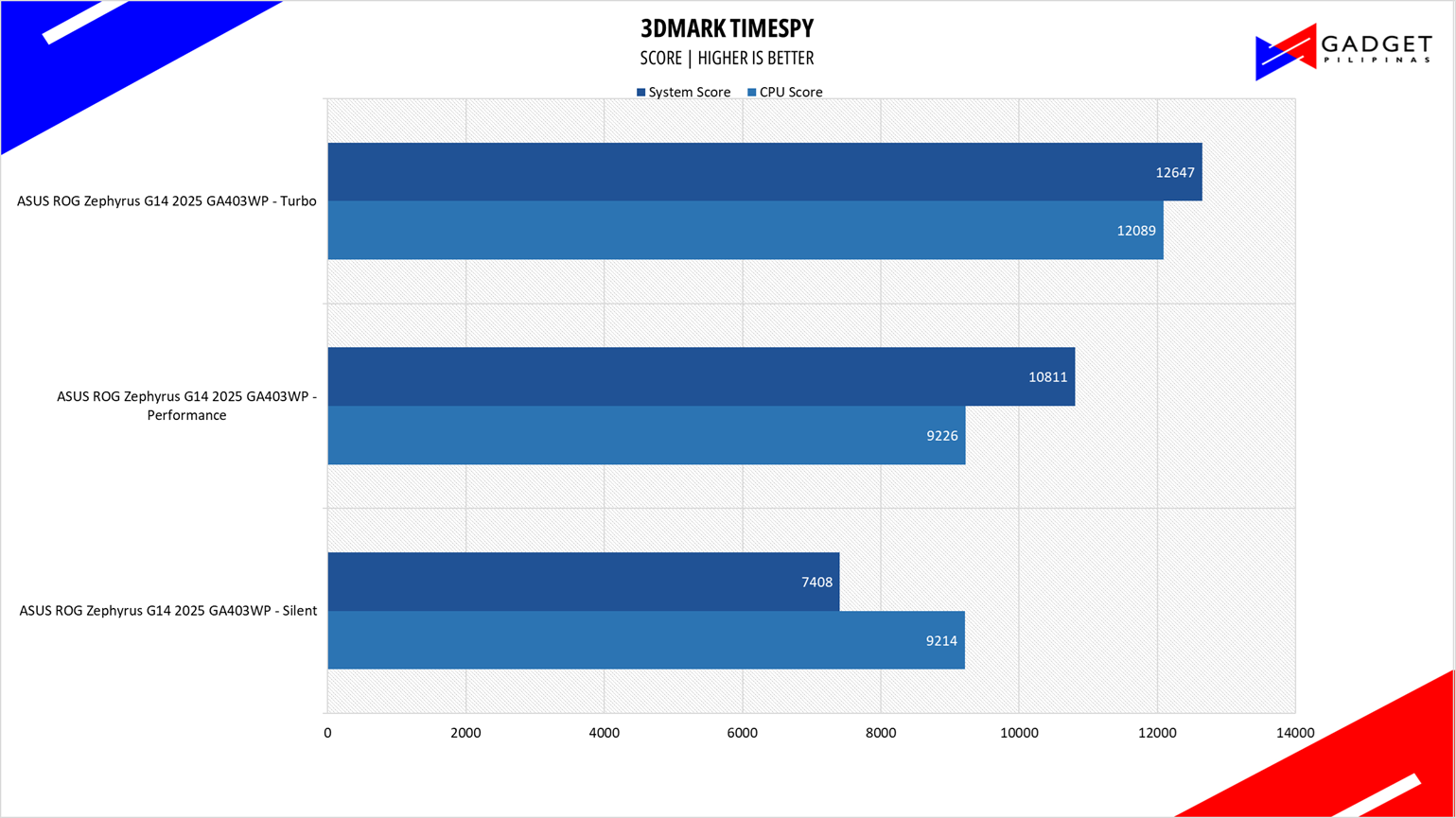
3DMark is the go-to benchmark for gamers because of the ability to share and compare results online. We test GPUs both in DX11 Firestike and DX12 Timespy to get a gauge of the performance.
CORONA RENDERER
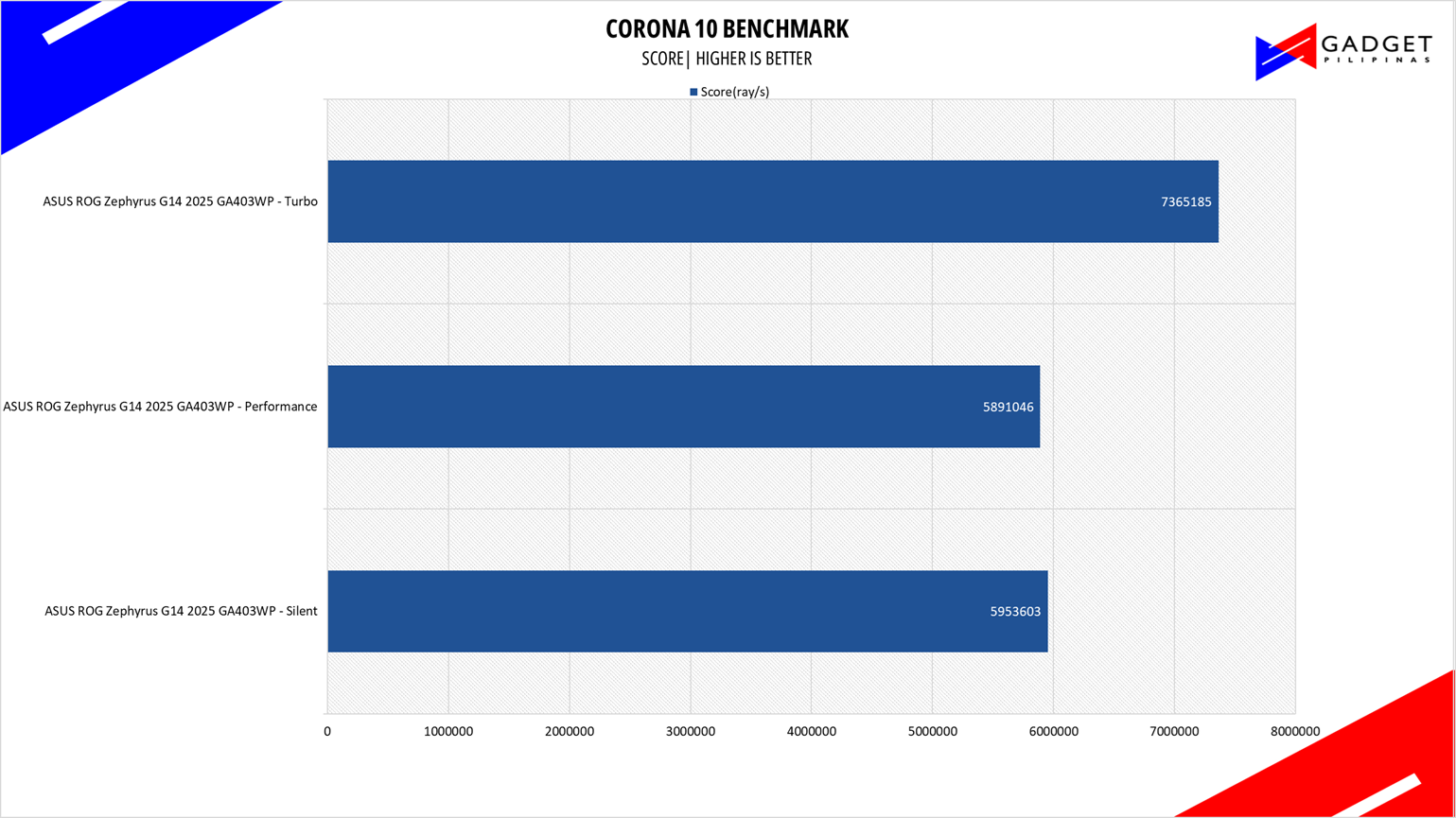
Corona Renderer is an unbiased photorealistic render available for Autodesk 3Ds Max, Maxon Cinema 4D, and as a stand-alone application. Its popularity, similar to Blender, led Chaos Group to develop a benchmark version of the app which runs using Corona Renderer 1.3. Workstation systems, especially CPUs, can utilize Corona Benchmark as up to 72 threads can be used in the benchmark, making it very suitable for CPUs with various price segments.
BapCo CROSSMARK
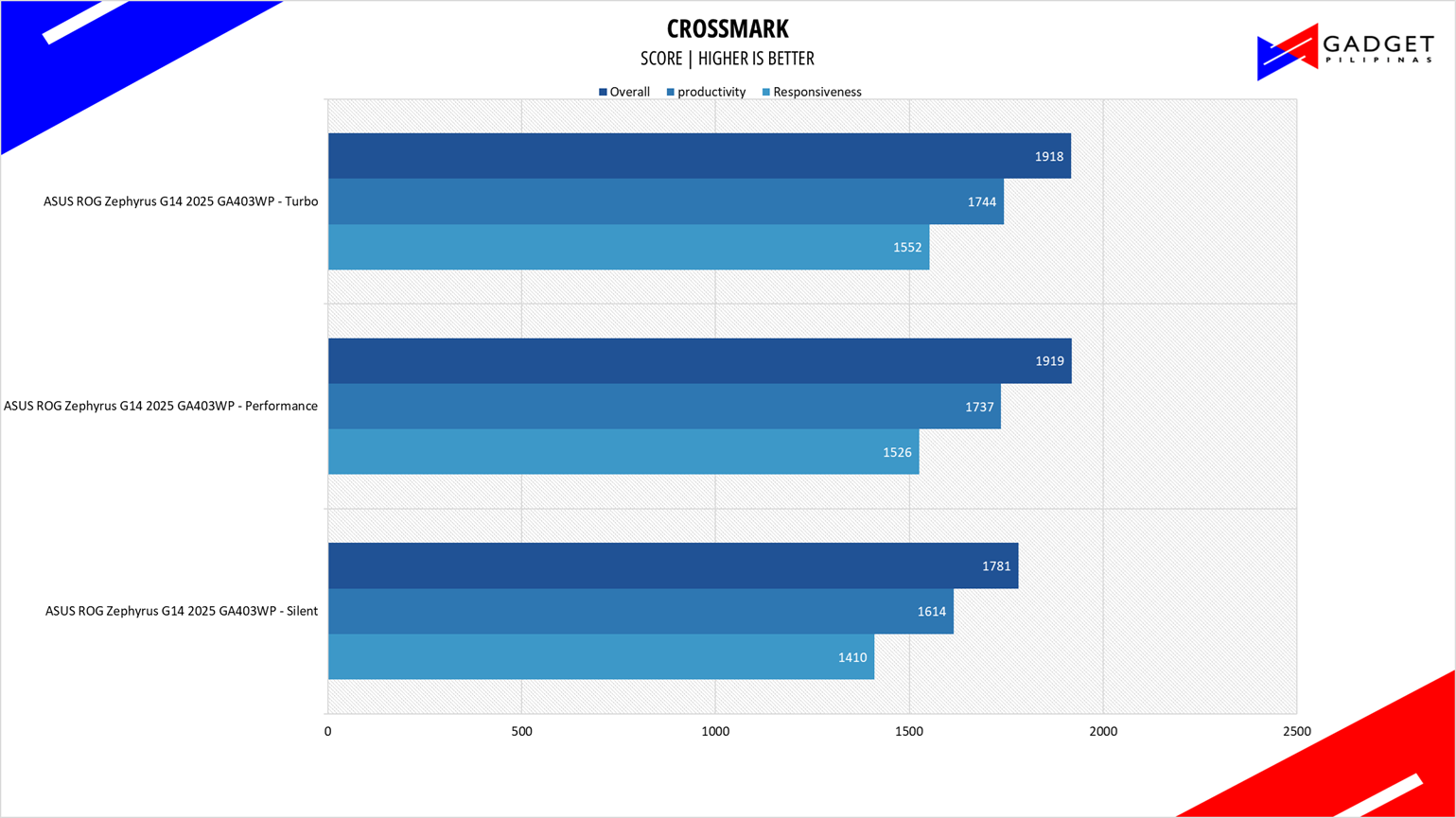
Crossmark is one of the few native cross-platform benchmark tools available for Windows, Android, Linux ChromeOS, iOS, and macOS. It measures overall system performance and system responsiveness using models of real-world applications making it a great comparison point across multiple platforms.
OCTANE 2.0 PLUS
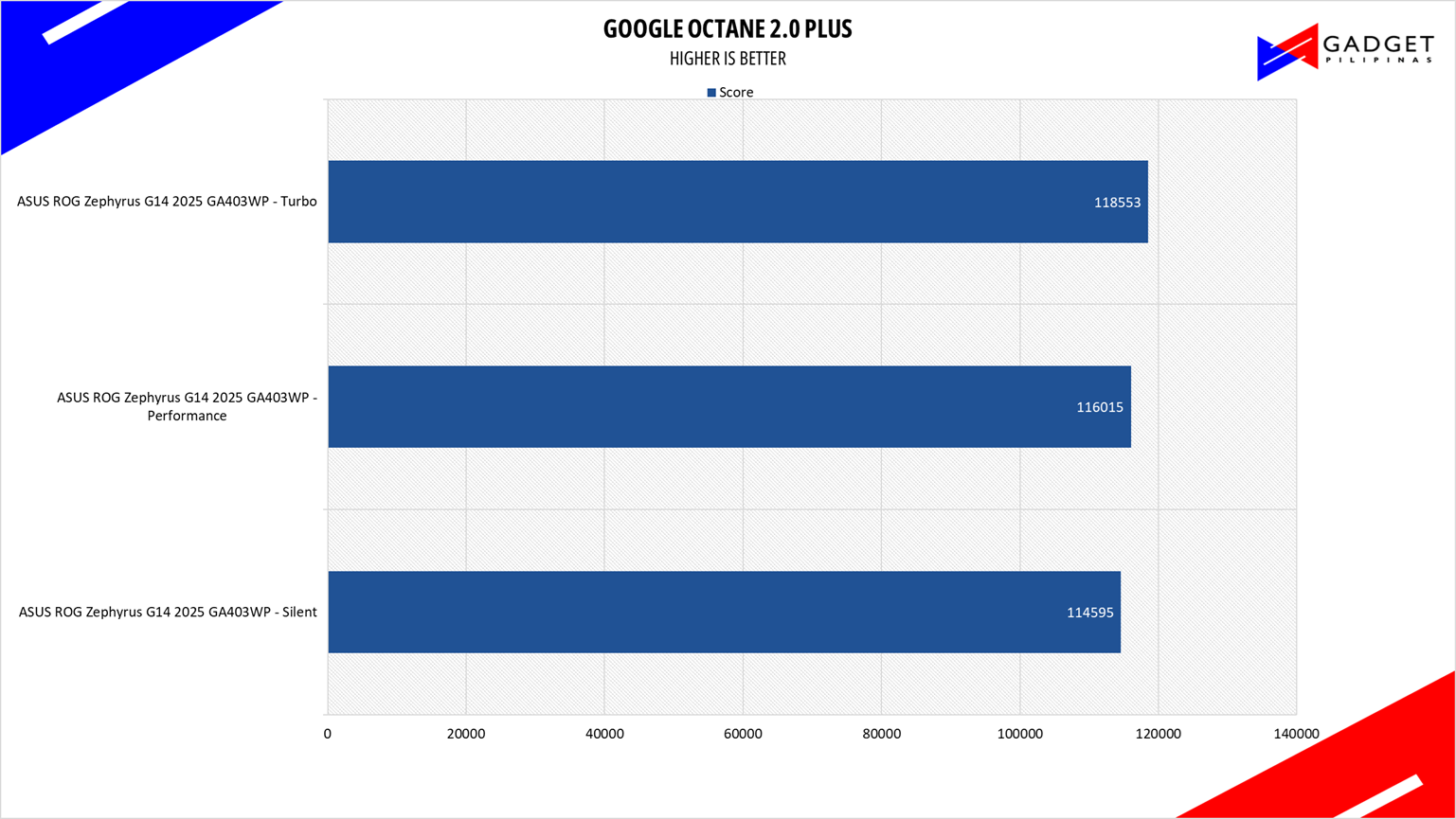
Octane 2.0 is a benchmark that measures a Javascript engine’s performance by running multiple tests representing different use cases of JavaScript applications. While Google Octane is retired and no longer maintained, it is still a good representation of today’s dynamic, interactive web applications. Our Octane 2.0 benchmark is run on Microsoft’s latest Chromium-based Edge browser.
ASUS ROG Zephyrus G14 2025 SSD Benchmark
Apart form the CPU and GPU upgrade, the SSD also gets a spec bump over the previous WD SN560 used on the 2024 Zephyrus G14. The 2025 variant now uses a 1TB Micron MTFDKBA1T0QGN-1BN1AABGA, a PCI-E Gen4 3D QLC SSD rated at 7,100 MB/s read and 5,800 MB/s write. It’s about double the speeds over the 2024’s SN560 drive. That said, you do go from a TLC to a QLC so expect some slow down as you fill up the drive as seen in our quick CrystalDiskMark benchmark.
ASUS ROG Zephyrus G14 2025 Gaming Benchmarks
RETURNAL
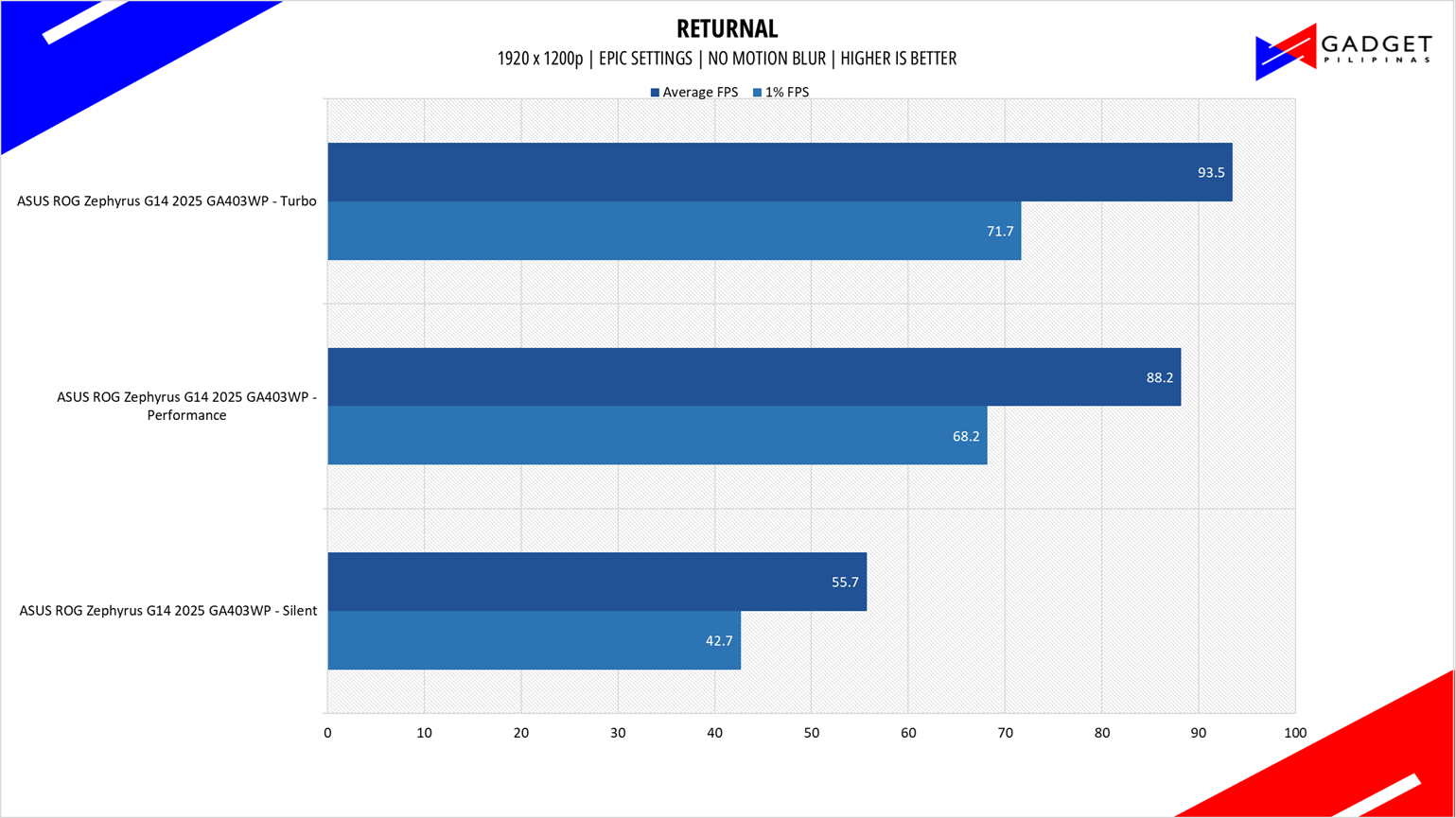
Returnal is one of the most technologically advanced games since the launch of Cyberpunk 2077. Released last April 2021 on PS5 and February 2023 on PC, it uses Unreal Engine 4 and supports multiple technologies such as Ray Tracing, DLSS, VSR, and FSR.
COUNTERSTRIKE 2
CounterStrike 2 or CS2 is the successor to the now-retired CSGO and now uses the Source 2 Engine – the same engine used on DOTA 2. CS2 is a great FPS game to test out CPU performance. Our benchmark process uses the replay function of the game.
DOTA 2

Dota 2 is a good repesentation among F2P titles especially MOBAs and RTS as it lands on the demanding side of the spectrum. Its gameplay and quality of life updates are far more frequent than most F2P titles thanks to its vast popularity. Our benchmark sequence is based on a replay of OG vs. Gaimin Gladiators in the ESL ONE Berlin Major Finals Game 4 from the team fight that happened from 23:00 to 24:00.
F1 25

F1 25 is the official video game of the 2023 Formula One and Formula 2 championships, developed by Codemasters. F1 25 is the eighteenth entry in the franchise and uses the Ego Engine 4.0. F1 25 is a good representation of racing games thanks to its realistic graphics and fairly demanding spec requirements as well as support for Ray Tracing and the latest upscaling technologies such as DLSS, XeSS, and FSR.
GHOST OF TSUSHIMA

Ghost of Tsushima is an action-adventure game developed by Sucker Punch Productions and published by Sony Interactive Entertainment. It was initially released for the PlayStation 4 in July 2020 and later for PlayStation 5 and Windows. Ghost of Tsushima runs on a modified and optimized version of Sucker Punch’s in-house engine, originally built for the PlayStation platforms.
HOGWARTS LEGACY

Hogwarts Legacy is a popular game catering to the hearts of Harry Potter fans and gamers with its rich world and engaging gameplay. Developed by Avalanche Software and built on the Unreal Engine 4, Hogwarts Legacy delivers detailed environments and character models with support for the latest rendering and upscaling technologies.
HORIZON FORBIDDEN WEST

Horizon Forbidden West is a 2022 action role-playing game developed by Guerrilla Games and published by Sony Interactive Entertainment. The Horizon Zero Dawn game sequel launched on PC last March 2024 built on the Decima Game Engine, the same one used on Death Stranding. Horizon Forbidden West features Ray Tracing and Upscaling technologies not present in the prequel game.
ASSASSIN’S CREED: MIRAGE
Assassin’s Creed Mirage is the latest Assassin’s Creed game from Ubisoft making it the thirteenth major installment in the franchise. It uses the AnvilNext 2.0 game engine and is the very first AC game to support the latest upscaling technology such as XeSS, FSR, and DLSS.
Cyberpunk 2077
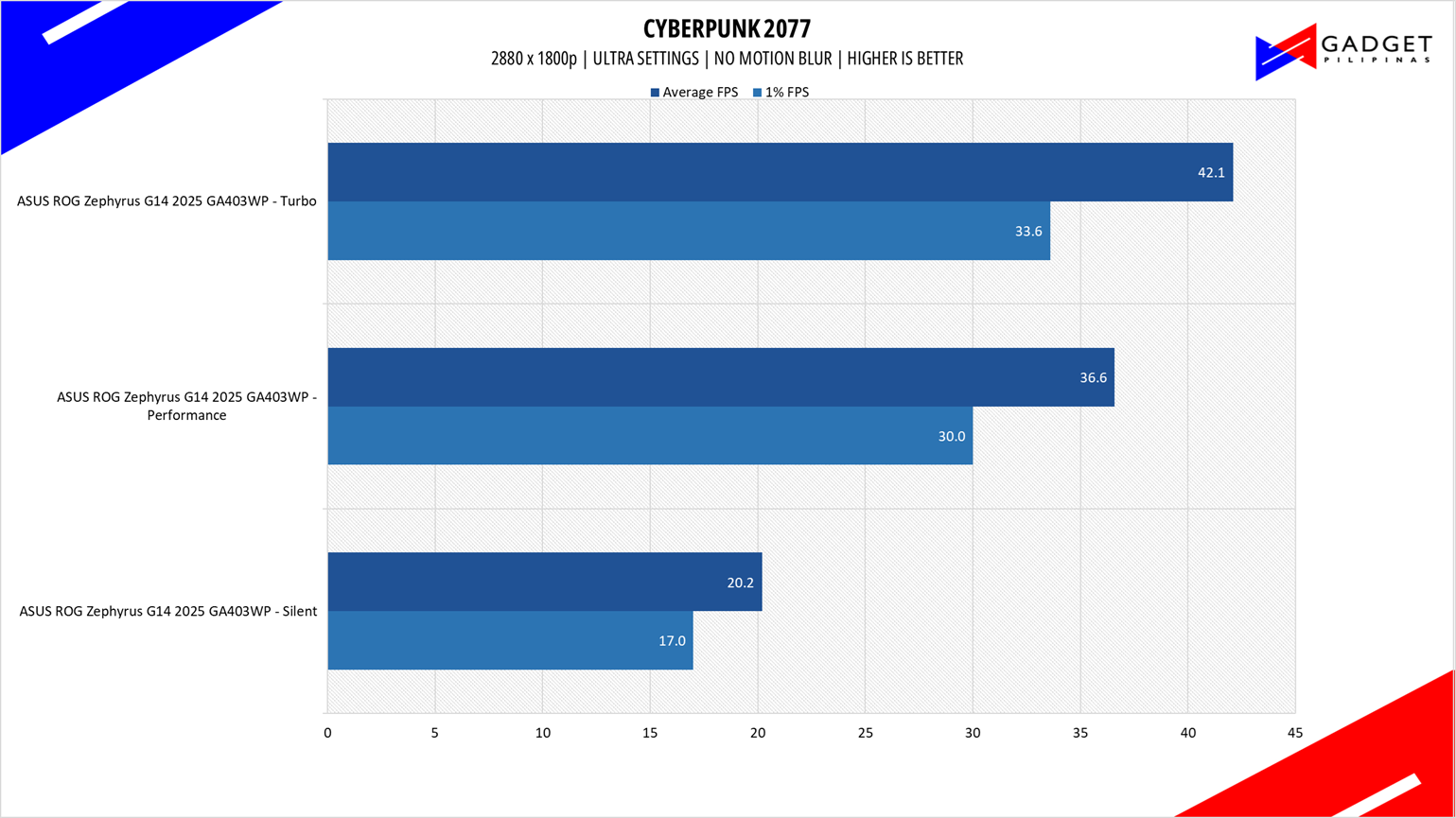
Cyberpunk 2077 is arguably the most hyped game of 2020. Developed by CD Projekt Red, the dystopian open-world, action-adventure RPG sports is one of the most demanding titles to date. Cyberpunk 2077 also supports three Ray Tracing settings as well as DLSS which makes the game a great tool to measure Ray tracing performance for both AMD and Nvidia graphics cards.
SPIDER-MAN: MILES MORALES
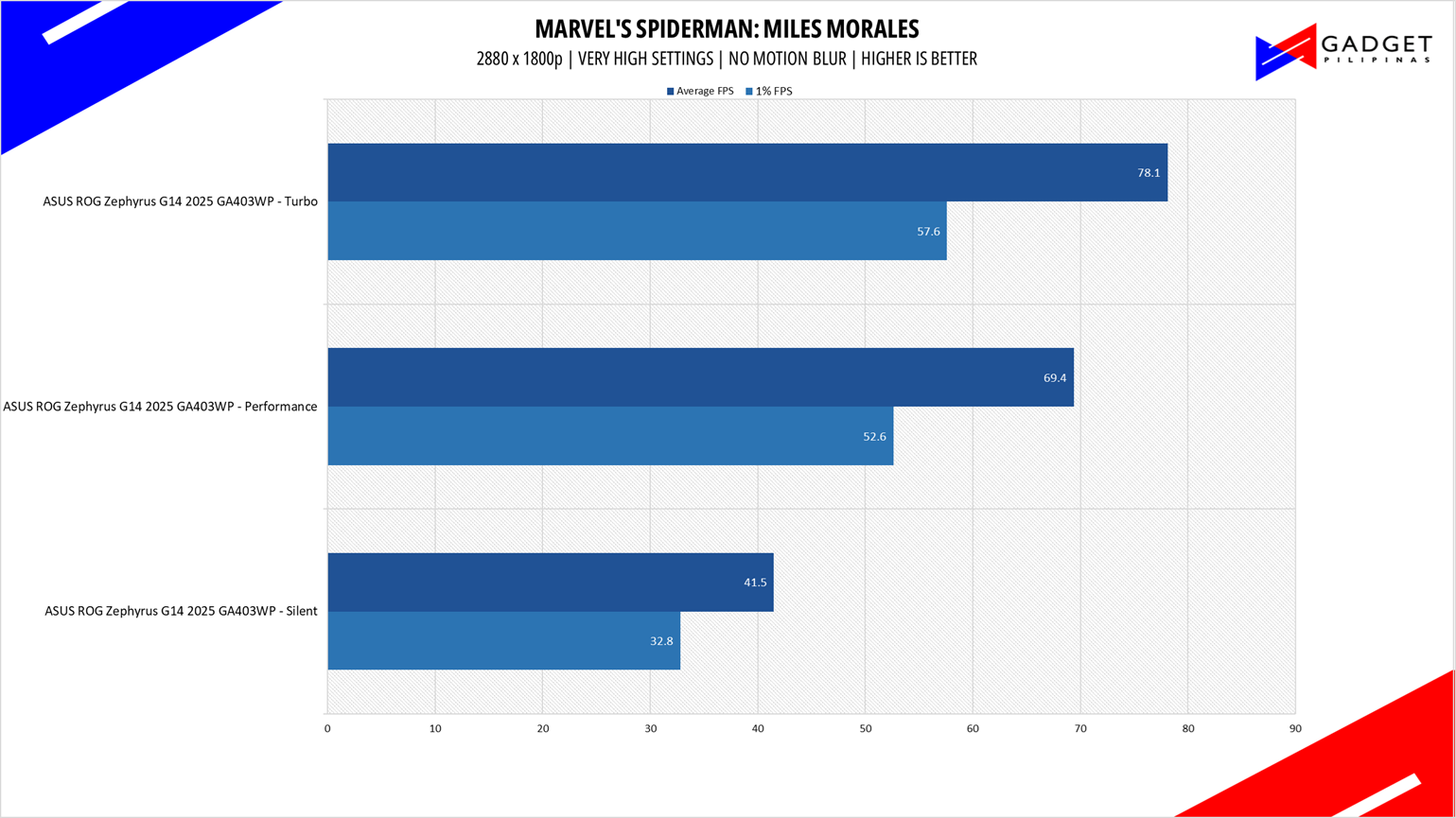
Marvel’s Spider-Man: Miles Morales is developed by Insomniac Games and published by Sony is one of the most popular PC port titles last 2022. It’s one of the few modern game titles that su
Far Cry 6
FarCry 6 is an FPS game published by Ubisoft and uses the Dunia engine. It heavily relies on and takes advantage of DirectX 12 to render a realistic environment that makes it taxing to both the CPU and GPU. It’s also the first game of the franchise to support Ray Tracing.
ASUS ROG Zephyrus G14 2025 Battery Life
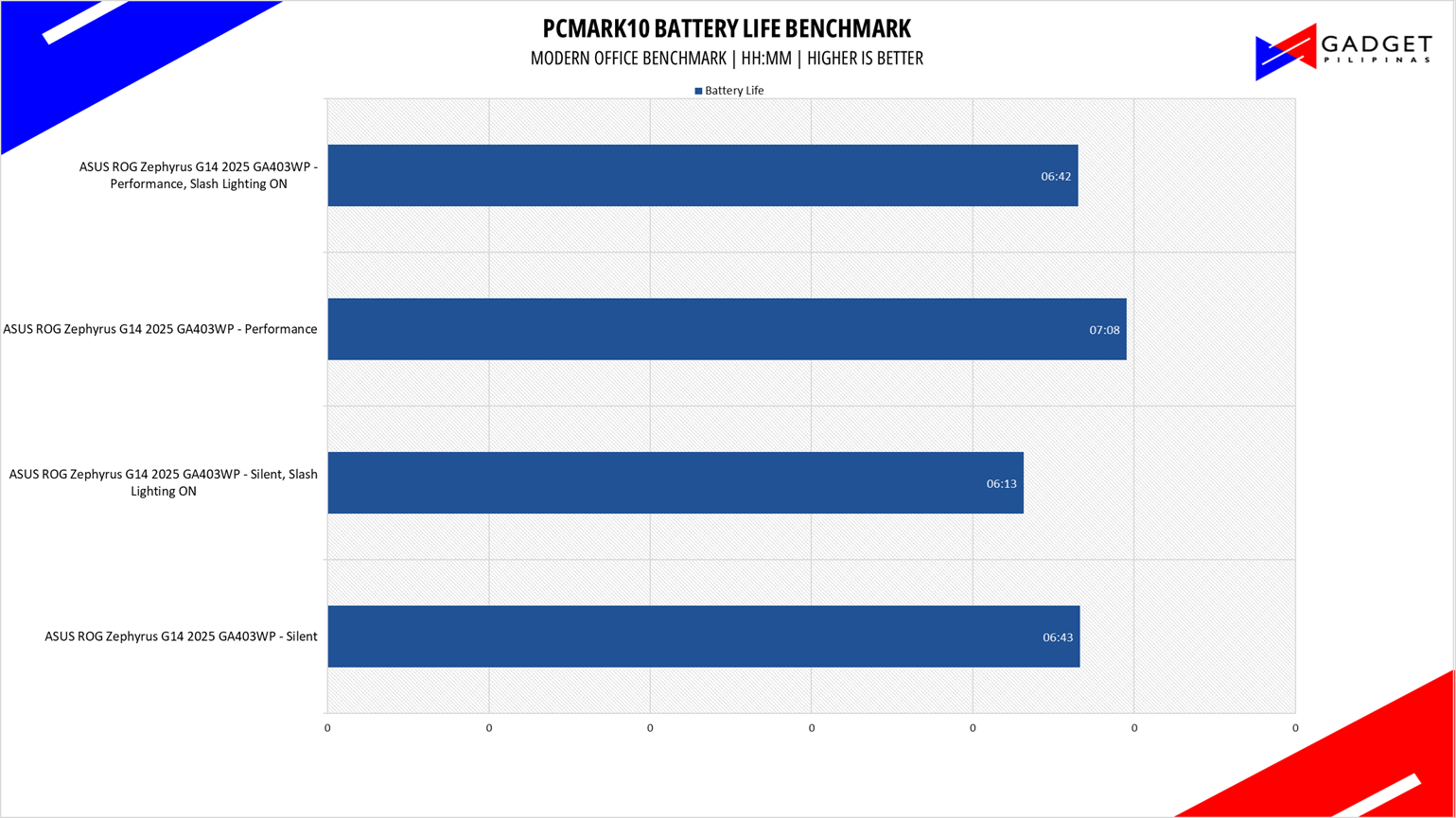
Like last year’s model, battery life isn’t a strong aspect of the ROG Zephyrus G14 2024. Using the laptop’s most conservative mode as well as turning off slash lighting only yielded 4 hours and 27 minutes. Turning on the slash lighting at 50% brightness reduced the battery life to only 3 hours and 32 minutes. While you have improved efficiency with the new CPU and GPU, the OLED battery drain cancels out these supposed benefits. That said, it’s good that ASUS included a small 100W Type-C charger to somehow compensate for the G14’s disappointing battery life.
Battery life played a big issue on last year’s model as it only yielded 4 hours and 27 minutes on the silent profile the ROG Slash Lighting disabled. For the 2025’s battery life test, we managed to record a peak battery life of 7 hours, surprisingly using the Performance Profile instead o the Silent Profile. Turning the ROG Slash Lighting to 50% with an power saving mode at 20% battery life only reduced about 30-minutes of battery life on both profiles.
ASUS ROG Zephyrus G14 2025 Temperatures

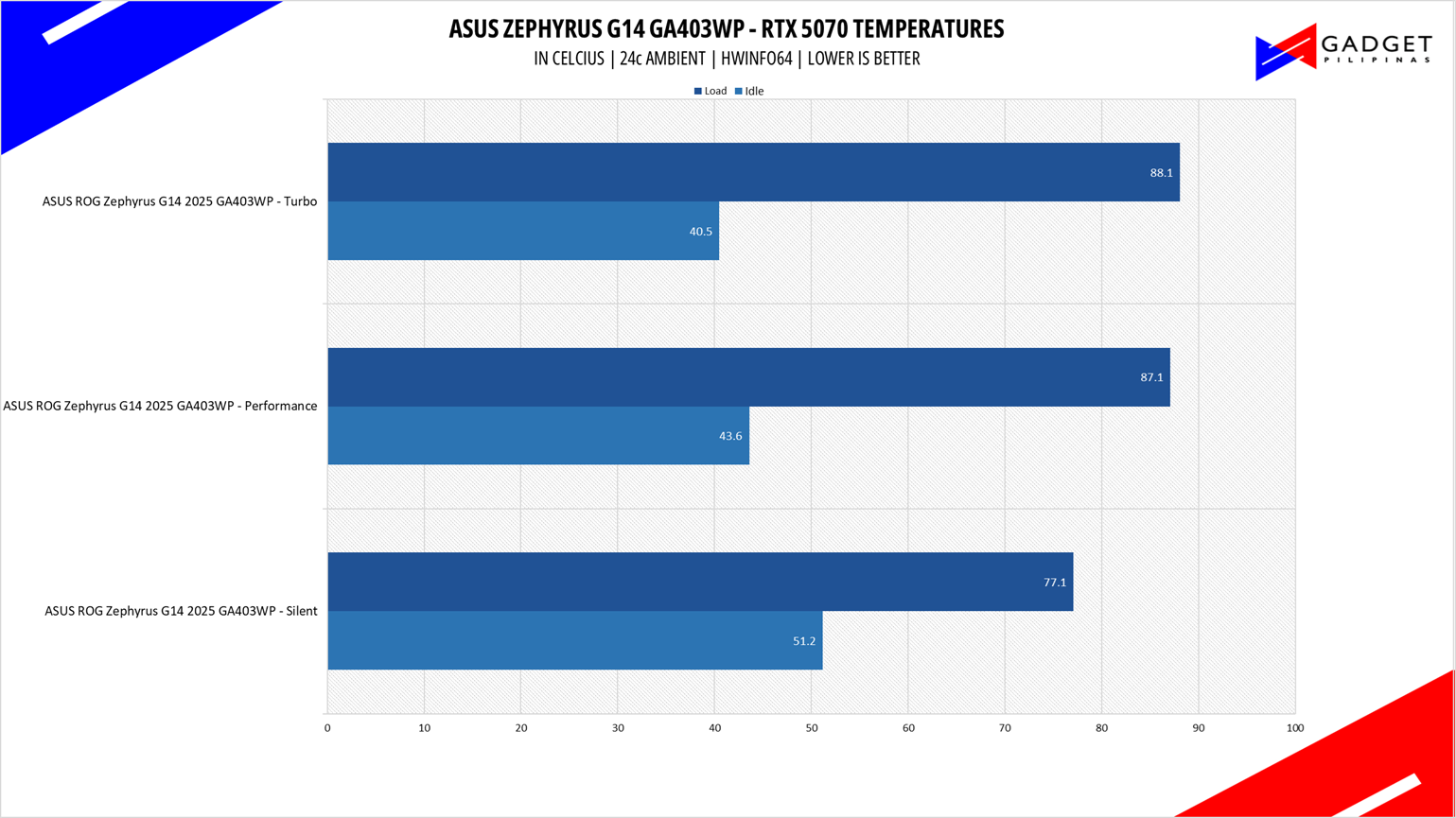
The smaller form factor of the ROG Zephyrus G14 is a double-edged sword. While you do get closer to ROG Flow X13 levels of portability, you’re also getting a much smaller surface area to cool the AMD Ryzen 9 8945HS and RTX 4070 GPU.
Both performance profiles place the Ryzen 9 8945HS above 93°C temperature while the RTX 4070 sits at 87°C regardless of power profile. This shows that GPU is prioritized when it comes to cooling. Considering the RTX 4070’s 90W TDP, prioritizing CPU cooling should yield better performance as apps and games are run at 1800p resolution.
Conclusion – Best 14-inch Gaming Laptop
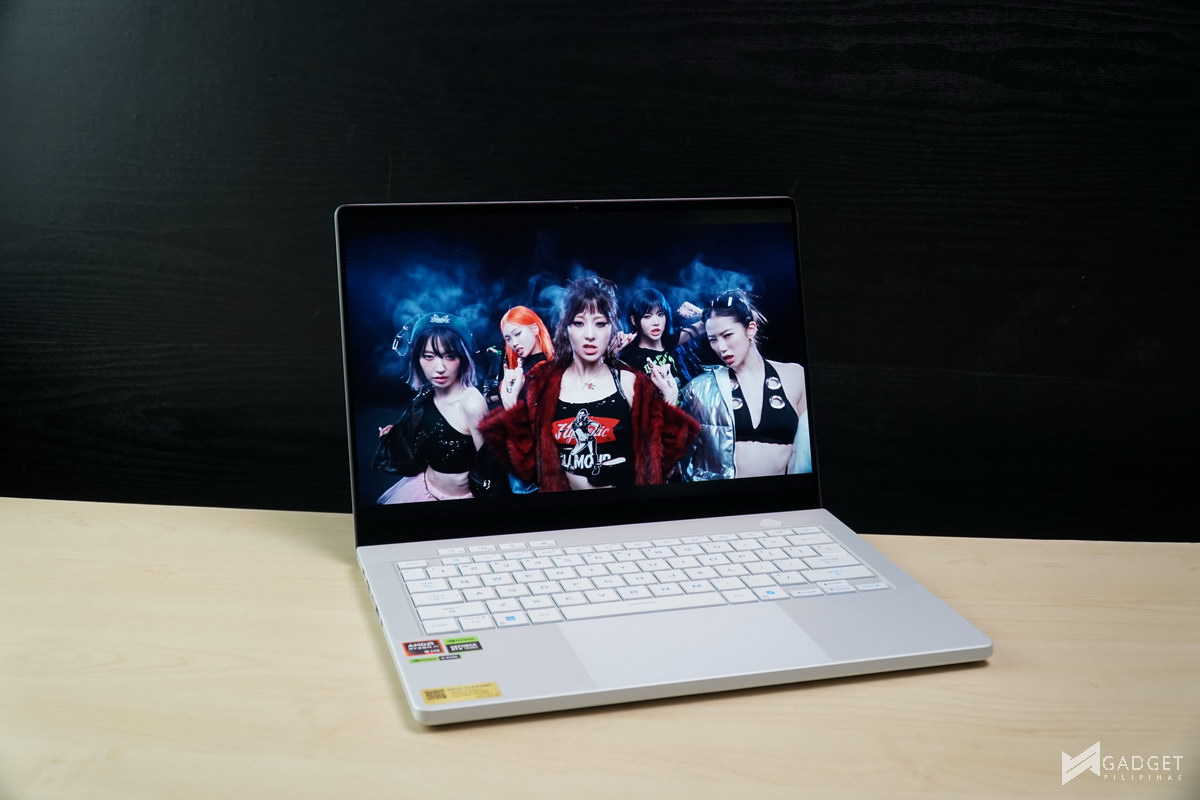
ASUS managed to fix plaguing issues of last year’s model with a simple upgrade to the CPU and GPU. The combinations of using the latest AMD Ryzen AI 9 HX 370 CPU and NVIDIA GeForce RTX 5070 Laptop GPU not only improves the overall performance but also greatly lengthen’s the G14 2024’s battery closer to ultrabook models and that’s even with the handicap of using a power-hungry OLED display and ROG Slash Lighting.
Performance-wise, the 1800p display makes it hard for the CPU and GPU to run games over 60 FPS, let alone the GeForce RTX 5070 Laptop GPU only having a 90W TGP. Luckily there’s upscaling technologies like DLSS and Multi-Frame Gen available to get a “boost” in perfomarnance. That said, the dense PPI, 12 and overall responsiveness of the ROG Nebula OLED display greatly contributed to the perceive smoothness of playing games at lower than 60 FPS. Taking into account the thermals, there’s clearly room for more performance as you have a large enough thermal headroom if it wasn’t for the 90W TGP limit on the GPU.
Overall, ASUS has managed to quell the 2024 Zephyrus G14’s battery life issue which makes the ASUS ROG Zephyrus G14 2025 model a more all-rounder laptop thanks to the CPU and GPU upgrade. Not only do you get better performance across the board but a more efficient battery life that makes it an all-rounder laptop, maximizing portability, performance, and battery life.
That said, the ASUS ROG Zephyrus G14 2025 is far from perfect. Upgradability is a clear compromise with the soldered memory, albeit you get 32GBs out of the box, and only one M.2 SSD slot. With battery life out of the way, its price is now the biggest hurdle for users considering to purchase the Zephyrus G14. Despite these shortcomings, we can still say that the ASUS ROG Zephyrus G14 2025 is the best 14-inch gaming laptop available in the market.
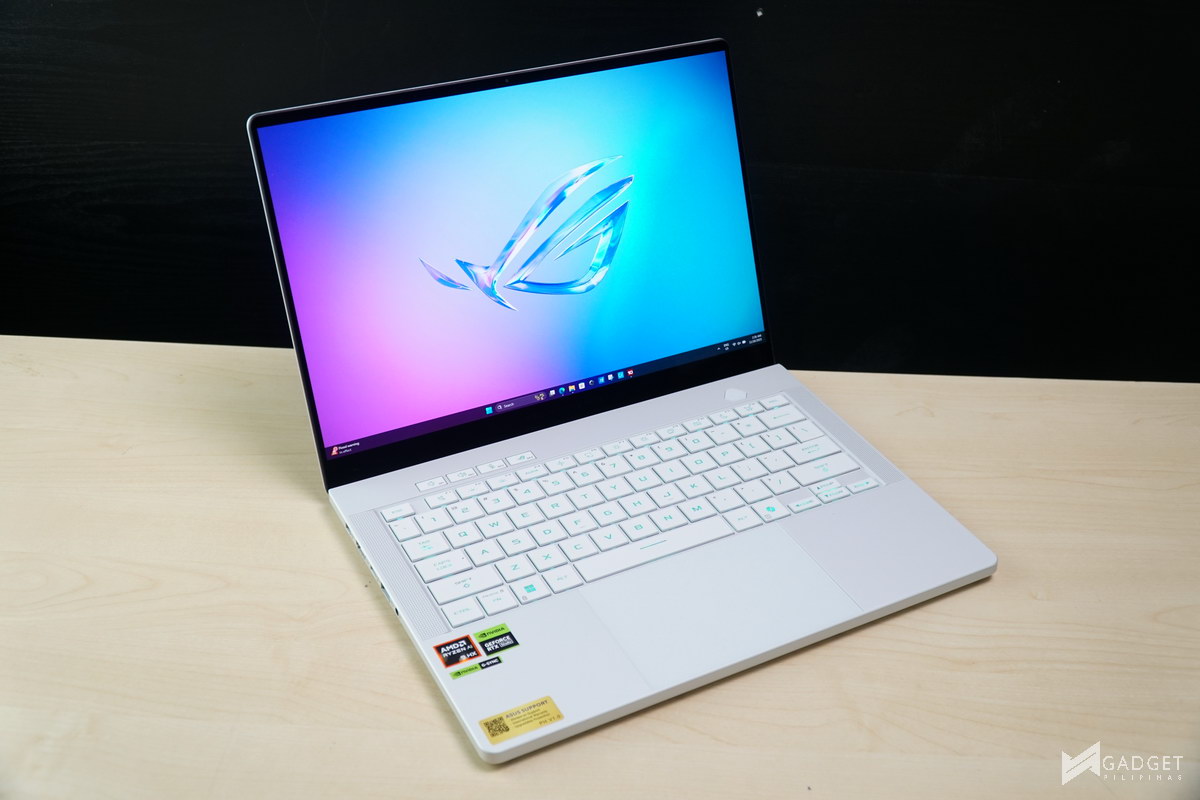
The ASUS ROG Zephyrus G14 2025 embodies the most balanced 14-inch thin and light gaming laptop you could get. It’s undoubtedly one of the fastest 14-inch gaming laptops in the market. The 14-inch ROG Nebula Display is unrivaled with the combination of its color accuracy and high resolution make it a visual eyecandy regardless of your tasks weather it be watching, gaming, or even productivity. With both performance, display quality and even the added ROG Slash Lighting taking a toll on the battery life, it still manages to compete with current ultrabooks.
The ASUS Zephyrus G14 2025 offers performance and features thats beyond what you can see in any 14-inch thin-and-light gaming laptops and ultrabooks in the market. At a hefty but arguably reasonable price of Php 169,995 you’re getting the best of both worlds with very little compromises to achieve above average 14-inch gaming laptop and ultrabook performance. The Zephyrus G14 2025 is for those who need more performance, especially those requiring GPU performance or those who simply want a powerful machine that’s packed in a slim package that won’t leave you the feeling of needing a desktop when you the moment you run a heavy workload.

Grant is a Financial Management graduate from UST. His passion for gadgets and tech crossed him over in the industry where he could apply his knowledge as an enthusiast and in-depth analytic skills as a Finance Major. His passion allows him to earn at the same time help Gadget Pilipinas' readers in making smart, value-based decisions and purchases with his reviews and guides.