


TweeGo for N900 finally arrives *Update: TweeGo is now available at Extras-Devel

Tweeting with style and ZOMG-experience has finally arrived on the Nokia N900 – meet TweeGo.

TweeGo is a “chirper” client made especially for the Maemo platform. Developed using QT/C++ by Mikhail Ramalho and Rodrigo Ramos, this application is ready to give reliable, efficient and awesome UI twitter experience. I tried the client myself and I must say that it’s MeeGo ready for me. I really wish that more developers will be enticed to create such cool applications for the N900.

Twitter Box for N900

Click Continue Reading to see the instructions on how to install it.

The application is currently available in Maemo Garage website. In order to install it, you must follow these instructions:

1. Be sure that your N900 has the appropriate binaries and rootsh installed in order to install and run the application properly.

2. Download TweeGo here. TweeGo 0.2.1 is available as of this writing. (Update: TweeGo developer Rodrigo Ramos told me in the comments section that they had to change the name of the app from TwitterBox to TweeGo because Twitter-Box is already taken. See his comment below.)

3. If asked, simply place the download in N900/Documents to easily install the deb file easily later.

4. Open X Terminal:

  • Type ‘sudo gainroot’ within the terminal box to access root.

  • Then, type ‘cd MyDocs/.documents’ to navigate to the folder where you placed the .deb file you downloaded earlier.

  • Type ‘dpkg -i tweego-0.1.deb’ to finally install TweeGo. Wait until the installation is done.

5. TweeGo is now installed. Go to the Application Menu, and execute the recently installed application. Below are screenies of TweeGo.

Twitterbox's Awesome Welcome/Login Page.

TweeGo's Awesome Welcome/Login Page.

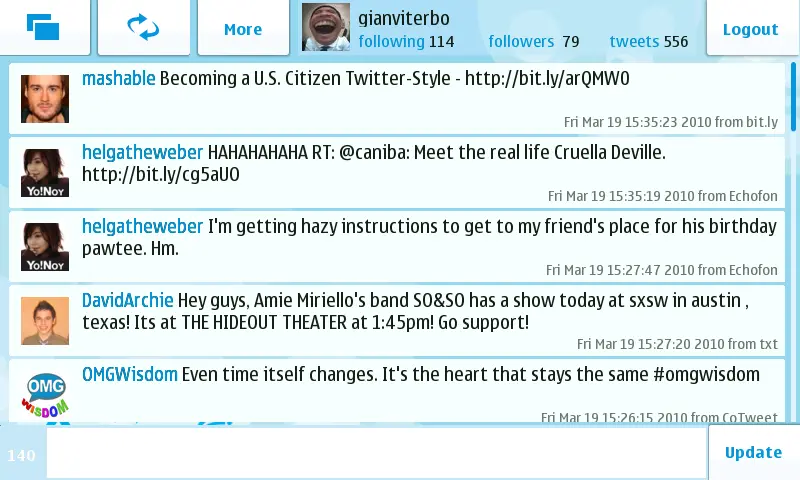
Chirps seen on TweeGo's panel.

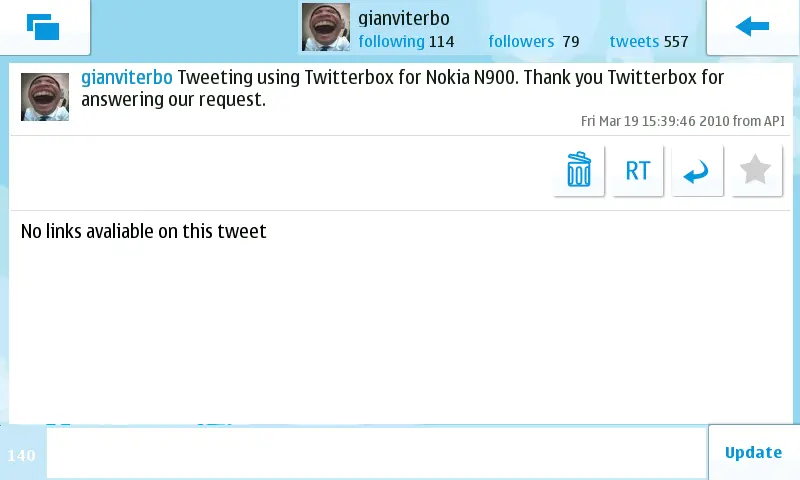
A tweet shown in expanded view.

A tweet shown in expanded view.

*Update: This application is now available at Extras-Devel Repository. You may download it from there.

NOTE: Please be aware that this application is still in development. The risk of bricking or making your N900 unstable is very likely to happen. I am not responsible for whatever may happen to your phone.

Popularity: 7% [?]

Discuss Using Facebook


Other Comments

12 Comments

  1. Rodrigo Ramos says:

    Hello, unfortunately the name TwitterBox is already in use by an iPhone application, http://www.twitter-box.com , therefore we changed the name to TweeGo.
    We hope you guys keep testing, sending bugs reports and feedbacks about it.

    From the TweeGo team,

    Rodrigo Ramos

    • Thank you for the info! Good luck to your team. Please continue producing more cool apps for maemo/meego. Tweego Rocks!

  2. bowee says:

    sir Rod, i’ve try to install to my n900 but it says error… actually the logo of tweego is in applications now but when i’m execute that, its not functioning… can you help this bug for this?

  3. edcarsky says:

    it look like good, but unfortunately i had encountered during installation, maybe you can help me?

    message: dpkg: error problems – leaving unconfigured. Processing triggers for catorise… Errors were encountered while processing..

    please let me know, i really like to have this one, cheers!

  4. edcarsky says:

    is there anyway of installing this app without involving xterminal?, is this avaialble already in repo?

  5. edcarsky says:

    Please i need assistance on this, details below:

    ErrorMsg:
    tweego depends on libqt4-maemo5-core; however: Package libqt4-maemo5-core is not installed.
    tweego depends on libqt4-maemo5-gui; however: Package libqt4-maemo5-gui is not installed.
    tweego depends on libqt4-maemo5-network; however: Package libqt4-maemo5-network is not installed.
    tweego depends on libqt4-maemo5-dbus; however: Package libqt4-maemo5-dbus is not installed.

    dpkg: error problems tweego (–install);
    dependency triggers problem – leaving unconfigured.
    Processing triggers for catorise…
    Errors were encountered while processing..

    Please let me know if any other options to support this process.

    • Hi Ed. This means that you need to install these qt core files before you install something which uses QT. I’m assuming that you are trying to install TweeGo.

      in that case, do the following:

      1. do ‘sudo gainroot’
      2. do ‘apt-get install libqt4-maemo5-core’ to install libqt4-maemo5-core. do ‘apt-get’ to install the other dependencies. Be sure that before you do this, enable extras-devel repositories first.

  6. bowee21 says:

    finally i’ve enjoying using this application… just i’ve download the QT-mobility-examples in extras-devel and this application functions very good now… thanks for the tips…

    • Thank you bowee21 for dropping by. :) This is definitely one of the best looking twitter apps for the n900. I just really hope that they port this the upcoming Meego 1.0 on May 2010.

  7. Rodrigo Ramos says:

    Hello,

    TweeGo is in extras-devel now, easier to install.
    I hope you like it.

  8. diimaan says:

    Hi,

    Whenever I tried to login it says Wrong username/e-mail and password combination!
    I am 100% sure that I am entering the correct username/e-mail password!

    please help me on this!

    • gianviterbo says:

      I suggest that you use the on-screen keyboard to make sure that typing the right password.

0 Trackbacks

Leave a Reply

Your email address will not be published. Required fields are marked *

*

You may use these HTML tags and attributes: <a href="" title=""> <abbr title=""> <acronym title=""> <b> <blockquote cite=""> <cite> <code> <del datetime=""> <em> <i> <q cite=""> <strike> <strong>

Content Protected Using Blog Protector By: PcDrome.