Okay, so you just got your new laptop pre-loaded with Windows Vista or 7? Here’s a way to easily personalize it by adding your name beside the taskbar clock.
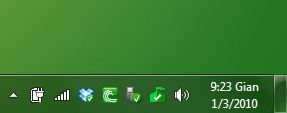
Click Start > Control Panel > Regional and Language Options > Customize Button (Additional Settings) > Time tab. Here, change both the AM and PM letters to any name you wish. Click Apply > OK.
Look at the demo below.
[youtube]https://www.youtube.com/watch?v=On9qLMTB0v4[/youtube]
If you wish to revert to default settings, simply click the Rest button or change the customized name to ‘AM’ and ‘PM’.

Giancarlo Viterbo is a Filipino Technology Journalist, blogger and Editor of gadgetpilipinas.net, He is also a Geek, Dad and a Husband. He knows a lot about washing the dishes, doing some errands and following instructions from his boss on his day job. Follow him on twitter: @gianviterbo and @gadgetpilipinas.